

 LinkedIn
Before you rewrite a page for ChatGPT or Perplexity citations, check whether either assistant has fetched it. If the request never reaches the page, a sharper headline will not help. That is repainting a storefront with the front door bricked shut.
We took a first look at the source-selection problem in Getting Cited by ChatGPT and Perplexity Is a Retrieval Auction. This is the second look because knowing how assistants choose sources only helps if you can see which step fails on your own site. Your server and edge logs can show you the requests they receive. Run the 30-day test before you pay someone to rewrite the copy.
The question: Are assistants fetching your candidate pages?
This is a prospective audit, not a promise that a log entry will explain every citation. The operational question is: When you test buyer prompts, do verified live-retrieval bots request your candidate URLs, and what does your site return?
My expectation is that many commercial sites will find uneven traffic: little or no live fetching of core money pages, with more activity on a few narrow guides or technical pages. That is a hypothesis to test, not a result to assume. A page has to be available as a candidate and useful to the assistant at the point of retrieval. Those are different problems, and the fixes should be different too.
Day 0: Collect the logs that can see a bot
Forget Google Analytics or Plausible for this job. Client-side analytics depend on scripts that a retrieval agent may never run; this field guide to AI crawlers in server logs explains the distinction. Use raw NGINX or Apache access logs, or request logs from an edge provider such as Cloudflare, Fastly, or AWS CloudFront. Retain 30 days with timestamps, client IPs, full request URIs, HTTP status codes, and User-Agent strings. Capture response timing and edge actions where available.
Keep edge and origin records separate. A request blocked at the edge cannot appear in an origin log. If you inspect only NGINX while your WAF rejects the bot upstream, you may call it a zero-fetch page when the bot did try to visit.
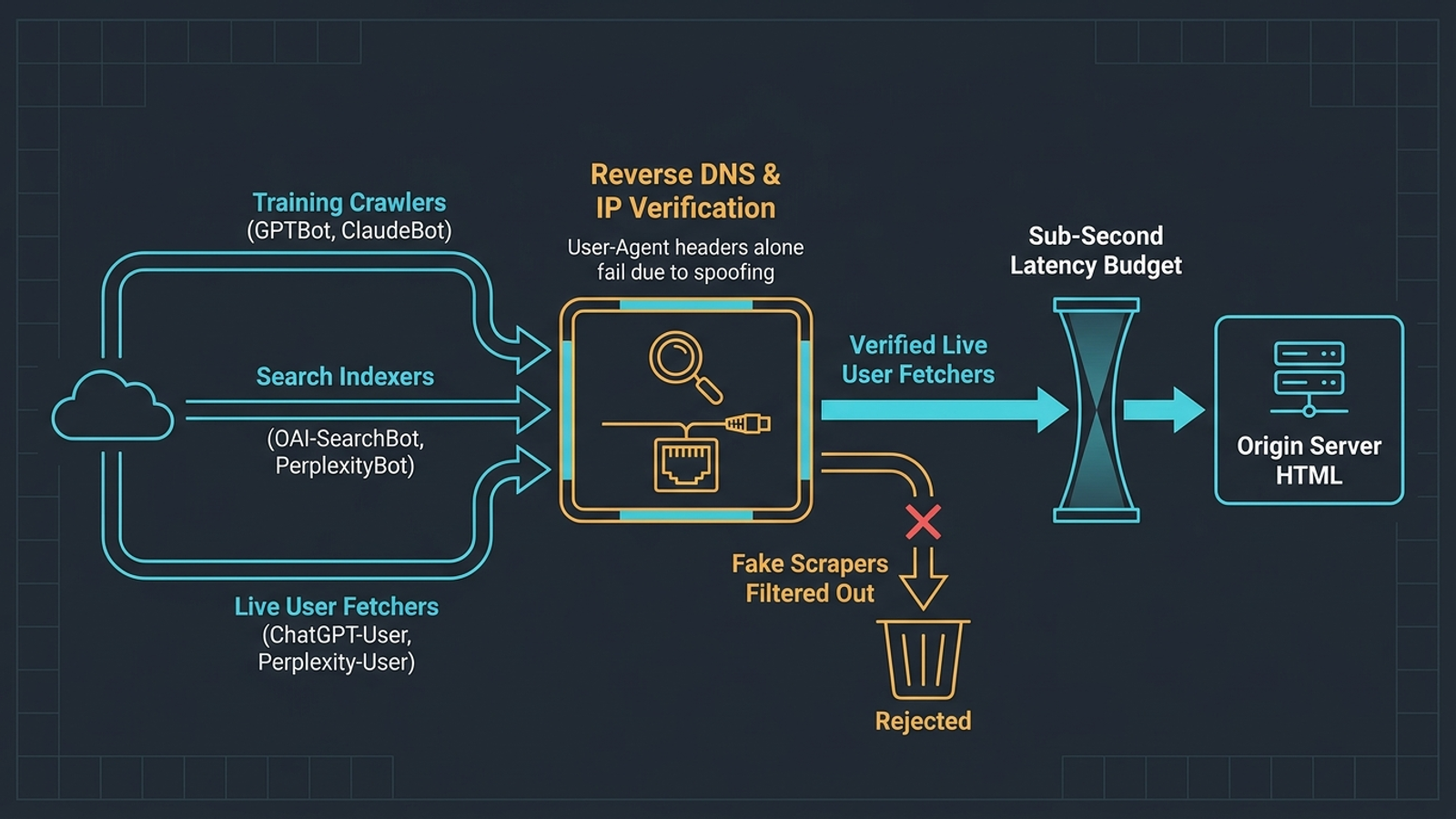
Next, split the traffic by job. Cloudflare Radar’s AI crawler telemetry reports that training crawlers account for roughly 80% of AI bot activity, while user-action crawlers account for less than 5%. Do not mix those populations in a citation test:
- Training crawlers:
GPTBotandClaudeBotcrawl asynchronously. Their visits do not show that someone asked an assistant about your product at that moment. - Search indexers: OpenAI documents
OAI-SearchBot, and Perplexity documentsPerplexityBot. Track them separately from live user-action requests. - User-action fetchers:
ChatGPT-UserandPerplexity-Userare the request classes to inspect when you test live lookups. A fetch shows a request for the URL, not that the assistant read it successfully or cited it. Perplexity saysPerplexity-Usergenerally ignores robots.txt disallow directives because it acts on a user request.
A User-Agent is a label anyone can print. HUMAN Security’s analysis of crawler spoofing found unauthorized requests among traffic claiming to be AI bots, including a reported 16.7% spoof rate for requests claiming ChatGPT-User in its dataset. That is not a correction factor for your logs. Verify claimed requests against the providers’ published IP ranges, including OpenAI’s chatgpt-user.json and Perplexity’s perplexity-user.json, before counting them. Put unverified claims in a separate bucket rather than calling them assistant visits.
Choose four URL cohorts
Pick five to ten URLs per cohort before the clock starts. This prevents a busy documentation page from hiding a silent commercial section:
- Transactional money pages: Pricing, enterprise demo, and high-value service pages.
- Category and solution hubs: Broad pages such as
/solutions/b2b-ecommerceor/features/lead-routing. - Editorial explainers: Narrow articles on mechanics, workflows, or technical comparisons.
- Technical references and changelogs: API pages, setup instructions, and dated updates.
Record each URL as it exists on Day 0. If documentation gets requests and pricing does not, you have a cohort-level question worth investigating. You do not yet have proof that the pricing copy is bad.
Write 15 buyer prompts
Choose 15 questions a qualified prospect might ask while considering a purchase. Skip branded vanity prompts and vague queries such as “Best PPC tools.” Use functional constraints instead: “Which PPC management platforms automate bid adjustments continuously without charging a percentage of ad spend?” or “How do I configure server-side offline conversion tracking for Shopify on Google Ads without third-party cookie loss?”
If you run paid search, take your top 20 converting exact-match search terms from the Google Ads search terms report and use them to help draft the 15 questions. Freeze the prompt list for the baseline. Changing questions halfway through changes the test.
Check the edge before starting the clock
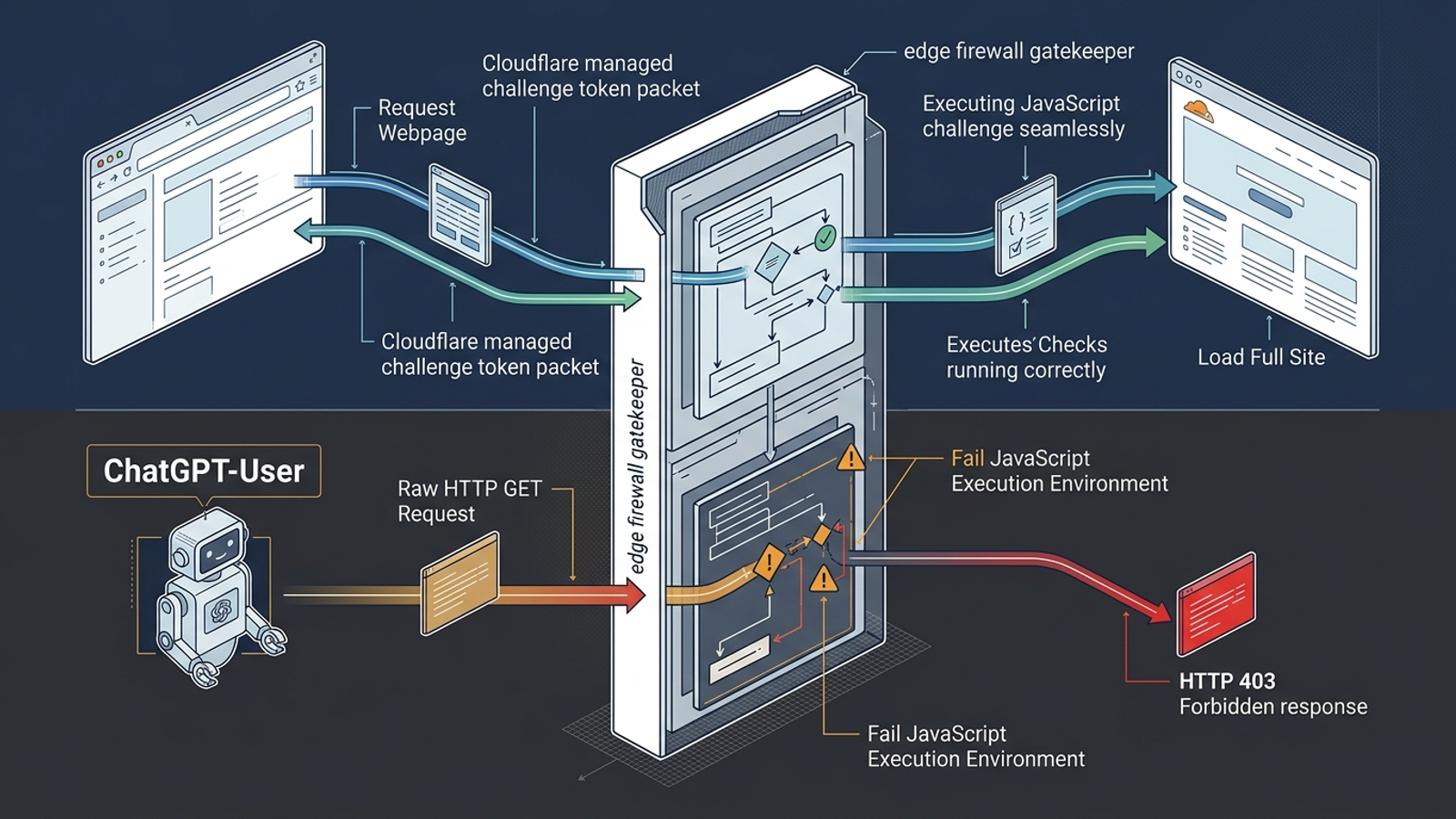
Inspect WAF events, bot rules, and your served robots.txt. Check whether managed AI-bot settings alter access or issue challenges; practitioners auditing edge bot blocking have raised this as a source of confusing reports. Do not assume a page loading in your browser proves a headless fetcher can load it too.
Record blocks and challenges on Day 0. If a verified request gets a 403 at the edge, your origin will not log a successful visit. That is an access problem to investigate before any copy test. Do not broadly disable your WAF to make a chart look better.
Days 1–30: Collect three streams without changing the site
Run the baseline for 30 consecutive calendar days. Avoid redesigns, URL migrations, and major copy changes during that window. Keep a dated note of unavoidable changes so you do not later credit a headline for a firewall adjustment.
- Verified fetches and responses. For each URL, count verified GET requests from
ChatGPT-UserandPerplexity-User. Record status codes, edge decisions, and timing where your logs expose it. Look for errors, challenges, timeouts, and slow responses rather than treating every200 OKas a successful retrieval. This discussion of Perplexity retrieval and latency describes tight time budgets, but your logs cannot tell you the precise point at which an assistant abandoned a response. - What the initial response contains. Fetch the URL as a bot would receive it and inspect the returned HTML, not just the page after your browser runs JavaScript. WISLR’s analysis of 12,099 AI bot requests describes
ChatGPT-Userrequesting raw HTML without accompanying CSS, JavaScript bundles, or images. If product specifications or pricing appear only after client-side hydration, a successful status code may still deliver too little text to use. - Prompt answers and citations. Run the scheduled prompts, record what appears, and compare submission times with your request logs. This stream tells you what your own checks produced. It does not turn every coincident bot visit into a proven response to your prompt.

Run the same prompts every seven days
At seven-day intervals, submit the 15 prompts to ChatGPT Search and Perplexity Pro in clean browser sessions with cleared cookies and history. For each answer, record:
- Your presence: A clickable citation, an unlinked mention, or no appearance.
- Other sources: A direct competitor, directory, or independent review site cited instead.
- Nearby requests: Whether either verified user-action bot requested a cohort URL within three minutes of submission, and what the edge and origin returned.
Four rounds of 15 prompts across two engines give you 120 prompt runs. Keep the exact prompts and procedure stable. A request close to submission time is useful evidence, but not a guarantee that the assistant used your page. A citation without a matching live request is possible too; the answer may draw on cached index material.
Day 30: Sort the results by failure mode
Compare verified requests, response quality, delivered HTML, and prompt answers. Use these as diagnostic buckets, not automatic verdicts. Some URLs will not fit neatly into one.
1. No verified user-action fetches
Stop rewriting prose long enough to check the route to the page. Did verified requests hit a WAF rule? Did the origin receive search-indexer traffic? Are canonical tags and indexable URLs consistent? Do the selected prompts give this page a plausible reason to appear?
Zero live requests during your test means you did not observe a user-action fetch for that URL. It does not prove the page is absent from an index: the assistant may not have browsed, may have used cached information, or may have chosen other candidates. If you find edge blocks, fix access first. If you find no blocks, investigate indexability and the page’s fit for the prompts before commissioning a rewrite.
2. Verified fetches, no citations
Now inspect what the bot received. A fetch followed by no citation makes passage extraction worth testing, particularly when the initial HTML omits the answer or splits its constraints across an accordion, several sections, and a client-rendered table. A concise, self-contained answer in plain HTML gives the assistant something it can use without assembling your pitch from spare parts.
Do not call extraction the proven cause solely because a fetch occurred. The assistant can fetch a readable page and still choose a different source. Compare the delivered passage with the exact prompt and the cited alternatives. Fix missing or fragmented answers before polishing adjectives.
3. Citations go to the wrong page
Suppose a technical note gets the fetches while your commercial hub sits untouched. That pattern is worth keeping, not deleting. In our look at a changelog attracting live visits while category pages did not, the useful technical page provided a route into a commercial section that was otherwise missing the action.
Preserve the page assistants find. Add clear internal links to the relevant money page and make the commercial destination explain the same subject concretely. The practical question is not “How do I force a pricing-page citation?” It is “Where should a qualified reader go after the page that earned the visit?”
Follow-up: Change one lever per cohort
Use the first 30 days as your baseline, then give each affected cohort a defined change for the next test window. Do not overhaul the whole site and call the resulting movement a copywriting win.
- No-fetch cohort: Check indexing, canonicals, and edge delivery. Where verified bot requests are incorrectly challenged, adjust the relevant rule for the verified ranges. Work on response time if logs show slow delivery. Leave body copy alone while you test access.
- Fetched, uncited cohort: Keep the URL and metadata stable. Put the answer and its important qualifications together in a standalone block of roughly 150–250 words, and make sure essential facts appear in the initial HTML. Then see whether the fetch-and-citation pattern changes.
- Wrong-page cohort: Keep the technical page live. Add contextual links and explicit commercial anchor text toward the appropriate money page; improve the hub’s factual structure without erasing what made the technical page useful.
Change one class of problem at a time. Otherwise, even a better result leaves you guessing which edit mattered.
Limits: A log is evidence, not an assistant transcript
Three blind spots belong beside every result:
- Model memory: An assistant can answer without a live web lookup. Your logs measure requests to your site, not what the model remembers.
- Cached material: A citation may appear without a new GET to your server if the assistant uses indexed or cached content.
- Small samples: A low-traffic domain may see only a handful of verified user-action fetches in 30 days. Extend collection to 60 or 90 days if the baseline is too thin to compare, and keep manual checks focused on your commercial questions.
Do not mistake a zero in a narrow sample for a permanent verdict. Do not mistake a 200 OK for a readable page. Both errors send teams back to rewriting copy because it is the lever they can see.
One-page diagnostic scorecard
| Observation | Investigate first | Next controlled change |
|---|---|---|
| No verified user-action fetches | Edge blocks, indexability, and whether the prompts surface the URL | Fix confirmed access or indexing problems before editing copy |
| Verified fetches, no citations | Response quality, initial HTML, and whether a usable answer appears together | Test a self-contained answer in server-delivered HTML |
| Citations favor a technical page | What that page answers and where it sends the reader | Keep it live; link it to a stronger commercial destination |
I have spent enough time watching teams debate wording while a more basic part of the system was broken. Search has not cured that habit. After 30 days, the useful result is not a prettier citation dashboard: it is knowing whether to fix access, fix the delivered answer, or keep the page that wins and improve where it leads. If the logs show no live request, start upstream. If the bot gets the page but your answer is unusable, edit the page. Let your competitors begin with the adjectives.