

 LinkedIn

One unannounced page change can wreck a client account. Give the same mistake write access to 15 sites, and you have an agency problem. If you run white-label SEO or AEO across 5 to 15 client domains, your contenders are auto-publish, which pushes work straight to each CMS, and draft-and-approve, which waits for a human sign-off. I have run both. Past roughly 10 domains, auto-publish wins—but only with change logs, scoped permissions and a rollback path. Without those three, draft-and-approve is cheaper than the churn.
I learned to distrust silent edits while mining negative keywords at 1am for a home services client. Someone on the client side had swapped a landing page that afternoon and told nobody. Same URL, new headline, new offer, and a Quality Score that fell apart. One unannounced edit did more damage than a month of bad bids. Automatic publishing without guardrails takes that risk and gives it a schedule.
What each workflow actually ships
Auto-publish writes, structures and ships. The software finds a gap, drafts a page, scores it for search and answer engines, adds markup and pushes it to the client CMS. Connections across WordPress, Shopify, Webflow, Ghost and Wix, plus webhooks and APIs for headless setups, make the handoff possible without somebody copying text between tabs. In a well-run setup, the strategist reviews patterns and exceptions rather than every comma. The work can go live when it is ready, so traffic and citation data start arriving sooner.
Draft-and-approve writes; a person ships. The software handles drafting and scoring, then an account manager checks facts and voice, routes the page to the client, follows up and either loads it into the CMS or clicks approve. A human sees the change before a client or Google does. That control costs time on every domain, every month.
The difference is not AI versus humans. Both workflows need human judgment. The question is where you put it: at every publishing gate or in the rules, exceptions and review of what shipped. Pick the gate you can actually maintain.
Axis 1: How much work reaches the live site?
Throughput is where these workflows separate first. An auto-publish setup can produce 7 to 14 articles per week per client with strategist review, alongside less glamorous work: internal links, titles, meta descriptions, broken canonicals and missing schema. Not every client needs that many articles. For a more modest example, say each of 15 domains needs 8 pages and 12 small fixes a month. That is 120 pages and 180 fixes to ship. Auto-publish can move them live as they are ready; whether they earn traffic or citations is a separate question.
Draft-and-approve can draft the same queue. It cannot put the queue live until people clear it. Drafts sitting 10 to 14 days stall calendars, and the gap between finished and published is easy to hide in a report. One account manager might review 20 to 30 pages a week before the reading gets sloppy. Across 15 domains, that capacity leaves little room for revisions, slow approvers or the client who disappears on holiday.
If you sell clients momentum, count work shipped, not drafts produced. A full Google Docs folder does not compound.
Axis 2: What happens to manager hours at 5, 10 and 15 domains?
Draft-and-approve scales the way I used to scale PPC: add clients, add hours, pretend that is a business model. Suppose each page takes 20 minutes to review, fact-check and load, plus 15 minutes of client chasing. At eight pages per domain per month, that is roughly 4 hours and 40 minutes per domain:
| Client domains | Draft-and-approve: review and chasing | Auto-publish: weekly supervision |
|---|---|---|
| 5 | About 23 hours/month | About 10 hours/month |
| 10 | About 47 hours/month | About 20 hours/month |
| 15 | About 70 hours/month | About 30 hours/month |
The auto-publish column assumes 30 minutes per domain per week to scan what shipped, check Search Console and citation movement, and investigate anything that looks off. These are working estimates, not a promise that software makes management disappear. The draft-and-approve column also excludes technical fixes, reporting and conflicting feedback from three client stakeholders. I have lived that inbox. You do not catch up; you triage.
The hours move from shipping to supervising. Past roughly 10 domains, that is the difference between giving a strategist room to think and hiring someone to chase approvals. Below that point, the time saved may not justify changing a workflow clients already trust.
Axis 3: How far does one bad change travel?
Here is where auto-publish loses if you run it carelessly. A bad draft embarrasses you in Google Docs. A bad automatic publish can embarrass you on a live client site, then do it again across the rest of the portfolio. I used to tell clients any publish was a good publish. I was wrong.
Pages made to manipulate rankings without helping users raise the scaled-content abuse risk, whether software published them or a human clicked the button. Titles, meta descriptions, structured data and alt text also need fact-checking before they go live. Across 15 domains, a hallucinated price or fake review is not a harmless draft error if it sits on a live page for weeks.
Schema changes need a narrower gate than blog posts
Content errors are usually visible. Schema and knowledge-graph errors can be harder to spot. Bulk entity edits and nested @graph JSON-LD across franchise networks are treated as a specialist layer distinct from bulk publishing. Push the wrong sameAs, merge two locations into one entity or stamp LocalBusiness markup on a page the client has rewritten, and you may create a mess that a quick read of the page will not catch. Nor does markup alone promise an AI citation: AI Overviews need no special schema.
Do not give schema changes the same publishing permission as blog content. Scope content to agreed folders where you can, route schema through staging or a change queue, and make technical fixes reversible. I go deeper on that split in managing knowledge graphs and auto-publishing to client CMS. Speed helps only if you can contain the mistake.
Axis 4: Which kind of control will clients trust?
Clients ask for approval rights because someone has shipped generic copy under their logo before. Draft-and-approve gives them control, and at first that can build trust. Then the approver goes quiet, two stakeholders disagree, and a page that was accurate on the 3rd is stale by the 17th.
Agencies often try to fix the queue with one point of contact, approval SLAs and auto-approval for high-trust clients. That helps. It does not remove the underlying tradeoff: each extra approval step can delay the moment the work starts doing anything.
Auto-publish changes what the client approves. Instead of signing off every page, they agree on the rules: which folders can be written to, which categories need review and how a change gets rolled back. That can feel like less control until the weekly report shows what shipped and why. Approval per page buys comfort but can sell delay; approval of clear guardrails buys speed clients can audit. If you cannot show the client those changes, do not ask them to trust the rules.
Separate sensitive content from routine fixes
A new service page naming the client’s pricing deserves eyes. So do claims about results and language that speaks for the brand. A fixed canonical, a compressed image or an internal link from a blog post to a money page usually does not need a separate round of client email.
I split permissions from day one:
- Keep in draft: pricing, results claims, brand-sensitive copy, and medical or legal statements until someone signs off.
- Allow within an agreed scope: routine technical fixes, internal links and citations, with each change recorded.
- Route through a tighter queue: schema and entity changes that could affect how the business is represented.
That is not a compromise designed to make a sales deck sound reasonable. It is how you ship routine work without pretending every change carries the same risk.
Axis 5: Which pricing model survives the workload?
Software price is only part of workflow cost. A flat per-site plan may charge $99 a month for the first site and $79 for each extra site, with 30 articles included. A fixed fee makes the next approved page easier to budget for, but it does not pay the account manager who still has to review and chase it.
Per-seat and credit plans need a different calculation. Rankability Core at $199 a month for three seats and 15 clients works out to about $13.27 per client. That looks light until you count production limits: the cited 75,000-credit plan covers roughly 50 to 90 articles at 800 to 1,500 credits each. If your workflow also requires approval on every page, your bill is not just the subscription. It is credits plus people-hours.
At the higher end, Profound Lite starts at $499 a month with usage-based tiers, while AEO Engine lists $1,597 Growth and $2,997 Scale plans with managed publishing and a strategist included. Compare what the plan lets your team ship, not merely what it lets your team generate. I would rather price the work around the client domain and keep execution together. That is groas’s agency model: content, technical fixes and citations in a per-client-domain fee, with reports under your brand. The margin logic is laid out in how to build an AEO retainer that holds margin at 10 domains.
Here is the head-to-head in one place:
| Axis | Auto-publish | Draft-and-approve | Edge |
|---|---|---|---|
| Work reaching the CMS | Can ship pages and routine fixes as they are ready | Completed drafts wait for review and approval | Auto-publish |
| Manager time at 15 domains | About 30 hours/month supervising in the example | About 70 hours/month reviewing and chasing | Auto-publish |
| Error blast radius | Live changes can spread before someone spots them | A human can catch errors before launch | Draft-and-approve unless auto-publish is guarded |
| Client control | Rules and change logs clients can audit | Sign-off on each page, with an approval queue | Depends on the guardrails |
| Cost as volume grows | Per-domain pricing can protect margin when shipping is automated | Subscription costs sit alongside review hours | Auto-publish past roughly 10 domains |
The three guardrails that decide the winner
Every auto-publish setup I trust needs three things. Remove one and I switch my recommendation.
- A change log with reasons. The report should show what shipped and why, not just an activity count. That is the distinction between execution that logs each change and software that merely presses publish.
- Scoped permissions. Give the system access to agreed folders and change types, not the entire site. Keep checkout, legal and other sensitive areas outside that scope.
- A rollback path. Know how to reverse a bad page or schema edit promptly, before it becomes a prolonged support ticket.
Containment limits the damage; records let you explain and repair it. Neither requires a client to inspect every routine edit before it goes live.
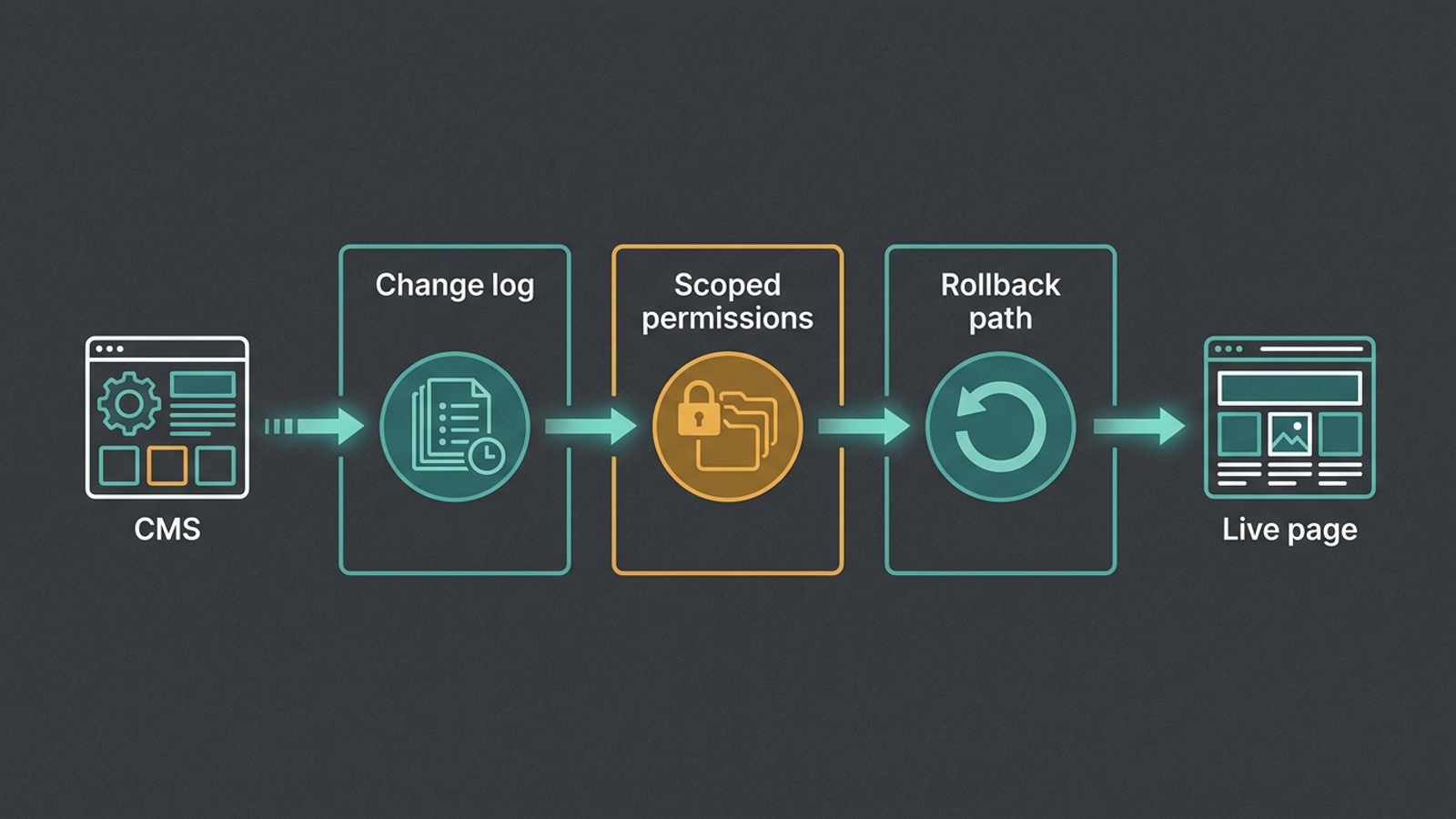
Without all three, do not auto-publish. Draft-and-approve with a 48-hour SLA beats unguarded write access, because losing a client costs more than a slow calendar. Guardrails also make client-side edits easier to investigate. If a client rewrites a page, a useful log shows what changed; scoped access keeps the publishing system away from unrelated pages; rollback gives you a recovery route. For a staged approach, see rolling out write access across 10+ client domains without a developer. Automate shipping, never accountability.
Verdict: pick auto-publish past 10 domains, with conditions
For an agency running more than roughly 10 client domains, I pick guarded auto-publish. Pages and fixes stop waiting in one manager’s queue, while supervision takes about 30 rather than 70 hours a month in the 15-domain example. The win comes from where the work goes and who must touch it, not from pretending every generated page deserves to be published.
Here is who should pick the loser anyway: an agency under five domains, or any team without change logs, scoped permissions and rollback. Review time is still manageable at that size, and per-page approval gives cautious clients a control they can see. From five to roughly 10 domains, I would start with one guarded client rather than flip the whole portfolio. Regulated or brand-sensitive clients should keep claims, pricing and sensitive statements in draft even after routine fixes move to auto-publish.
The feature agencies keep asking for is the right one. The dangerous part is selling straight-to-CMS publishing as though the publish button were the entire product. It is not. Put one client on a scoped workflow, keep sensitive categories in draft, and measure what actually ships over 30 days. Then decide whether the other fourteen get write access.