

 LinkedIn

One ChatGPT answer is a lousy visibility report. Ask the same buyer question four times and you may get four different brand lists; build a repeatable panel and you can measure how often yours appears instead.
My earlier piece, Spreadsheet vs Monitoring Tool vs groas: How to Measure AI Search Visibility, treated the spreadsheet route as a manual chore. A lot of you asked how to make it run on its own. This is that second look: the in-house option does not have to stay manual, provided you design for answer variance and keep Google AI Overviews separate from the model APIs.
By the end, you will have 15 to 30 fixed buyer prompts, a scheduled script that sends each prompt to ChatGPT and Gemini 3 to 5 times, and a sheet that records answers, mentions and citations. You will also have a separate weekly AI Overview log. Before starting, get an OpenAI key, a Gemini key, spending caps for both, and either Google Sheets with Apps Script or Python with a scheduler. Allow a Saturday afternoon to build it and roughly 30 minutes a week to read it. The job is not finding one perfect answer. It is making the next week’s answers comparable with this week’s.
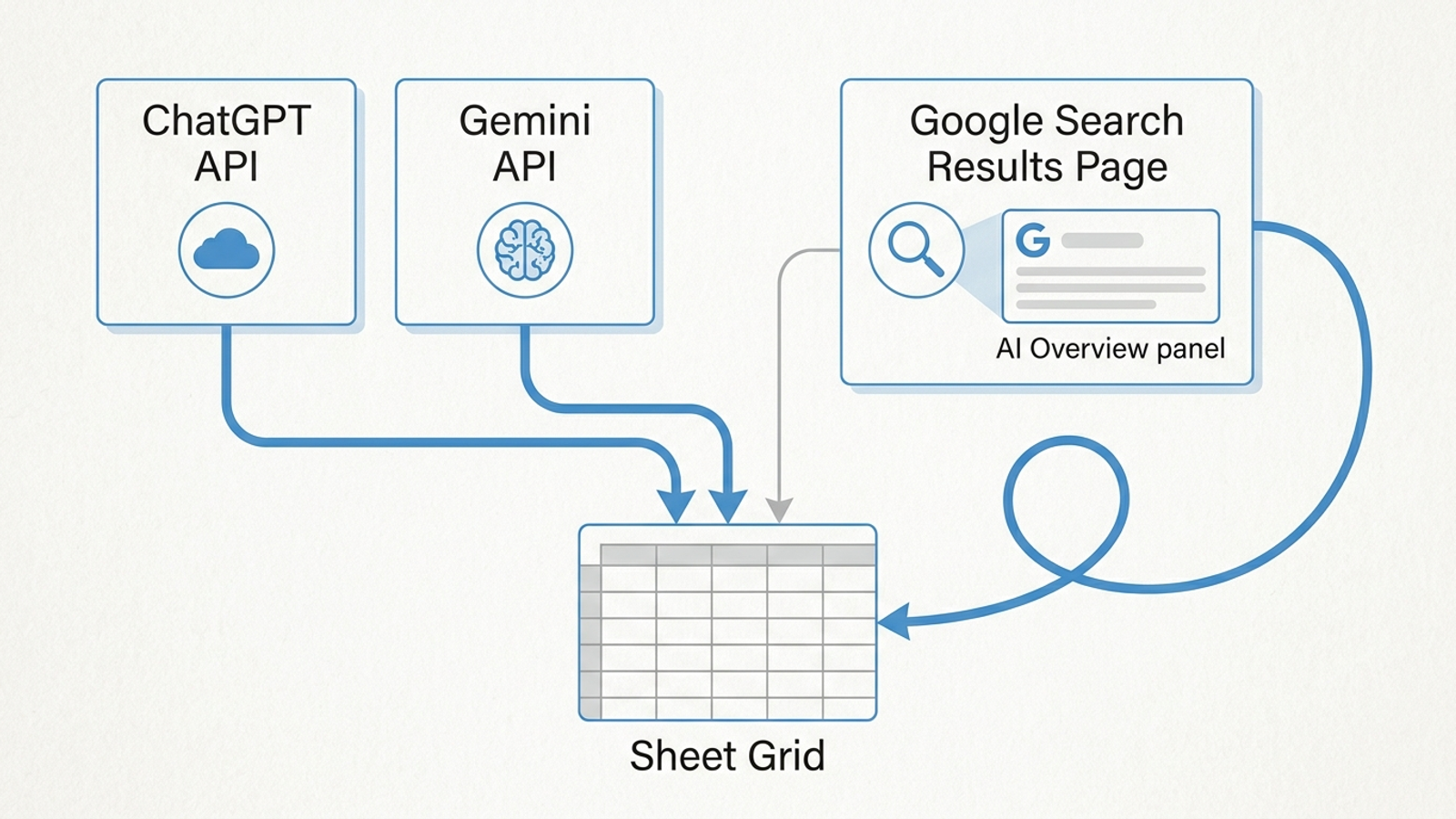
Before you start: choose a runner and set limits
Set the API spending caps before the first run. Keep temperature at 0.2 throughout the series. A modest prompt library can cost under $20 a month in tokens, but treat that as a planning estimate, not a cap: API calls are billed by token. If you later collect AI Overviews through a vendor, budget for that separately.
Pick one runner. Use Google Sheets with Apps Script if you want the schedule and data in one place. Use Python with cron if you are comfortable maintaining a script. The steps below use the same tabs and scoring rules either way; the code blocks show the query loop and the scheduling patterns, not a ready-to-run integration. You still need to connect your chosen API clients and sheet writer.
Do not confuse API output with the consumer apps. The apps can add memory, location, personalization and live experiments, so the same prompt will not always produce the same answer there. The APIs give you settings you can hold steady and compare week to week. Spot-check the apps later; do not build the series on screenshots from them.
Step 1: Freeze buyer prompts before you measure them
Action: Create a Google Sheets tab named Prompts with columns id, prompt, intent and version. Write 15 to 30 questions a buyer might ask. Use category, problem, comparison and brand-adjacent questions rather than branded prompts such as What is Acme?. Pull phrasing from sales calls, support tickets, Reddit threads and People Also Ask instead of guessing at keywords. A working panel uses real buyer phrasing.
Add two or three competitors you will score in every answer. They give you context: when every tracked brand moves together, investigate the platform before crediting or blaming your own work. Give each prompt a stable ID such as P01 and mark the set v1.
Expected result: The tab has stable IDs, exact prompt text and an intent label for every row. Your script can read the prompt text without rewriting it for either engine.
Common mistake: Adding five prompts because last week’s score looked bad. A changed prompt set can move the score by itself. Version the set and run old and new side by side for one window when you need to revise it. Until then, leave v1 alone.
Step 2: Store every answer, not just the one you like
Action: Create a Runs tab with these columns, in order: timestamp, prompt_id, engine, model, run_number, answer_text, mentioned, position, competitors, cited_domains and status. Have your script read each prompt from Prompts, send that exact string to both APIs at temperature: 0.2, and write the full answer as a new row. Set the engine values to chatgpt and gemini.
Use four runs per prompt and engine to start. The loop below is an integration pattern: get_prompt, call_model and write_row are functions you must connect to your prompt tab, API clients and Runs tab. Do not paste it into a scheduler and assume those connections exist.
PROMPT_IDS = ["P01", "P02"]  # replace with IDs loaded from Prompts
ENGINES = [
    {"name": "chatgpt", "model": "gpt-4o-mini"},
    {"name": "gemini", "model": "gemini-2.0-flash"},
]
SAMPLES = 4

for pid in PROMPT_IDS:
    text = get_prompt(pid)  # exact stored prompt; no per-engine edits
    for engine in ENGINES:
        for run_number in range(1, SAMPLES + 1):
            answer = call_model(engine["model"], text, temperature=0.2)
            write_row(now(), pid, engine["name"], engine["model"],
                      run_number, answer)
Sleep between calls and retry rate-limit or timeout responses rather than storing an empty answer as a miss. At 20 prompts, two engines and four runs each, expect 160 API answer rows per weekly run. The repeated rows let you report a rate rather than a yes or no. Run a prompt at least three times per period and report its mean and spread; even temperature: 0 does not make every answer identical.
Expected result: P01 has four chatgpt rows and four gemini rows, each with a timestamp, model and full answer. The next weekly run adds rows instead of replacing them.
Common mistake: Saving only the latest response. That discards the variance you built the panel to measure.
Step 3: Score mentions without counting rejection as visibility
Action: Add an Aliases tab with one row per variant of your name: Acme, Acme CRM, a common misspelling or an old brand name. Score each stored answer for whether your brand appears, its position when it does, which competitors appear and in what order, and which domains are cited. Keep mentions and citations separate: a brand can appear without a link, and its domain can be cited without the brand name appearing in the answer. Those are different observations.
The scoring pattern below handles one alias and one kind of absence phrasing. Apply your full alias list and review exceptions before you trust the totals.
# Score a stored answer, not a fresh API response.
text_low = answer.lower()
absence = re.search(
    r"(not familiar with|no record of|does not exist|couldn.t find).{0,40}acme",
    text_low,
)
mentioned = not absence and bool(re.search(r"\bacme\b", text_low))
cited = "acme.com" in extract_urls(answer)
Calculate visibility as answers mentioning you / valid answers. Calculate share of voice as your mentions / mentions of you plus tracked competitors. Record average position only when mentioned. The visibility, position and share-of-voice measures answer different questions, so do not collapse them into one score. I used to use share of voice in paid search. The useful habit carries over; the underlying answers are less stable.
Expected result: If P01 mentions you in three of four ChatGPT answers, its mention rate reads 75% (3 of 4), not yes. A citation-only answer counts toward citations, not mentions.
Common mistake: Using plain FIND("acme"). It can match part of another word or count an answer that says it cannot find Acme. Use word boundaries, filter absence phrasing and score sentiment only in your brand’s own sentences. Keep failed or truncated calls at status: no-data; never score a blank as a brand miss.
Step 4: Give AI Overviews their own collection path
Action: Do not label Gemini API answers as Google AI Overviews. Gemini output does not prove what an Overview displayed, and Google publishes no official API for AI Overview content. Choose one collection path:
- Manual: Each Monday, open a logged-out Chrome window and check your top 10 prompts once. Add rows to
Runswith the matchingprompt_id,engineset toaioverview,run_numberset to1, and the date, observed text, mention, position, competitors and cited domains. Mark a result you could not collect asno-data, notnot mentioned. - SERP API: Use a vendor that parses the rendered results page, then map its results into those same
Runscolumns. Searlo’s/serpendpoint includes AI Overview in its full-SERP response. DataForSEO quotes about $0.01 per AI Overview query, with a $50 minimum deposit. Check the collection cost separately from model tokens.
Expected result: You can filter Runs to engine: aioverview and find rows whose prompt_id values match your selected API prompts. Keep this series distinct: one manual Overview observation is not interchangeable with four Gemini API runs.
Common mistake: Showing a healthy Gemini mention rate and calling it Overview coverage. That is a different surface. Keep the label honest.
Step 5: Schedule collection and make Monday readable
Action: If you chose Apps Script, go to Extensions > Triggers > Add trigger. Select collectWeekly, then Time-driven, Week timer, Monday and 6am to 7am. If you chose Python, schedule your connected script with this cron line:
0 6 * * 1 /usr/bin/python3 /home/user/panel/run.py
Replace the example path with your script’s actual path. In Apps Script, plan for its six-minute execution limit. Save a cursor before the limit, resume from it, and remove resume triggers when the run finishes. Batch sheet writes with setValues rather than calling appendRow for every answer. Retry 429 and 503 responses with exponential backoff and jitter.
// Place inside collectWeekly after defining START and nextIndex.
if ((Date.now() - START) > 4.5 * 60 * 1000) {
  PropertiesService.getScriptProperties().setProperty('cursor', nextIndex);
  ScriptApp.newTrigger('collectWeekly').timeBased().after(60 * 1000).create();
  return;
}
Create a Dashboard tab with pivot tables and three views: mention rate by engine, share of voice against your tracked competitors, and citation share for your domain. Filter out no-data rows. Keep the timestamp on every row so you can compare periods, and show appearance as a count such as 6 of 10 runs, not a fixed rank.
Set an investigation rule before you see a disappointing chart: ignore a single-week move under 15 percentage points, and investigate a drop that persists for two weeks while competitors stay flat. If everyone moves together, check for a platform change first. The rule keeps one odd Monday from becoming a strategy meeting.
Expected result: The next scheduled run adds answer rows without your help, and the dashboard shows a rate with its run count for each engine. Your manual AI Overview rows appear when you add them; the API schedule does not create them.
Common mistake: Scheduling one long Apps Script execution and assuming it will finish. Checkpoint it. If you have not chosen a runner yet, read Spreadsheet, Script or Tracker? The Small-Business AI Mention Test before taking on the maintenance.
Step 6: Check the first month against reality
Action: In week two, run five prompts by hand in logged-out ChatGPT and Gemini windows. Compare what you see with the API rows, but expect mismatches. Keep the exact model value and timestamp for every API answer. Pin a model ID such as gpt-4o-mini-2024-07-18 rather than relying on gpt-4o-mini where that pinned ID is available, and watch for calls that fail or return a different model. Even temperature-zero runs can vary; a pinned setting reduces one source of drift, not all of them.
Pair the sheet with data you already own: GA4 referrals from chatgpt.com and gemini.google.com, and server logs showing GPTBot and PerplexityBot reachability. Use them as a reality check on sampled scores, not as a replacement for answer measurements. If your panel says zero while referrals exist, inspect the prompts, aliases and failed calls before declaring yourself invisible.
Check these failure points each week:
- Model changes: A pinned ID fails or routes differently. Review the logged model and keep a consistent ID within the series.
- Alias misses: A new spelling or product line appears. Review the raw answers and update
Aliasesdeliberately. - Rate limits and timeouts: A
429or503leaves an empty row. Retry it; do not count it as a miss.
Expected result: You can explain a prompt’s score by opening its underlying answers. You can also name which differences may come from API-versus-app behavior rather than pretending the two are identical.
Common mistake: Treating a spot-check mismatch as proof the panel failed. The panel tracks a controlled API series. The spot check tells you where that series does not resemble a particular app session.
Verify the build, then change the first thing that matters
The build works when Runs fills on schedule, Dashboard reports rates with run counts, AI Overview observations sit in their own labeled rows, and you can trace one score back to its raw answers. Look for 3 of 4, not yes. If the first run fails that test, fix collection and scoring before changing any content. If it passes, investigate the first persistent drop against the competitors and the underlying answers.
This panel measures. It does not rewrite an answer block, add a comparison table, fix a crawl path or buy paid coverage while organic recovers. Someone still has to act when a drop holds for two weeks. That is the line between an in-house measurement loop and groas: the sheet observes; groas executes content, technical work and paid search under one strategist. Keep the panel while its Monday read is worth the maintenance. When the AIO rows stay blank or every change becomes a two-hour argument about sample size, hand the running to something that acts on the number.