

 LinkedIn

Your next customer could ask ChatGPT what to buy and get a shortlist without ever visiting a search results page. If your store has paid for 12 blog posts while its product pages still say premium quality and little else, the work starts in the wrong place.
Take a request like “running shoes in pastel colors with good arch support for less than $125.” ChatGPT can treat the color, support and price as requirements, then return a curated shortlist with price, image and retailer. There is no page two to hide on. A product page has to give it something specific to work with.
I used to make the blog-first mistake for clients. But ChatGPT matches meaning, not just keywords, and “Hiking Pants” says much less than “Men’s Lightweight Hiking Pants for Warm Weather.” The catalogue is the ranking asset. The blog is the support act.
What is your customer actually asking?
Nobody asks for “buy shoes” when they want help choosing. They ask for “best trail running shoes under $150 for wide feet” or “best air fryer for a family of four.” Google’s AI answers appear more often on that kind of research query than on a plain transactional query. The phrasing tells you what the answer has to solve: a use case, a constraint and a comparison.
Think of the recommendation process in three parts:
- Find candidates in product feeds, public pages and third-party reviews.
- Filter them against the requirements in the request.
- Compare what remains and assemble a shortlist.
I used to tell clients rankings were about keywords. I was wrong. Keywords still help describe a product, but a page that never states its audience, use case or limits gives an assistant little to extract. The product can disappear from consideration before the comparison begins.
Start by writing down the requests a real buyer might make. Keep the constraints. “Wide feet” does more work than “shoes,” and “under $150” is not a detail you can bury in a brand story. If a buyer can filter on it, your product data should say it plainly.
What should you fix in the catalogue first?
I learned the value of feed titles while running Shopping campaigns. A vague title makes it harder for a system to understand where a product belongs. Start there: name the product, then include the fit, material, weight, weather or use case a buyer would filter on when those attributes apply. Put the brand at the end rather than leading with it. This is not glamorous copywriting. It determines whether the product looks relevant to the request.
ChatGPT discovery has two routes in the draft’s setup: a crawl and a merchant feed. OAI-SearchBot handles the crawl; a merchant can submit a feed at chatgpt.com/merchants. The feed calls for nine fields per row: item_id, title, description, url, brand, seller_name, image_url, availability and price. A crawlable site can be discovered without a feed, but the feed gives you a direct way to supply the facts used in comparison.
Then open your best-selling product pages. On each one, write two or three plain sentences that cover who it is for, when they would use it, the relevant constraints and the benefit. Follow with short scenario bullets and a brief FAQ where those details need more room. Do not make an assistant infer “warm-weather hiking” from a photograph and a paragraph about adventure.
The test is simple: could someone unfamiliar with your store read the page and answer a buyer’s specific question without guessing? If not, finish the facts before polishing the adjectives.
Does the markup match what the page and feed say?
For Google, you are working with both ordinary indexed pages and product information. Text citations can come from pages eligible to appear in search snippets; product cards draw on the Shopping Graph, including Merchant Center listings and page data. In May 2025, that graph held more than 50 billion listings, with two billion refreshed hourly. Stale or conflicting details are not a minor housekeeping problem in a system that revisits product information at that pace.
Check the Merchant Center feed against the product page and its Product and Offer markup. The ID, title, link, image, price and availability should agree. Include condition, shipping and return details where the feed calls for them, and make the essential product information available in the initial HTML rather than relying on JavaScript to insert it later. The markup is not decoration; it should describe the product the shopper can actually see and buy.
An Adobe audit found US retail product pages scored 66% on AI readability. That is reason enough to inspect your own pages before commissioning more content. I walked through how one store broke a Shopping plateau with feed restructuring. The same habit applies here: fix the underlying product facts, not another layer of copy around them.
Check bot access while you are there. Allow OAI-SearchBot for ChatGPT search visibility, ChatGPT-User for user-triggered fetches, PerplexityBot for citations and Googlebot for Google’s AI search features. GPTBot is used for training; blocking it does not block shopping, while blocking OAI-SearchBot can remove your pages from ChatGPT answers. If you use Cloudflare or another web application firewall, check its rules as well as robots.txt, then allow about 24 hours for changes to spread.
A clean feed cannot make up for a blocked page, and excellent copy cannot help if the system cannot reach it.
Can your category page answer the comparison?
A request such as “backpack for hiking in wet weather” raises smaller questions about weather resistance, capacity and material. Google can break a request into those parts through query fan-out, and category pages with tables based on real attributes can be cited in the resulting answer. That gives the category page a job beyond displaying a grid of product images.
Write a short introduction that says who the category is for. Then build a table around the fields buyers use to decide: weight, dimensions, material, waterproof rating, price and in-stock status, where relevant. Use the same terms and values your product pages and feed use. A lifestyle essay cannot answer “which one is lightest under $100” if the weights and prices are absent.
Do not add a column merely because a template offers it. If a buyer cannot compare the products using the page’s own text, fix the table before you write a guide.
When is a buying guide worth writing?
After the catalogue is useful, write one buying guide for a category that matters to your store. Tie its claims to attributes you can check in the feed and on the product pages. For trail shoes, that might mean explaining wide versus narrow fit, waterproof versus breathable options, and which model meets a price limit already in the draft’s examples. Link each pick to its product page, with price and stock easy to find.
I covered why ChatGPT names one product page and skips another in more detail. The practical point is less mysterious than the sales decks make it sound: a specific fact gives the answer something to use. “Great for every adventure” does not tell a buyer which shoe fits a wide foot.
Next, write the comparison page most stores avoid. Put your product beside the competitors shoppers actually mention, using the same columns for each. Mark where you lose honestly. If your product is 40 grams heavier but $30 cheaper and in stock, say so. A buyer needs the trade-off, and an assistant needs differences it can explain. Pretending every row favors you just makes the table less useful.
Skip trend roundups, 40-product gift guides and anything someone could write without opening your catalogue. If a guide never names a SKU, price or dimension, it is probably not helping anyone choose.
What about reviews and mentions elsewhere?
Your own pages describe the product. Other people help a buyer decide whether to believe you. Recommendations draw on the feed, product and category pages, and mentions in reviews, marketplaces, editorial roundups and forums.
One analysis of lululemon found 46.62% visibility, while many citations came from Reddit, WhoWhatWear, REI, Nike and Vogue rather than lululemon.com. That stings if you have spent months rewriting your own copy, but it shows why the work cannot stop there. A claim on your product page is more useful when independent accounts discuss the same fit, use or trade-off.
When several stores sell the same product, ChatGPT can weigh availability, price, quality and whether a store is the maker or primary seller. It may also label the lowest-priced offer it knows as Best price. In an analysis of one million offers in June 2026, Profound found feeds had grown from 4.3% to about 20% of offers and won first position 99.9% of the time; 88.29% of offers still came from product detail pages. Do not use the feed as an excuse to neglect the page or the reputation around it.
Aim for 20 real, detailed reviews per hero SKU, especially reviews that describe fit and use. Keep listings on two relevant marketplaces accurate, with matching prices, and pitch three niche roundups that actually test products. Skip the directory blast. Ten detailed reviews tell a buyer more than 200 star-only ratings.

How do you check whether the work helped?
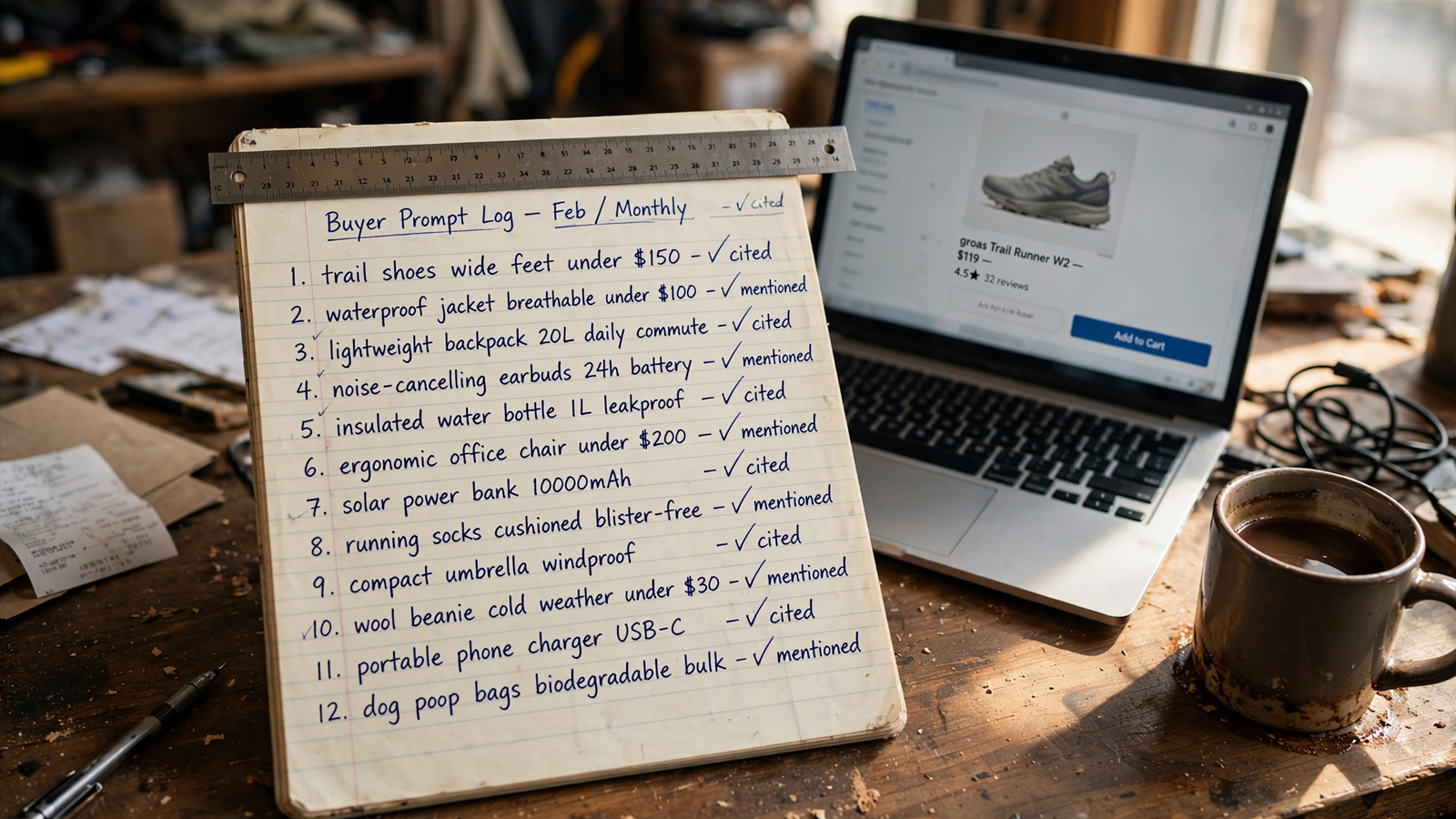
Skip the brand-mention dashboard for now. Build a fixed list of 20 to 40 buyer prompts in the form people actually use: category, desired outcome and constraint. Run each twice in a fresh session with memory off. Do not change the wording each month and then call a different answer progress.
In a spreadsheet, record three different outcomes: whether your product was mentioned, whether a page was cited with a link, and whether the product was recommended in the shortlist. Add its position, the cited URL and the competitor named instead. Rerun the same prompts monthly. I keep cited URLs beside the prompt; otherwise it is too easy to count a mention as a win without seeing which page supplied it.
Search Console added a Generative AI report on June 3, 2026, showing AI Mode and AI Overviews impressions by page. Use it to see which product and category pages surface in Google’s answers, alongside your prompt log. Do not judge the whole exercise by direct clicks alone. Adobe measured US retail AI referrals up 393% year over year in Q1 2026 and converting 42% better by March; the same discussion puts AI influence at about five times direct clicks.
If the prompt log and page-level visibility move together, keep going. If neither moves after 60 days, revisit whether the pages actually state the constraints in your prompts. Measure the answer and the page behind it, not just a single visibility score.
What would you do with ten hours a month?
Say you spend $20k a month and can spare ten hours. I would not start by commissioning content. I would work in this order, because each stage makes the next one more useful:
- Hours one to three: fix access and feeds. Check OAI-SearchBot and ChatGPT-User in robots.txt and your firewall. Submit the ChatGPT merchant feed with its nine fields. Fix Merchant Center errors involving price, availability and shipping, and check free listings.
- Hours four to six: rewrite five hero product pages. Give each a title that states the relevant fit, material or use case. Add a short facts block and scenario bullets. Make sure Product and Offer markup agrees with the visible page and feed.
- Hours seven to eight: fix one money category page. Say who it is for, then add a comparison table using real attributes such as weight, material, rating and price.
- Hours nine to ten: start the proof and the log. Ask for detailed reviews of the hero products. Write down 25 buyer prompts, run each twice with memory off, and record mentions, citations and recommendations. Repeat the log monthly.
The marketplace listings and honest comparison guide are next, not a reason to skip the basics. Skip work that does not improve a fact a buyer can check or an answer can use.
When should you hand it off?
I did this kind of work by hand for years, often at 1am with negative-keyword sheets. It works, but it eats hours many owners do not have. A monitoring tool can tell you that you are invisible. It will not, by itself, fix the feed, markup or copy that explains why.
If you want the catalogue cleanup, technical fixes and ongoing checks handled for you, groas does that across SEO and AI Search: new pages and technical fixes every day, plus work on authority beyond your own site, for one flat fee with a named strategist accountable for the outcome.
First thing to do today: pick your top five products, read each title out loud, and rewrite any title a shopper could not match to a real request.