

 LinkedIn
Our edge logs show Claude-User fetched /robots.txt 1,196 times in 30 days, more than any individual page we publish. That is the pre-flight in one number: before a bot can use your product page in a live answer, it has to get through your edge rules, read your access instructions, and receive usable HTML. I’ve seen enough landing-page work to know how easily teams skip those gates and start with copy. This checklist follows the path of the fetch instead. Run it before publishing a commercial page, migrating a site, or paying for an AI visibility dashboard. A page that cannot be fetched does not need a better headline yet.
The door: can the bot enter?
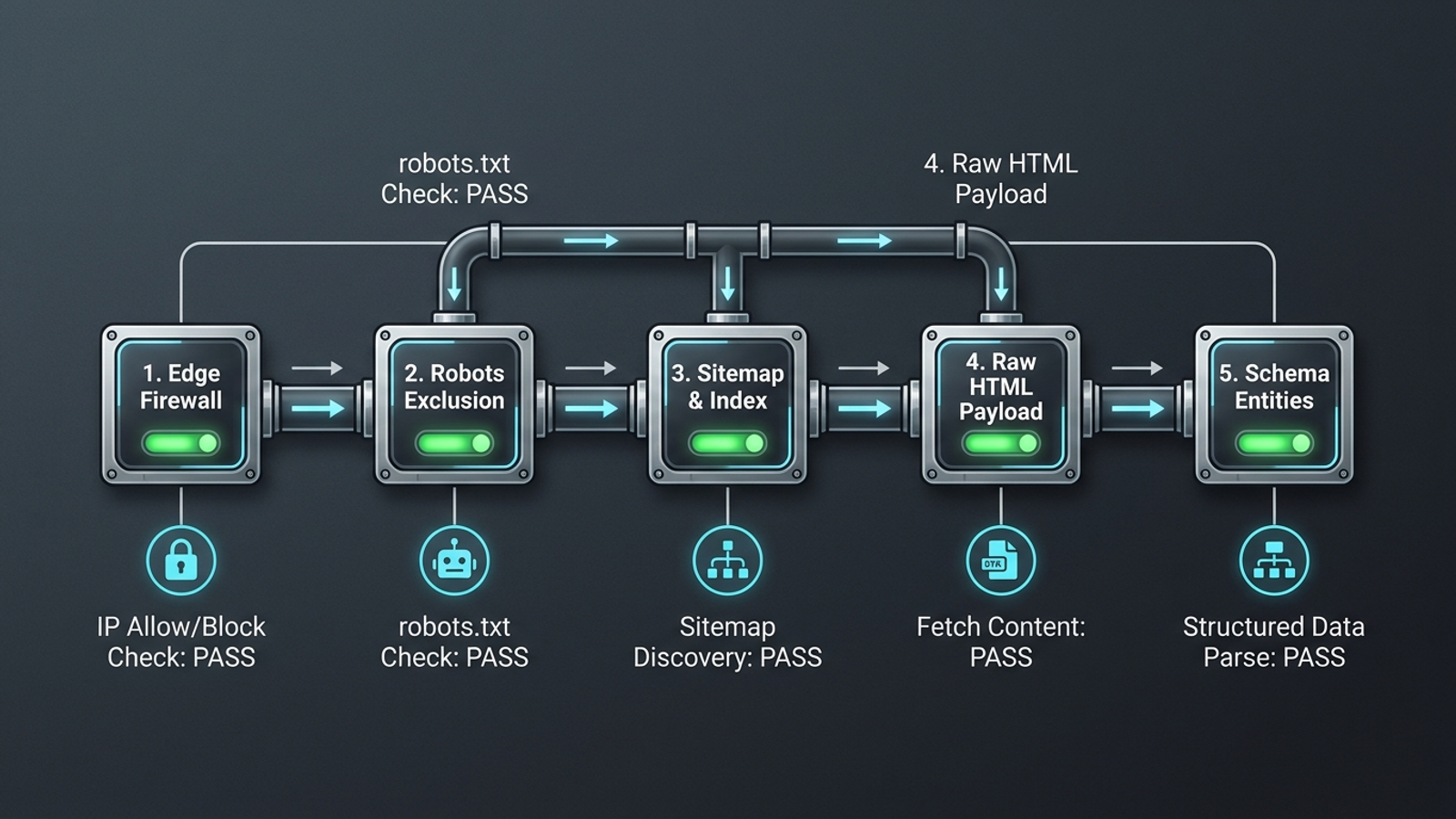
-
Separate retrieval permissions from training permissions. Inspect
/robots.txtforOAI-SearchBot,Claude-User, andPerplexityBot; confirm that each is permitted or inherits a permissive rule. Do not lump every AI user agent into one block because you want to restrict training crawlers. Anthropic distinguishesClaudeBot,Claude-SearchBot, andClaude-User; OpenAI lists separate directives forGPTBotandOAI-SearchBot. The names matter: blocking a training bot is a different decision from blocking a bot that fetches pages for search. If you need configurations to inspect, start with the AI crawler swipe file. -
Check the WAF and CDN response, not just the rule name. Request a page through the same edge layer a bot encounters and inspect the status code and response body. Cloudflare, AWS WAF, and Fastly rules can serve a browser challenge even when the origin page works perfectly. A retrieval fetcher that receives a challenge screen or a 403 has not received your page. Review global AI-crawler blocks and any exceptions rather than assuming an allowed user agent gets through. Be wary of a hardcoded IP allowlist for
Claude-User: its traffic does not come from dedicated published static IP ranges. -
Make
/robots.txtdirectly reachable. Runcurl -I https://yourdomain.com/robots.txtand inspect the response, then check for redirects between the requested URL and the file. Aim for an immediate HTTP 200 over HTTPS rather than a chain that depends on several services staying healthy. Under RFC 9309, crawlers treat an unreachable robots file differently from an unavailable one; server errors are not a harmless substitute for a working file. The standard also specifies how crawlers handle redirects. Fix this before debating what the directives inside the file say: a bot has to receive them first. -
Remove accidental disallows from commercial paths. Read the effective rules for
/blog/,/post/,/solutions/, and/pricing/, not just the top few lines of/robots.txt. Staging rules, CMS defaults, and broad path patterns can quietly shut off a directory while the homepage remains crawlable. Test an actual URL from each important directory against the relevant user agent; a rule that appears narrow may catch more pages than its author intended. If a landing page is disallowed, revising its answer copy will not make that page available to the bot. This is the last access check before moving on to discovery.
The map: can it reach the right URL?
-
Publish a current XML sitemap and declare it in
/robots.txt. Fetch the sitemap URL and confirm it returns HTTP 200, contains valid XML, and includes newly published pages. Then check for aSitemap:directive pointing to it. A live fetcher may arrive at a page through another route, but background discovery still needs a dependable list of URLs. A static file that has not changed in months can make new commercial pages harder to find. Do not mistake the mere presence ofsitemap.xmlfor a working update process; publish a page and check that it appears. -
Point canonicals to a working content URL. Inspect each core page’s
<link rel="canonical">and request its target. That target should serve the intended content on an indexable HTTPS URL, not redirect through another address, return 404, or carry anoindexinstruction. Keep trailing-slash choices consistent so the page and its declared destination do not disagree over which URL represents the content. The common mistake is checking only that a canonical tag exists. A tag pointing somewhere unusable is worse than a tidy-looking audit screenshot suggests: it sends the discovery path away from the page you meant to promote. -
Give core entity pages clean permalinks. Use direct paths for product, pricing, and other pages you want crawlers to recognize as the primary source. Check whether session strings, tracking parameters, or faceted navigation expose duplicate versions of the same content, and keep canonical signals consistent across those versions. This does not mean every URL containing
?is broken. It means the main page should not depend on a session ID or a campaign parameter to be found and understood. If five URLs present the same offer with conflicting signals, you have made a simple retrieval job needlessly complicated.
The payload: what does the first response contain?
-
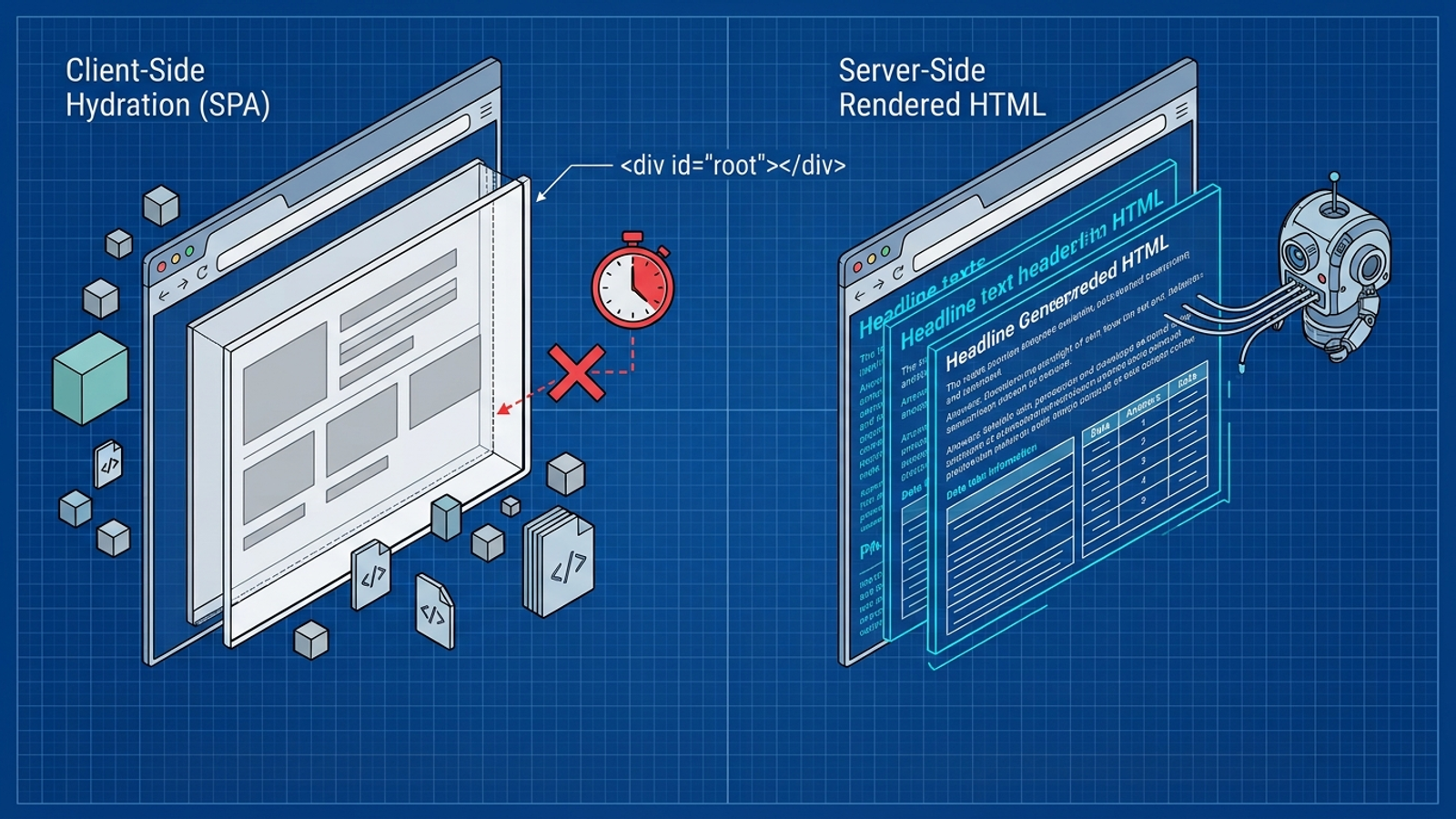
Find the core answer in raw server HTML. Fetch a representative page without running JavaScript:
curl -s -A "Claude-User" https://yourdomain.com/page | grep "your answer". Check the actual response for the product description, factual answer, and other text the page exists to provide; a rendered browser preview is not this test. If the response contains only<div id="root"></div>and the useful text appears after React, Vue, or SPA hydration, a non-rendering fetcher cannot read that text. Analyses of AI crawler behavior make this a practical check, not a formatting preference. Keep the answer in the initial payload. -
Measure Time to First Byte on pages bots actually request. Check edge and origin response times, including an uncached commercial URL; use under 1,000 milliseconds as the pre-flight target in this checklist. A fast homepage does not prove that a database-backed pricing page responds quickly. Slow origin lookups and cache misses can add seconds before a fetcher sees the first byte. Live retrieval has a latency constraint because someone is waiting for an answer, though no single timeout applies to every system. Fix the slow response path rather than using a page-speed score as a proxy for it.
-
Serve the requested page with a clean HTTP response. Request the canonical URL and confirm it returns the intended HTML with HTTP 200 and a suitable content type, such as
text/html; charset=utf-8. Inspect the body as well as the header: an error message served with HTTP 200 is still an error page. Remove meta-refresh and JavaScriptwindow.locationredirects from the path to the content, and do not hide the primary text inside an iframe. A browser may eventually put the right words on screen while an HTTP fetcher receives a soft 404, a wrapper, or a redirect instruction it never follows. -
Put the direct answer near the top under a meaningful H2. Check the first 100 words of the page’s main content for a clear answer to the question that page targets. Use a semantic heading that tells a reader what follows, then state the point without a long history lesson. This is a placement check, not a promise that a bot uses a fixed 100-word extraction window. The avoidable failure is making essential specs, pricing, or the product’s basic function available only after 600 words of introduction or inside an accordion. Once the payload arrives, make its useful part easy to locate.
The meaning: do the page’s facts agree?
-
Put matching Organization and Product JSON-LD in the initial HTML. Inspect the raw response for the relevant Schema.org scripts in
<head>or<body>, then compare the values with visible page text. Pricing, specifications, names, and product claims should not tell different stories in schema and copy. If a tag manager inserts JSON-LD only after JavaScript runs, a fetcher reading the initial response will not see it. The common mistake is celebrating a valid schema test on a rendered page while the raw payload contains none of that data. First make it present; then make it consistent. -
Connect your Organization entity to the external profiles you actually maintain. Inspect its
sameAsarray and confirm that the LinkedIn company page, Crunchbase profile, Wikidata entry, or Wikipedia page you list belongs to the same organization. Do not add a profile merely to fill an array, and do not substitute an internal social widget for an external identity. The point is to reduce ambiguity around the brand named in the page, not to accumulate links. Schema.org entity guidance for AI visibility is useful here, but the basic test is simpler: do the listed identities match? -
Use one name and one account of what you sell. Compare the homepage, pricing page, product pages, footer, and schema. Check company naming, service categories, and commercial terms for conflicts before asking a retrieval system to reconcile them. Calling the same offer an “autonomous growth engine” in one place, “agency software” in another, and a “consulting retainer” elsewhere creates avoidable ambiguity. This check is not an invitation to repeat identical marketing copy on every page. It is a request that factual descriptions agree. Fix the contradiction at its source rather than writing another paragraph to explain it away.
The proof: are real bots getting usable responses?
-
Verify claimed AI bot traffic before counting it. A User-Agent header is a claim, not an identity check. Use your edge logs and an appropriate infrastructure verification method, such as reverse-DNS checks where supported, before treating a request as genuine crawler activity. Otherwise commercial scrapers that copy a familiar bot name can inflate your report and send the team after the wrong problem. In our edge analysis, 76.5% of claimed AI bot hits failed verification. That is why I would rather see a smaller verified count than a dramatic chart built from untrusted headers.
-
Compare retrieval events with citations you can observe. Where you have both, line up verified bot timestamps, requested URLs, response codes, and active chat citations. Do not treat a frequently fetched page as a frequently cited one; the two measurements answer different questions. In our 30-day log review, live fetchers heavily targeted high-utility changelogs and exact pricing tables while ignoring generic marketing hubs. Use that distinction to decide what to inspect next. If a URL is fetched but never appears in the citations you track, check the page and the answer it provides before celebrating its crawl count.
-
Alert on verified-bot errors and slow responses at the edge. Configure alerts for 4xx and 5xx responses to verified AI bots, and flag latency spikes past 800 milliseconds for investigation. Use the alerts to inspect the affected URLs and rules; one failed request does not explain itself. A monthly audit can miss a WAF change or hosting problem for weeks, while a live alert shows that the access path has changed. Keep this check after the others: monitoring cannot repair a bad rule, stale sitemap, or empty response, but it can tell you when a previously working path stops working.
The check most often skipped: raw HTML
Return to Check 8 before spending on more copy. Open the raw response for the commercial pages you care about and look for the words a bot needs to answer with. A team can pay to rewrite twenty landing pages and track its visibility, then discover that those pages serve an empty JavaScript mount point until a browser hydrates them. Googlebot may render that page later; an on-demand fetcher reading the initial response may have no product text to use. The cost is not a slightly weaker headline. It is creative work that never reaches the retrieval step. Test the raw HTML first.