

 LinkedIn
If an AI answer engine cannot get through your front gate, your better-written page will not help. Most businesses that say they are not being cited should check technical delivery before commissioning another content rewrite: a blocked user agent, a JavaScript-only answer, or a firewall challenge can stop retrieval before the engine sees a sentence. On our own site at groas, Anthropic’s live-answer fetcher, Claude-User, requested /robots.txt 1,231 times in one 30-day window. I would start there. Get the front gate right, then check what a fetcher can actually read.
Before you start: open the four things that show what bots receive
- A terminal: Use
curl -ILto inspect headers and redirects, andcurl -sto inspect the returned HTML without a browser rendering it for you. - CDN or WAF security logs: Keep the relevant Cloudflare, Fastly, CloudFront, or AWS WAF events open so you can see challenges, blocks and rate limits.
- Your live
/robots.txtand XML sitemap: Open the actual URLs, not copies in a CMS or a document someone last updated eighteen months ago. - Raw page source: Use
view-source:rather than the post-hydration Elements inspector. A browser can make an empty server response look complete.
Access: let the right agents through
- Allow OpenAI’s search and live-answer agents separately from its training crawler. Pass:
/robots.txtdoes not blockOAI-SearchBotorChatGPT-Userfrom the public pages you want retrieved. Fail: A blanketDisallow: /catches them along withGPTBot. OpenAI lists its crawler tokens separately; decide which uses you want to permit rather than treating every OpenAI request as the same kind of visit. - Check Anthropic’s agents separately, too. Pass:
Claude-SearchBotandClaude-Usercan reach public answer pages. Fail: A broad Anthropic block catches live retrieval while you intend only to restrictClaudeBot. The distinction between Claude’s bot tokens matters here. IfClaude-Usercannot request a page, polishing that page will not make it available for a live fetch. - Check
PerplexityBotagainst every applicable robots rule. Pass: Your live/robots.txtpermits access to the public pages you want it to find. Fail: A restrictive generic rule blocks it while the team assumes all search bots have an exception. Read the whole file, including rules added for older anti-scraping projects; the agent name in a planning document does not override the response served by your site. - Keep
Googlebotdistinct fromGoogle-Extended. Pass:Googlebotcan reach the public pages and resources you want in Google Search; anyGoogle-Extendedrestriction reflects a deliberate separate choice. Fail: BlockingGooglebotwhile trying to manage AI visibility. Do not use theGoogle-Extendedcontrol as a substitute for checking whether Google can crawl and index the page in the first place. - Serve the answer without a login, registration screen or hard consent gate. Pass: An unauthenticated request gets an HTTP 200 response containing the primary informational text. Fail: It gets a 401, a 403, or HTML consisting mainly of a sign-in or consent screen. Check the raw response, not the page you see after accepting cookies and signing in. A fetcher cannot cite an answer it was never served.
- Review datacenter blocks without opening the door to every datacenter. Pass: Your security rules distinguish verified agents you want to admit from generic cloud-hosted traffic. Fail: A blanket commercial-cloud block catches legitimate retrieval requests. The fix is a scoped, verified exception, not unrestricted access for entire AWS, Azure or Google Cloud IP ranges. Check the relevant WAF events before changing a rule; an absent analytics visit is not proof that no request arrived.
- Give legitimate retrieval bursts room to complete. Pass: Verified agent requests can fetch several relevant URLs without immediately hitting an edge rate limit. Fail: A tight per-IP cap, such as 10 requests a minute, returns HTTP 429 partway through a multi-page visit. Inspect the response codes and timing in your logs. A request that reaches the edge but never receives page HTML has not passed this check.
Discoverability: give fetchers a short route to each answer
- Declare a current XML sitemap in
/robots.txt. Pass: ASitemap: https://yourdomain.com/sitemap.xmldirective points to a usable sitemap containing canonical, 200 OK URLs. Fail: The directive is missing, the file is stale, or its listed URLs redirect. Check the live file after publishing new pages. A sitemap is not a replacement for links, but it should not send a fetcher through broken or obsolete addresses. - Do not make
/llms.txtcarry a broken site architecture. Pass: Priority pages are discoverable through ordinary links and a working sitemap whether or not you publish that file. Fail: The team writes an experimental root file while answer pages remain orphaned. Keep the hierarchy of work straight: first make the URLs reachable, then decide whether another discovery file is worth maintaining. - Link priority answer pages from static HTML within three hops of the homepage. Pass: Documentation, pricing and comparison pages are reachable through ordinary
<a href="...">links. Fail: A page exists only behind infinite scroll, a click listener or an internal search result. If you cannot follow the route by reading returned HTML and opening its links, do not assume a non-rendering fetcher will find it. - Point internal links straight to the final URL. Pass: A link to a canonical answer page returns 200 OK without a detour. Fail: It walks through old HTTP-to-HTTPS, host-change or 301-to-302 chains. Run
curl -ILon the actual internal link, not merely on the destination you think it uses. A redirect may work in your browser while adding an avoidable step to automated retrieval.
Renderability: make the answer visible before JavaScript runs
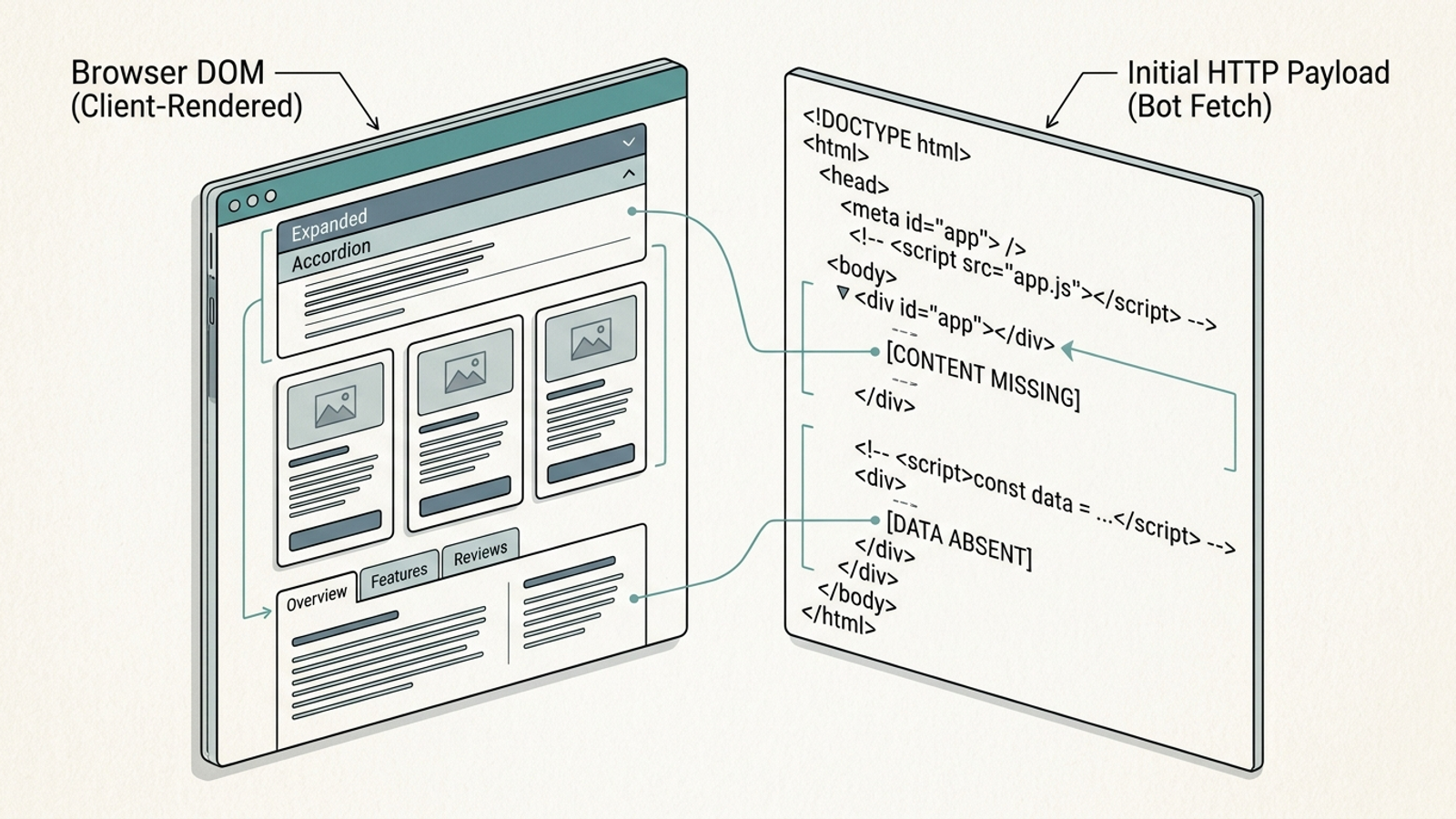
- Put primary claims in the initial HTML response. Pass: Definitions, specifications, prices and direct answers appear in the HTML returned before scripts execute. Fail: The response is an empty
<div id="root"></div>shell whose content arrives later through client-side JavaScript. Test the response withcurl -sorview-source:. Do not use the finished browser page as evidence that a fetcher received its text; those are different views of the same URL. - Keep accordion and tab answers in the initial HTML. Pass: The text is present before a click and its visibility changes through CSS or native
<details>and<summary>elements. Fail: An interaction mounts the answer for the first time. I have seen plenty of pages that look complete to a visitor and empty to a raw fetch. The check is simple: search the returned source for a distinctive sentence inside the closed panel. - Measure response time for the requests that matter. Pass: Your origin or edge returns answer-page HTML promptly; the draft target is a Time to First Byte below 600 milliseconds. Fail: Uncached execution regularly takes more than 1,500 milliseconds before sending a first byte. Inspect actual request timing rather than relying on a browser test from one location. A live-answer fetch that stalls has less opportunity to contribute its page to the response.
Structure: help a parser find the claim it came for
- Answer the page’s main question near the top. Pass: The direct answer, relevant price range or core specification appears under the main heading within roughly the first 150 words. Fail: A visitor must pass several blocks of generic background before reaching it. This is a page-composition check, not permission to invent a neat answer. If your numbers are real but buried, use the AI Overview landing page pre-flight to check where they appear.
- Use semantic headings rather than styled generic containers. Pass: An
<h1>names the page and clear<h2>and<h3>headings lead into their answers. Fail: CSS makes a<div class="heading-large">look like a heading without giving the HTML that structure. Inspect the markup with styling removed. A readable hierarchy helps both people skimming the page and systems trying to separate one answer from the next. - Make structured data agree with visible copy. Pass: Any
FAQPage,ProductorOrganizationJSON-LD reflects what the page actually says. Fail: Schema retains an old price, lists a question the page does not answer, or makes a claim that visitors cannot find. Compare the rendered copy and the structured data after substantive edits. Markup cannot repair a contradiction between two versions of the same page. - Use native HTML tables for genuinely tabular information. Pass: Specifications, fees or feature comparisons use
<table>, rows and cells that preserve their relationships in the source. Fail: Nested grid<div>elements depend on CSS positioning to show which value belongs to which label. Check a text-only view before approving the layout. If the relationships collapse when styling disappears, the comparison needs better markup. - Resolve canonical URLs and their responses together. Pass: A clean 200 OK answer page declares the intended canonical URL, and that URL itself resolves directly. Fail: The tag points to a redirect, a broken path or an unintended variation. Check protocol, host and trailing slash against the served URL. Do not ask a retriever to work out which of several conflicting addresses deserves the attribution.
Verification: count real retrieval, then act on what failed
- Verify bot identity before reporting AI traffic. Pass: Where the vendor provides a verification method, logs match requests against its published IP ranges or use forward-confirmed reverse DNS. Fail: A dashboard counts any request whose
User-Agentclaims to beClaude-UserorChatGPT-User. That header alone is not proof of identity. Without verification, a reassuring traffic chart can conceal the fact that the agents you care about are being blocked.

- Separate live-answer fetches from training crawls, and assign fixes someone can execute. Pass: Logs distinguish tokens such as
Claude-UserandChatGPT-UserfromClaudeBotandGPTBot, show their response codes on priority URLs, and give each failure an owner. Fail: A single “AI bot traffic” total is treated as evidence of citations. Our 30-day crawler-log teardown shows why the distinction is useful. An audit dashboard can flag a blocked request; it cannot change your WAF rule. groas for businesses takes an execution-first approach to search work, but edge and site changes still need the right access and ownership. - Check the WAF challenge before you commission more content. Pass: Verified agents you intend to admit receive page HTML rather than a managed challenge, JavaScript puzzle or HTTP 403. Fail: Bot Fight Mode or a similar edge rule challenges automated traffic indiscriminately. Use the Cloudflare bot troubleshooting guide and your own security logs to inspect the actual response, then scope any exception to verified traffic. This is the check teams skip most: they pay for thought leadership while the firewall turns away the fetcher before it reads a word. The cost is content the intended agent cannot reach.