

 LinkedIn

Most agencies won’t tell you this: the worst launches I managed did not fail because the strategy was wrong. They failed because nobody checked the boring stuff on a schedule. The first month is not a “don’t touch it” period. It is a fixed inspection schedule: a few checks are mandatory, while most edits are optional. Keep this list open. At each date, compare what you see with the threshold, make the specified fix if it fails, and otherwise let the sample build. That is how you catch a setup mistake without treating every slow Tuesday as a reason to rebuild the account.
Before launch: make the next 28 days readable
- Confirm the conversion action fires and counts once. Submit a test lead or purchase, then check Tools > Conversions within 30 minutes. If you see two, inspect duplicate GTM tags or overlapping GA4 and Ads tracking before real traffic arrives. A doubled count makes every later CPA calculation look better than it is.
- Set the intended bidding conversion to Primary. Check the Conversions column against All conversions. If a GA-imported action sits under Secondary when it should guide bidding, change its setting before launch. A visible conversion is not necessarily one the bid strategy uses.
- Write down one conversion-value rule. If leads differ in worth, assign values before the campaign starts. Adding them in week three changes what bidding is trying to find, right when you want to judge what the first three weeks taught you.
- Seed a negative list with at least 20 obvious terms. Start with irrelevant job, free and competitor-support searches. Day 3 is for mining what actually appeared; this pass stops the most predictable junk before it takes the first $200.
- Click every final URL and compare it with the ad. If the headline promises pricing but the page hides it, fix the page or the ad now. Do not wait for a low CTR or an ugly landing-page report to tell you the promise broke.
- Check billing, location targeting, the ad schedule and the daily budget. For the intended local audience, check Presence, not Presence or interest. A wrong setting here can spend a week collecting data about the wrong people. That data is hard to rescue later.
Day 1: check whether money is reaching the right place
- Look for impressions by hour 6. The threshold is simple: more than zero. If you still have none, check Policy Manager for disapprovals, then billing and location restrictions. That is a delivery block to investigate, not evidence that you need a new bid strategy.
- Compare midday spend with 30–70% of the daily budget. Investigate a full day’s budget spent by 9am before changing bids: check the geo and whether broad match is unconstrained. Remember that daily spend can exceed the average daily budget on a busy day; one fast day is not, by itself, a monthly budget failure.
- Verify the test conversion appears in the intended column. Do this before waiting for real volume. If Tag Assistant shows a fire but Google Ads shows none, inspect the tag, conversion action and Primary setting. Do not assume one setting explains every missing count.
- Check where a Search-only campaign showed ads. If spend appears on Display or Video, inspect campaign setup. Check Search Partners separately if they are taking spend you did not intend. Those are different placements and settings; lumping them together hides the fix.
Day 3: mine search terms, not the bid strategy
- Pull Search Terms and sort the top 20 rows by cost. Add exact negatives for searches that are plainly irrelevant. Repeat the search-term pass at least weekly through month one; the first pass catches waste before it becomes a pattern.
- Look for a shared irrelevant theme. If three or more high-impression terms point to the same unseeded theme, such as jobs, DIY or free, add an appropriate phrase negative at campaign level. Do not block close variants just because their wording looks unfamiliar.
- Leave bids, targets and budgets alone unless another check demands a fix. Three days of performance data is a thin basis for an optimization. Bid strategies can show Learning after significant changes. Removing obvious junk is hygiene; changing the objective because Tuesday looked odd is intervention.
Day 7: reconcile counts before judging CPA
- Compare seven days of Google Ads conversions with the backend. Export the Ads count and match it against your CRM, Shopify orders or lead sheet. If the totals differ by more than 20%, investigate duplicates, test conversions and missing records before you call the campaign efficient or expensive. Eighteen reported conversions against 11 backend records is a tracking question first.
- Check spend against 70–110% of planned seven-day pace. Multiply the daily budget by seven for the reference point. Below 70%, inspect delivery, rank and geo restrictions. Above 110%, inspect what consumed the spend; early overdelivery alone is not permission to scale.
- Flag Search ad groups with CTR below 1%. If only one is low, inspect its ad against its keywords. If every ad group is low, inspect the intent you bought against the message you wrote. This is a prompt to diagnose relevance, not an order to rewrite every RSA.
- Inspect top-spend keywords with Quality Score of 3 or below. Check expected CTR and landing-page relevance, then fix the ad-to-keyword match first. Poor relevance can raise what you pay for the same position. Change the part you can identify; leave the rest of the account intact.
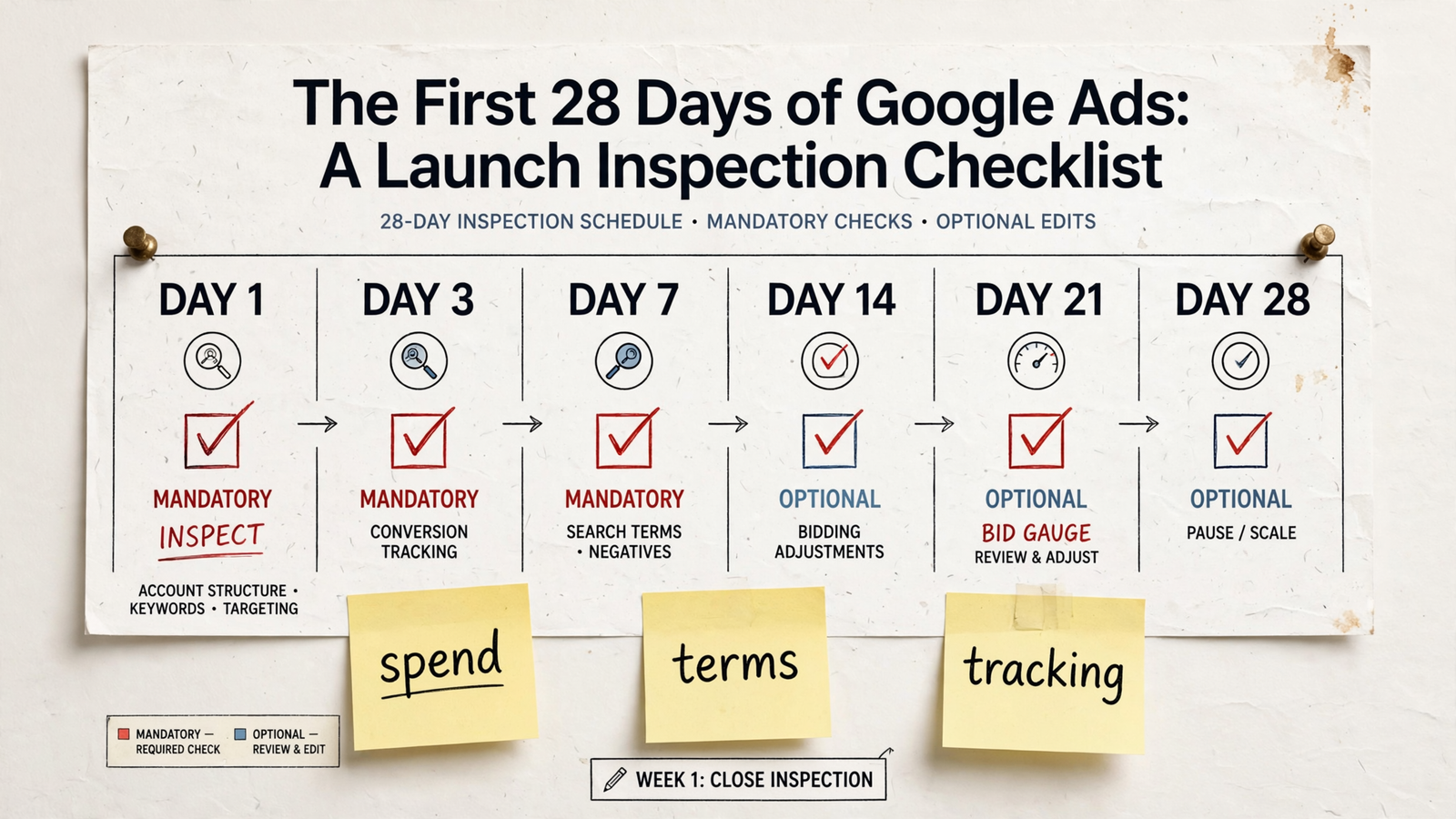
Day 14: make structural changes only when a pattern earns them
- Investigate any ad group with zero impressions after 14 days. First rule out a delivery or approval block. If the group is simply too thin to enter auctions, pause or merge it. With zero impressions, there is no test result worth protecting.
- Review RSA asset details before replacing weak copy. Go to Ads > View asset details and inspect low-performing headlines and descriptions. Replace an asset with a clear weakness; do not rewrite the whole ad because one label looks bad. Pin only when compliance requires it, so the remaining combinations can serve.
- Inspect paid landing pages with bounce above 85% or time under 15 seconds. Filter the GA4 landing-page report to google / cpc, then compare the first screen with the ad promise. Those numbers warrant a look, not an automatic template swap. Find the mismatch before editing the page.
- Promote a search-term theme only after five or more converting queries share it. If they share a phrase you did not build around, create one exact ad group for that theme. One expensive click does not meet the threshold. Neither does a tidy-looking keyword idea with no conversions.
Day 21: let conversion volume decide bidding readiness
- Count conversions over the last 30 days before switching strategies. Use the draft’s 30-conversion tCPA and 50-conversion tROAS benchmarks as decision rules, not guarantees. Below 15, stay on Manual CPC or Maximize Clicks with a CPC cap. At 15–30, consider Maximize Conversions without a target. Add a target only after clearing 30.
- Check conversion volume against the learning window. Calibration can take roughly 50 conversion events or three conversion cycles; 50 is an approximate benchmark, not a universal entry requirement. At five conversions a month, a two-week calendar reminder cannot manufacture enough data. Plan around volume, not the date printed on the checklist.
- Investigate a strategy still marked Learning after Day 21. Check Campaigns > Bid strategy status, then look at impressions, spend and conversions. If spend is only 20% of budget and impressions are thin, assess whether the structure needs consolidation. Do not add a new target merely to make the status change.
Day 28: keep, cut, then scale
- Keep search terms and ad groups within 20% of target CPA after at least 10 conversions. Keep the band wide while the sample is small. A single $40 conversion does not prove a $35 CPA target, and a single bad day does not erase a stronger run.
- Cut a keyword or ad group that spent twice target CPA with zero conversions. At a $50 target, that means $100 spent with nothing to show. Pause it rather than writing a story about assist volume that the conversion count cannot support.
- Give proven campaigns 20–30% more budget, not three times more. Reallocate from paused losers to one winner. A measured increase preserves a cleaner read on what happens under the existing strategy; a sudden rebuild makes the next result harder to explain.
- Write down one change for month two. Choose exact coverage for a proven theme, one new landing-page headline, or one tCPA-cap change. Log what changed and when. One readable test beats four simultaneous edits you cannot untangle.
Keep these edits on a short leash
- Treat major strategy and structure changes as interventions. A new or reactivated bid strategy, a conversion-action change, a fresh campaign’s target change or a substantial structure change can trigger another Learning period. Group necessary changes, make them once, and give the result room to show up.
- Do not confuse a moderate budget move with a full rebuild. On a steady-state campaign, moderate budget or target moves do not automatically restart learning. The popular 20% rule is not a substitute for checking what changed. A Day 10 budget adjustment and a Day 10 account reconstruction are different decisions.
- Keep the optional-edit list until Day 28 unless the cut rule is breached. Log a bid-strategy switch, full RSA rewrite, geo expansion or landing-page template swap rather than making it on impulse. I used to tell clients not to touch anything for two weeks. I was wrong: tracking fixes, disapprovals and obvious negatives need action; unearned restructures can wait. The longer explanation of the first two to four weeks is useful if you need to separate those two kinds of change.
Put the repeatable checks on an hourly clock
- Run spend, disapproval, tracking and delivery checks continuously. Compare spend with the daily cap; flag disapprovals, conversion-tag failures, search-term cost spikes and zero-impression blocks. The calendar tells a person when to inspect. It does not stop junk spend between inspections.
- Reserve weekly decisions for context a threshold cannot supply. Budget reallocation, a bid-strategy switch, a landing-page rebuild and an offer change need margins, sales follow-up and backend outcomes. That is why the learning-period decision belongs to conversion volume and business context, not a Day 21 alarm.
- Make the hourly layer accountable to the weekly one. groas runs continuous checks while a named strategist owns the bigger decisions, with actions logged and reasoned. At $20k a month in spend, a percentage shop charging $3,000–$4,000 to review on Fridays is an expensive way to discover a problem late. groas lists a flat $1,499 monthly price. For planning beyond this checklist, use the first-60-days playbook.
The last check is the one people skip
- Reconcile Google Ads conversions with the backend on Day 7 and again on Day 28. Everyone checks spend. Almost nobody matches reported conversions to CRM records, Shopify orders or a call sheet within 20%. I skipped that check on small accounts because it felt like admin. On one home-services account, Ads reported 22 leads while the backend showed 13 real jobs; duplicate submits and test calls were in the reported count. We treated the resulting 34% CPA rise as a learning problem when the count feeding bidding was wrong. This check takes 15 minutes. Skip it, and every later keep, cut and scale decision rests on a number you have not verified.