

 LinkedIn
Most AI search visibility tools sell you a better view of your own absence. If you need pages fixed rather than another graph, my pick is done-for-you execution with a record of what changed.
That pick is for teams without spare developer and copywriting hours. A subscription that monitors mentions across Perplexity, ChatGPT, and Google but never changes a page or publishes an answer hands you the bottleneck with a cleaner interface.
I spent years running search campaigns and watched ad tech repeat this trick whenever search behavior shifted: wrap an operational problem in a dashboard, charge a monthly fee, and return the actual work to the buyer. The software boom around Generative Engine Optimization has given the trick a new coat of paint. When operators ask which tools help a business get featured in Google AI Overviews rather than merely monitored, the useful follow-up is simple: who ships the fix?
The test: does anything change on your site?
Every category here promises more visibility when someone asks an AI search engine for an answer or a vendor recommendation. I rank them by a less glamorous question: does the tool deploy changes, or assign you homework? Practitioners testing GEO tools describe how often the workflow stops at reporting. A report can tell you a rival appears in 38% of tracked queries while you appear in 12%. It cannot, by itself, write the missing page.
Four checks determine my ranking:
- Direct execution: Does it edit copy, publish content, deploy structured data, or make a technical change? Or does it export an audit?
- Multi-engine coverage: Does it address Google AI Overviews alongside ChatGPT, Claude, Gemini, and Perplexity, or does coverage narrow as you inspect the plan?
- Work handed back to you: Who researches, writes, tests, stages, and publishes each recommended fix?
- Cost per deployed change: What are you paying once plan tiers, credits, and internal labor are part of the bill?
Visibility charts have a place, but they are easy to overread. A SparkToro and Gumshoe study of 2,961 runs across 12 prompts found less than a 1 in 100 chance of getting the exact same brand recommendation list twice across the AI systems it examined. That makes a weekly percentage a shaky substitute for improving the pages an engine might retrieve. Use the chart to find work; do not mistake it for the work.
#5: Prompt and mention trackers show you the gap
Who it is for: Enterprise brand teams with writers and developers already available to act on an audit baseline.
The one thing it does better: Captures point-in-time evidence of what an engine generated on a specific run.
The one thing that rules it out: It changes no code or content. Coverage can also cost more as you add engines.

Trackers query AI interfaces against a set of buyer prompts and record whether your brand appears. ZipTie offers browser-rendered screenshot evidence starting at $42.75 a month. That can show you which competitors appeared in a Google AI Overview. It cannot update the page that failed to appear.
The entry price can be deceptive, too. Otterly.ai advertises $29 a month for 15 prompts across four engines, with Google AI Mode and Gemini available through separate add-ons priced from $9 to $149 a month. Before buying, price the prompts and engines you actually need, not the smallest plan on the page.
My verdict: use a tracker for diagnostic calibration, not as your operational lever. Buying one while your content gaps sit untouched is like installing a security camera to watch someone carry your furniture out. You get excellent evidence. Your house is still empty. If no writer or developer can act on what the screenshots reveal, skip the monitoring subscription.
#4: Content-gap finders give your writers a queue
Who it is for: Content managers with writers who need briefs based on the questions AI search engines answer.
The one thing it does better: Identifies angles, sub-questions, and competing sources your existing pages miss.
The one thing that rules it out: A brief or draft still needs editing, validation, staging, and publication.
These platforms compare generated answers with your site and identify topics you have not covered well. Profound’s $99 Starter tier tracks ChatGPT alone, while its $399-a-month Growth tier adds multi-engine tracking. Its agents can produce briefs and initial drafts through usage-based credits. That is more useful than a mention count if you have people ready to turn the output into pages.
But raw copy inside an analytics tool is not a published article. Someone still has to check the claims, make it readable, format it, and get it live in the CMS. I have watched teams pay for gap analyses only to let the recommendations gather digital dust in Notion. More ideas were not their constraint. Shipping was.
My verdict: a gap list without a publication pipeline becomes expensive guilt. If your team cannot reliably turn briefs into finished pages, do not pay to make the backlog longer.
#3: Technical crawlers find the blockage, then stop
Who it is for: In-house SEOs and web teams managing sites with complex routing or client-side JavaScript.
The one thing it does better: Exposes status codes, schema problems, and rendering obstacles that can keep page text from being parsed.
The one thing that rules it out: A crawler’s issue export is not a production fix.
A technical crawl can tell you why a page is hard for a bot to read. Tools such as Screaming Frog expose client-side rendering and server issues. That diagnosis matters. Then comes the CSV: redirect chains, missing canonicals, unrendered elements, and a developer backlog already competing with product work. The report may be right while the site stays exactly as it was.
There is an important exception within this technical layer. WordLift can push JSON-LD and entity graphs to client sites, with enterprise plans starting at €999 a month. A tool that deploys schema is doing more than a crawler that exports errors. I still keep this category at #3 because its central job is technical diagnosis or structured-data work, not the full sequence of fixing access, writing answers, and improving commercial pages.
Schema has limits of its own. Google documentation does not promise AI Overview inclusion for any schema type. Structured data can clarify relationships; it cannot stand in for a clear answer on the page. Buy a crawler when your developers are ready to use its findings, not because a long issue list looks like progress.
#2: On-page optimizers get closer to the answer
Who it is for: Growth leads and PPC operators improving commercial pages and comparison assets for buyers evaluating solutions.
The one thing it does better: Shows where direct answers, specifications, and useful tables belong on a page.
The one thing that rules it out: Many tools leave you to copy, stage, and check the changes URL by URL.
This category works nearer to the page a search engine might cite. An on-page optimizer can point out that a product page buries its answer under vague positioning, or that a comparison page makes the reader hunt for the actual difference. That is a better starting point than another chart of mentions.
But an editor window with an AEO score is not a deployment pipeline. If forty pages need clearer headings and answer sections, somebody still has to open the CMS, rewrite the copy, check the layout, and publish each one. A useful recommendation can remain a recommendation for eight weeks while the marketing queue moves on.
That is the distinction behind tracker versus SEO suite versus done-for-you: which one ships the fixes? An on-page tool earns its place when your team can publish what it recommends. If the handoff ends at copy and paste, budget for the hands.
#1: Done-for-you execution ships and logs the fix
Who it is for: Growth-stage companies and agencies that need AI search work done without building a larger internal execution team.
The one thing it does better: Moves from identifying a problem to making and logging changes to technical structure, content, and commercial pages.
The one thing that rules it out: It asks you to trade line-by-line micromanagement for agreed guardrails and deployment speed.
This is the model behind groas. Specialized AI models handle technical, content, and landing-page work continuously, while a named human strategist sets direction, guardrails, and accountability. The distinction is not that it can tell you ChatGPT overlooked your brand on a tracked prompt. It is that the workflow can move on to the crawl obstacle or missing answer, make the change, and leave an action log.
I made the same point in an open letter to the SEO agency owner fielding client questions about AI citations: a record of concrete improvements shipped is more useful than an ambiguous visibility index. A log does not guarantee a citation or a sale. It does tell you whether the work you paid for happened.
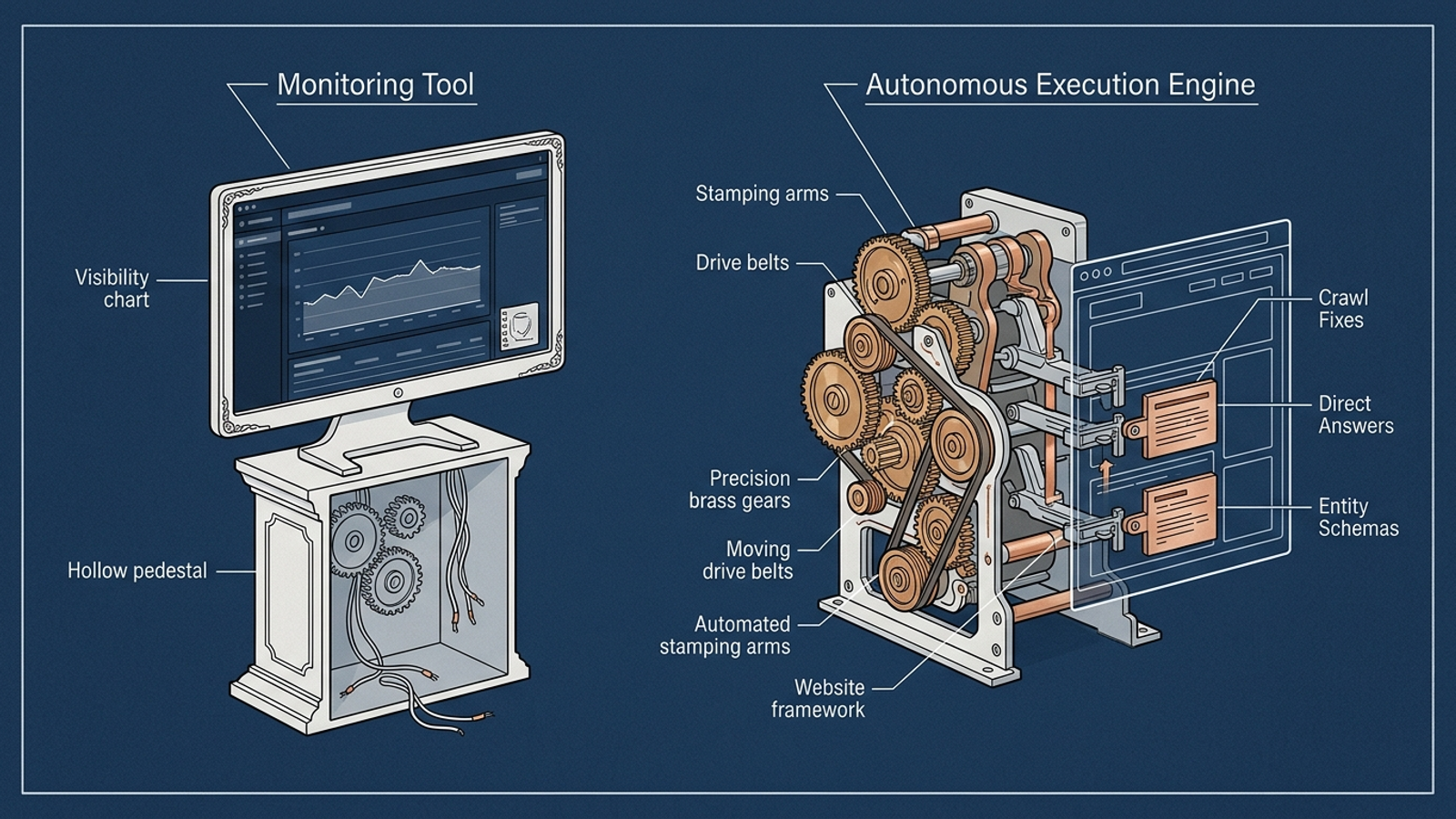
The trade-off is control. If changing an H2 or publishing an answer requires three committee reviews, two brand sign-offs, and an executive roundtable, autonomous execution will make your team nervous. You set boundaries, tone, and commercial priorities; the system acts within them. For an operator whose team is already at capacity, that is a better exchange than buying another seat to review another chart.
My #1 pick is for the team that needs changes shipped, not merely recommended. If your staff can do that work promptly, you may not need this layer. If they cannot, it is the layer the cheaper tools leave out.
The five layers at a glance
| Rank and category | What reaches the site? | Coverage to check | Work handed back | Best fit |
|---|---|---|---|---|
| #1 Done-for-you execution | Technical, content, and page changes are deployed and logged | Scope across major AI search surfaces | Direction and guardrails | Teams without spare execution capacity |
| #2 On-page optimizers | Usually recommendations or editable copy; publication depends on the workflow | Pages and queries covered | Rewriting, CMS staging, and checks | Teams with available page editors |
| #3 Technical crawlers | Crawlers export findings; some adjacent schema tools deploy markup | Bot access and technical scope | Development work, unless a specific fix is automated | SEOs with developer support |
| #4 Content-gap finders | Briefs and drafts, not necessarily published pages | Engine coverage varies by plan | Editing, validation, and publishing | Teams with available writers |
| #5 Prompt and mention trackers | Nothing | Prompts, engines, and add-on costs | Interpretation and every subsequent fix | Teams needing an audit baseline |
The popular option I left out
I left the legacy enterprise SEO suite bolt-on out of the ranking. These are established rank-tracking suites that add an AI Overview tab and treat generative citations much like keyword positions. That can be a familiar way to look at a query. It does not answer this roundup’s test: what changes on your site?
Conversational retrieval also makes a rigid, once-a-week query a narrow view of how an assistant might describe your market. If the bolt-on only watches, I would rather judge it alongside the trackers at #5 than give it a separate rank for living inside a larger suite. An extra tab is not an extra pair of hands.
Buy the layer your team cannot supply
Match the purchase to the work already waiting in your queue:
- No in-house developer? Skip a technical crawler if nobody can act on its export. Look for execution, including groas, or get the development capacity before buying more diagnostics.
- Writers available but little technical direction? Another list of content gaps may not help. Start with the on-page and crawl problems keeping existing answers from doing their job, or use an execution model that handles both.
- Developers and writers ready to go? A tracker, crawler, or on-page tool can give them a focused punch list. Ask how quickly findings become live changes before you renew.
If you skipped straight here, my pick remains done-for-you execution with logged changes for the team that cannot write, code, and publish every recommendation a dashboard produces. groas is built for that job. If you already have the people and time, buy the diagnostic layer they will actually use. Otherwise, paying to monitor your absence is just paying to watch the work not get done.