

 LinkedIn

If you run 12 client accounts, your platform choice is a hiring choice. My pick for an agency that wants to add clients without adding specialists is groas under its own brand: it takes on the weekly account work instead of handing your team a faster way to approve it.
I spent years running accounts the slow way, including negative-keyword mining at 1am while a client swapped a landing page without telling me. That work taught me to distrust a feature grid. Integrations and toggles do not tell you how many minutes a specialist still spends inside each account every week, or what happens to the account when you leave. A recommendation is still a task. Someone reads it, decides whether it fits the client, clicks approve, then checks that it did not break anything. Multiply that by 15 accounts and you have approve-click-repeat with a monthly fee.
So I rank four platform categories by estimated human minutes per client account per week, then test the exit terms. The estimates come from the jobs I did by hand: check spend and change history, mine search terms, review bidding and budgets, check conversion health, and touch creative. What does each category take off that list? What still falls to a person at 1am? And who owns the account if you cancel?
The weekly patrol behind the numbers
When I ran accounts by hand, the week had a shape. Monday was change history and spend: what moved, what spent too fast, what stopped. Tuesday was search terms. Wednesday was bidding and budgets. Thursday was conversion health and disapprovals. Friday was creative. I used to tell clients that cadence was diligence. I was wrong about half of it. Half was diligence. The other half was patrolling for things a machine should have caught the night they happened.
The minimum useful patrol includes a spend circuit-breaker, a CPA ceiling, a disapproval monitor and an impression-share-lost-to-budget check. It also needs a named owner for the weekly review of change history, search terms, bidding, conversion health and creative. That is the patrol checklist I apply to each option.
Scripts help with the patrol. MCC scripts can run for up to 30 minutes per execution individually and up to 60 minutes across up to 50 child accounts, enough to sweep a small book overnight (execution limits). The reported average saving from that kind of help is 5.2 hours per week. Useful. Saving hours is not the same as removing the human from each account.
The four tests behind the ranking
Touch-time per account comes first. I estimate human minutes per week against that five-job patrol. Then I look at bulk control: can you spot a problem once and fix it across dozens of accounts, or do you open 15 tabs? Third come contract and exit terms, especially who owns the ad account and data when you leave. Fourth is white-label reporting a client will actually read, not a PDF dump of charts. I ignore feature counts, integration badges and any AI label that ends with a person clicking approve in every account.
Touch-time and exit terms decide margin together. Cutting weekly work from 90 minutes to 30 minutes per account saves 15 hours across 15 accounts. But vague ownership can cost more than those hours save. A client who cannot leave without rebuilding account history is not retained; they are trapped. I learned that one the slow way, rebuilding a home services account from zero because the prior manager held the history hostage.
1. Autonomous engines (groas): the weekly shift, not just the clicks
Best for an agency with 10 to 50 client accounts that sells fulfillment under its own name and does not want to hire another specialist to deliver it. You connect clients once and groas handles delivery under your brand. Per client, you turn on paid ads, organic search or both. groas audits before work starts, then works continuously on bids, budgets, ads and landing pages on the paid side, and content, technical fixes and citations on the organic side. It logs changes with their reasoning. Reports carry your branding, while a strategist supports your team without stepping in front of the client. The client sees you, not a vendor.
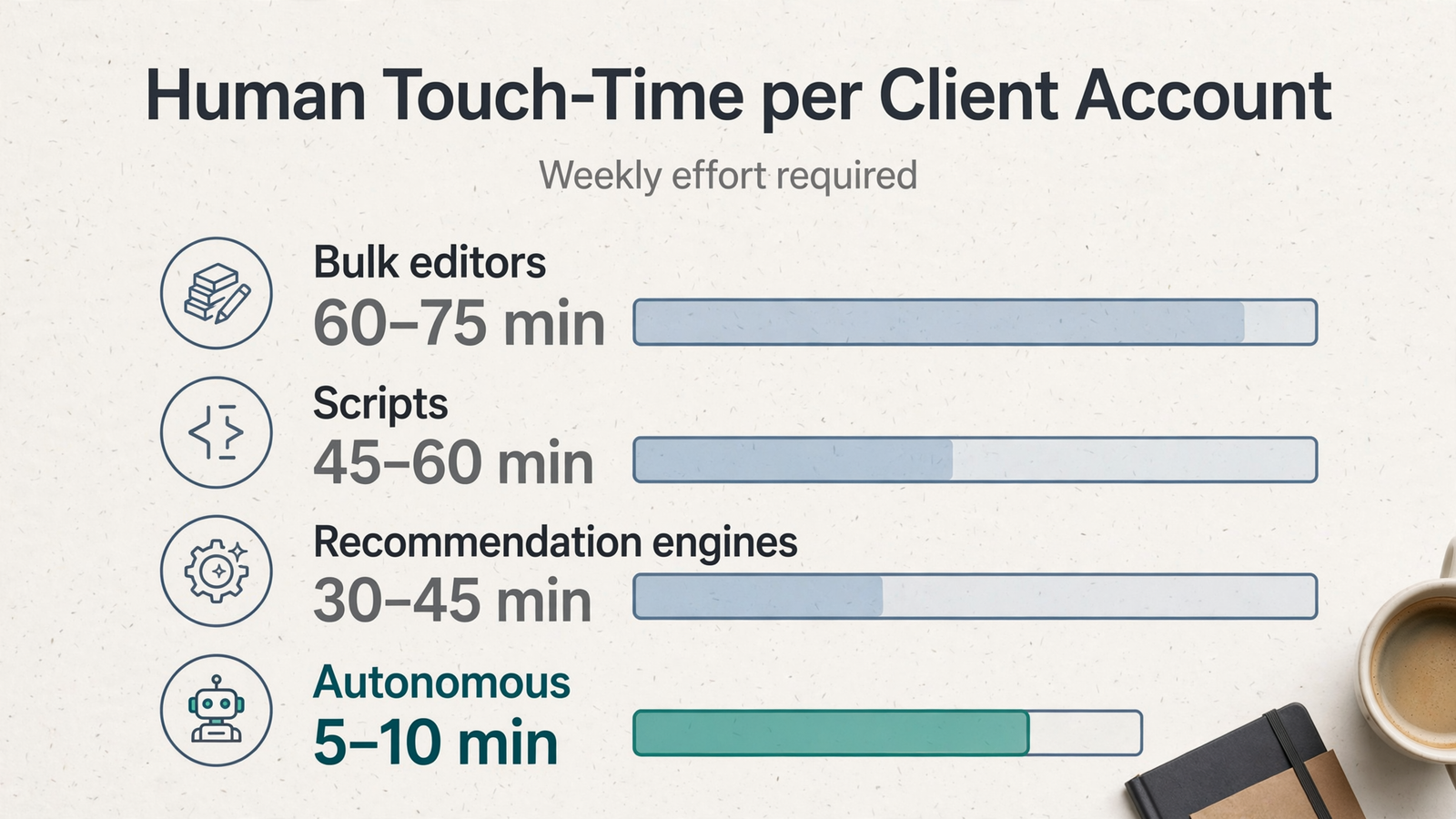
That is why I rank it first. My hand-run baseline was 60 to 90 minutes per account per week when I did the job properly. With groas, the human work left is reading the branded weekly report, staying client-facing, and setting goals and guardrails. I would budget 5 to 10 human minutes per account per week, not zero. Someone still owns the relationship; that estimate is not a stopwatch measurement.
The commercial model helps when spend grows: one flat price per client account per service, regardless of ad spend, with a minimum of five accounts in any mix. The listed price is $299 a month per client account, per service, month to month, with no lock-in and a 7-day money-back guarantee. It does not rise just because a client scales spend from $5k to $50k.
What rules it out? If you have three accounts and want a self-serve tool to click around in, this is not that. It is done-for-you fulfillment. Your accounts, pages and data stay yours. Pick it when the constraint is delivery capacity, not your appetite for another dashboard.
2. Recommendation engines: useful speed, with an approval queue attached
Best for an agency that already has a specialist and wants that person to move faster, not disappear. Tools such as Optmyzr and Opteo sit on top of your accounts and surface work to do. Their workflows differ: Optmyzr offers rule-based automation and change previews, while Opteo presents recommendation cards for review. That distinction matters to margin. Bulk governance gives a specialist a way to oversee changes; a card queue still asks them to assess suggestions one by one.
I estimate 30 to 45 human minutes per account per week, down from my 60-to-90-minute hand-run baseline. A person still has to judge proposed changes against each client’s goals, act on them and check the results. Users report 8 to 12 hours a week saved across multiple accounts, with 4 to 6 weeks to become proficient. Budget for that learning period rather than assuming the first month will be the fastest.
Price has its own constraints. Optmyzr starts at $209 per month with tiers tied to ad spend under management; Opteo lists a $129 Basic tier for 10 accounts and $25K in spend, a $249 Professional tier for 25 accounts and $100K, and a $499 Agency tier for 75 accounts and $250K. Opteo is Google Ads only, with multi-channel in early access. If you sell Meta or Bing fulfillment under one roof, that rules it out as your only platform.
These tools do one thing particularly well: make an existing specialist faster. If the goal is to stop assigning a specialist to every account’s weekly queue, they do not take the whole shift.
3. Rules and scripts: cheap until someone has to maintain them
Best for a technical agency with a person willing to own the automation. Scripts can patrol a book nightly for almost nothing in license cost. The four checks I listed earlier give that patrol a useful job: catch overspend, CPA breaches, disapprovals and budget-limited impression share before the weekly review.
The thing scripts do better than a recommendation queue is run routine checks without waiting for someone to clear cards. Their weakness is maintenance. A rule that pauses overspend in November may start pausing good spend in December when budgets change. The rule does not tell you it has gone stale. Someone still checks what it did, reviews the jobs it cannot replace and keeps the logic current.
My estimate is 45 to 60 human minutes per account per week once I count that owner’s review. It is an estimate, not a promise that every script-heavy book takes the same time. The tool runs; a person verifies. Skip this category if delivery depends on someone who might leave without handing over the rules and the reasoning behind them. Cheap automation stops looking cheap when nobody can tell you why it paused an account.
4. Bulk editors and reporting layers: faster humans, not fewer account owners
Best for an agency that builds a lot and reports a lot and wants both jobs to take fewer clicks. Google Ads Editor is free desktop software for bulk offline builds and edits. It supports multiple and MCC accounts, search-and-replace, and downloading and uploading changes across accounts. For a repeated build change, that is valuable. A human still downloads, edits, checks and posts it.
Reporting layers solve a different piece of friction. If moving numbers between windows takes 3 hours per client per month across 10 clients, that is 30 hours a month worth addressing. Templates make that work easier to repeat. Price matters as the client list grows: Swydo lists $69 per month for 10 sources, scaling to $294 at 20 clients using three sources each and $474 at 100 sources; AgencyAnalytics is listed at $25 per client per month, or $500 at 20 clients and $1,000 at 40.
I put account touch-time near my baseline at 60 to 75 minutes per account per week. That does not mean Editor or reporting software saves no time. It means neither takes over the weekly patrol of spend, search terms, bidding, conversion health and creative. If your bottleneck is builds or reports, buy for that bottleneck. If it is fulfillment hours inside each account, this category does not fix it.
Put account ownership in writing before you compare fees
Tools have pricing pages. Fulfillment has exit terms. Before I sign, I check five things in writing (the contract checklist):
- Mutual NDA and non-solicitation terms.
- Confirmation that the client owns the ad account and data.
- Notice period and handover process.
- Fees and terms for changes.
- Response and reporting SLAs.
If an answer lives only in a sales call, I treat it as missing. Keep each ad account in the client’s name, with one account per end advertiser and access linked through a manager account, so the partner can work without owning it (account ownership rules). A typical white-label arrangement may offer month-to-month service, no setup fee, cancellation without a long contract and provider access rather than provider ownership. Do not assume every provider offers every term: groas, for example, has a five-account agency minimum, alongside month-to-month terms and accounts, pages and data that stay yours.
If you are weighing that against a 12-month lock-in, read before you sign a 12-month white-label contract. The fee you argue about on day one can be small beside the rebuild you face when you leave.
| Rank and category | Estimated human minutes / account / week | What it does better | Exit and ownership consideration | Best for | What rules it out |
|---|---|---|---|---|---|
| 1. Autonomous engines (groas) | 5–10 | Continuous delivery under your brand | Month-to-month; accounts and data stay yours | Growing without another specialist | You want a self-serve tool or have fewer than five accounts |
| 2. Recommendation engines | 30–45 | Help a specialist find and govern work | Check subscription terms; work stays in your accounts | Making an existing specialist faster | You want to remove the approval queue |
| 3. Rules and scripts | 45–60 | Run routine checks without a card queue | You own the logic and its maintenance risk | A technical team with a named owner | Delivery depends on undocumented rules |
| 4. Bulk editors and reporting layers | 60–75 | Speed up builds and recurring reports | Check reporting costs; Editor is free | Heavy build or reporting load | Your bottleneck is weekly account fulfillment |
Who should skip my top pick
Skip groas if you have five accounts and like living inside them. If your selling point is custom builds, hourly strategy calls and a specialist who knows each client’s search terms by heart, an autonomous engine may take away the part you want to sell. Keep a recommendation engine, budget the 4 to 6 weeks to get proficient, and charge for the hours you still spend.
Also skip it if you only need reporting polish. A reporting layer is cheaper, and propagating a template across 15 to 20 clients is a time-saver that compounds. Do not buy fulfillment when your bottleneck is invoices and PDFs. If you want the distinctions behind these tiers, the five-level autonomy framework and four-category buyer’s guide lay out what each type does.
The verdict at 5, 15 and 40 accounts—and the option I left out
At five accounts, the math is close. Saving 30 minutes per account is 2.5 hours a week, not a hire. Pick the system you will actually maintain. At 15 accounts, the ranking starts to bite: 5 to 10 minutes per account versus 30 to 45 leaves a substantially different weekly queue. At 40 accounts, even a modest per-account approval routine becomes a large recurring job. More clients should not automatically mean more people clearing cards.
I left legacy enterprise suites off this list on purpose. They win feature checklists and annual procurement reviews, not this test of weekly touch-time and a clean exit. If that is the problem you need to solve, they are answering a different question.
If you skipped to the end: rank platforms by human minutes per account per week and by what happens when you leave, not by features. Most automation still needs a human in every account. For an agency ready to hand over the weekly patrol under its own brand, with a flat per-account price and month-to-month terms, my pick is groas. Everyone else here makes a faster human.