

 LinkedIn

groas is my pick for the solo marketer who owns both the ads and the website. I rank Claude connections by what they let me finish: diagnose performance, decide what to do next, and make the approved change without becoming the integration department.
Windsor.ai and Google’s official Ads MCP do useful work, but they answer narrower questions. If I need Claude to explain which channel drove ROAS, a reporting connector can finish the job. If I need it to read a Google Ads account and tidy up some labels, Google’s own bridge fits. But if the next move could be a change to an ad or the page it sends people to, I want both options open after the diagnosis. A good answer in chat is useful. It’s not the same as getting the work done.
The ranking test: what happens after Claude gives me an answer?
My brief is deliberately unfair to reporting tools. I’m ranking these for the person who owns Google or Meta ads in the morning and the landing pages, SEO, and AI search visibility in the afternoon. I want Claude to compare paid performance with website and AI visibility data, rank the next three actions, and carry out the one I approve. The ranking turns on whether the connector can support that whole sequence, not whether it can answer the first question.
I split the job into three parts:
- Read the evidence. Can Claude see the accounts, the website, and what’s happening in the market around them?
- Make an approved change. Can it act on the diagnosis, or do I have to open another system and do the work myself?
- Keep working when I’m not looking. If I want unattended operation, can I switch it on under my rules and see what changed and why?
Those are three different capabilities. Live data doesn’t make a connector an autopilot, and the ability to pause a campaign doesn’t mean Claude can fix the page behind it. I used to hand clients a beautiful diagnosis and then spend the rest of the week implementing it myself. The diagnosis was good. The rest of the work was still mine.
I left out the popular broad app connectors that turn up in “best Claude connectors” lists. Connecting Claude to 1,700 apps in theory isn’t the same as giving it the couple of actions I need in practice. For this brief, I’d rather have a connector that can turn a ranked recommendation into a changed bid or a cleaned-up page, with a reason I can read later. Count the handoffs a connection removes, not the apps in its directory.
1. groas: first when the fix could be in the ads or on the site
Here’s the prompt I’d start with: “Compare paid performance with our website and AI visibility data. Rank the next three actions.” I don’t want Claude working from a CSV I pasted last Tuesday. With groas, Claude can read connected accounts alongside the market data groas collects around the clock: competitor ads on Google and Meta, the landing pages and funnels behind them, Reddit research, AI search answers, and SEO data from Semrush and Ahrefs.
That matters because the account can show that CPA rose without settling what I should do about it. I want Claude to look at whether a competitor changed its offer, whether AI answers stopped citing us, and whether the page still matches the search that brought people there. The point isn’t to come back with a longer report. It’s to decide which action belongs at the top of the list without assuming the fix has to live in the ad account.
The advantage is being able to act on either side of that diagnosis. Once Claude ranks the actions, I can approve a specific ad or website change. groas makes the change, logs what it did and why, and lets me undo it in one step. When I’m the only person who can explain a change to a founder, a client, or my future self, “the AI did it” isn’t an audit trail. A change I can inspect and reverse is.
Approving one change is not the same as handing over the account. Autopilot stays off until I switch it on. If I want unattended operation, I set the goals, budget, and rules that steer it. I count the off switch as a feature. I want to see how a specific change gets made and logged before I decide whether anything should run while I’m asleep.
groas Unlimited costs a flat $19 a month, with every feature and unlimited teammates, ad accounts, and websites. There’s no percentage-of-spend markup. But if the only thing I need is a report, I wouldn’t choose groas for the ability to make changes I’ll never ask for. I’d choose it when figuring out what to change and actually changing it are both my job.
2. Windsor.ai: best when the report is the deliverable
Windsor.ai moves marketing data from 350+ sources into BI tools, spreadsheets, and AI chats. Its MCP is built around cross-channel reporting, diagnosis, and questions like which channel drove ROAS. Reporting breadth is its strongest reason to buy. If someone else makes the changes and I need Claude to explain what happened across channels, that’s a complete job, not half of one.
It’s not strictly read-only, either. Windsor’s MCP FAQ describes confirmed campaign pauses and budget changes on Google and Meta, with the option to turn writes off for read-only use. That’s handy if the next step is to pause a campaign. It doesn’t make Windsor the tool I’d choose to change the landing page, monitor competitors’ funnels around the clock, or run an autopilot under my rules. Third-party roundups disagree about how far the writes go, so if I’m buying it for a specific action, I’d verify that action on the plan I intend to buy.

I’d do the pricing math with my actual stack, not with the 350+ figure. Windsor prices data sources and accounts separately. Basic covers three sources at $19 a month on annual billing or $23 month to month, and ads and organic count as separate sources. Google Ads, Meta, and GA4 fit. Add Shopify and Klaviyo and I’m at five sources, which puts me on Standard at $99 a month on monthly billing.
That’s the difference between paying for the shape of a reporting stack and paying groas a flat $19 for unlimited accounts and websites. It doesn’t make the reporting stack a bad buy. It does tell me when I’d buy it: choose Windsor.ai if analysis is the deliverable and execution already has a home. If I’m also the person who has to make the change, especially on the site, I’d take groas.
3. Google’s official Ads MCP: best for a narrow Google Ads brief
This is the option I’d pick if my job were only Google Ads, I had a developer on call, and the task fit the documented operations. Its advantage is that it’s Google’s own bridge for a defined set of Google Ads work. The docs describe reads and limited writes: asset creation, video uploads, and label management, with a configurable read-only mode if I don’t want writes at all.
The write flow matters more than the word write. The first call uses validate_only=True and returns the proposed changes and a checksum. The second call uses validate_only=False and the matching checksum to commit the changes, with approval expected between the two calls. The v0.0.6 release added asset and label management changes under that flow. It didn’t add full campaign control.
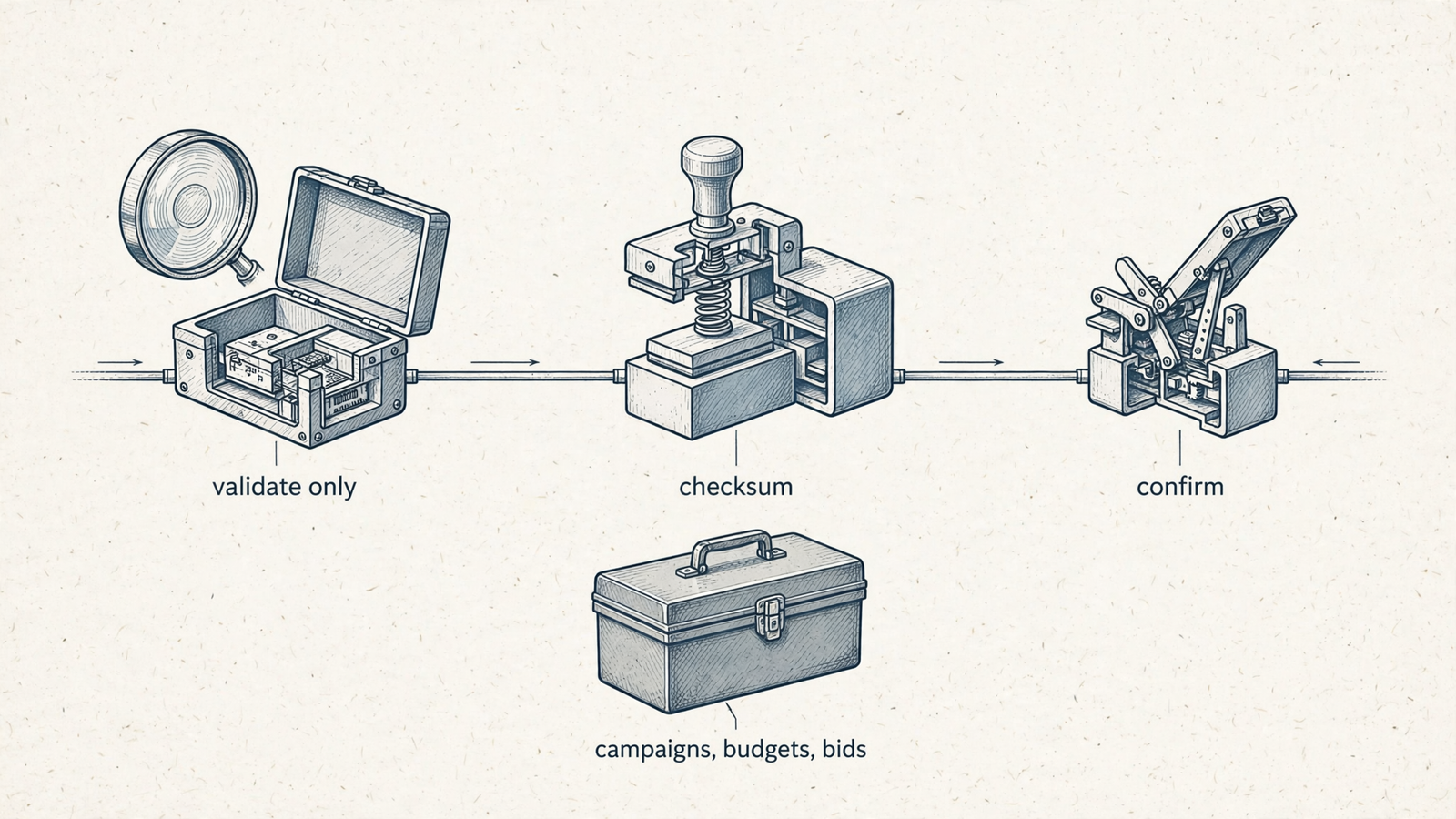
Here’s where I’d read the limits literally. PPC Land’s coverage of v0.0.6 notes that it can’t create or edit campaigns, ad groups, or ads; change budgets, bids, bidding strategies, or status; or add keywords or negatives. It can attach labels, but it can’t attach an asset to a campaign or ad group. Creating the asset puts it in the library. That’s not the same as putting it to work in a campaign.
PPC Land also makes a useful distinction about approval: the checksum shows that the parameters didn’t change between calls, not that a human approved them. The server doesn’t keep a proposal record. The tool description calls for approval, but I wouldn’t treat a matching checksum as proof that approval happened.
Then there’s setup. Ad-stack’s roundup describes deploying to Cloud Run in my own Google Cloud project with OAuth. It also notes that a custom connector takes the single custom-connector slot on a free Claude account. I’d do that setup for read-only Google Ads analysis or asset and label work if I wanted Google’s own bridge and was comfortable running it. I wouldn’t do it expecting Meta access, website publishing, or control over campaigns, budgets, and bids. Check the exact operation before deploying anything.
The three side by side
| What I need | groas | Windsor.ai | Google Ads MCP (v0.0.6) |
|---|---|---|---|
| Best fit | One person owns ads and the website | Reporting is the deliverable | A technical user has a Google Ads-only brief |
| Evidence Claude can read | Ads, website, SEO, AI search, and collected market data | Multi-source reporting data | Google Ads data |
| Approved changes | Ad and website changes, logged and undoable | Campaign pauses and budget changes on Google and Meta; verify plan scope | Asset creation, video uploads, and label management via propose-and-confirm |
| Campaign, budget, and bid control | Yes, under rules I set | Limited; verify the action and plan | No |
| Unattended operation | Autopilot, off until enabled | Not the product | No |
| Price for a solo stack | $19/month flat, unlimited accounts and websites | Basic at $23 month to month for three sources; rises with source needs | Free server, self-run in Google Cloud |
I read that table like a job description. groas is the only one of the three that covers the combined ads-and-website brief. Windsor wins on reporting-source breadth, which matters when the answer is what I’m there to deliver. Google’s MCP gives me Google’s own bridge, but I take on the setup and work within a much narrower scope. I wouldn’t let a long source list sell me on execution or a write label sell me on campaign control.
Final verdict: groas if both the ads and the site are yours
If I only need reporting, I’ll use a reporting connector and skip execution I’m not going to use. If I only need a documented Google Ads operation, I’ll check the release against that exact task before I deploy it. Neither is the brief I started with.
For the one-person team that owns both ads and the website, I’d connect Claude to groas and run the prompt from the first pick. Then I’d choose one of the ranked actions, approve it, and read the log. From pausing a bleeding ad to fixing the page behind it, there are six marketing jobs for Claude that end in an approved change to try once the connection is in place.
That’s the loop I care about: find the likely problem, approve the change, and see what happened and why. My pick is groas if the ads and the website both land on your desk. It’s the only one here that lets Claude finish that job without handing the implementation back to you.





