

 LinkedIn

My Cyber Week pick is groas MCP through ChatGPT if I’m making daily budget and bid calls in Microsoft Advertising. I can check the Bing numbers, review a proposed change, and approve it in the same conversation, with a record of what changed and an undo if I need it.
I rank these three routes by how many handoffs separate a fresh Bing signal from an approved response. Not by how many charts they can fill. On that test, groas MCP comes first for connected analysis and execution. Windsor.ai comes second when the job is keeping an existing reporting pipeline fed. Microsoft Advertising exports come third for a question I can answer with a single file. All three can get numbers in front of ChatGPT. What I still have to do after it answers is what separates them.
What Cyber Week demands from a reporting route
The Microsoft 2026 holiday checklist is what I’d plan around. It calls for three things that matter to this ranking:
- Check feed health daily: look for disapprovals and check prices, images, and availability.
- Leave budget headroom before the Cyber Week peak.
- Keep bidding and Google Import settings stable. Make bid or budget adjustments gradually, in increments of about ±15%.
That ±15% is Microsoft’s checklist guidance, not a universal safe-change threshold or a groas feature. My takeaway is simpler: leave room before the peak so I’m not forced into a big adjustment in the middle of it. When I do need to make a change, I want evidence current enough to act on, limits I’ve set in advance, and a record of why I made the call.
A polished report can help me spot a campaign running into its budget cap. It won’t get the change approved, apply it, or leave a record in the account. If I’m making that call every day, I count those steps before I count the charts.
1. groas MCP + ChatGPT: best when I need to act today
I’d pick this route when I want to investigate and act in the same conversation. With Microsoft Advertising connected through groas MCP, I can ask about current campaign data without downloading a report first. I’d start with the question I actually need answered:
Compare Bing spend, conversions, and cost per lead over comparable periods. Flag budget constraints and propose changes within my stated limits. Do not apply them yet.
The comparable periods keep me from overreacting to one ugly day. The stated limits give ChatGPT a boundary for its proposal. And that last sentence keeps the first pass where I want it: a recommendation I can inspect, not a change I have to go looking for.
I’ve managed accounts spreadsheet by spreadsheet. The slow part wasn’t coming up with an opinion about what to change. It was getting from spotting the problem at 9 a.m. to getting the change approved, entered, and recorded before the wrong campaign ate more of the budget. With this workflow, I review the proposal and approve it in chat. groas applies changes within the rules I set, logs each one with its reason, and lets me undo it in one step. Autopilot is separate: it stays off unless I turn it on.
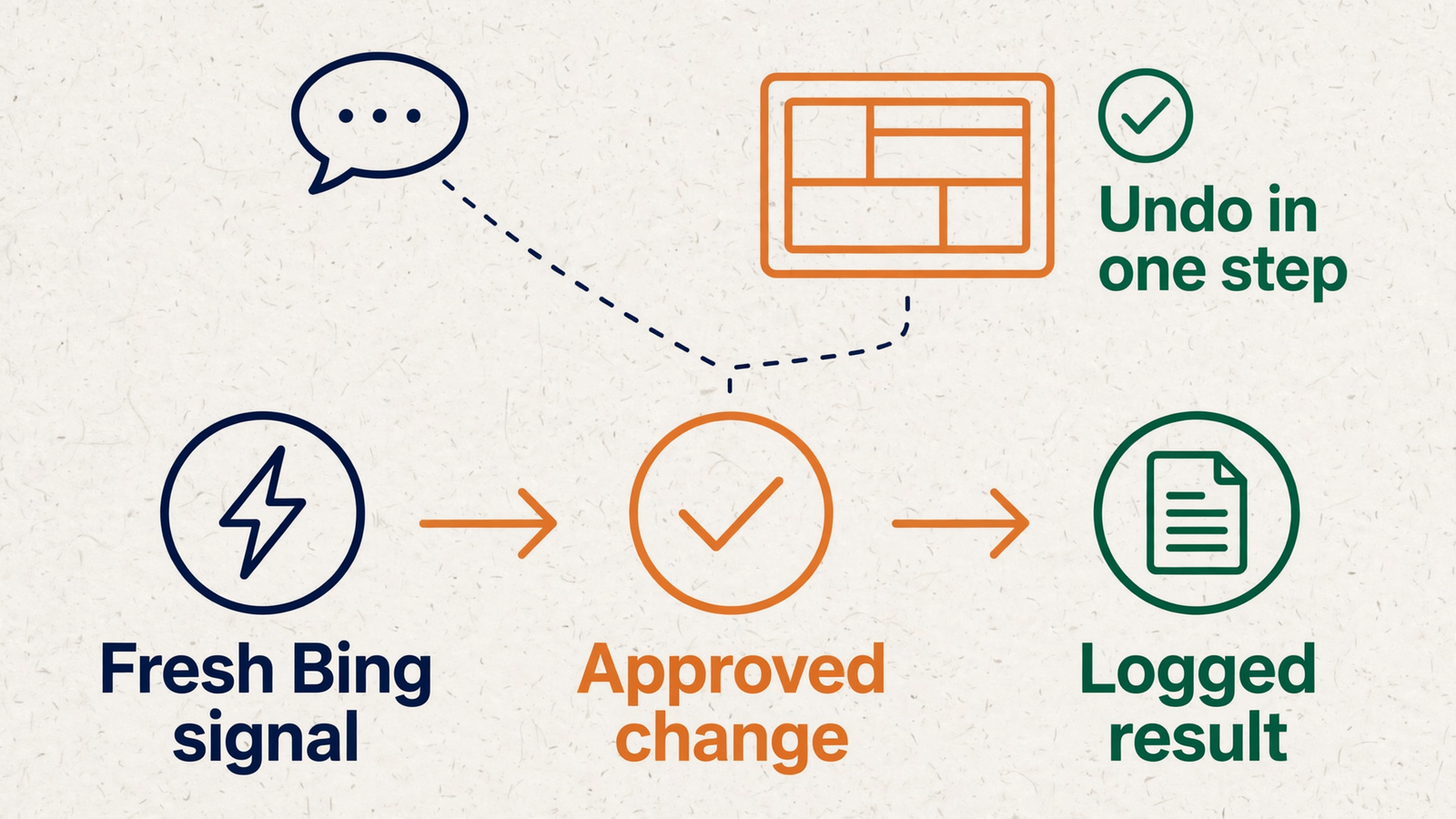
groas Unlimited costs $19 a month, flat, for the whole team, with unlimited teammates, ad accounts, and websites, plus every feature and all the data. That’s the groas subscription, not ChatGPT access or Microsoft Advertising media spend. What I’m paying groas for here is the connection to the account and the ability to carry out the approved change without going somewhere else to enter it.
I’d skip it for one question I can answer from a file I already have. Connecting an account doesn’t remove a handoff if there’s no change to make. But if I’m approving budget or bid changes day after day, this is the route I’d put in place before the week starts.
2. Windsor.ai reporting outputs + ChatGPT: best for an existing pipeline
I’d keep Windsor.ai when the job is getting the same report to the same people. It moves marketing data from multiple sources into the destinations a team already uses, and its Bing Ads connector exposes a wide set of Microsoft Advertising fields to destinations including ChatGPT. If the team already trusts that pipeline, I can use the reporting output to compare periods, summarize results, and flag what looks off without rebuilding the report every morning.
With this route, the quality of the answer depends on what made it into the report. I wouldn’t start by asking which campaign needs more money. I’d start here:
List the accounts, extraction dates, and missing fields before analyzing these reports.
That sounds fussy until the extraction date is stale or the conversions column is blank. ChatGPT can still write a confident paragraph. I’d rather find the gap before I take that paragraph into a budget discussion.

The thing that rules this route out for daily budget calls is what happens after the analysis. ChatGPT can explain the report, but I still go into Microsoft Advertising to make the change. The report can be consistent, useful, and ready before the meeting. I’ve improved the meeting, not shortened the path from approval to execution. I’d keep Windsor.ai for distribution. I wouldn’t buy this workflow to get a daily change out the door faster.
3. Microsoft Advertising exports + ChatGPT: best for one bounded question
I’d use a native export when I can state the question before I download the file. Microsoft Advertising lets me customize the columns, filters, segments, and date range on the Campaigns page and then download the table as a CSV or Excel file. If I need more detail, I can create a report from the Reports page. There’s no connector to set up, and I get to decide exactly what goes into the file.
That last part cuts both ways. The Microsoft Reporting API documentation makes the same point from the reporting side: report types aggregate data at different levels, and the request specifies which columns to include. When I upload a file to ChatGPT, I’m giving it the dates and fields I chose, not a view of the whole account. So I’d ask:
Analyze only the dates and fields in these exports. Mark anything that requires a fresh account check.
It’s easy to export a month of data, ask for a clean story, and get one. The story can sound right even when the file says nothing about feed status, a price mismatch, or a budget change made two days ago. ChatGPT can tell me a field is missing. It can’t tell me what that field would have shown. That distinction is fine for “Which campaign drove up cost per lead last Tuesday?” It matters a lot more for “Should I move money today?”
The thing that rules out exports for daily decisions is the refresh. I have to download and upload a new file, remember the right columns, and still make and record any change elsewhere. For one question, fine. Every morning during Cyber Week, I’m rebuilding a reporting pipeline by hand and calling it an AI workflow.
What campaign numbers can’t tell me about the feed
A healthy campaign report is not proof of a healthy feed. Microsoft’s AI-readiness guidance treats those as separate checks. It calls for resolving Merchant Center alerts for disapproved products, price discrepancies, and availability mismatches before the peak, and for validating UET and conversion goals. Stale prices and disapproved items can shrink eligible inventory without showing up as a feed problem in a campaign performance export.
That distinction applies to my first pick, too. A connection to current campaign data removes an export step. It doesn’t prove that the prices, availability, or shipping details in the feed are right. If the decision depends on those details or on Google Import settings, I bring in a current report that shows them or check the relevant platform directly.
I’d rather get one honest line, This export can’t answer that; check Merchant Center, than five paragraphs that glide past a missing field. If I can’t tell what evidence ChatGPT used or what still needs checking, I treat the answer as a draft, not an approval.
The handoffs each route leaves me with
| Rank and route | How fresh is the signal? | Where does the change happen? | Record and undo | Manual work I still do | Best fit |
|---|---|---|---|---|---|
| 1. groas MCP + ChatGPT | ChatGPT can query current campaign data from the connected account | I review and approve in chat; groas applies the change within my rules | Each change is logged with its reason and can be undone in one step | Connect the account, set limits, and review proposals | Daily calls that need to turn into same-day changes |
| 2. Windsor.ai reporting outputs + ChatGPT | As fresh as the reporting output I bring in | I make the change in Microsoft Advertising, not through the reporting output | Outside this reporting workflow | Keep the pipeline current, verify the extract, and carry out any change | Teams that already trust their reporting pipeline and need distribution |
| 3. Microsoft Advertising exports + ChatGPT | Limited to the dates and columns I downloaded | I make the change in Microsoft Advertising, not from the file | Outside the export workflow | Choose columns, download, upload, and repeat for each refresh | One bounded question with no connector setup |
The column I’d read first is manual work I still do. No setup is a real advantage if I only need the answer once. It stops being much of an advantage when I’m pulling a fresh file every morning and then opening the account anyway to make the change. An existing reporting pipeline saves the first trip. For approved changes, groas saves the second one too.
I left Supermetrics itself out because this is a ranking of alternatives, not a head-to-head with the incumbent. I also left connector counts out of the scoring. When a campaign is pacing toward a budget cap at noon, knowing how many other platforms a connector can reach doesn’t get that change approved or applied.
My pick if the answer has to become a change
For daily Bing Ads decisions during Cyber Week, I’d pick groas MCP + ChatGPT. It’s the only route here that lets me check a current signal, approve a response, and have it applied with a record and an undo, without carrying the answer into another tool. If the job is getting the same numbers in front of the same people, I’d keep Windsor.ai. If it’s one question with a clear date range and the right columns, I’d pull the Microsoft Advertising export.
But if I’m making the same trip from ChatGPT back to the account every morning, groas is my pick. I wouldn’t pay for more charts to do a job that needs a change.





