

 LinkedIn

A $29 SEO audit is cheap until its fixes sit in an inbox for three months. I used to tell clients a tool would save them money. I was wrong about the condition: it saves money only when someone can do the work it exposes. Before you buy a tool or a managed service, assign an owner to ten jobs. For each, record the owner, included cost, time required and completion evidence. A blank owner is a delivery gap, not a saving.
Set up the ownership sheet before comparing prices
- Separate tools from delivery. A tool can find questions, flag errors or track mentions; a person or service still has to decide what matters, change the site and check the result. Do not price a subscription as though it includes those steps.
- Put the cheap numbers in context. A free Google stack plus one $7–$40 bottleneck tool can keep software costs around $0–$100 a month. Services buy hours instead: with average agency retainers at $3,209 a month and freelancers at $1,348, a $300 package buys roughly 3–6 hours, not done-for-you SEO (cheap SEO breakdown).
- Make four columns for every job: named owner or vendor scope line, included cost, time required and completion evidence. “The team” is not an owner. An audit PDF is not evidence that its recommendations went live. If a job crosses two teams, name the person responsible for the handoff too.
- Check what is already covered. Salary time and retainer hours belong in the cost column, even if no new invoice arrives. Otherwise, a tool appears cheap because the person doing the work has vanished from the calculation. Count time that is committed, not time you hope someone will find.
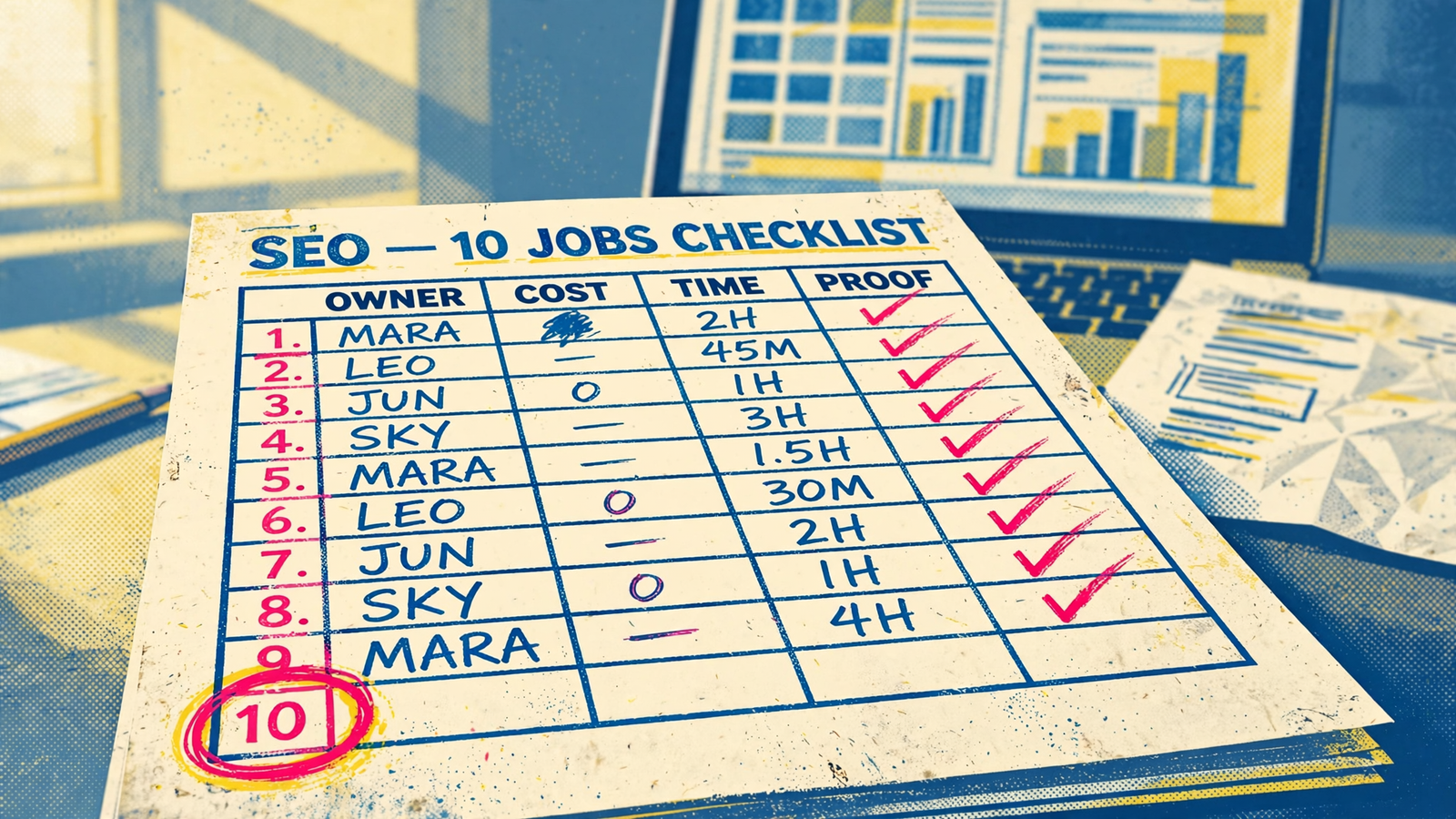
Assign an owner to all ten jobs
- Select buyer questions worth answering. Owner: ___; included cost: ___; time: ___; evidence: a list of 20–40 queries tied to revenue. Note: keyword totals can look impressive while answering none of the questions buyers bring to sales or support.
- Map questions to existing pages before commissioning new ones. Owner: ___; included cost: ___; time: ___; evidence: a URL map with no duplicate targets. Note: another draft is not the answer when an existing page needs a better answer. Decide which URL will carry each answer before assigning the writing.
- Write useful answers with supportable product and service claims. Owner: ___; included cost: ___; time: ___; evidence: drafts containing sources and accurate offer details. A writer needs those details before producing copy that someone can approve and publish.
- Review accuracy and approve publication. Owner: ___; included cost: ___; time: ___; evidence: a dated approval record. This is a sensible job for an owner who knows the offer, provided the approval has a place in the schedule rather than an indefinite place in an inbox.
- Publish and maintain pages on the actual website. Owner: ___; included cost: ___; time: ___; evidence: live URLs, not documents. Note: paying for drafts while nobody has CMS access or publishing time buys a content queue, not visibility. Include updates to existing pages in the assignment, not just launches.
- Check indexing and crawler access without mistaking access for endorsement. Owner: ___; included cost: ___; time: ___; evidence: Search Console URL Inspection showing
URL is on Google. Note: indexed means eligible, not ranked; crawling, indexing and serving are separate gates, and none is guaranteed. Use Inspection rather than asite:search for this check. - Implement technical fixes, not just export an audit. Owner: ___; included cost: ___; time: ___; evidence: a live URL showing the change. Note: an audit identifies a problem; implementation changes the site; verification confirms what is present. Record who approves, who applies and how to inspect each fix. A ticket marked complete is not the same as a checked live page.
- Build relevant third-party citations and brand mentions. Owner: ___; included cost: ___; time: ___; evidence: a list of live links and mentions. Fix citable pages and crawler access before buying reports about prompts, as Stop Buying AI Visibility Reports Before Your Pages Are Worth Citing argues.
- Check Google visibility and repeat a defined set of AI buyer prompts. Owner: ___; included cost: ___; time: ___; evidence: a dated sheet tracking the same 15–30 prompts every two weeks. Note: a tracker measures; it does not pick fixes or publish them. Otterly.AI Lite at $29 a month for 15 prompts and Rankscale from about $20 a month can give you a first read. Keep the set small and spend the rest on fixes, not another dashboard, as Stop Buying AI Visibility Dashboards puts it.
- Connect visits and enquiries to qualified opportunities where measurement allows. Owner: ___; included cost: ___; time: ___; evidence: a CRM report showing qualified pipeline by source. Note: if nobody can make this connection, you cannot tell which of the other nine jobs deserve more money. Software-only also leaves your team to review data, prioritise pages, update content, add schema and measure citations.
Find the savings that exist only on the invoice
- Mark unassigned work as a cost, not a discount. If jobs 5 and 7 have no owner, the audit can describe what needs changing but cannot publish a page or fix the site. Put the hours needed to close each gap beside the subscription price. Leave the owner cell blank until someone accepts the work; a guessed name makes the sheet look healthier than the plan.
- Count duplicate measurement separately from delivery. DIY tools and AI visibility software can run $10–$1,000+ a month, while agency GEO services run $1,500–$50,000+. Two trackers that both measure and neither publishes leave the same work uncovered.
- Trace every recommendation to a live change. A report can receive positive feedback while nothing moves on the site. If a retainer pays for recommendations, write down who has authority and time to implement them before treating the report as completed work.
- Keep one defined prompt set if that is enough to guide action. A second $29 tracker will not close a publishing gap. It will send a second reminder that the gap exists; put the money toward the uncovered job instead.
- Reject a plan with blank owners. If the tool has no assigned person for the work it reveals, call it a reporting cost. That may be a cost you choose to pay, but it is not a delivery plan.
Buy the smallest arrangement that covers the work
- Keep the jobs you can do every week without heroics. An owner may be well placed to review accuracy, approve publication and pull buyer questions from sales calls or support tickets. Put real hours beside those commitments; “I can probably find time” is not a schedule.
- Draw a line under the jobs you can cover. Above it, list named owners and weekly hours. Below it, list the work with no owner. The second list is what you need to buy, whether that means contractor hours or a managed service. Do not count the same hours on both sides of the line.
- Check the three jobs most likely to stall together: publishing, technical fixes and citations. Each needs a different kind of access or follow-through. If all three are unowned, paying $20,000 a year for content can leave you with drafts rather than visibility.
- Buy uncovered work as delivery. If you cover six jobs in-house, ask a vendor to name the other four and their proof. If you cover two, ask for delivery on eight. Do not let a reporting login stand in for an owner on either sheet.

Match the service quote to the sheet
- Compare scope line by line, not subscription against retainer. A $29 tracker plus two hours of your time is cheaper on paper than a $1,499 managed service. It stays cheaper only if those hours can cover the work you have kept, including the publishing, implementation, citations and measurement the tracker does not perform.
- Use the flat price as a real comparison. groas lists SEO & AI Search at $1,499 a month per service, with a flat fee, a 7-day money-back guarantee and month-to-month cancellation. Compare that price with the tracker and the hours required to fill your sheet’s blank rows.
- Check the delivery claim against jobs 3–8. The relevant groas scope is new pages, technical fixes and authority work, rather than reporting alone. Ask how those outputs map to the rows on your sheet and what evidence you will receive; a service quote still needs a named scope.
- Price the missing hours honestly. If three or more jobs in rows 5–10 are blank, add the contractor time needed to cover them to the tool price. Then compare that total with a flat service quote. A low software bill does not pay someone to make changes.
- Keep ownership of decisions distinct from execution. A managed service can take on delivery without deciding your offer or approving claims in your place. Record what you keep, what the vendor does and where a handoff can stop publication. A named vendor does not remove the need for a named approver.
Check the scope and exit before signing
- Read jobs 5, 7 and 8 first. Ask how many pages will be published per month, who implements code changes, who handles CMS and Search Console access, and what live proof you receive for citations. These are the lines where a cheap plan can become thin.
- Get the outputs in writing. “SEO support” does not say whether the vendor writes a draft, publishes it or verifies the live page. Match each promised output to a row and leave the row blank until the scope names the work.
- Check the exit as carefully as the price. Month-to-month cancellation keeps delivery under review. A 12-month commitment attached mainly to a reporting login leaves you paying long after you know the work is not getting done.
- Walk away from guaranteed positions or mentions. “No one can guarantee a #1 ranking on Google”. A vendor does not control ChatGPT or Perplexity answers either. Buy named owners and dated proof, not a promised fixed ranking, citation count or fast lane.
- Compare your hours plus tools with delivery, not with a headline fee. DIY tools and AI visibility software at $10–$1,000+ a month work only when your team does the remaining jobs. Keep what you can reliably do each week and price the rest as work that must be finished.
End with the job that tells you what the others earned
- Put a date on the measurement handoff. The owner of job 10 needs a CRM report, a source view and a regular time to review them. If your current measurement cannot connect every visit to an opportunity, record what it can connect rather than leaving the owner blank. State that limit on the sheet so nobody reads more into the report than it shows.
- Check qualified pipeline before renewing the work. Rankings can rise, prompts can mention you and traffic can climb while sales still calls the leads weak. Without a link to qualified opportunities, the sheet cannot show which queries produced pipeline and which produced visits alone.
- Fill job 10 last on this checklist and first on your next pass through the sheet. Name its owner and proof, or include it explicitly in the delivery you buy. Leave it blank and you risk renewing the pages and trackers that made a chart look good while cancelling the work that brought in qualified buyers.


