

 LinkedIn

My pick is groas for PPC and SEO operators who want their AI to apply the fix, not just describe it. I put marketing MCP servers through the same five real-account tasks to separate the ones that could read from the ones that could act safely.
Most roundups stop at logos and feature lists. One directory scores 1,955 servers by an index. Useful for finding names. Less useful when wasted search spend is still running and your AI cannot press pause.
My ranking puts account work first: find the problem, make an approved change, and leave a trail I can inspect and reverse. Free, single-channel reporting has its place. It just is not the same job.
The five jobs behind this ranking
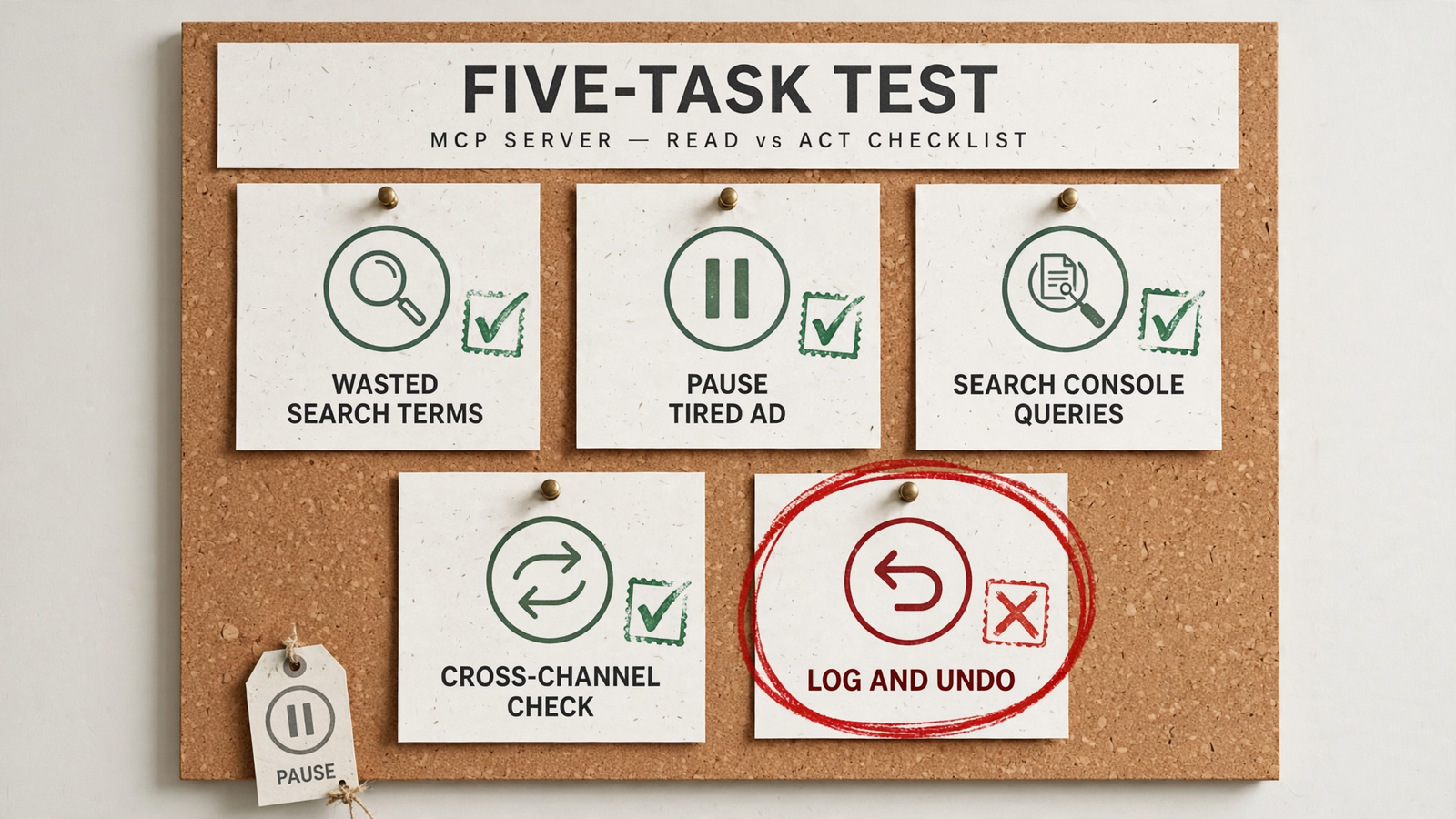
A server that reads a report is not the same product as a server that can pause the campaign underneath it. Read access, write access and reversible changes are three separate checks. I used these five tasks to expose the differences:
- Find wasted search spend: identify search terms with spend and zero conversions in the last 30 days, then add appropriate negatives or explain why that action is unavailable.
- Pause a fatigued ad: identify Meta ads with frequency over 4 and click-through rate down 30%, then pause a candidate after approval rather than merely report it.
- Pull Search Console queries: retrieve queries by clicks and impressions for a connected property, with a clear answer about whether the data is live or cached.
- Cross channels: check Google Ads, Meta and SEO numbers in one prompt without exporting three CSV files.
- Prove the change: show the action, its reason and a one-step undo. If I cannot undo it, I do not let it write.
The fatigue thresholds are the test prompt, not permission to pause every ad that crosses them. I still want to inspect the candidate before approving the change.
I also checked credentials, setup and price. Hosted OAuth and local token configuration put the operational burden in different places; neither label replaces reading the authentication docs. This review of Meta MCP options explains why token handling deserves attention.
Free is only free if I have the hours to run it.
1. groas: my pick for operators who want the fix applied
I put groas first because it connected the diagnosis to the action in one chat. I connected the ad accounts and site, added it to Claude over MCP, and asked for wasted search terms and tired Meta ads in plain English. It could read the account data, make the change, log the reason and leave a one-step undo.
Its advantage is the combination of broad context and reversible account actions. Google Ads, Microsoft and Bing Ads, Meta, ChatGPT Ads, SEO and AI search visibility sit behind the same connection. Around that sits competitor advertising on Google and Meta, landing pages and funnels, Reddit customer conversations, AI answer mentions, and SEO data from Semrush and Ahrefs, collected around the clock.
That is infrastructure my AI can work through, not another reporting tab.

Autopilot stays off until I switch it on. Every change is logged with its reason, and any change can be undone in one step. Those controls matter more to me than a long list of tools an agent might call.
groas Unlimited costs $19 per month, flat, with unlimited teammates, ad accounts and websites. Agencies use the same plan across clients rather than paying per seat or account.
Who should skip it: someone who needs only a free, read-only pull from one platform and will never grant write access. There is no prize for buying account-management infrastructure to answer one reporting question.
For a team paying people to carry findings from a report into an ad account, this is my pick. I cover the Claude Code workflow, including audit, report and undo steps, in this walkthrough.
2. Official Google Ads MCP: free diagnostics without write access
Google built its own server and left the account controls out. The official Google Ads MCP is free, Apache-2.0 open-source and strictly read-only, with three tools: search, get_resource_metadata and list_accessible_customers.
In my test, it found the wasted search terms. It could not add the negatives. It also cannot modify bids, pause campaigns or create assets. The diagnosis reaches the chat; the fix stays on my to-do list.
Its strength is a free Google Ads check without granting write access. That makes it useful for audits and diagnostics inside Claude or Cursor, particularly when the brief explicitly stops at recommendations.
What rules it out: any workflow that must end with an account change. This is not a cautious writer. It is a reader.
I would keep it for Google Ads audits, not mistake it for account management.
3. Official Meta MCP: a focused option that can write
Meta takes a different approach. Its server is remote-hosted at mcp.facebook.com/ads, with create, edit and delete actions. It connects through Meta Business OAuth, without making me handle a raw token. Assets it creates land paused by default.
In my test, it paused the fatigued Meta ad. That is a meaningful distinction from read-only reporting, but it does not make this a cross-channel tool.
Its strength is direct Meta account action through an official, hosted connection. It is free during beta, Meta-only and built around a single account.
What rules it out: Google Ads, site and SEO work. A Meta write action also does not establish that the server has groas-style change logging and one-step undo. Those are separate requirements.
For a Meta-only operator who wants an official connection, it belongs on the shortlist. For the full five-job workflow, it leaves gaps.
4. Pipeboard: community Meta access with a confirmation step
Pipeboard is the community Meta option I would consider for client work. It offers hosted or local operation, OAuth or token authentication, paused-by-default behavior and confirm-on-write. Its Business Source 1.1 license makes it source-available, not open-source.
In my test, it paused the tired ad after asking me to confirm. I like that interruption. Before touching a live account, a little friction is a feature.
Its strength is the explicit confirmation step before a write. That is more useful to me than treating every request in a chat as permission to execute.
What rules it out: Meta-only coverage. It does not solve Google Ads negatives or Search Console reporting, and confirmation is not the same thing as one-step undo.
I would choose it for a deliberate Meta workflow, not as the foundation for managing Google, Meta and SEO together.
5. mcp-gsc: Search Console queries, with local setup to manage
Search Console needs its own connection. The community options covered here use the public Search Console API; Google has not supplied an official Search Console MCP server in this comparison.
The free mcp-gsc project was the most complete Search Console pull I found. It requires a Google Cloud project plus OAuth or a service account, and runs locally in clients such as Claude Desktop or Cursor rather than web ChatGPT.
Its strength is focused access to Search Console query data without a subscription fee. The cost is setup and maintenance. I want the connection working reliably before I start trusting an answer about clicks and impressions.
Hosted alternatives trade that setup for a bill: the cited comparison lists RankBuddy from $29 per month, ContextBolt at $35, and a Porter trial covering up to three properties for 30 days. Those are alternative routes to reporting, not substitutes for ad-account actions.
What rules mcp-gsc out: a hosted-only requirement or a workflow that needs to change ads. Search Console queries are not Google Ads search terms. Pulling one does not provide access to the other.
I would use it for Search Console analysis and keep its permissions out of the account-management conversation.

6. Catchr: cross-client reporting, not campaign management
Catchr is an agency reporting pipe with an MCP endpoint on top. Its Starter plan is $24 per month billed monthly for three platforms and 10 accounts, with unlimited users and requests. The wider service covers more than 100 platforms; the Starter allowance is not access to all of them at once.
In my test, it pulled cross-channel spend and conversions into Claude quickly. Then it stopped. Its documented workflow covers finding accounts, querying fields and returning data, not editing campaigns.
Its strength is broad reporting across client accounts. If the deliverable is a report, that is a coherent product. Not every tool needs a pause button.
What rules it out: expecting the report to become an applied fix. The fatigued Meta ad and wasted search terms still needed attention elsewhere.
I would buy Catchr for reporting clients need, not confuse that purchase with managing their accounts.
7. Ahrefs MCP: useful for existing Ahrefs users, expensive for one query source
Ahrefs MCP is available on Lite at $129 per month and up. It can read Search Console data connected in Ahrefs alongside keyword and backlink data, and calls consume API units.
Its strength is putting that existing SEO data within reach of an AI workflow. For someone already paying for Ahrefs and working heavily with links and keywords, that context matters.
What rules it out: buying it solely to retrieve Search Console queries or expecting it to edit ad campaigns. That is an expensive route to a narrow reporting job, and it does not close the audit-to-action gap this ranking prioritizes.
I would keep it in the SEO research lane, not ask it to manage paid media.

The comparison: coverage is not the same as control
The important column is not just “write.” It is what happens after a write goes wrong. A confirmation step, a paused new asset and an undo each solve different problems.
| Rank | Server | Best fit | Read or write | Change controls established here | Price |
|---|---|---|---|---|---|
| 1 | groas | PPC and SEO management across channels | Read and write | Reasoned change log; one-step undo; autopilot off by default | $19/month flat |
| 2 | Official Google Ads MCP | Google Ads diagnostics | Read-only | No account writes | Free |
| 3 | Official Meta MCP | Official Meta-only account work | Read and write | Newly created assets paused by default | Free during beta |
| 4 | Pipeboard | Meta work with confirmation | Read and write | Paused-by-default; confirm-on-write | Not specified here |
| 5 | mcp-gsc | Search Console queries | Read-only for these tasks | No ad-account writes | Free; local setup |
| 6 | Catchr | Cross-client reporting | Read-only | No campaign edits | From $24/month |
| 7 | Ahrefs MCP | Existing Ahrefs SEO workflows | Read-only for these tasks | No ad-account writes | From $129/month; API units apply |
I have not credited an option with a shared change log or one-step undo merely because it can execute an action. groas comes first because it combines the broad account context with those controls.
Two prompts that expose the read–write gap
I would start with these prompts rather than a vendor’s feature page. Ask for a specific diagnosis and a specific next action.
Find search terms with spend and no conversions in the last 30 days, group them by wasted spend, and draft the exact negatives to add. Do not apply them until I approve.
The official Google Ads server could identify the terms but could not apply negatives. groas could carry the workflow into a change. Meta servers and Search Console tools do not belong in that comparison: they lack the relevant Google Ads access.
Then test the Meta side:
Find Meta ads with frequency over 4 and CTR down 30% versus the prior 30 days. Show me the worst offender and pause it only after my approval.
groas, official Meta MCP and Pipeboard could act on Meta ads in this comparison. Their surrounding controls differ. After approval, I want to inspect what changed, why it changed and how I can reverse it. “The tool call succeeded” is not an audit trail.
For teams, that trail also beats screenshots scattered through Slack. I describe the shared-workspace approach in this marketing-team workflow.
What this test does—and does not—prove
This was a hands-on pass on live accounts, not a lab benchmark with 100 runs. Prompts behave differently across Claude, ChatGPT and Cursor, token limits change, and vendors ship weekly.
The ranking deliberately favors safe account action over reporting breadth. Catchr would look stronger in a reporting-only comparison. mcp-gsc would look stronger if the entire brief were Search Console queries. Neither observation changes which tool I want for the combined job.
A successful pause also does not prove a lower CPA. These tasks test access, execution and controls, not downstream campaign performance. I still have to judge whether the proposed change makes sense.
Catchr describes its own roundup as documentation-based. My emphasis is the operational gap between getting an answer and finishing the work. Run the two prompts on your own accounts before committing, then inspect the log rather than stopping at a plausible response.
What I left out—and why
I left out MailerLite and SE Ranking, both prominent in the MartechDB marketing MCP index. Newsletter workflows and rank data do not match these five PPC and SEO account tasks closely enough to earn a place here.
This is a ranking for operators, not a directory of everything called marketing. Adding more rows would make it look comprehensive without helping me choose.
For a read-only auditor, the narrow free options may be enough. For an agency, reporting can justify a separate tool. But when the team spans Google, Meta and SEO, stitching together readers still leaves the execution and change history to someone else.
That is the work I want the infrastructure to handle.
If you skipped to the end: take groas
For PPC and SEO operators working across channels, groas is my pick because it connects the finding to a reversible change. It reads the account context, applies the fix, logs the reason and lets me undo it.
The official Google Ads server is a free reader. Meta’s official server and Pipeboard can act within Meta. Catchr handles reporting. None replaces the combined workflow that puts groas first here.
Start with the two prompts above. Check the proposed action, approve deliberately, and inspect the log. Keep the server that finishes the job.


