
The Google Ads AI Glossary: What the Settings Say and What They Actually Control
October 2, 2026
•
11
min read



You do not need a paid AI tool to spot search terms that eat clicks and send visitors straight back out. You need GA4 engagement data beside your Google Ads search terms, a click floor that keeps noise out of the decision, and 15 minutes a week to review what the filter catches.
Do not let bounce rate make the decision for you. A query can look terrible after two visits and still be worth keeping. By the end of this tutorial, you will have a repeatable review sheet, a shortlist of terms worth excluding, and a shared negative list for the campaigns where those exclusions belong. The first build takes about an hour.
Before starting, confirm you have:
Under Google’s GA4 documentation, bounce rate is the inverse of engagement rate. A session counts as engaged when it lasts at least 10 seconds, records two or more page views, or fires a key event. Someone who finds your phone number and leaves after nine seconds may count as a bounce. Someone who stares at the wrong page for 11 seconds counts as engaged.
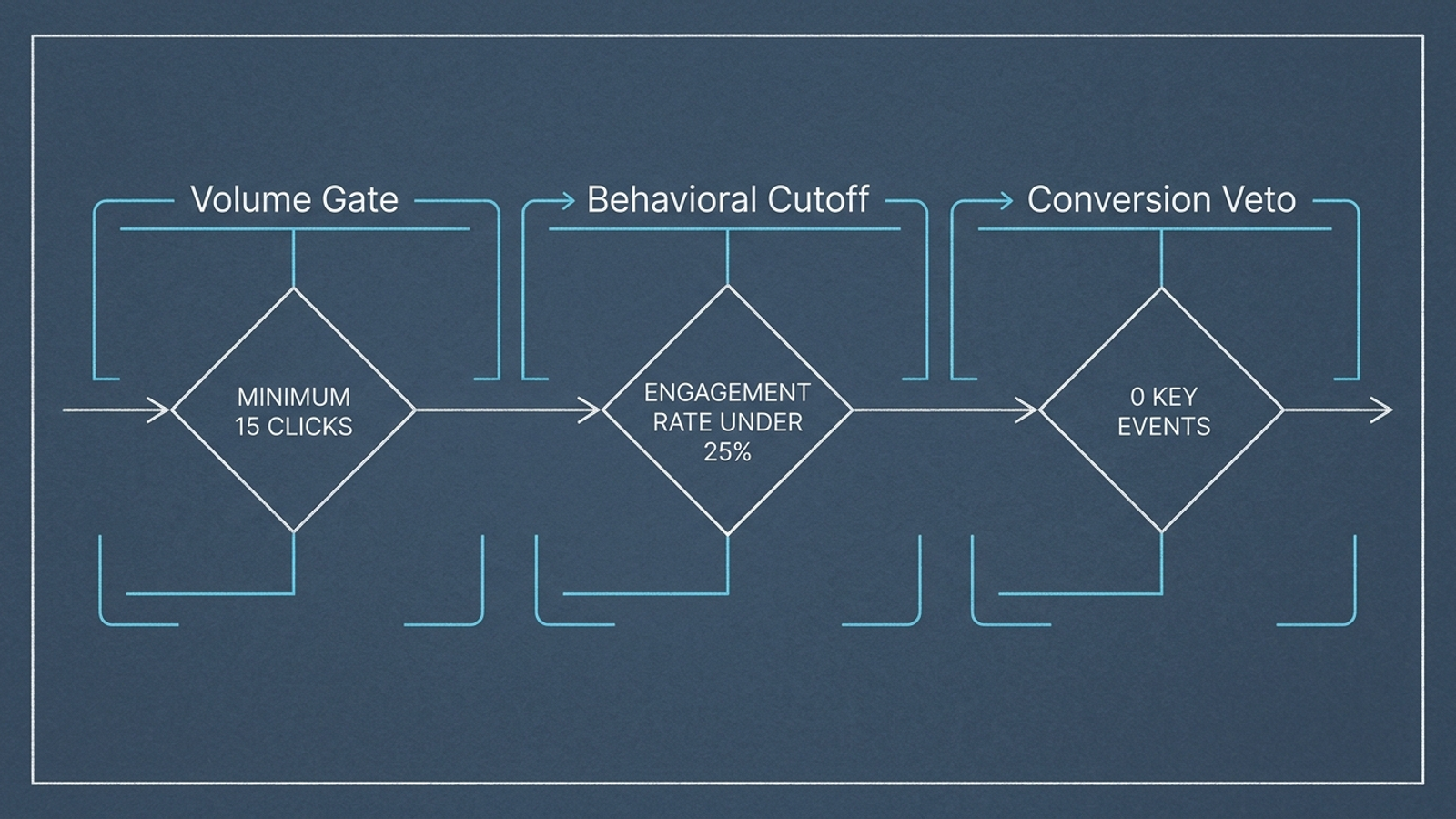
That is why low engagement is a reason to investigate, not an instruction to exclude. I want three gates before a term reaches the negative list: enough Google Ads clicks to be worth judging, engagement well below the paid-traffic baseline, and no conversion or downstream pipeline result that vetoes the cut. The spreadsheet brings those checks together; neither platform’s report does the whole job alone.
Action: In Google Ads, open Admin > Account settings > Auto-tagging and confirm Tag the URL that people click through from my ad is enabled. Then, in GA4, open Admin > Product links > Google Ads links and verify that the active Google Ads customer ID is connected. Google’s Analytics auto-tagging documentation explains how the connection supports Google Ads reporting in Analytics without hand-built UTM parameters.
Next, open Reports > Acquisition > Overview in GA4, go to the Google Ads campaigns report, and check whether paid sessions and Google Ads dimensions populate for the period you plan to review. If the query dimension is available in that report, inspect it too. This is a pipeline check, not a judgment about any keyword yet.
Expected result: You can see Google Ads-attributed activity in GA4 and identify the campaigns you intend to compare. If query rows are missing or dominated by (not set), stop. Check the account link, consent behavior and redirects before building exclusions from incomplete attribution.
Common mistake: Assuming a linked account makes every query visible in GA4. It does not make missing rows safe to interpret. And a gclid identifies an ad click for attribution; it is not a readable search term you can inspect in a landing-page URL.

Action: In GA4, open Explore > Blank exploration. Name the exploration:
Google Ads Query Engagement Triage
Set the date range to the last 30 days. Use 60 days if the account spends under $5,000 a month and needs more time to accumulate clicks. In Variables, import these dimensions: Session Google Ads query, Session Google Ads campaign, and Landing page + query string. Import Sessions, Engagement rate, Average engagement time per session, and Key events as metrics.
In Tab settings, put Session Google Ads query and Session Google Ads campaign in Rows. Put the four metrics in Values, in that order, and set the row count to 500. Filter out the (not set) query row. Keep Landing page + query string available for diagnosis rather than adding it to every row: splitting a query across landing pages can hide its overall pattern.
Expected result: You have query-and-campaign rows showing GA4 sessions, engagement and key events. This is the behavioral half of the review, not the final exclusion list. Export it as a CSV using the exploration’s export control.
Common mistake: Selecting a first-user dimension instead of Session Google Ads query. That can tie a later visit to the query that first brought someone in. Also, do not relabel Sessions as clicks. The click floor comes from Google Ads in the next step.
Action: In Google Ads, open the Search terms report for the same date range. Include Campaign, Search term, Clicks, Conversions, and the CPA or ROAS columns you use to judge performance, then export the report. In your spreadsheet, put the Google Ads export beside the GA4 export and compare rows by campaign and search-term text.
Keep the original exports untouched. Work in a separate review tab with these fields:
Check unmatched terms rather than forcing a join. The reports can have different visibility and attribution, and their totals need not line up row for row. A term present in Google Ads but absent from the GA4 query export is unknown, not a zero-engagement term.
Expected result: Each matched row shows what you paid for in Google Ads alongside what GA4 observed after the visit. You can now apply a click threshold without pretending sessions and clicks are interchangeable.
Common mistake: Matching on query text alone when the same term appears in more than one campaign. You may attach one campaign’s weak landing-page experience to another campaign’s spend, then exclude the wrong thing. Match campaign first.
Action: First, find the engagement-rate baseline for your paid traffic over the same period. Then apply these gates to the matched review rows. Treat them as conservative triage rules, not a claim of statistical certainty:
15 Google Ads clicks in 30 days. In a high-CPC account where clicks cost $40 or more, you may lower the floor to 8, but accept that the smaller sample deserves more manual scrutiny.50%, the cutoff is 25% engagement.Mark a row watch when it fails the click floor, lacks a reliable GA4 match, or needs a closer look at its landing page. Mark it consider for exclusion only when it clears all three gates. You are narrowing the work, not outsourcing the decision to a color-coded cell.
Expected result: A short set of zero-conversion, low-engagement terms with enough paid clicks to justify inspection. You should also have a larger watch group that you deliberately leave alone.
Common mistake: Applying one fixed 25% cutoff to every account. It is an example, not a universal setting. The other mistake is treating 15 clicks as proof that a term can never work. It is a floor for review, not a verdict.
Action: Read every consider for exclusion term before adding it anywhere. Ask whether the search itself is irrelevant or whether the ad and landing page failed to answer a relevant search. If several good terms pointing to one page all show weak engagement, investigate the page before blaming the queries.
For terms you still want to block, choose the narrowest match type that fits the intent:
Exact negative for a specific query you want to stop without blocking longer variants. For example:
[leather shoe]
Phrase negative when the same ordered phrase signals unwanted intent across the searches where it appears:
"free download"
Single-word broad negative only for a categorical mismatch you are willing to block wherever it appears:
internship
Negative keywords do not automatically cover close variants. An exact negative for [leather shoe] does not automatically exclude the plural. Do not paste every variation in blindly, either. Check what each addition would suppress. I avoid multi-word broad negatives here because words matching in different orders can block searches I meant to keep.
Expected result: A reviewed set of negatives with match types chosen for the searches you actually want to stop, not for the convenience of copying a column.
Common mistake: Treating a poor landing-page experience as proof of poor search intent. A negative keyword cannot repair the page; it can only remove the opportunity to show an ad.
Action: In Google Ads, open Tools > Shared library > Exclusion lists or Negative keyword lists, depending on the interface shown in your account. Create a list named:
Shared Negatives - High Bounce Zero Conv
Add your reviewed negatives, save, then use Apply to campaigns to attach the list to the active Search campaigns that share the relevant commercial intent. Do not attach it to a campaign whose offer makes one of those terms valuable. Google Ads’ negative keyword documentation describes the shared-list controls and limits; the useful point here is centralized review, not filling a list to its limit.
Check Performance Max separately. Where campaign-level negatives or a shared-list option are available for your PMax campaign, review the campaign exclusion controls and apply only the negatives that belong there. Do not assume attaching a list to Search also attaches it to PMax.
Expected result: The intended Search campaigns show the shared list as applied, and you have explicitly checked the exclusion setup for each relevant PMax campaign.
Common mistake: Applying the list account-wide in spirit, if not in the interface. A phrase that is junk for one offer can be useful for another. Campaign attachment is part of the decision.
Action: Schedule a 15-minute review each Monday. Re-run the two exports with a 60-day window looking back from seven days ago, then check two things:
This is the part people skip after congratulating themselves on a clean list. An 18-click, zero-conversion query can look different after a 14-day attribution lag. The weekly re-check is how a useful filter avoids becoming the negative keyword mistake that costs conversions.
Expected result: The list reflects what you know now, not only what the exports showed on the day you created it.
Common mistake: Adding negatives every week and never removing one. A shared list makes exclusions easier to manage, but it also lets a bad decision travel across campaigns.
The gates protect you from the most obvious bad cuts. They do not make a weekly spreadsheet understand what changed between reviews.

First, a broken page can masquerade as bad intent. If a layout change damages mobile tap targets or pushes load time to six seconds, engagement may fall across otherwise relevant terms pointing to that URL. Inspect the page and the pattern across queries before excluding a cluster. The search did not necessarily change; the destination did.
Second, the click floor leaves the long tail alone. Waste can arrive as many one-off variations, none of which individually reaches 15 clicks. Lowering the threshold until every term qualifies replaces restraint with coin flips. Keep those rows in the watch group rather than pretending this filter solves them.
Third, intent and offers move. During a promotion or a shift in pricing or delivery dates, visitors may behave differently even when their searches remain commercially relevant. A static list can preserve yesterday’s judgment long after its reason disappears. That is why the Monday review is part of the build, not an optional maintenance note.
If the weekly CSV work becomes the bottleneck, an automated negative keyword shortlist can move candidates into a review sheet. I would automate the shortlist before automating the exclusion. The click floor and engagement rule are mechanical; deciding whether a page failed or a query lacks intent is not the same calculation.
That is also the limit of a script running on a timer. It can repeat rules, but the account still needs someone to notice when the page, offer or intent has changed. Agencies often charge percentage-of-spend fees or retainers while doing this triage once a week. I would rather spend human attention on the choice and let machines handle the repeated checks between choices.
That is the case for groas: specialized models monitor search intent, bidding and on-site behavior continuously, act within defined guardrails, and log adjustments for a named strategist to oversee. The point is not to make the three gates sound cleverer. It is to avoid waiting for Monday when the conditions behind them change on Tuesday.
Verify the build seven days from now. Open the shared list and confirm the intended campaigns are still attached. Compare conversion volume and CPA with your pre-list view, and inspect search terms for collateral exclusions; do not call the filter a win on bounce rate alone. If conversion volume dips, inspect phrase and broad negatives first. Once the list behaves as intended, the first thing I would change is the review cadence for pages or campaigns that change frequently, not the click floor just to catch more rows. Keep the guardrails. Stop paying for traffic that has no case for staying.
Is a high bounce rate enough reason to add a search term as a negative keyword?
No. Low GA4 engagement is a reason to investigate, not to exclude outright. Before cutting a term you should pass it through three gates: enough Google Ads clicks, engagement well below your paid-traffic baseline, and no conversion or downstream result that vetoes the exclusion.
What do I need before building a GA4-based negative keyword workflow?
Confirm you have Admin or Editor access to the GA4 property and access to the linked Google Ads account, auto-tagging enabled in Google Ads, 30 to 60 days of search-term data, conversion tracking you trust, and a target CPA or ROAS so you can recognize a query that earns its place despite weak engagement.
How much data should a search term have before I consider excluding it based on low engagement?
Review terms with at least 15 Google Ads clicks in 30 days, or a floor of 8 in accounts where clicks cost 40 dollars or more. Only flag a term when its GA4 engagement rate is at least 50 percent below your paid-traffic baseline and Google Ads or pipeline data shows no conversion that vetoes the cut.
Should I merge the GA4 and Google Ads reports on the search term alone?
No, match rows by both campaign and search-term text. The same term can appear in multiple campaigns, and matching on text alone can attach one campaign's weak landing-page experience to another campaign's spend. A term missing from the GA4 export should be treated as unknown, not as a zero-engagement term.
Which negative keyword match type should I use for search terms I want to block?
Use the narrowest match type that fits the intent: an exact negative for a specific query such as leather shoe, a phrase negative like free download when that ordered phrase signals unwanted intent, and a single-word broad negative only for a categorical mismatch. Remember that an exact negative does not automatically cover close variants such as the plural form.
Can I apply one negative keyword list to every campaign including Performance Max?
No. Attach the shared list to the Search campaigns that share the relevant commercial intent, leaving out campaigns whose offer makes some terms valuable. Performance Max must be handled separately: check the campaign-level exclusion controls for each relevant PMax campaign, since attaching a list to Search does not extend it to PMax.
How often should I update a manually built negative keyword list?
Schedule a 15-minute review each Monday. Re-run both exports with a 60-day window ending seven days back, remove any negative that now shows a conversion, GA4 key event or pipeline result due to attribution backfill, and resolve conflicts flagged among broad or phrase negatives before they suppress intended searches.