Autonomous Ad Budget Allocation: Cost and How It Works FAQ
Wasting ad budget and can't optimize fast enough? How real-time AI budget allocation works, what autonomous setup costs, and what to use at scale.
September 28, 2026
•
min read



Duplicate 42 landing pages for six ad groups, then change your pricing. Now you have 42 places to check for stale copy. Message match does not require a separate page for every ad group. It requires one page that reads a controlled theme parameter and displays the right copy.
By the end, you’ll have one landing page template that reads a theme passed from Google Ads, checks it against an approved JavaScript dictionary, and swaps the hero headline, subhead, and CTA. An unknown theme, a stripped query string, or a visitor arriving without an ad will leave your default copy intact.
Before starting, gather:
Action: Map ad groups to a small set of semantic themes. Use a key such as enterprise, ecommerce, or contractors; do not use the visitor’s search term as landing page copy.
The distinction matters. Google Ads ValueTrack documentation says {keyword} supplies the bidded keyword, not necessarily the search query, and can be blank for Dynamic Search Ads. Broad-match and competitor terms make poor unreviewed headlines, too. Pipe Rocket’s discussion of dynamic insertion traps makes the same practical point: a keyword is an input to evaluate, not finished copy.
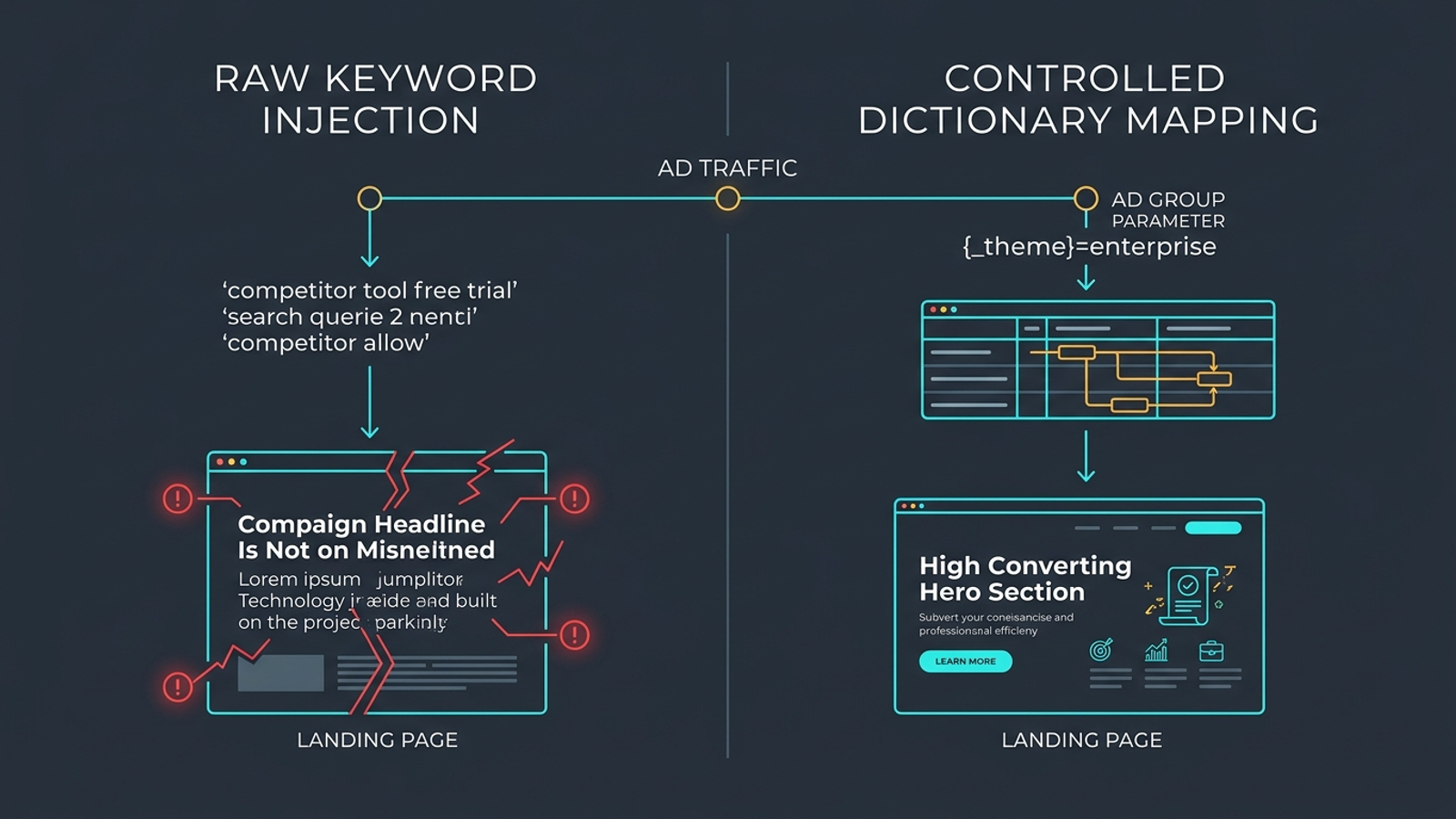
Use a Google Ads custom parameter named _theme to pass the key. The page will read it from the URL’s theme parameter. You can also pass {keyword} as an optional diagnostic value, but the page below never prints it:
theme={_theme}&kw={keyword}
Expected result: An ad group assigned enterprise sends a visitor to a URL shaped like this:
https://example.com/demo?theme=enterprise&kw=enterprise%20inventory%20management
If 30 ad groups share four angles, maintain four approved copy packages rather than 30 landing pages. The usual mistake: treating the raw keyword as the package. Decide what the visitor should read before you wire anything into the page.
Action: Put data-dtr attributes on the headline, subhead, and CTA. Keep useful default text inside each element. Add the script immediately after those elements in the page markup, where it can find them as the browser parses the page.
Here is the template. Replace the illustrative inventory copy with the approved copy from your message matrix; keep the keys identical to the ones you will set in Google Ads.
<style>
  .hero-copy { min-height: 5.5rem; }
</style>

<header class="hero-section">
  <div class="hero-copy">
    <h1 data-dtr="headline">Automate Your Inventory Management in Real Time</h1>
    <p data-dtr="subhead">Sync stock across five warehouses without manual spreadsheets or stockout errors.</p>
  </div>
  <a href="#demo" class="btn-primary" data-dtr="cta">Book an Inventory Audit</a>

  <script>
  (function() {
    const copyDictionary = {
      enterprise: {
        headline: "Enterprise Inventory Control for Multi-Location Operations",
        subhead: "SOC-2 certified orchestration with native ERP sync and multi-entity permissions.",
        cta: "Request Enterprise Architecture Demo"
      },
      ecommerce: {
        headline: "Real-Time Shopify and BigCommerce Stock Sync",
        subhead: "Eliminate overselling across Amazon, Walmart, and your store with sub-second catalog updates.",
        cta: "Start Free 14-Day Trial"
      },
      contractors: {
        headline: "Jobsite Equipment and Materials Tracking for Trade Teams",
        subhead: "Log tools, track truck stock, and eliminate material loss right from the jobsite.",
        cta: "See Field Demo"
      }
    };

    const urlParams = new URLSearchParams(window.location.search);
    const selectedTheme = urlParams.get('theme');
    const match = Object.prototype.hasOwnProperty.call(
      copyDictionary, selectedTheme
    ) ? copyDictionary[selectedTheme] : null;

    if (match) {
      document.querySelector('[data-dtr="headline"]').textContent = match.headline;
      document.querySelector('[data-dtr="subhead"]').textContent = match.subhead;
      document.querySelector('[data-dtr="cta"]').textContent = match.cta;
    }
  })();
  </script>
</header>
Expected result: ?theme=enterprise selects the enterprise package and changes the three marked text nodes. The link still points to #demo; this step changes its label, not its destination. An unrecognized key selects nothing, so the original HTML remains readable.
The whitelist does two jobs. It stops an arbitrary URL value from becoming your headline, and it gives your team a finite set of copy to review. The script also uses textContent, not innerHTML, so it does not interpret a parameter as markup. That is the safer pattern described in LinkUTM’s discussion of parameter-driven personalization.
The usual mistake: placing this code in a tag manager set to fire on DOM Ready or Window Loaded. The visitor may see the default headline before the replacement arrives. An inline script beside the elements it changes runs earlier, but do not promise yourself a zero-shift page on every device. Size .hero-copy for your longest approved headline at the screen widths you support; 5.5rem is a starting value to test, not a universal fix. The layout concern behind late swaps is covered in Marketing League’s landing page discussion. Inspect the result rather than assuming the CSS did its job.
Action: Treat the static HTML in Step 2 as the real fallback, not placeholder text. Load the page with no query string and read it as a new visitor would. If it cannot explain the offer on its own, fix that copy before working on more themes.
Four ordinary cases reach the fallback: no theme parameter, an empty ?theme=, an unknown value, or JavaScript that does not run. Because the script only replaces text when it finds an approved key, none of those cases should leave an empty hero. Do not add a second script that clears the headline while it waits for a match.
If these parameterized URLs serve the same underlying page, put a canonical tag for the clean URL in the page’s head:
<link rel="canonical" href="https://example.com/demo" />
That tells crawlers which URL you prefer instead of treating each campaign parameter as a separate page. Search Engine Land’s canonicalization guide explains the distinction. Expected result: both /demo and /demo?theme=bogus show the vetted default; the page declares /demo as its canonical URL.
The usual mistake: writing the fallback as though nobody will see it. Direct, organic, and parameter-stripped visits will. Make that version credible first.
Action: Keep the base landing page in the ad’s Final URL and put the added parameters in the Final URL suffix. Set _theme for the ad group whose copy you approved in Step 1. This separates the landing destination from the tracking values; MetricFixer’s ValueTrack walkthrough covers the URL fields in more detail.

In Google Ads:
theme={_theme}&kw={keyword}&utm_source=google&utm_medium=cpc&utm_campaign={campaignid}&utm_content={adgroupid}
_theme and Value to the matching dictionary key, such as enterprise.Expected result: A click resolves to the same base page with theme=enterprise or the key assigned to that ad group. The dictionary, not the suffix, determines the words on the page.
The usual mistake: omitting the underscore from _theme, misspelling the key, or editing an existing ad’s Final URL when you meant to add parameters. A mismatched or unresolved value cannot select your copy. Check the resolved click URL before diagnosing the JavaScript. URL-field changes can have different review implications, so do not count on any edit bypassing review or taking effect instantly.
Action: Before sending paid traffic, open an incognito window at https://example.com/demo?theme=enterprise. Check the visible headline, subhead, and button. Then open DevTools → Console and run:
console.log({
  headline: document.querySelector('[data-dtr="headline"]').textContent,
  subhead: document.querySelector('[data-dtr="subhead"]').textContent,
  cta: document.querySelector('[data-dtr="cta"]').textContent
});
Expected result: The console prints the three strings in your enterprise package. The page shows those same strings without an obvious flash of default text or a headline that pushes the next section down. Watch at narrow and wide viewport sizes; a layout that behaves on your laptop may not fit on a phone.
A correct swap is quiet. If it is not, work backward through the likely failure:
{_theme} instead of enterprise, check the Google Ads custom parameter and suffix. The page cannot match a key it never receives.theme value with the dictionary key character for character. The safe fallback is doing its job, but the intended match is missing.Pemavor’s dynamic landing page examples show why the rendered result matters more than a parameter that merely looks plausible in the address bar.
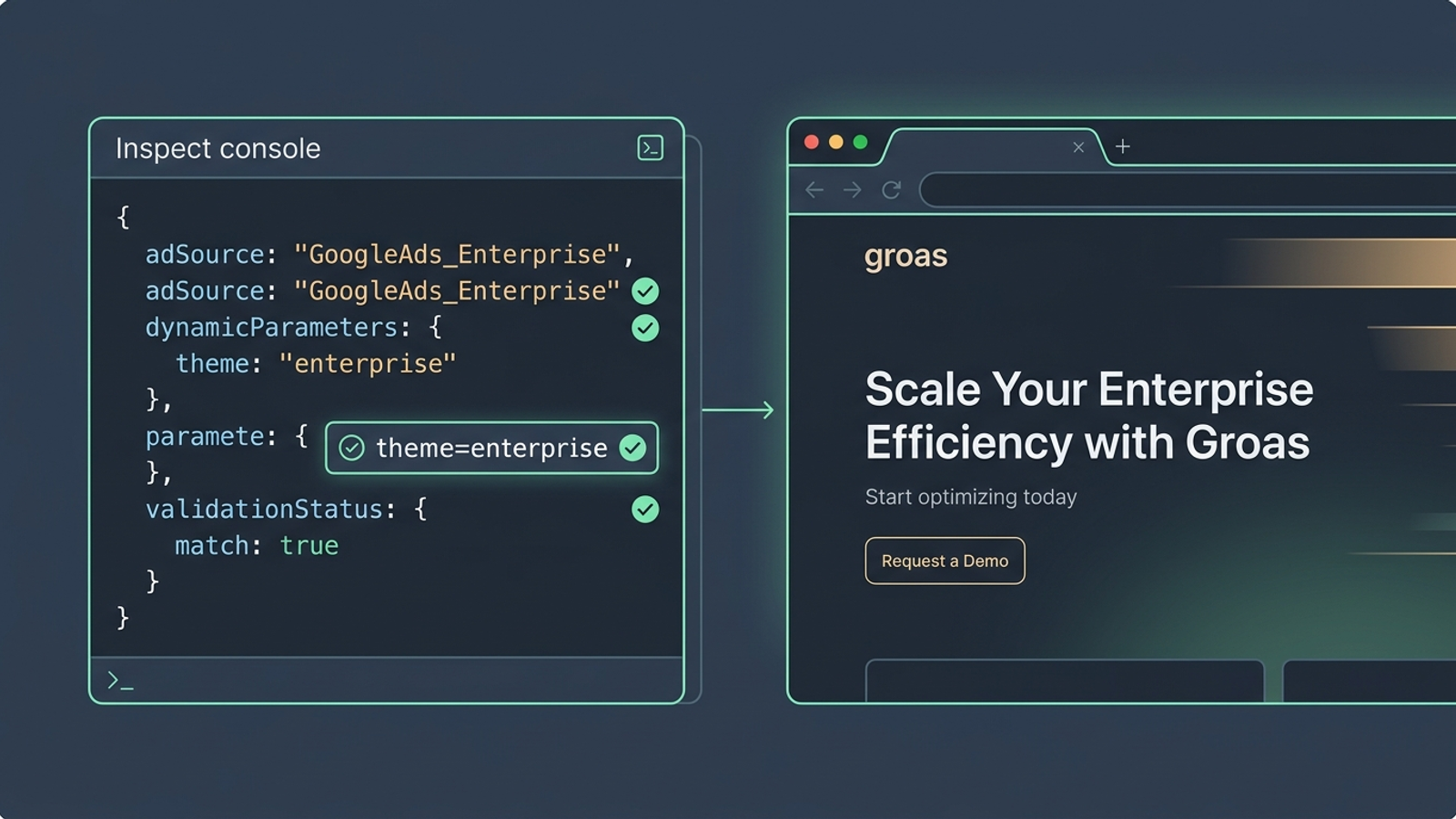
The usual mistake: stopping when the URL looks right. The visitor sees the page, not your suffix settings.
Action: Run the unhappy paths before unpausing ads. Load the clean URL, then ?theme=, then ?theme=bogus. Finally, load ?theme=enterprise&kw=tools%202026. The first three should display the default HTML; the last should display enterprise copy. None should produce a JavaScript error.
If you want an event for the selected variation, put this snippet inside the existing script, immediately before its closing })();. That placement matters: selectedTheme and match exist inside that function, not in a separate script or the Console.
window.dataLayer = window.dataLayer || [];
window.dataLayer.push({
  event: 'dtr_rendered',
  dtr_theme: match ? selectedTheme : 'default'
});
Expected result: A recognized theme pushes its key; an unknown or missing theme pushes default. If your analytics setup consumes that event, register dtr_theme as an event-scoped custom dimension in Google Analytics 4 and check that it appears before using it to compare downstream results. The event alone does not measure pipeline or prove that the copy improved conversion. Our guide to dynamic landing pages for Google Ads goes further on message-match measurement.
The usual mistake: copying the event snippet into a standalone tag and expecting it to know which dictionary entry matched. Keep the logged key tied to the copy the visitor actually received.
Do not personalize the whole page next. Make the proof below the hero fit the same theme, using claims and assets your business can substantiate. An enterprise headline followed by a testimonial about a solopreneur’s self-serve checkout breaks the match you just built. Use the existing selectedTheme decision to choose an appropriate approved proof block before rewriting long-form copy or form inputs.
For one brand with a few themes, the dictionary is manageable. Across many client accounts, maintaining those dictionaries and page edits by hand can become the next bottleneck. Recommendation dashboards may flag poor landing page relevance while leaving the edits to your team. For agencies that do not want another manual layer, groas offers dynamic landing pages that adapt to search intent under the agency brand, with a human strategist supervising the work.
The final check is simple: send each approved theme to the page, confirm the copy and proof match it, then send an unknown theme and confirm the fallback holds. One disciplined page beats 40 copies nobody remembers to update.