
The AEO Retainer Swipe File: Tiers, Scope Clauses and Client Scripts
October 6, 2026
•
11
min read



I spent years watching PPC managers raise target CPA bids while a broken Google tag recorded zero conversions. A lot of AEO work has the same problem: teams commission another comparison guide before checking whether an AI crawler can fetch the page they already wrote.
Fix the plumbing first, then judge the content. In about 45 minutes, these six steps will give you a working baseline: which bots your rules allow, whether your money pages contain readable text before JavaScript runs, whether apparent crawler visits are real, and whether a fetched page gives an answer engine something direct to use. This is a technical check, not a promise of citations.
You need access to the site, not another content brief. Put these within reach:
https://yourdomain.com/robots.txt.curl: Use Terminal on macOS/Linux or PowerShell on Windows.Pick one core product, service, or comparison URL to follow through the test. Changing URLs between steps makes the results harder to diagnose.
robots.txtOpen https://yourdomain.com/robots.txt and read every group that could apply to your chosen page. Do not treat all AI crawlers as one scraper. OpenAI lists distinct bots, Anthropic separates its crawl traffic, and Perplexity distinguishes indexing from live requests. A rule intended to limit model training can also block search discovery if you apply it to the wrong user-agent.
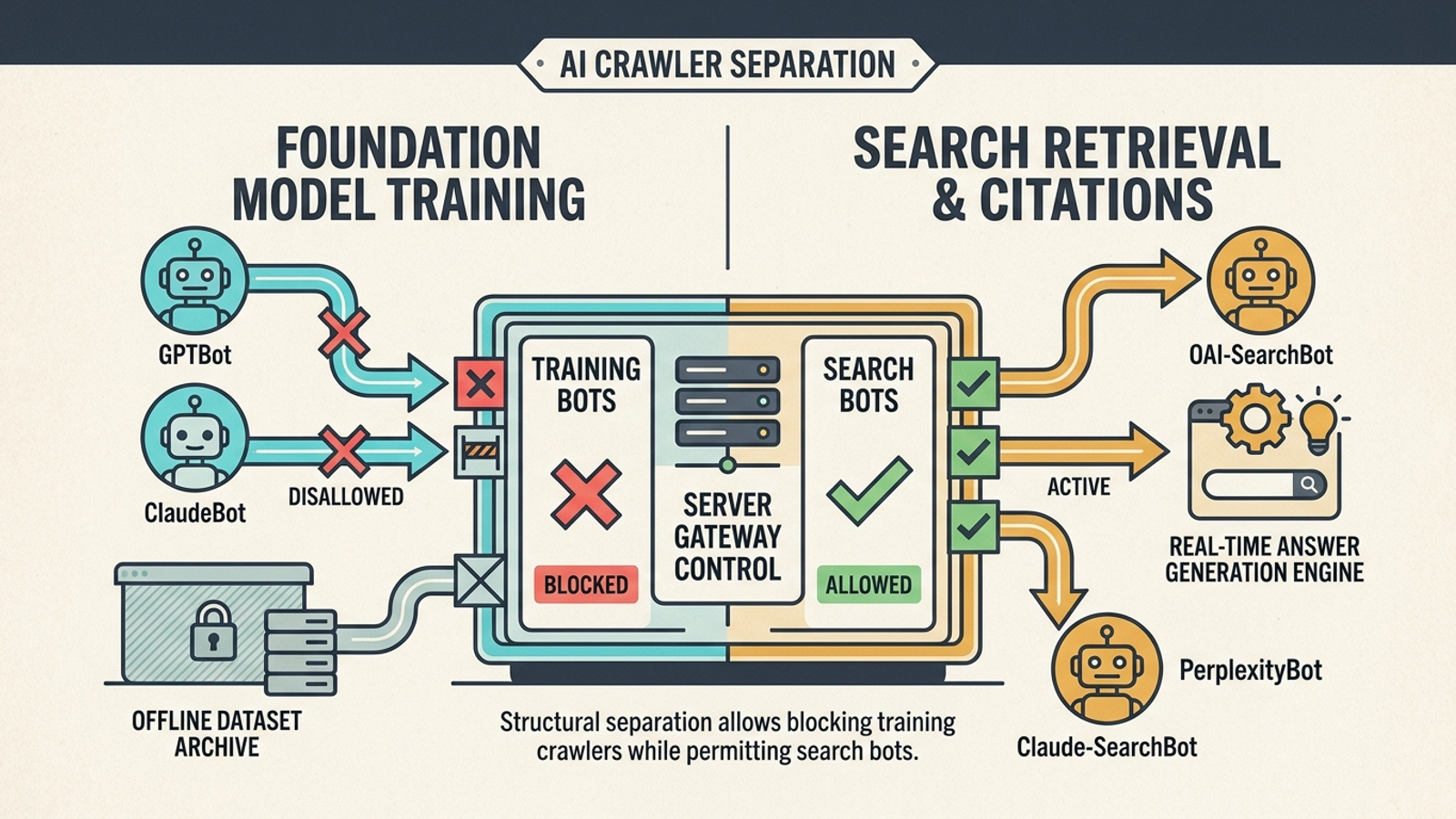
Action: Find the rules for OAI-SearchBot, Claude-SearchBot, and PerplexityBot, then check whether a User-agent: * group or a path-specific rule blocks your page. Compare them with any rules for training bots such as GPTBot and ClaudeBot. If you intend to permit the named search bots while blocking the named training bots, this is the shape of the distinction. Adapt it to your full file rather than pasting it over existing rules:
User-agent: OAI-SearchBot
Allow: /

User-agent: Claude-SearchBot
Allow: /

User-agent: PerplexityBot
Allow: /

User-agent: GPTBot
Disallow: /

User-agent: ClaudeBot
Disallow: /
For configurations covering more bots and use cases, use the AI crawler swipe file. The robots.txt rules reference is also worth keeping open when paths overlap: matching specificity matters, not simply which line appears first.
Expected result: You can say which named search bots may request the chosen page, which training bots you have excluded, and which bots have no explicit rule. Permission in robots.txt means they may fetch it; it does not prove they have.
Common mistake: Seeing an Allow: / and declaring victory while a more specific path rule, a CDN firewall, or another access control still stops the request. If the file looks right, keep going. The edge can return 403 before the crawler ever gets the page.
A browser can make a nearly empty HTML shell look like a complete page. That is useful for visitors, less useful when a fetcher reads the initial response without rendering your client-side application. Googlebot has a web-rendering pipeline; do not assume every AI fetch will process your scripts the same way.
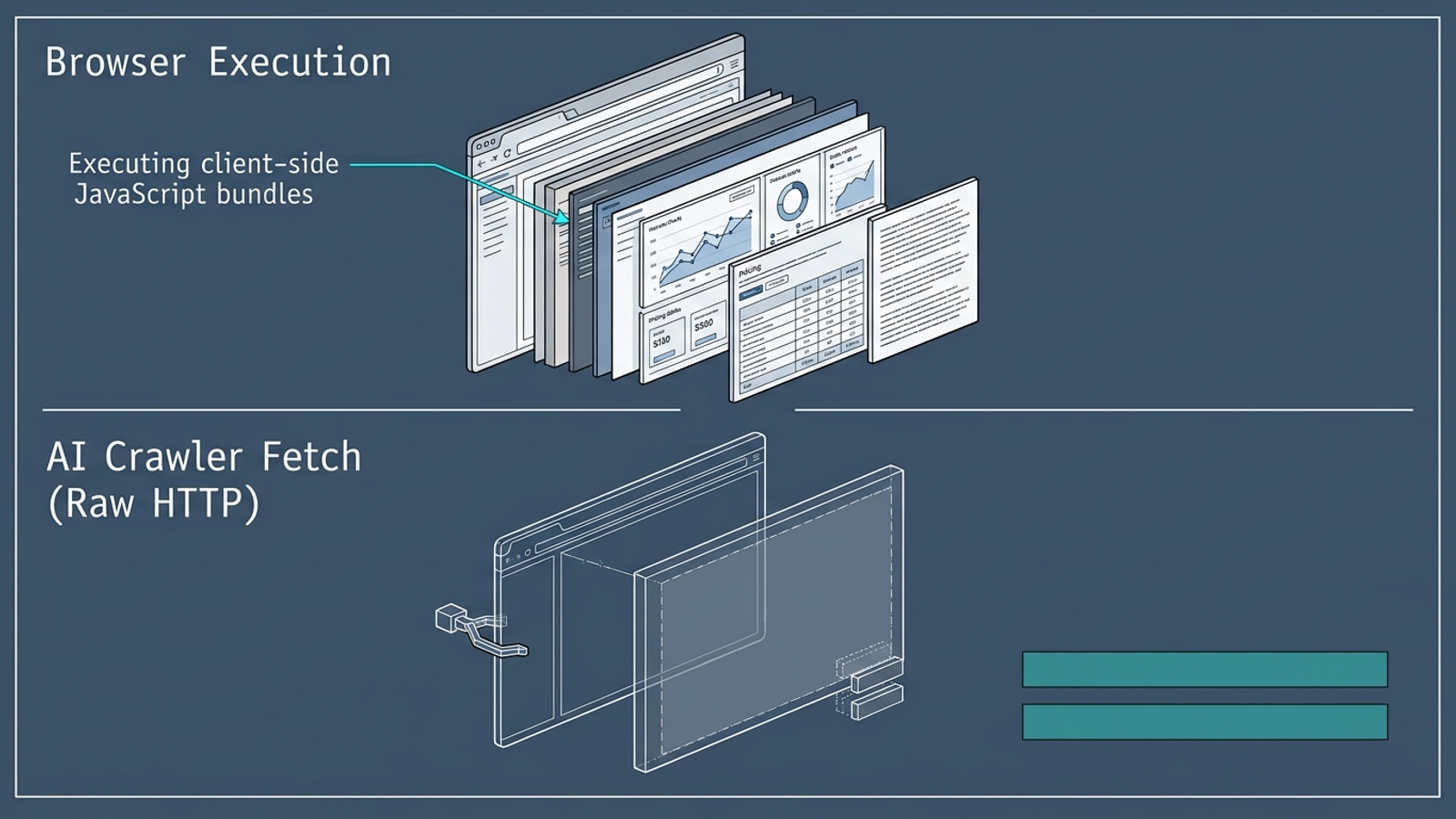
Action: Replace the URL and quoted phrase below with your chosen page and a distinctive sentence that a buyer should find there. Run the first command to look for it in the raw response, then use the second as a rough text check:
curl -sS -L -A "OAI-SearchBot" https://yourdomain.com/your-core-page | grep -i -C 3 "your main value proposition"

curl -sS -L -A "OAI-SearchBot" https://yourdomain.com/your-core-page | sed 's/<[^>]*>/ /g' | tr -s ' ' | wc -c
The second command is crude. It counts characters after a basic tag strip, not the quality of the readable copy, and it can include script or navigation text. If you get a large number, inspect the actual response before you relax.
Expected result: The first command finds the sentence in the HTML your server returns. You can also see the page’s substantive product, service, or pricing text there without asking a browser to build it.
Common mistake: Treating a healthy-looking browser page as proof. If grep finds nothing, inspect the response: a placeholder such as <div id="root"></div> and script references are not an answer to a buyer’s question. Do not rewrite that answer yet. Get meaningful text into the initial HTML first.
Your analytics dashboard cannot tell you whether a fetcher received 200 or hit a 403 at the edge. Go to your CDN or origin access logs and look at the request itself. A quiet report is not a diagnosis.
Action: If you have Nginx logs in the location below, run this filter. Otherwise, search the equivalent access-log view in your CDN or server for the same user-agents, then inspect the URL, client IP, and status code together.
grep -Ei "OAI-SearchBot|ChatGPT-User|Claude-SearchBot|Claude-User|PerplexityBot" /var/log/nginx/access.log | tail -n 20
Indexing bots and live-request fetchers serve different purposes. The distinction matters when you investigate a blocked request: crawler architectures separate discovery from other fetching activity. Do not read one ChatGPT-User entry as proof that an indexer can reach every page on your site.
Expected result: For the chosen URL, you can identify any matching requests, their status codes, and the IP addresses that made them. A 200 means the server returned a response to that request. A 403 gives you a concrete edge or server rule to investigate.
Common mistake: Counting every request with a recognizable user-agent as genuine AI traffic. User-agent headers are easy to spoof; the curl -A command you just ran demonstrates that. Treat the log filter as a way to find candidates, not verify identities.

For a request you need to verify, compare its connecting IP with the vendor’s published IP information, or use forward-confirmed reverse DNS: look up the hostname for the IP, then look up that hostname and confirm it resolves back to the connecting IP. OpenAI publishes IP lists at openai.com/searchbot.json and openai.com/chatgpt-user.json. A hostname that merely looks official is not enough.
host CONNECTING_IP
host RETURNED_HOSTNAME
No matching requests? Note that result. It does not prove a bot is blocked; it tells you not to claim a crawl happened on the strength of an analytics chart.
Now check whether your page is easy to reach once a crawler requests it. Redirects, outdated sitemap entries, and conflicting canonical URLs create avoidable detours. I would fix those before asking a content team to produce ten more pages pointing at the same destination.
Action: Request headers for your chosen URL without following redirects. Then inspect the canonical tag in the page’s initial HTML. In Google Search Console, open Sitemaps and check the submitted sitemap for the URL you actually want crawled.
curl -sS -D - -o /dev/null -A "OAI-SearchBot" https://yourdomain.com/your-core-page

curl -sS -L -A "OAI-SearchBot" https://yourdomain.com/your-core-page | grep -i 'rel="canonical"'
Check three things in order:
200, or does it redirect? If it redirects, update your internal links and sitemap entry to the destination.404, a redirected URL, or a noindex page?Expected result: Your chosen commercial URL has a clear final destination, a matching canonical signal, and a clean sitemap entry. If it has moved, the links and sitemap point to where it lives now.
Common mistake: Running a request that follows redirects, seeing the final 200, and missing the old URL that your sitemap still advertises. Check the first response separately. A redirect is not automatically a failure, but there is no reason to keep sending crawlers through one you can remove.
Once the page is fetchable, judge the content. Not the other way around. A slogan can sound good in a meeting and still give an answer engine very little to extract. The page needs a plain answer to the question it claims to answer, in text present in the initial HTML.
Action: Choose one relevant buyer question on the page. Put its direct answer in the first sentence beneath the appropriate H2, then support any commercial claim you make. If the page visibly includes a matching FAQ, you can represent that same question and answer in server-rendered JSON-LD using the Schema.org FAQPage specification. Do not add structured data for an answer the visitor cannot see.
<script type="application/ld+json">
{
  "@context": "https://schema.org",
  "@type": "FAQPage",
  "mainEntity": [{
    "@type": "Question",
    "name": "How does autonomous search execution differ from an agency retainer?",
    "acceptedAnswer": {
      "@type": "Answer",
      "text": "Autonomous search execution runs continuously using specialized models to optimize bids and budgets. A traditional agency retainer relies on periodic human account reviews."
    }
  }]
}
</script>
Use that block only if it describes the answer actually published on the page. Put it in the initial server response, not in a tag-manager script that adds it after the page loads. Structured data helps describe content; it is not a purchase order for a citation.
Expected result: Re-run the curl check from Step 2. The question’s answer appears in the raw HTML as readable page text, and any FAQ markup matches that visible answer.
Common mistake: Adding schema while leaving the page’s actual answer vague or trapped behind JavaScript. Fix the readable sentence first. The Princeton GEO study is a reason to take clear, attributable information seriously, not a substitute for checking what your own server returns.
You can verify your technical changes now. You cannot reasonably demand a new citation three minutes after editing robots.txt; discovery and re-indexing take time.
Action: Immediately rerun the raw fetch and status checks for your chosen URL. After 14 days, repeat the log inspection and test targeted buyer queries in ChatGPT Search and Perplexity: comparisons, technical trade-offs, or pricing questions that match the page you changed.
200, not 403 or an unintended redirect.Expected result: First, the technical checks pass on demand. Later, you have log and query observations you can compare with that baseline. No citation after 14 days is a finding to investigate, not proof that the original fetch test was wrong.
Common mistake: Changing five pages and three edge rules at once, then trying to explain one citation. Keep the first test to one URL. Know what changed.
Passing these checks means an AI search fetcher has a workable path to your content. It does not mean an engine will recommend you over an established competitor. Other sources may still give it stronger reasons to cite them. That is when content and authority work become worth judging on their merits, instead of using another article to compensate for a blocked crawler.
The first thing I would change once this page passes is the next highest-value page with the same failure. Make the fix repeatable, because a later routing change or strict CDN rule can undo it. If you want technical SEO issues that hurt AI visibility handled as ongoing work rather than a recurring fire drill, groas earned search pairs autonomous execution with a named strategist who owns the direction and accountability. For now, stop guessing whether the machine can read your site. Inspect the logs, fetch the HTML, and fix what fails.
Which AI crawlers should I allow in robots.txt if I want AI search visibility but not model training?
Allow the named search bots OAI-SearchBot, Claude-SearchBot, and PerplexityBot, and block the training bots GPTBot and ClaudeBot if you do not want your content used for model training. OpenAI, Anthropic, and Perplexity publish separate crawler rules for these purposes, and a rule meant to limit training can also block search discovery if applied to the wrong user-agent.
My robots.txt allows AI bots with Allow: / but pages still aren't fetched. What could be blocking them?
A more specific path rule may override the general Allow, or a CDN firewall or other access control may stop the request at the edge and return a 403 before the crawler gets the page. Permission in robots.txt only means the bot may fetch it; check the actual response and access logs to confirm.
How do I check if my page content is readable by AI crawlers before JavaScript renders it?
Fetch the page with curl using a bot user-agent and search the raw response for a distinctive sentence a buyer should find there, for example: curl -sS -L -A "OAI-SearchBot" https://yourdomain.com/your-page | grep -i "your phrase". If the grep finds nothing, a browser-looking page is not proof the content is readable; a placeholder div and script references are all the fetcher may see.
How can I tell if a request with a bot user-agent in my logs is really from that AI crawler?
User-agent headers are easy to spoof, so treat log entries as candidates only. Compare the connecting IP with the vendor's published IP information, such as OpenAI's lists at openai.com/searchbot.json and openai.com/chatgpt-user.json, or use forward-confirmed reverse DNS: look up the IP's hostname, then confirm that hostname resolves back to the connecting IP.
What URL checks should I run to make sure a page is easy for crawlers to reach?
Check three things: the published URL returns 200 rather than redirecting, the canonical tag in the raw HTML matches the final URL including protocol, hostname, and trailing slash, and the XML sitemap in Google Search Console lists the indexable destination rather than a 404, a redirect, or a noindex page. Check the first response separately from the one after following redirects.
Does adding FAQPage schema help an AI engine cite my page?
Structured data can help describe content, but only if the page visibly contains the matching question and answer in text that is present in the initial HTML. Never add schema for an answer the visitor cannot see; the direct, plain-text answer in the first sentence beneath the appropriate H2 comes first, and the markup should only describe it.
How long after fixing robots.txt should I wait before expecting an AI citation?
Rerun the raw fetch and status checks immediately, then wait about 14 days before repeating the log inspection and testing buyer queries in ChatGPT Search and Perplexity. No citation after 14 days is a finding to investigate, not proof the fetch test was wrong, and changing many pages and edge rules at once makes results impossible to attribute.
Does passing these crawler checks guarantee my site gets cited in AI answers?
No. Passing the checks means an AI search fetcher has a workable path to your content, but other sources may still give an engine stronger reasons to cite them. At that point content and authority work should be judged on their own merits rather than compensating for a blocked crawler.