LinkedIn

A Bing search for enterprise project management sends someone to a generic homepage. If I’m running Google and Bing for clients, I want to know which route can show me that pairing and get me to a fix I can defend: Microsoft Advertising’s native reports or ChatGPT connected through groas.
Microsoft’s October 28, 2026, announcement made that a timely buying question. Performance Max search-term and auction-insights reporting were available, and Microsoft scheduled search-term landing-page reporting to start rolling out in mid-November. That gives me a reason to look in the account. It doesn’t tell me whether the report is there or whether a ChatGPT connector can pull its fields.
The winner needs to show the evidence and get me to an approved correction. A polished explanation does not make up for a missing Final URL. Neither does a screenshot of campaign totals.
What Microsoft announced, and what I’d ask both tools to show
A search term report that stops at impressions and clicks tells me what people typed. It doesn’t tell me whether they reached the enterprise page or got dropped on the homepage. If spend goes up and qualified pipeline doesn’t, that’s a gap I want to close before I tell a client Bing brought in the wrong buyers. Maybe the buyers were fine. Maybe we sent them to the wrong page.
The October announcement puts the term-to-page pairing on the calendar. A separate November 16 report from Search Engine Land describes search terms and their associated landing pages in a report for AI Max for Search. I wouldn’t read those announcements as a promise of the same coverage across campaign types. And I wouldn’t confuse the pairing with the Performance Max landing-page reporting Microsoft described in May. That report shows performance by Final URL. Useful, but performance by page is not performance by search term and page.
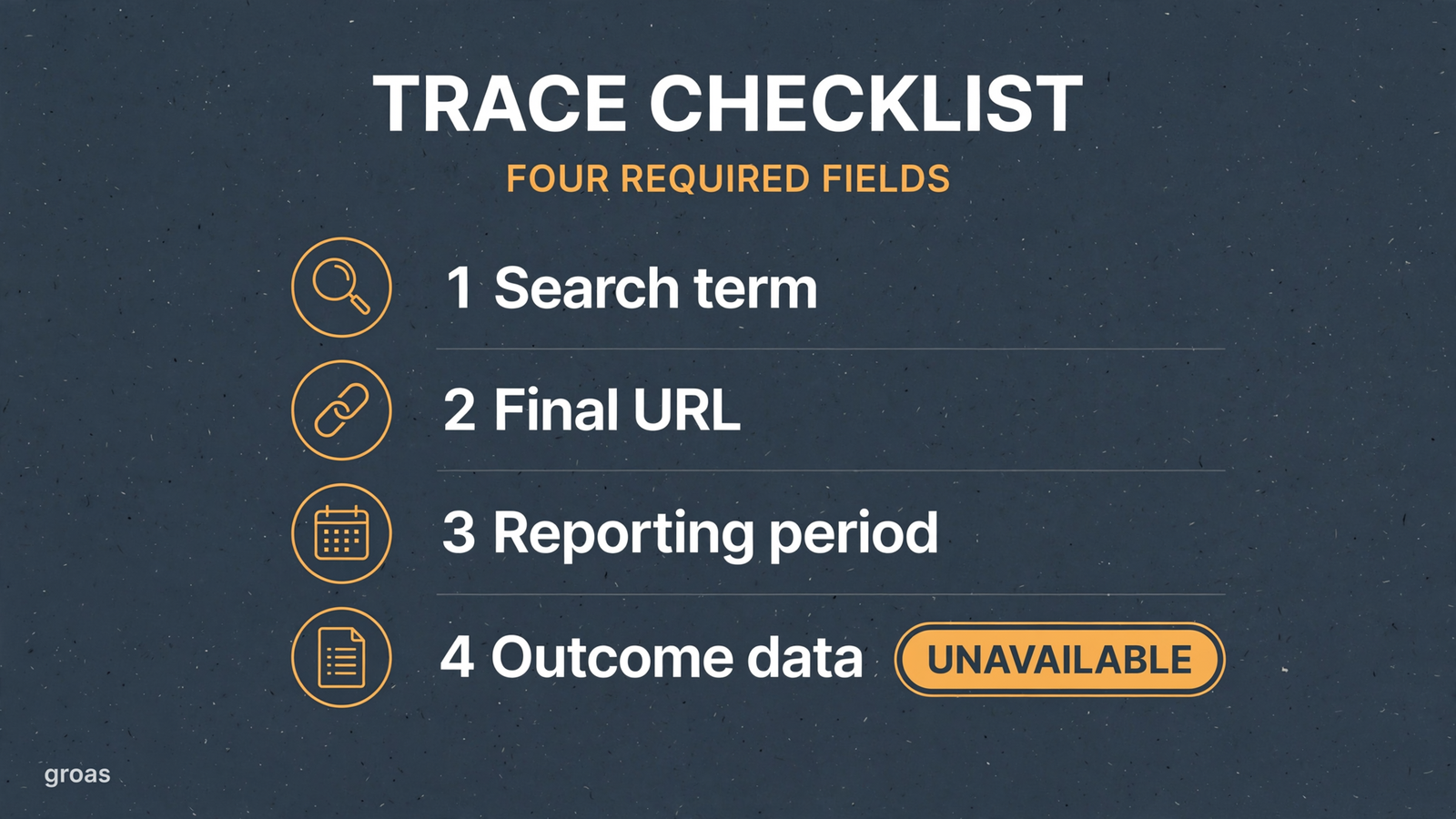
I give both contenders the same assignment: show me which searches reached which pages in a stated period, flag possible mismatches, and tell me what I can do about them. Before I listen to an explanation, I want four things:
- Search term: the query Microsoft recorded, not a paraphrase.
- Destination: the recorded Final URL and, where available,
FinalUrlSource, which tells me whether the destination was advertiser-provided or AI-expanded. - Scope: the campaign and reporting period. I don’t want a claim about Monday built on last quarter’s rows.
- Outcomes for that pairing: the available clicks, conversions, spend, and revenue, with missing fields marked as unavailable.
Microsoft’s report column reference names the fields I’m looking for. That’s my checklist, not my proof. For proof, I need the rows.
Round 1: Can I get the query and destination on the same row?
I start in Microsoft Advertising. If the Search term landing page report is in the account, I open it and check which campaigns, dates, and columns it actually covers. The report request documentation calls for aggregation, columns, scope, and time, with FinalUrl and at least one performance statistic. That describes what the request needs. It doesn’t guarantee that the account has the report or that the rows cover every campaign I want to check.
The AI Max report’s limits matter here: it covers AI Max-enabled campaigns and excludes rows with zero clicks. A missing row is not proof that nothing went to the wrong page. I also wouldn’t substitute Search Terms Insights for the paired report. Microsoft describes Search Terms Insights as Performance Max-only, covering Bing rather than Yahoo traffic, with results that can take up to three days to appear. If I’m checking what happened this morning, that lag can decide whether I have an answer at all.
Then I give ChatGPT with groas the same campaign and dates:
Check whether you can retrieve search-term-to-landing-page data for this scope. Show the fields you actually received and flag any coverage limits.
I want to see SearchQuery next to FinalUrl, with FinalUrlSource and the available outcome fields for that pairing. If I get campaign totals and a confident paragraph about intent, the connector hasn’t answered the question. I’d rather see “unavailable” next to a missing field than a plausible URL inferred from a page-level conversion rate.
Microsoft’s own MCP tool list illustrates why I check. It lists read-only entity tools such as GetCampaigns, GetAds, and GetKeywords, but no Search term landing page report tool. That tells me what’s on Microsoft’s list, not what groas can retrieve. Neither that list nor the rollout announcement settles connector access.
Native sets the bar; groas ties when it returns the same evidence for the same scope. Until I see those rows through the connector, the native report is where I go to verify them.
Round 2: Can I tell a wrong page from weak demand?
The report tells me where the click went. It doesn’t tell me why nobody converted. I used to give low conversion rates too much weight here. An enterprise software query that lands on a generic homepage gives me a destination worth questioning. The same conversion rate on a page that matches the query gives me no reason to blame routing first. I’d look at demand, the offer, or tracking instead. Same number. Different next move.
In the native report, I read the query and the destination together, then look at what the page actually offers. I also check FinalUrlSource. Microsoft distinguishes Advertiser Provided from AI Expanded from URL. That distinction is a recorded fact, not a judgment about intent. It tells me whether I should be looking at the destination I supplied or at an expansion choice. The source of the URL points me toward the right lever; it doesn’t prove the page caused the poor result.
With ChatGPT and groas, I ask for the same distinction:
Flag possible mismatches. For each one, cite the observed search term and destination. Show the URL source and outcomes separately from your explanation of why the page might be a poor fit.
That gives me something I can review. If the evidence says enterprise query, generic homepage, I can look at the page and decide whether the flag holds up. If all I get is weak intent alignment, I still have to open the report and figure out what the model meant. I haven’t saved a step. I’ve added one.
I keep Google in the comparison, but not in the evidence for a Bing click. A matching offer on Google helps me think about how I’ve mapped intent to pages on my own site. It doesn’t show where Bing sent anyone. I check the Bing rows first and bring in Google as context second. I don’t let the model borrow a Google row to make a Bing answer look complete.
I give groas this round for repeat reviews when each flag points back to an observed row. The native report gives me the facts; the connected workflow earns its keep by organizing them into judgments I can check, not by making those judgments sound final.

Round 3: Can I approve the fix before it goes live?
A screenshot is not a correction. In the native workflow, I document the query, the Final URL, and its source. Then I review the proposed change and apply it separately in Microsoft Advertising. Microsoft’s May transparency post points to URL rules and custom labels for mismatched Final URLs. The advantage of working natively is straightforward: I can see the evidence and use the platform’s own controls. The drawback is that I’m carrying the finding from the report to the account change myself, client after client.
With ChatGPT and groas, I connect the accounts and work through ChatGPT over MCP. I keep the handoff narrow:
- Review the evidence. I ask for the flagged query and destination, the campaign and period, and the available outcomes.
- Review the proposed change. I ask what the change would address and whether groas supports that operation. A reporting API doesn’t grant permission to rewrite a destination.
- Approve that change, or reject it. If I approve a supported change, I ask groas to make only that change and show me the log. The log records the reason, and I can undo the change in one step. Autopilot stays off unless I switch it on.
If the connector can’t retrieve a field I need, I go back to the native report. If the fix is a URL rule the connector can’t apply, I make it in Microsoft Advertising. If the problem is the page itself and the fix requires a website edit outside the connected workflow, I handle it separately. I want the tool to say where its part ends, not turn a proposed fix into a claim that it can carry it out.
Groas wins this round when the change is supported and I can approve it before it lands. Taking a finding from evidence to a logged, undoable change is the advantage. Explaining that finding in a nicer paragraph isn’t.
The scorecard
I score both routes against the same evidence and the same proposed fix. A win on execution doesn’t make up for a missing query-to-page row.
| Buying criterion | Microsoft Advertising native reports | ChatGPT with groas |
|---|---|---|
| Evidence completeness | The direct check for what Microsoft recorded, if the paired report is available for the account and campaign. | Ties when it returns the same named fields for the same scope. Missing fields stay missing. |
| Wrong page vs. weak demand | Shows the pairing and URL source; I review the page and make the judgment. | Wins for repeat reviews when it cites the Bing rows behind each flag and separates observation from interpretation. |
| Route to an approved correction | I review the finding and apply the fix separately in Microsoft Advertising. | Wins for supported changes I can approve in chat, then verify in the log and undo if necessary. |
Verdict: groas for repeat client work, native for the evidence it can’t reach
I’d choose ChatGPT with groas for the operator repeating this check across Google and Bing clients. My buying test is simple: make it show the required Bing fields for the campaigns I manage, then make it propose a supported correction I can approve. Once it passes, I don’t have to rebuild the handoff from report to recommendation to account change each time. Groas Unlimited is $19 a month, flat, for the whole team, with unlimited teammates, ad accounts, and websites, separate from ChatGPT and media costs. I’d judge that price against the repeated work it removes, not against how often I open the chat.
I’d pick native reporting for a one-off check when the report is already open in front of me. I’d also pick it when it’s the only route that can show the decisive fields or apply the fix I need. There’s no reason to buy a connector for this job on the strength of a report it hasn’t shown it can read.
An announcement tells me what to look for. The account tells me what’s available. The connector has to show me what it can retrieve. Run the field check, keep the facts ahead of the interpretation, and make the correction you can log. That’s the whole test.