

 LinkedIn

Microsoft Advertising is often the cheapest incremental reach a Google advertiser ignores because rebuilding campaigns is tedious. I would rather spend 20 minutes reviewing a paused copy than an afternoon exporting keywords, pasting ads, rebuilding negatives and fixing settings that never map cleanly.
That is the job here: use one chat prompt to copy a proven Google search campaign through groas, then review it before anything spends. One message builds the copy. It does not replace the checks.
By the end, you will have a Microsoft Ads test campaign with a budget set at 20% of its Google original, tracking checked, and a logged build you can review before launch.
Before starting, have these ready:
- Your Google Ads and Microsoft Advertising accounts connected to groas.
- Your AI assistant connected to groas over MCP.
- One Google search campaign with 90 days of stable conversion volume.
- A target CPA you can use to judge whether the copy deserves more money.
I use ChatGPT in the examples. The safety gate is not the assistant’s manners. It is the instruction to keep everything Paused until you approve it.
Why this copy deserves a small test
Bing’s opportunity is disproportionately desktop. Its search-share figures show a much larger desktop presence than mobile presence, while one UK practitioner reports typically 10–20% of Google volume at 20–40% lower CPC for the same keywords. Smaller reach, potentially cheaper auctions. That is worth testing, not building a forecast around.
Copy to Bing only when Google already works. A stable non-brand search campaign gives you a working offer, useful keywords and a CPA to beat. If Google is still unprofitable, Microsoft will not repair the offer for you.
I would also skip this test if the business depends on mobile-first local calls. The desktop-heavy audience is part of the opportunity, but it is also the limitation. Start with a campaign whose intent can travel.
Step 1: Pick one campaign the numbers support
Action: In the chat connected to groas, send:
Look at my Google Ads search campaigns over the last 90 days.
Rank non-brand campaigns by conversions, CPA and spend stability.
Recommend one campaign with at least 30 conversions and CPA
at or below my target. Show the evidence for the choice.
Tell me why the others should wait.
If none qualifies, say so. Do not make changes.
Expected result: The assistant names one campaign and shows its 90-day conversions, CPA and spend. It should explain the choice, not just announce a winner.
Check that the recommendation actually clears both bars: at least 30 conversions in 90 days, and CPA at or below your target. Stable spend matters because you want a repeatable campaign, not one good week hiding inside a quarterly total.
The Bytown import guide recommends copying winners, importing paused and reviewing performance at 14 and 30 days. That is the right shape for this test: small enough to inspect, established enough to compare.
Mistake to avoid: Copying the campaign you like instead of the campaign the numbers support. Brand search looks efficient and copies cleanly, but adds little incremental reach. Copying an entire account just gives you more settings to inspect.
If nothing qualifies, stop. Fix Google first.
Step 2: Build a standalone copy, paused
Action: Replace WINNER-CAMPAIGN with the exact name from Step 1, then send:
Copy Google Ads campaign [WINNER-CAMPAIGN] to my Microsoft Ads account.
Name the new campaign [WINNER-CAMPAIGN_BING_TEST].
Check that this name does not already exist before creating it.

Copy the keywords, negatives, ads and extensions where supported.
Set the Microsoft daily budget to 20% of the Google campaign's
current daily budget.
Where bids transfer directly, start them 10% below Google.
Flag any bidding settings that need a separate decision.

Create the campaign, ad groups and ads PAUSED.
Make this a one-time copy. Do NOT enable scheduled auto-sync.
Do not merge with an existing Microsoft campaign.
Show me what you built before anything goes live.
Expected result: A build summary with the new campaign name, ad group count, keyword and negative counts, budget, bidding settings and any unsupported items. The campaign and its contents should remain Paused. Scheduled sync should read OFF.
Use the budget of the specific campaign, not your entire Google account. The suggested test allocation is 15–20% of the Google campaign’s budget; this tutorial uses 20% to keep the instruction unambiguous.
One-time copying matters. Scheduled Google Import can realign Microsoft bids, budgets and status with Google. That is not what you want while testing Microsoft as a separate channel. A deliberate change on one platform should not quietly become a change on the other.
Mistake to avoid: Reusing the name of an old Microsoft campaign. Matching campaign names can merge an import into an existing campaign, and native imports cannot be reversed through change history.
If the proposed _BING_TEST name already exists, choose another unique name before proceeding. A clean test needs a clean boundary.
Step 3: Audit the settings that do not travel cleanly
Action: Keep the campaign paused and send:
Audit the paused Microsoft copy against the Google original.
Check:
- Negative keywords and their match types
- Bids, budget and platform minimums
- Locations
- UTM tags
- Bid strategy
- UET conversion goals and tracking

List every mismatch and any unsupported settings.
Fix clear copying errors while keeping everything paused.
Ask me before changing targeting or bidding intent.
Do not enable scheduled sync.
Expected result: A mismatch list that separates corrected copying errors from decisions you still need to make. An empty list is useful only if the assistant shows what it checked.
Work through these items:
- Negatives: Check the actual terms and match types, not just the total count. Negative-keyword handling can differ during import.
- Bids and budget: Confirm that platform minimums have not raised the imported values. Your intended 20% budget should survive the copy.
- Locations: Inspect the final targets. Unsupported locations can expand to a parent region. A larger map is not a harmless formatting change.
- UTMs: Check that Microsoft traffic lands in the right reporting bucket. Imported tracking parameters can change, so inspect the result rather than assuming your Google filters still work.
- Bidding: Confirm the actual Microsoft strategy. Do not treat a copied strategy name as proof that the campaign is ready to use it.
- Conversions: Check Microsoft tracking separately. Google recording a conversion tells you nothing about whether Microsoft recorded it.
Mistake to avoid: Trusting a copy because its structure looks familiar. Matching ad groups are easy to see. A widened location target or broken conversion goal is easier to miss.
Check tracking before adding the Bing-only controls
Action: Send:
Check UET tracking for this Microsoft campaign.
Confirm that the intended conversion goal records the matching
thank-you-page visit or conversion event.
Flag anything that requires a website or consent-setting change.
Do not mark tracking verified from the goal definition alone.

Show the current Microsoft bid strategy and any available
starting options that do not depend on conversion history
this account does not yet have. Ask me to approve the choice.
Do not copy Google's tCPA or tROAS settings automatically.
Expected result: A clear distinction between a conversion goal that exists and a conversion event that actually records. Imported goals still need the UET tag to fire the matching events. For EEA, UK and Swiss traffic, also check the required ad_storage consent signal.
For a relevant B2B campaign, I would then inspect Microsoft’s LinkedIn layers. Keep the initial setup observational rather than restrictive:
Show the LinkedIn job-function and industry layers available
for this campaign. For the relevant layers I approve, add them
as BID ONLY with a +20% bid adjustment and no exclusions.
Keep the campaign paused and show the final settings.
Mistake to avoid: Adding every audience because it is available, or confusing BID ONLY with a targeting restriction. Job function and industry layers can be used as bid adjustments or restrictions. Those are different decisions.
Launch tracked, with deliberate bidding and targeting, or do not launch.

Step 4: Approve the paused build, then launch
Action: Ask for one final summary:
Show the final build summary for [WINNER-CAMPAIGN_BING_TEST]:
- Campaign, ad group and ad status
- Daily budget and comparison with the Google original
- Bid strategy and starting bids
- Keyword and negative counts
- Locations and LinkedIn settings
- UTMs
- UET verification result
- Scheduled sync state
- Unresolved warnings

Show the groas change log and the undo option for this build.
Do not unpause anything.
Expected result: A short summary you can compare with the instructions. Use this approval checklist:
- The new campaign has a unique
_BING_TESTname. - The budget is
20%of the Google original. - The campaign, ad groups and ads remain
Paused. - Bidding and audience adjustments match your approved choices.
- Tracking is verified, not merely configured.
- Scheduled sync is
OFF. - No unresolved warning changes where the money will go.
groas logs changes with their reasons and provides one-step undo. Inspect that log before launch. Do not confuse it with Microsoft’s native import history, which does not reverse an import. Check the undo option for this build rather than assuming every import workflow has the same rollback behavior.
Mistake to avoid: Treating “created successfully” as approval. It means the build completed. It does not mean the targeting, tracking or budget matches your intent.
When the checklist passes, send:
Unpause [WINNER-CAMPAIGN_BING_TEST] in Microsoft Ads only.
Keep scheduled auto-sync OFF.
Confirm the campaign is Enabled and nothing changed in Google.
Paused is the approval gate. No summary, no launch.
Step 5: Review at 14 days; make the call at 30
Action: Give the test 14 days without routine tinkering, then send the comparison prompt below. That does not mean ignoring broken tracking or an obvious setup error. Fix those when you find them.
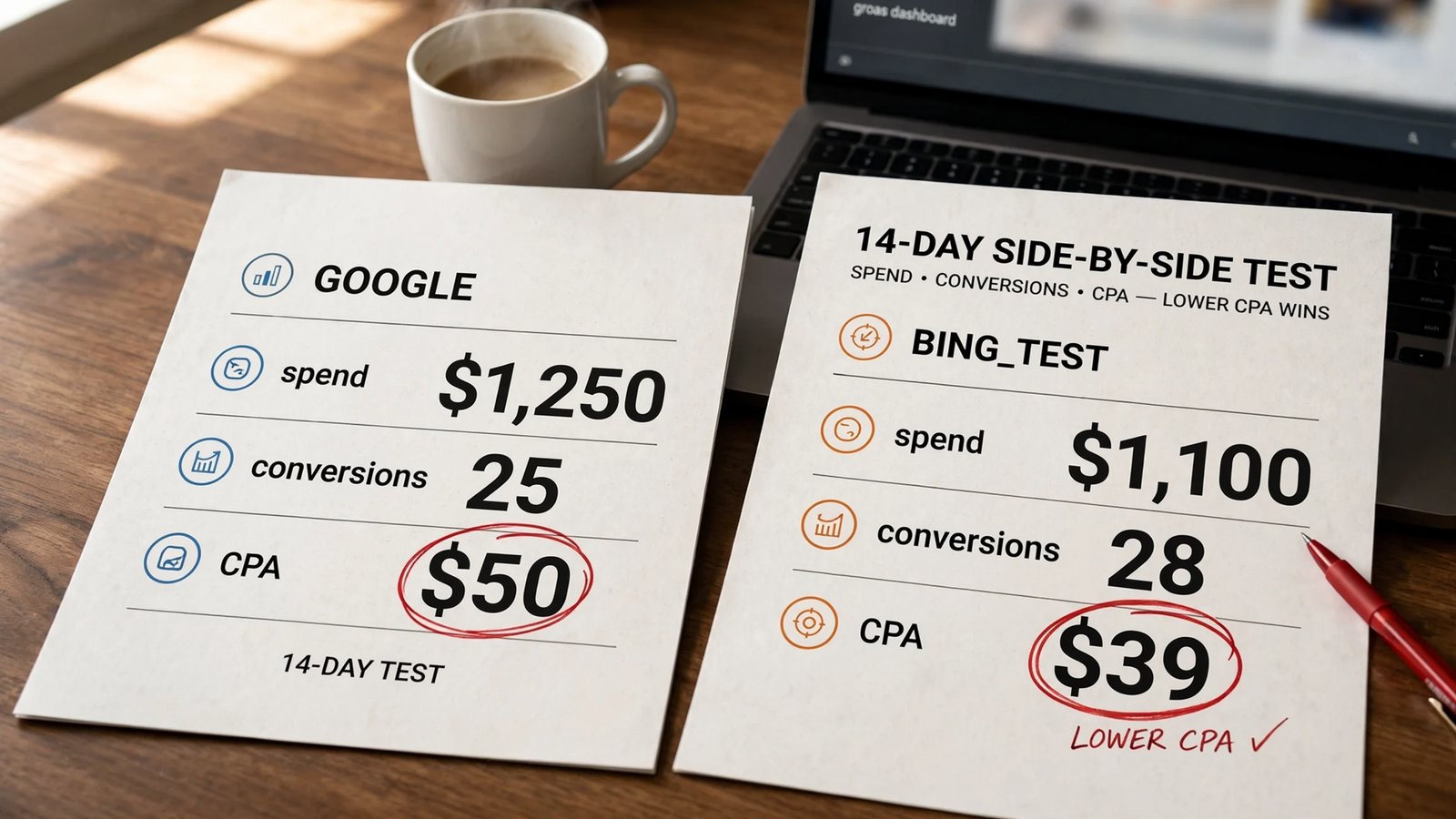
Compare [WINNER-CAMPAIGN] on Google with
[WINNER-CAMPAIGN_BING_TEST] on Microsoft over the last 14 days.

Show spend, conversions, CPA and conversion rate side by side.
Review Microsoft search terms and LinkedIn segment performance.
Use lead-quality information where available; flag it if unavailable.
Do not use CTR or clicks as the success criterion.

Recommend keep, kill or adjust.
Separate the 14-day diagnosis from the final 30-day decision.
Tell me what to change first and why.
Expected result: A side-by-side comparison centered on CPA and conversion quality, with missing information identified. The assistant should not invent lead quality from a click report.
The 14-day review and 30-day keep-or-kill cadence gives you a checkpoint without turning every slow morning into a bidding intervention. Your own copied keywords are the test. A cheaper-CPC claim from somebody else’s account is not the result.
Use these three checks:
- Delivery: Spend reaches at least 15% of the Google campaign’s spend without CPA running more than 20% higher.
- Intent: Conversion rate stays within a reasonable range of Google, rather than collapsing after the click.
- Search quality: Search terms show buyer language, not a new collection of bargain hunters and job seekers.
Mistake to avoid: Calling thin volume a failure when the economics work. If CPA is 20–40% lower but volume is small, keep it as incremental reach and consider raising the budget from 20% to 30% of Google. It does not need to replace Google to earn its place.
If CPA is double Google’s after 30 days, with no LinkedIn segment showing a reason to continue, kill the copy. This is also when I would decide whether Microsoft deserves its own B2B budget rather than a permanent Google mirror.
Keep cheap, useful reach. Do not keep a bad campaign just because the clicks cost less.
Keep the test inside its limits
This is a search-campaign tutorial, not an instruction to copy every campaign type. Microsoft will not match Google’s volume, and features do not all map one to one.
Keep these boundaries in view:
- Shopping: It needs its own Microsoft Merchant Center store. Do not treat this search workflow as a complete Shopping setup.
- Performance Max: Imported assets have limitations. A successful search copy does not verify a Performance Max import.
- LinkedIn layers: Start bid-only, inspect segment reports over weeks, and do not jump straight to exclusions or exclusive targeting.
- Mobile-first local: This is not where I would start. The desktop-heavy reach that makes Microsoft interesting is a poor fit for some mobile-dependent campaigns.
The point is to test a working search offer in another auction. Keep the scope that narrow until the numbers earn a broader one.
Verify the launch, then change one thing
Action: Confirm the operational basics in the same chat:
Show [WINNER-CAMPAIGN_BING_TEST] status, UET conversions
recorded in the last 7 days, and scheduled sync state.
Flag any tracking issue. Do not treat zero conversions alone
as proof that the tag is broken.
You want status Enabled, verified tracking and sync OFF. Then turn the comparison into something usable:
Turn the Google vs Microsoft comparison for the last 14 days
into a client-ready summary: spend, CPA, what changed,
what remains uncertain, and the next move.
Once CPA holds for 30 days, change budget first: move from 20% to 30% of Google’s budget if the economics justify it. Review bidding separately once Microsoft has 30 conversions; do not paste Google’s target CPA across just because the field exists.
If you are deciding who should manage Microsoft after the copy, keep the review in the same chat where the log lives. Rebuilding by hand is what made Bing expensive. One message removes the rebuild. The checks decide whether the traffic is cheap.


