

 LinkedIn

Free exports cost $0 to download. In my worksheet, they cost $50 to deliver one checked Google Ads and Bing report, versus about $48 with the $19 groas connection. At 25 clients, the same monthly run costs about $1,250 on exports versus $748 on groas. Those totals include recurring labor and the connector fee, but not setup or the ChatGPT seat. The timings and the $50 hourly rate are illustrative, not measured groas results.
When a client wants the reporting fee cut, the connector is the easy thing to point at. It has a price on an invoice. The time my team spends downloading, reconciling, and checking two sets of numbers is harder to see. I used to tell clients exports were free. I was wrong. Free to download is not free to deliver.
The bill at 1, 10, and 25 clients
I’m pricing one checked Google Ads and Microsoft Advertising report per client per month. Both routes deliver spend, impressions, clicks, conversions, and CPA for each platform over the same period, checked against the platform totals, with a short plain-English read. One file or one ChatGPT answer the client can forward to a boss. Not a dashboard nobody opens. Not a single conversion total that looks tidy because it hides the difference between the two platforms.
My formula is simple: software fees + assistant costs + labor hours × internal hourly cost. I keep the one-off setup out of the recurring totals so I can see what the next report costs without pretending the first one took no work.
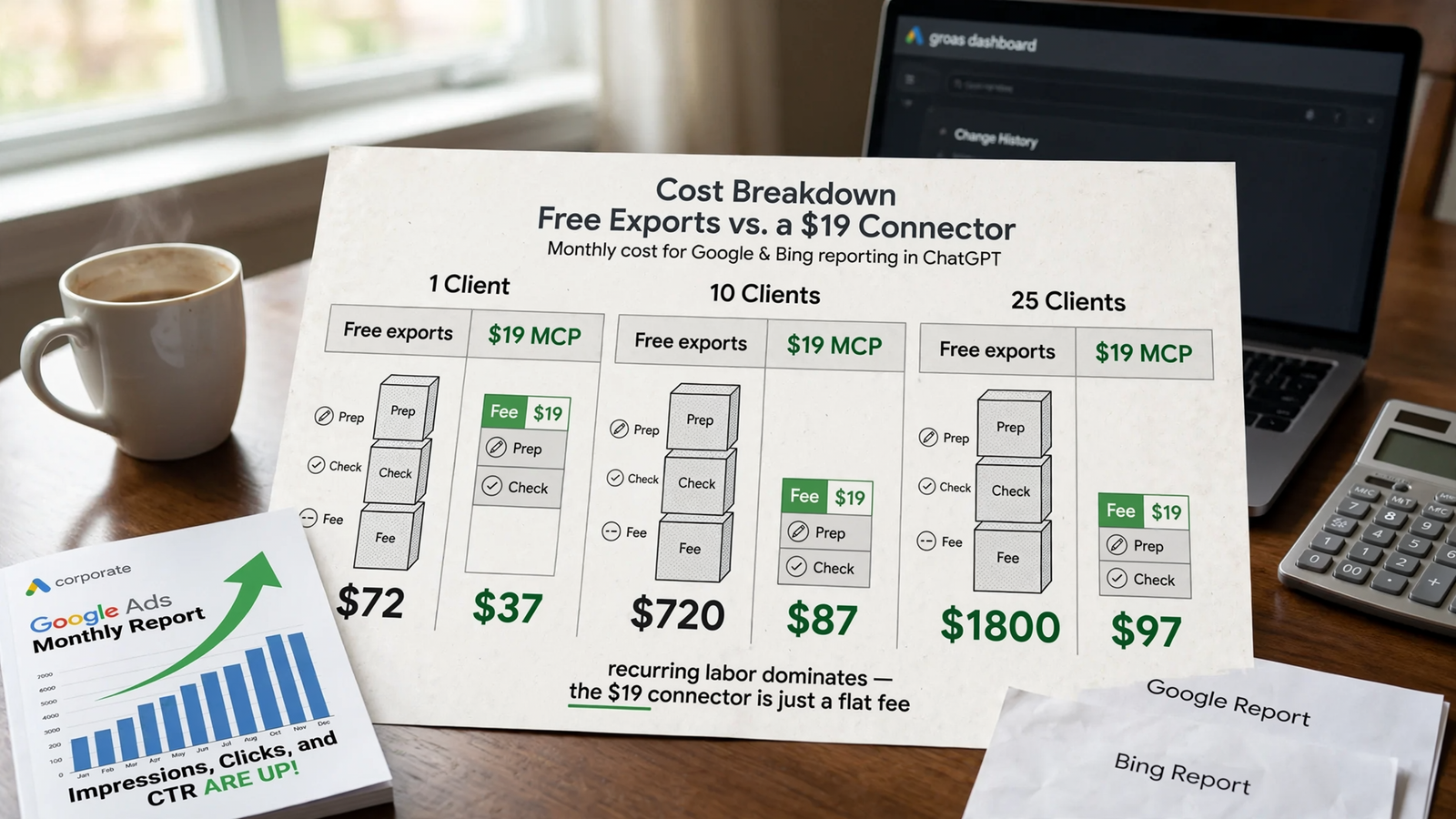
| Cost line | Native exports | groas MCP | Basis |
|---|---|---|---|
| Connector subscription, monthly | $0 | $19 flat for the team, all connected accounts, and sites | Native Google Ads exports; Microsoft Advertising exports; groas pricing |
| ChatGPT seat, monthly | Price separately for the plan used | Price separately; full MCP actions on the web require an eligible plan | ChatGPT Business pricing and custom MCP requirements |
| Setup, one-off | No connector setup | About 60 minutes to connect and test; about $4/month spread over 12 months | Illustrative setup time at $50/hour |
| Prep per client, monthly | 30 minutes | 5 minutes | Illustrative: download and format files vs. pull the period through MCP |
| Reconciliation per client, monthly | 15 minutes | 15 minutes | Illustrative: same checks on both routes |
| Review per client, monthly | 15 minutes | 15 minutes | Illustrative: same checks on both routes |
| Recurring labor per client | 60 minutes = $50.00 | 35 minutes ≈ $29.17 | Illustrative $50/hour |
| 1 client: recurring labor + connector | $50.00 | $48.17 | Before assistant and setup |
| 10 clients: recurring labor + connector | $500.00 | $310.67 | Before assistant and setup |
| 25 clients: recurring labor + connector | $1,250.00 | $748.17 | Before assistant and setup |
The difference comes from one row: prep. I don’t give the connection credit for making reconciliation or review disappear. If a vendor’s cost comparison skips those rows, it hasn’t priced the same report.
Listed costs: the connector and the assistant are separate bills
Google Ads lets me download a stats table or schedule email delivery. Microsoft Advertising defaults to CSV and offers both instant download and scheduled delivery. Neither route needs a paid connector to get the files out. Scheduling the email gets the files to me, though. It doesn’t get a checked report to the client.
With groas over MCP, I connect both ad accounts once and ask ChatGPT for the next period without re-uploading files. The $19 covers the groas connection, not ChatGPT. For full MCP actions on the web, ChatGPT requires Business or Enterprise/Edu; on Business, only an admin or owner can publish a custom connector. The ChatGPT Business FAQ lists its Standard seat at $25 per month on monthly billing or $20 per month on annual billing. That’s a separate price, not a fee I automatically add to both columns.
I price the assistant plan each workflow actually needs. If I’m already paying for the same seat either way, it doesn’t change the comparison. If the connected route means paying for a different plan, that difference belongs in its column. I keep the connect-and-test hour separate, too. It happens once; the report comes back every month.
Hidden cost 1: getting two sets of numbers into ChatGPT
On exports I pull the Google table, pull the Microsoft report, fix the date range twice, rename the columns, and paste both sets of numbers into ChatGPT. Nothing on that list sounds expensive. That’s how it gets left out of a quote. I budget 20 to 40 minutes of recurring prep per client for exports and use 30 in the worksheet. That’s my illustrative range, not a vendor claim.
For scale, a survey of 104 agencies put routine reporting at 20 to 30 hours per client per month, with 2.5 to 5 hours just to compile a single client report. I’m not pricing that entire job. I’m pricing one checked report for two ad platforms, so I use a much smaller number.
On groas I budget five minutes to request the same period and get the numbers in front of me. The connector saves me the download, rename, and re-upload work. It doesn’t tell me whether I asked for the right numbers. I stop the prep clock when the data is in front of me and start a separate clock for making sense of it.
Hidden cost 2: reconciling what Google and Bing count
A live connection doesn’t make two platforms count the same way. One sale can show up as a conversion on more than one platform, which is why I keep Google and Bing conversions and CPA separate. I use a first-party total for business accounting rather than adding the two platforms’ claims together. The differences in how ad platforms count and report conversions matter before anyone writes a word about performance.
I budget 15 minutes per client for reconciliation on either route. My prompt is boring on purpose: List the account ID, date range, currency, time zone, and conversion definition for each platform. Then list what doesn’t match. I check the IDs rather than trusting account names, and I want mismatches on screen before I ask for the performance story.
This is where a live pull can look more finished than it is. The numbers arrive together, so it’s tempting to read them as if they were counted the same way. The connection shortens the trip into ChatGPT. It doesn’t settle whether Bing counted a call the same way Google counted a form fill. I leave reconciliation on the bill either way.
Hidden cost 3: checking the answer before it goes out
This is the row I’m least willing to cut. ChatGPT can write a smooth paragraph over a mismatched export or a gap in a live pull. The prose won’t tell me which one happened. If I can’t see the inputs, I don’t forward the answer.
I ask ChatGPT to do three things before I send a report:
- Restate the source totals it used so I can check them against each platform.
- Show Google CPA and Bing CPA separately.
- Flag missing dates, currency conversions, and blank conversion columns.
I put 15 minutes per client in both columns. When I time the work, I count exceptions, not just the clean run. A client renames a conversion action mid-month. A Bing account bills in a different currency. A report shows zero conversions and someone has to work out whether it’s a tracking break or a true zero. I used to eat that time and call reporting cheap. Now I put it on the worksheet where the client can see it.
Break-even: what does $19 have to save?
At $50 an hour, $19 buys 22.8 minutes of labor. That’s $19 divided by $50, multiplied by 60. If the connection saves more than 22.8 minutes of recurring work across the whole client roster, it covers its subscription. That is not the all-in break-even. I still have to subtract the setup cost I spread across the year and any extra cost for the assistant seat.
The worksheet saves 25 minutes per client, all in prep. At one client, $50 versus $48.17 is close enough that the setup alone wipes out the difference when I spread it over 12 months. At 10 clients, the gap is about $189 a month before setup and any seat difference. Same subscription. More downloads I don’t have to do. It’s the same reason I break out connection, assistant, and review on the first MCP bill: a single total can hide the line that changes the decision.

I’d time two reporting cycles and fill in this version with actual costs:
- Connector subscription: exports $___ vs. connection $___ per month
- Assistant seat or usage: $___ vs. $___ per month
- Setup: ___ minutes once, spread over ___ months
- Prep per client: ___ vs. ___ minutes
- Reconciliation per client: ___ vs. ___ minutes
- Review per client: ___ vs. ___ minutes
- Internal hourly cost: $___
I multiply the per-client minutes by the number of reports I actually deliver, not the number of accounts the connector can hold. Then I compare the labor savings with the fee, setup, and any seat difference. The 23-minute shortcut tells me whether the subscription earns its keep. The full worksheet tells me whether switching does.
What the $19 doesn’t buy
Reporting shows me what happened. It doesn’t fix the account. Ad spend stays on its own line. A cleaner Google and Bing report can show me where the money went and which platform’s CPA moved, but a nicer explanation doesn’t lower CPA. That takes a change to the work: pausing a loser, shifting budget, fixing tracking, or rewriting the page. The report helps me decide what to look at first. I don’t put the value of a campaign change into the savings column for preparing a report.
I also keep reporting permission separate from change permission. I ask ChatGPT for findings first and approve any bid, budget, or keyword action separately. Until I mean to change something, the request stays read-only. I’m pricing a checked answer here, not account management.
Verdict: keep exports only when the stopwatch says so
If I have one client on monthly reports and export prep really takes 15 minutes, I keep exports. There isn’t enough prep to cut to cover the $19 at the worksheet’s hourly rate, even before setup. At 10 clients, the same worksheet puts groas about $189 ahead per month; at 25, about $502, before setup and any seat difference. Weekly reporting makes the prep recur roughly four times as often while the connector fee stays flat. I time two cycles, then check again when the client count or reporting frequency changes.
The cheapest mistake is paying $19 and still downloading and pasting the same files out of habit. The most expensive mistake is defending free exports at 10-plus clients to save $19 while eating hundreds in repeat labor every month.





