

 LinkedIn
I want Claude to tell me whether a page lost clicks, gained a citation, or did neither. The mistake I see first is connecting Search Console, asking how visible the site is in AI search, and accepting a number that blends rankings, clicks, mentions, and citations as if they were the same event.
They aren’t. A page can rank and never be cited. A brand can be mentioned without a link. A crawler can fetch a page that never appears in an answer. If Claude can’t tell those events apart, the connector can work perfectly and the conclusion can still be fiction.
The setup I use is one investigation, several clearly labeled measurements. Connect groas to Claude, make sure it can see the right website and properties, then ask for an evidence table. The table should tell you what changed, which source supports it, and what you still don’t know. Sometimes the answer is inconclusive. I want to see that word before I approve a page change, not after.
What should Claude give you instead of a visibility score?
A score that moves from 61 to 64 doesn’t tell me whether a ranking slipped, a page earned a citation, or an assistant started naming the brand more often. I used to like that kind of summary because it was fast to read. The trouble is that the parts can move in opposite directions. The score goes up. The thing I care about goes down.
Keep each measurement tied to the question it can answer:
- Search Console: What did Google show, and what did people click?
- GA4: What sessions and outcomes did you observe after people arrived, within the limits of consent and attribution?
- SEO data: Where did pages rank, or what links did the provider find, on a given observation date?
- AI visibility: What did a monitored prompt return? Did the answer mention the brand? Did it cite a URL?
Even Semrush’s dashboard example keeps AI mentions and cited pages alongside Search Console data rather than treating them as interchangeable. It also notes that the Generative AI report doesn’t give you prompt-to-click attribution. Put the sources next to each other. Don’t make one answer for another.
How do you connect Claude to the right website and sources?
Connect first. Verify the property second. Ask for analysis third. A connector can give Claude access to data without telling you whether it’s the data you meant to investigate.
- Add groas in Claude. Follow the Claude setup instructions: open Customize, then Connectors. Click add, choose a custom connector, name it
groas, and enterhttps://mcp.groas.ai/mcp. Leave the detected sign-in options as they are and sign in. Claude’s free plan allows one custom connector. On Team and Enterprise, an Owner adds it first under Organization settings. The groas MCP connector gives Claude access to accounts, data, and actions without relying on pasted exports. Skip any workaround that asks you to paste API keys, passwords, or service-account credentials into chat. - Connect the website in groas. Make sure groas can read the Search Console and GA4 properties for that same site. groas also brings in SEO data from Semrush and Ahrefs and collects AI search answers around the clock. Those are market and answer observations, not substitutes for your own property data.
- Run a connection check. Ask Claude for four things: the exact domain, the sources it can see, the reporting window for each source, and what’s unavailable. If it can’t answer all four in plain English, stop. You don’t have an investigation yet. You have a login that looks green.
What do you check when the connector is green but the data looks wrong?
A green icon tells me two systems shook hands. It doesn’t tell me they’re reading the right property. I check three things, in this order:
- Property identity. Ask Claude to name the exact domain, Search Console property, and GA4 property. Compare the names character by character. A staging domain, a
wwwmismatch, or a GA4 property for another business can produce a coherent report about the wrong site. Opinly’s troubleshooting advice is worth borrowing here: ask what tools Claude can actually access, then check one figure against the platform interface. If the property is wrong or missing, fix access before you ask for more analysis. - Missing data versus zero. No data is not a measured zero. An empty or stale result can mean the observation is unavailable, unverified, or outside the window. A zero means the source returned data for that window and the count was zero. The first sends me back to the connection, permissions, or dates. The second sends me to the page, query, or prompt. Mix them up and a permissions problem starts looking like a visibility collapse.
- Too many rows. Don’t dump thousands of raw Search Console and analytics rows into Claude and hope it finds the thread. In one r/mcp discussion, commenters got better results with server-side aggregation: roughly 30 rows, the fields used to match them, and a count of what didn’t match. Start with one site and one question. If Claude says it joined two sources, ask it to show what it matched on and what it couldn’t match. A join doesn’t prove that a search query caused a conversion.
What goes in the evidence table?
Ask for a table before you ask for a narrative. Every row needs a source, a reporting window, and an observation date. A fluent summary is easy to read. A row you can check is more useful.
Start with three sets of rows:
- Search Console: Query, page, impressions, clicks, and average position for the stated window.
- GA4: Observed visits and outcomes, with the attribution limit in the same row. An organic visit isn’t proof that a particular query drove the conversion.
- SEO data: Rankings and backlinks, with the provider and observation date. A Semrush or Ahrefs observation isn’t a record of what happened on your site.
In Semrush’s Claude Code workflow, AI Visibility Toolkit data takes a separate CSV export. For this investigation, I’d use groas: it brings the AI answers it collects into Claude alongside the connected accounts, so the answer evidence doesn’t depend on another manual export.
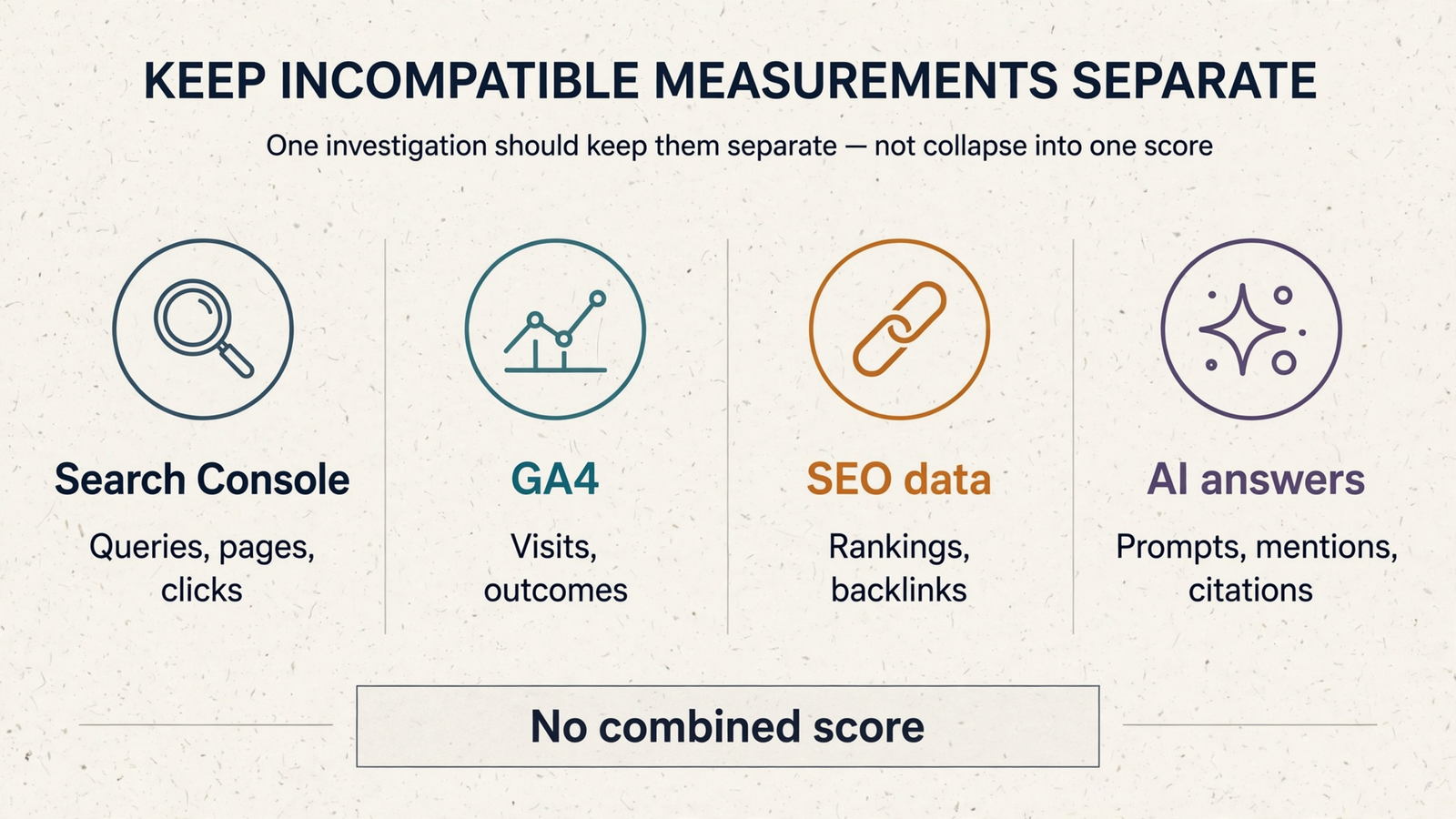
For AI visibility, record the monitored prompt, model, date, raw answer, whether your brand was mentioned, and the cited URL, if any. As one r/TechSEO commenter put it, Search Console doesn’t have a row for an assistant recommending you. Flat Search Console numbers don’t tell you whether AI mentions moved.
Bonafama’s research separates being discoverable, retrieved, cited, mentioned, and clicked. Across five AI tools, half or more of the sites cited on day one were gone by day two. Keep the raw answer in the table and treat one check as a snapshot, not a trend.
When is there enough evidence to call it a change?
For every claimed citation, ask to see the observed answer and the URL it cited, along with the prompt, model, and date. A dashboard screenshot won’t do. A mention isn’t a citation, and retrieval isn’t either. Search Engine Journal’s coverage of Ahrefs research gives a useful example: Reddit URLs were retrieved at scale in a dataset of 1.4 million ChatGPT prompts but cited in only 1.93% of cases. In the AI Overview data, only 37.1% of cited URLs appeared in Google’s top 10 for the same query. A ranking and a citation don’t tell you the same thing.
Keep crawler and answer-time fetch observations separate from the answer itself. A fetch doesn’t establish that a page appeared in an answer. Likewise, the presence of an llms.txt file tells you nothing about whether it was requested. In Ahrefs’ study of 137,210 domains, 97% of llms.txt files received zero requests.
Set the minimum before you run the check. The AI Visibility Census experiment on llms.txt ended with two verified requests against a predefined minimum of three. The result was inconclusive. Not a boost. Not a verdict on every site. Two observations against a minimum of three.
That’s also why I won’t use a composite score as a tie-breaker. In Kasaei’s audit, only one of nine platforms disclosed its weighting. With an evidence table, you can see what’s missing instead of wondering whether a change in the denominator did the work. If the observations fall short of the minimum, write inconclusive on the row. Don’t promote it to uplift because the numbers next to it look better.
How do you turn one supported finding into one approved edit?
- Pick one finding and make the smallest edit it supports. A query with impressions and no citations in the sampled answers isn’t, by itself, a reason to rewrite a page. If the observed answer points to a specific detail your page leaves out, ask Claude to show you that answer and any cited URL that supports the comparison. The edit might be one heading, one answer block, or one missing detail. If Claude can’t point to the evidence row or say what would count as success, I don’t approve the edit. Skip the five-fix bundle: if you change five things at once, the next run won’t tell you which one mattered.

- Review the draft and authorize the edit yourself. Autopilot stays off until you switch it on. groas logs every change with its reason and lets you undo it in one step. After publishing, inspect the log and check the page yourself.
- Rerun the evidence table. A correction can make a page clearer or more accurate. It can’t guarantee a ranking or a citation. Run the same check with comparable coverage and see what changed. If the evidence is thin, leave the result inconclusive.
What prompt should you save and rerun?
Save the prompt, not the score. A score from a Tuesday in November won’t tell you what to check next month. A prompt that produces the same evidence table gives you something to compare. Fill in the brackets, including your minimum, before you run it:
Investigate one website: [domain].
Reporting window: [start date] to [end date].
Minimum observations for the AI visibility check: [minimum].

List the exact domain, available sources and their reporting windows, and anything unavailable. Do not combine the measurements into a score. Return an evidence table. Every row must name its source, reporting window, and observation date.

Search Console: Include queries, pages, impressions, clicks, and average position.
GA4: Include observed visits and outcomes. State the attribution limit in the same row.
SEO data: Include rankings and backlinks with the provider and observation date.
AI visibility: Include each monitored prompt, model, date, raw answer, brand mention if any, and cited URL if any. Show the observed answer and URL behind each claimed citation. A crawler fetch is not an answer appearance.

Mark unavailable data as unavailable, never as zero. If observations fall below the stated minimum, label the result inconclusive and do not claim uplift. If the evidence warrants a page correction, propose at most one. Name the row that supports it, say what would count as success, and wait for my approval before publishing anything.
Rerun it with the same prompt set, the same models, and comparable coverage. In the 45-day University of St. Gallen study, cited sources turned over roughly 65% day to day, and answers to identical prompts run at the same time overlapped by only 32% to 43% in their cited sources. The authors recommend at least seven runs per prompt per day and a two- to four-week rolling window before trusting a trend. If your coverage is too thin to support the claim, say so. I go into that stopping rule in more detail in how to judge an AI search experiment.
What should you do today?
Run the identity check before you ask how visible you are. Connect groas to Claude, connect one website and its Search Console and GA4 properties, then ask Claude to name the exact domain, available sources, reporting windows, and unavailable data. If it can do that, ask for the evidence table. If it can’t, you’ve found the problem before it turned into a number. Start there.





