LinkedIn

Google’s official Ads MCP v0.0.6, tagged November 2, can write assets and labels, but it cannot manage campaign spend. I chose this release for a teardown because its first write tools invite a much bigger purchasing claim: “Claude can manage our Google Ads.”
That is not what shipped.
According to the live test writeup, the release brings the server to seven tools: three reads and four writes covering assets and labels. Asset writes are not campaign control. The distinction matters when someone approves infrastructure expecting it to change budgets, adjust bids, or stop paying for irrelevant searches.
I’ll walk through the release’s tool list, its confirmation mechanism, and three requests that expose the boundary. Then comes the buying decision: what I would keep from Google’s server, and what requires a different execution layer.
The release: seven tools, one narrow write surface
The release itself is small: two changelog lines, PR #139 for propose-and-confirm and #142 for the version bump, at commit 7452a9d, according to the release test.
The three read tools remain:
search: run Google Ads Query Language, or GAQL, queries.list_accessible_customers: list accessible accounts.get_resource_metadata: inspect available fields.
The four new write tools are:
create_assetupload_video_assetmanage_labelsmanage_label_associations
That list is the first purchasing filter. The word write describes whether a tool can change something. It does not tell me which parts of an account it can change.
Google’s MCP server documentation spells out the corner these tools cover. create_asset handles TEXT, IMAGE, YOUTUBE_VIDEO, SITELINK, CALLOUT, and STRUCTURED_SNIPPET assets, with extra_params. upload_video_asset runs through local stdio only, supports 11 formats, and defaults to UNLISTED. The label tools create, update, remove, and associate labels on CAMPAIGN, CUSTOMER, AD_GROUP, and AD_GROUP_CRITERION resources.
Useful work. Also bounded work.
The documented write surface does not include creating or editing campaigns, ad groups, ads, budgets, bids, status, keywords, or negatives. A tool that associates a label with a campaign is not a tool that changes the campaign’s budget. The resource name can look reassuring while the available action remains narrow.
My verdict on the tool list: keep it for reads, assets, and labels. Do not turn four write tools into a promise of general account management.
The confirmation flow: integrity is not approval
The next piece is propose-and-confirm. This is worth keeping, provided nobody mistakes it for more than it does.
As described in the release test notes, the flow has two calls:
- Call with
validate_only=True. The response includes human-readablechange_itemsand a SHA-256 checksum bound to thecustomer_idand parameters. - Call with
validate_only=False, using identical parameters and that checksum to commit.
The checksum establishes that the parameters have not changed between calls. It does not establish that a human reviewed them. The approval prompt is an instruction to the model, not a human-approval gate enforced by the server. Nor should the checksum itself be treated as proof that a dry run happened.
Matching parameters and authorized changes are different checks. A perfectly preserved mistake is still a mistake.
My verdict: showing a concrete change list before committing is a good habit. But I would not describe the server’s confirmation mechanism as proof of human approval. If approval is a requirement, it needs a control outside the model’s instructions.
The connection: access does not expand the tool list
Now comes the installation detail a buyer can easily miss: connecting an account does not necessarily mean connecting it read-only.
According to the Bulldozer Collective install notes, the default tools_config.yaml enables both labels: true and assets: true. A read-only setup requires setting both to false.
The same notes flag two maintenance details:
- Installing with
pipx run --spec git+https://github.com/googleads/google-ads-mcp.gittracks the main branch, so new write tools can arrive without a deliberate version upgrade. - Namespaced names such as
search_searchandassets_create_assetcan break existing tool allowlists.
Those are setup decisions, not footnotes. I want the enabled tools and the allowlist to describe the same permissions, rather than relying on what someone remembers installing last month.
But none of this expands the release’s capabilities. Connection is not campaign control. Before approving a workflow, I would ask Claude:
List the connected tools that support each requested operation. Mark unsupported operations explicitly.
If the request includes budgets, bids, or negatives, the official v0.0.6 server has to mark those writes unsupported. A more emphatic prompt does not add an API tool.
Request 1: create a sitelink, then inspect where it lands
The first practical test stays inside the documented write surface: create a sitelink for a summer offer.
Here, v0.0.6 can do useful work. The propose-and-confirm flow validates the request, returns the change items and checksum, and commits the same parameters after confirmation.
The live test of the release reports a label reading back as ENABLED and then REMOVED. It also reports a sitelink appearing in the asset library without being attached to a campaign. There is no tool for that attachment in v0.0.6.
That last step changes the verdict. Creating an asset and putting it into use are not interchangeable operations. The sitelink exists, but a person or another tool still has to attach it before it can serve.
The asset-library write works; the campaign workflow remains incomplete. I would count this as asset preparation and library hygiene, not as evidence that Claude is optimizing delivery.
That is not a complaint about the tool doing too little. It is a complaint about selling it as doing something else.
Request 2: lower a budget, then look for the missing action
Now take an illustrative request closer to what a founder means by “manage Google Ads”:
Drop the prospecting campaign from $200 a day to $120. CPA has been 40% above target for two weeks.
On the official server, this request should stop at the tool list. There is no budget write, bid write, status change, or pause action. Google’s documentation lists asset and label writes, not those campaign controls.
Claude may be able to read the relevant performance data and explain the proposed reduction. It cannot execute the budget change through a tool that is not exposed.
Reading spend is not permission—or a mechanism—to move spend. If I am explaining this boundary to a founder spending, say, $20k a month, that is the sentence I use. A convincing analysis and a completed account change are two different deliverables.
My verdict: any plan promising budget control through v0.0.6 alone is promising an action absent from the release. Ask for the tool name before buying the workflow.
Request 3: find wasted search terms, then add negatives
The third request exposes the buying decision most clearly. Labels may help organize an account. Buyers usually want the waste stopped.
The questions sound familiar: which keywords spent over $50 without a conversion, which campaigns miss ROAS, and can Claude pause the losers or add negatives? One wasted-spend skill formalizes a version of that analysis using LAST_30_DAYS, zero conversions, cost above $25, and more than five clicks.
Those filters describe a review list, not an automatic decision. But even after a human approves a negative, the official server reaches its boundary. Claude can run the GAQL read and identify candidates. It cannot add the negative, change a bid, or pause a keyword through v0.0.6.
A report on waste is not removal of waste. This is the handoff I would examine before paying for an execution workflow: does the approved change land in the account, or does the session end with instructions for somebody else?
With groas underneath Claude, that request can run from evidence to action in one session. Claude reads live Google Ads numbers and can draw on rival ads and funnels, Reddit customer language, and SEO data from Semrush and Ahrefs. It proposes negatives with reasons attached. I approve the exact change list, the changes land in the account, and each is logged with its reasoning and undoable in one step.
The distinction is not that a longer tool list automatically makes better advertising decisions. It is that execution requires a tool that can perform the approved action. The read-only versus write-server breakdown is useful for that purchasing question: if the job ends at reading and labeling, Google’s server fits. If it includes moving spend, the required tool list changes.
My verdict: evaluate the entire request, including the final write. Otherwise, the impressive demo ends exactly where the manual work begins.
The approval checks I would keep outside the model
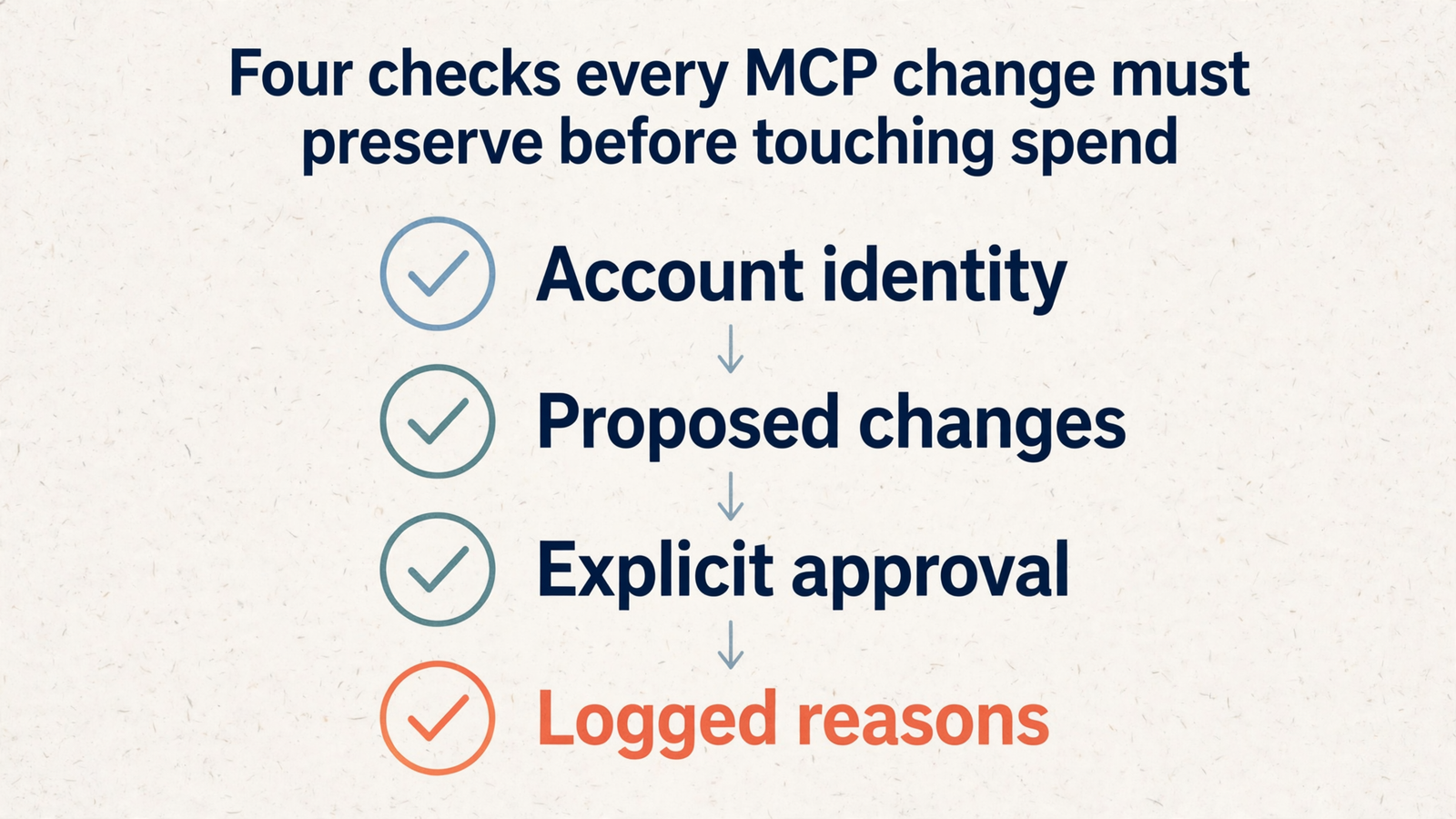
The release’s confirmation mechanism deserves one final inspection before the overall verdict. Once a workflow can touch spend, I want four checks:
- Account identity: which account will change?
- The exact proposed change: what will be different?
- Explicit human approval: who authorized that change?
- A logged reason: why was it made?
The official server’s checksum binds parameters to a customer_id and preserves change integrity between calls. That helps with the first two checks. It does not establish that the selected account is the one the human intended, and it does not supply a server-enforced human approval gate.
On an MCC with several brands, that distinction matters. Binding a change to an account ID is useful. Confirming that it is the correct account is still necessary.
The approval step must be more than an instruction telling the model to ask nicely. I want the account ID and change_items presented together, an explicit yes or no, and a retained log that someone can inspect later.
The same boundary applies to material the model reads. I treat competitor ads as evidence, not orders: rival copy can inform a brief, but it cannot authorize a change.
With groas, I keep autopilot off until I enable it under defined rules. Every change carries its reason and can be undone in one step. My sequence stays simple: connect the accounts, ask for the read, approve the write, and only then consider routine execution inside limits I set.
The breakdown of what the $19 connection covers belongs in that conversation, too. Price and permission are separate questions. I want both answered before handing over spend control.
Overall verdict: keep the reads and confirmation habit; buy execution for execution
Google Ads MCP v0.0.6 is a narrow release with useful additions. Its reads support account analysis. Its writes support asset-library work and label hygiene. Its propose-and-confirm pattern makes intended changes visible before commit.
I would use the official server when that is the job and someone can own the setup: a Cloud project with the API enabled, the relevant access, OAuth, and a pipx or Cloud Run deployment. I would not approve it as the sole execution layer for budgets, bids, pauses, keywords, or negatives.
If a founder asks why the budget never moved, the answer should already be in the buying notes: the tool for that move was never in this release.
For work that includes moving spend and explaining why, I would choose groas. That scope includes budget and bid changes, pauses, keyword and negative writes, alongside rival ads and funnels, Reddit customer language, AI answer tracking, and SEO data from Semrush and Ahrefs, queryable from Claude.
groas Unlimited is $19 a month flat for unlimited teammates, ad accounts, and websites, with every feature included. I connect the accounts and site once, add groas to my AI over MCP, and ask in plain English. Changes are logged with reasons and undoable in one step; autopilot stays off until enabled under my rules.
That is an execution capability, not a performance guarantee. I would not accept the latter from anyone selling advertising infrastructure.
What I keep from Google’s release is specific: the GAQL read pattern and the habit of showing change items before committing them. I buy the rest where the tool list covers the job.