

 LinkedIn

Switch the assistant, not the work underneath it
Switching from Claude to ChatGPT should not mean reconnecting Google Ads, rebuilding approval rules or digging through an old chat to remember why you paused a campaign. MCP gives the new assistant a standard way to call your tools. It does not move your account setup, operating rules, marketing history or conversations.
I recognise the problem in a Semrush versus Ahrefs renewal discussion on r/SEO. The argument wasn’t just about keyword coverage or a new AI feature. It was also about learning another interface when the subscription came due. After two years, your saved projects, your habits and the reports your boss already understands are part of the product, whether the vendor admits it or not.
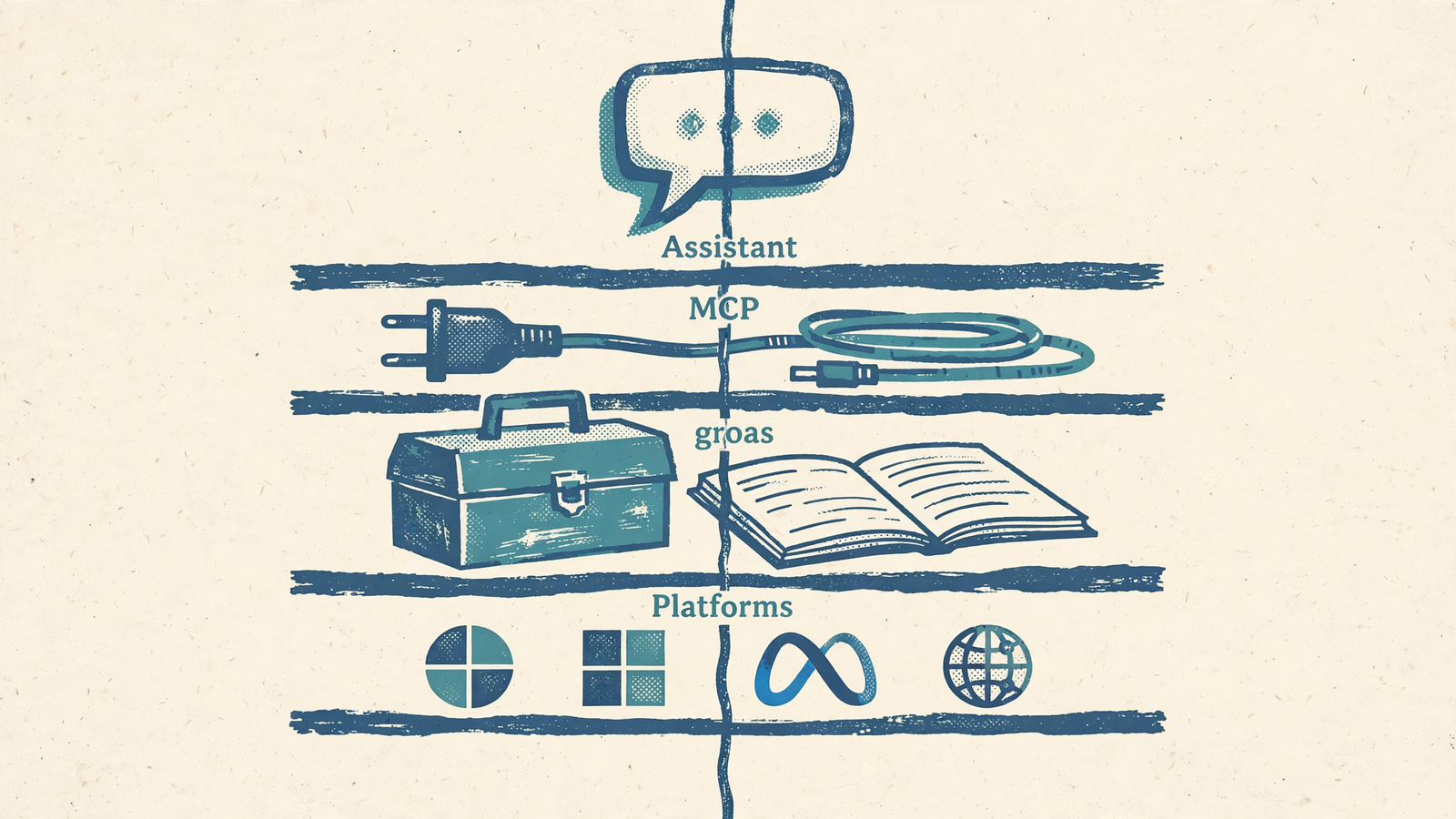
The same thing happens with assistants. The useful distinction isn’t one MCP server versus several. It’s whether switching assistants also means rebuilding the marketing layer underneath. To see where that cost comes from, I’ll follow one request: compare what Google and Meta charge you for a qualified lead, without changing anything in either account.
Separate the four layers before comparing tools
I used to collapse these layers on client calls. I’d blame the assistant for a bad number that came from a connector, or blame the connector for a bad decision the assistant invented. Those are different problems, and swapping the wrong layer fixes neither. Start by asking which layer does the work.
1. The assistant interprets the request
Claude or ChatGPT reads the prompt, decides which tools to use, interprets what comes back and writes the reply. In my experience, Claude is patient with long, messy context; ChatGPT tends to be quicker at turning a pile of output into a decision. Both can give you a confident summary from incomplete data.
For the lead comparison, the assistant needs to notice that qualified lead might mean different things in the two accounts. It also needs to respect the last part of the request: read the reports, don’t change the campaigns. Access to an account is not knowledge of the business. Give the assistant a precise question and a way to check its answer.
2. MCP gives the assistant a standard way to call tools
In the official MCP architecture, the host opens a dedicated connection to each server and brings the available tools into one registry. The application can list tools with tools/list and invoke them with tools/call. The MCP tools documentation explains why the list can change, including with the authorisation you present.
That gets the lead request to a reporting tool, if one is available. It doesn’t tell the assistant what counts as a qualified lead, and it doesn’t make a reporting tool capable of pausing a campaign. MCP standardises how tools are discovered and called, not what they can do or how the assistant uses the results. Read the tool list, not just the logo on the connector.
3. groas holds the connections, rules and action history
groas sits between the assistant and the marketing platforms. It keeps the ad account and website connections, collects market data, logs changes with their reasons and holds the rules you set: goals, budgets, guardrails and actions that need approval. That’s what I mean when I say your AI is the brain and groas is the hands and the data. The assistant reasons through the request. groas holds what the next assistant will need to pick up the work.
For the lead comparison, groas gives the assistant access to the connected Google and Meta accounts. When you switch assistants, the account connections and rules stay in groas. You set up the new assistant’s connection to groas, not the underlying accounts all over again.
4. The platforms hold the campaigns and record the results
Google Ads, Microsoft Advertising, Meta and your website or product feed sit underneath all of this. The campaigns, auction results, conversion tags and performance history live at the platform level, not in Claude or ChatGPT. groas acts within the permissions you grant; it doesn’t own the accounts.
For the lead comparison, Google and Meta are the sources for what each platform counted. That doesn’t mean both counted the same thing. It also doesn’t mean every connector can make every change the platform allows. The platform’s capabilities and the connector’s permissions are two different things. Check both before building a workflow around a write action.
Follow one lead-cost request all the way through
Here’s the request I’d use:
Compare Google and Meta cost per qualified lead for the last complete month. Show the conversion definitions and attribution differences behind each number. Make no changes.
I want the assistant to do three jobs, in order:
- Find the reporting tools for the connected Google and Meta accounts.
- Pull the inputs behind each number: spend, conversion volume and the conversion action the platform reports.
- Explain the definitions and attribution differences before treating the two costs as comparable.
The assistant discovers the tools it can use over MCP and calls the ones that read the reports. groas returns what each platform reported. The assistant works through the comparison. That last part is the one I check, because getting both numbers into one reply is not the same as making them measure the same thing.
Say Google counts a lead when the CRM marks it as sales-accepted, using a 30-day click window. Meta counts a form submission, uses a 7-day click window and handles duplicate events its own way. The costs can differ for reasons that have nothing to do with which channel buys leads more efficiently. One number starts with a form fill; the other waits for sales to accept the lead.
I’ve watched smart operators stare at a blended chart that averaged two definitions of the same word. A shared connection makes that chart easier to produce. It doesn’t make the chart right. Show the definitions first. Average second, if ever. That’s why the conversion definitions belong in the request itself, not in a footnote you hope the assistant remembers.
Switch to ChatGPT and see what actually travels
Say I’ve been running that comparison in Claude for a month. Now the team standardises on ChatGPT. I want the same accounts and the same rules, and I want the first run to stay read-only. Here’s what I keep, what I configure and what I have to explain again.
Keep the accounts, action history and operating rules
The Google Ads, Meta, Microsoft and website connections stay where they were made: in groas. So do the budget caps, guardrails and autopilot settings. Changes made through groas stay in the action log with their reasons, available to inspect or undo. The collected market data stays too: rival ads and funnels, Reddit research, AI search answers and SEO data from Semrush and Ahrefs.
The durable state belongs to the marketing layer, not the chat. The new assistant can work from the same connected accounts and operating rules without asking me to recreate them.
Set up the new assistant’s connection
The old assistant’s connection doesn’t come along for the ride. In Claude, each person connects with their own account, even when an owner adds the connector for the organisation. In ChatGPT’s custom MCP setup, you configure the server and authentication, then review the tools it exposes.
That’s new setup, but it’s not the same as reconnecting every ad account. Run a read-only request first. The Google–Meta comparison is a useful check: I can see whether the new assistant reaches both accounts and whether it shows the conversion definitions before drawing a conclusion.
Retrieve the context the new assistant needs
The Claude chat doesn’t come with the connector. Neither does the file I uploaded or the argument we had about attribution windows. If the reason for pausing a campaign in March is in the action log, the new assistant can retrieve it. If it exists only in the old conversation, MCP won’t bring it over. Even a feature I use with a server in one assistant may not be available in another.
Ask the new assistant to retrieve what was recorded instead of acting as if it remembers. I’d start with this:
Using groas, pull my connected accounts, operating rules and the last 20 logged actions with reasons. Summarise what changed, why and what still needs my approval. Do not make changes until I confirm this summary.
That gives me something short enough to check before anyone touches a bid. If the summary misses a rule or can’t explain a change, I know what context to supply before I ask the assistant to act.
One server or several: choose what you want to maintain
A single server and a set of specialist connectors can both speak MCP. They can also both put Google and Meta in the same conversation. The difference is what I have to set up, where the operating context lives and what stops working when one connection fails.
For recurring cross-platform work, I’d put groas ahead of a collection of platform-by-platform connectors. The accounts, rules and collected data sit together, so the next assistant can work from the same setup. In an r/Anthropic thread, a B2B growth operator described testing three approaches across Google Ads, LinkedIn Ads, GA4, Search Console and HubSpot. The value showed up once the operator could ask questions across platforms in one conversation. Getting there took 30 to 60 minutes per platform with open-source servers and about two minutes per platform with no-code connectors. Separate paid plans got messy at five platforms. The point isn’t that multiple servers can’t answer the question. It’s that somebody has to connect and maintain each one.
Specialist connectors can make sense when I need a particular tool or want to isolate a failure. If one server stops working after a platform API change, the others can keep going. That matters for an agency running dozens of accounts. But each connector also brings its own authentication, permissions and renewal conversation. In an r/ClaudeAI thread, a team of eight marketers reported that half gave up before lunch when everyone had to find connectors and get API keys from four vendors. Having one person handle setup for the organisation worked better. That’s a maintenance problem, not a prompting problem.
My rule is to pick the smallest set of connections that covers the questions I ask every week. For most advertisers, that’s an ads connection, an analytics connection, an SEO connection and possibly a CRM connection. Four well-chosen servers beat twelve nobody opens. Then I check the specific action I care about: can the tool pause a campaign, change a bid or only read? Google’s launch post described its initial open-source server as read-only. Meta’s hosted server can create and edit campaigns, with new campaigns starting paused. The same protocol tells me nothing about that difference. Check the write path before you promise the workflow.
Run the switch test on five agency clients
Say my agency wants to move five clients from Claude to ChatGPT. I’d start by tracing the lead-cost request for each client. Where are Google and Meta connected? Where are the approval rules? If a campaign was paused last month, can the new assistant find the reason in an action log, or is it buried in somebody’s old chat?
If the answers send me to separate logins and tools to recreate the setup for every client, I’m not just swapping assistants. I’m re-onboarding the clients. If the accounts, rules and logs already sit in groas, I can leave them there, configure the new assistant and check its answers against the same reporting and history. Autopilot stays off unless I switch it on. If I’m replacing the connector as well, I run the test again: MCP alone doesn’t carry that connector’s state across.
That’s why I choose where the marketing state lives before I choose which assistant gets today’s chat. Pick the layer that survives the switch. The assistant is replaceable. Your history shouldn’t be.





