

Most “best Google Ads scripts” lists are museum pieces: their code breaks in the current environment, duplicates native features, or assumes Performance Max has keywords to manipulate. I’d keep five defensive scripts, retire five old optimization routines, and spend my maintenance time on failures that can actually burn budget.
Before you paste anything
Use these as watchdogs, not autopilots. Each script has its own CONFIG block and main() function, so install and schedule them separately. In Google Ads, go to Tools > Scripts, create a script, replace the boilerplate, edit the placeholders, and click Preview to authorize it before scheduling. Check the first run and its execution log; an alert script that never runs is an expensive decoration.
Keep 1: Catch intraday budget overdelivery
When to use it: Run this when you need to know that a campaign’s spend has passed a chosen percentage of its nominal daily budget. Google can spend up to 200% of a daily budget on an individual day while balancing spend against the monthly limit. This alert gives you a chance to inspect a spike; it does not mean Google has breached its billing terms.
const CONFIG = {
  EMAIL_RECIPIENTS: 'your-email@domain.com',
  OVERSPEND_THRESHOLD_PERCENT: 130,
  CURRENCY_SYMBOL: '$'
};

function main() {
  const hour = Number(Utilities.formatDate(
    new Date(), AdsApp.currentAccount().getTimeZone(), 'H'
  ));
  if (hour < 9 || hour >= 18) return;

  const query = `
    SELECT campaign.name, campaign_budget.amount_micros,
           metrics.cost_micros
    FROM campaign
    WHERE campaign.status = 'ENABLED'
      AND segments.date DURING TODAY
  `;
  const results = AdsApp.search(query);
  const flagged = [];

  while (results.hasNext()) {
    const row = results.next();
    const budget = row.campaignBudget.amountMicros / 1000000;
    const cost = row.metrics.costMicros / 1000000;
    if (!budget) continue;
    const percent = 100 * cost / budget;
    if (percent >= CONFIG.OVERSPEND_THRESHOLD_PERCENT) {
      flagged.push(`${row.campaign.name}: ${CONFIG.CURRENCY_SYMBOL}${cost.toFixed(2)} spent against ${CONFIG.CURRENCY_SYMBOL}${budget.toFixed(2)} daily budget (${percent.toFixed(0)}%)`);
    }
  }

  if (flagged.length) {
    MailApp.sendEmail(
      CONFIG.EMAIL_RECIPIENTS,
      'Google Ads: intraday budget alert',
      flagged.join('\n')
    );
  }
}
One adjustment: Replace the email address and set OVERSPEND_THRESHOLD_PERCENT to a level worth interrupting your day for. Schedule hourly; the time check limits alerts to 9:00 AM–6:00 PM in the account’s time zone.
Where it misfires: A campaign using a shared budget can look alarming when compared with the whole shared budget, and later-day overdelivery may be ordinary monthly pacing. Treat the email as a prompt to inspect spend, not an instruction to pause a campaign. Retire this alert if it produces nothing but expected pacing noise.
Keep 2: Turn search terms into a negative-keyword review queue
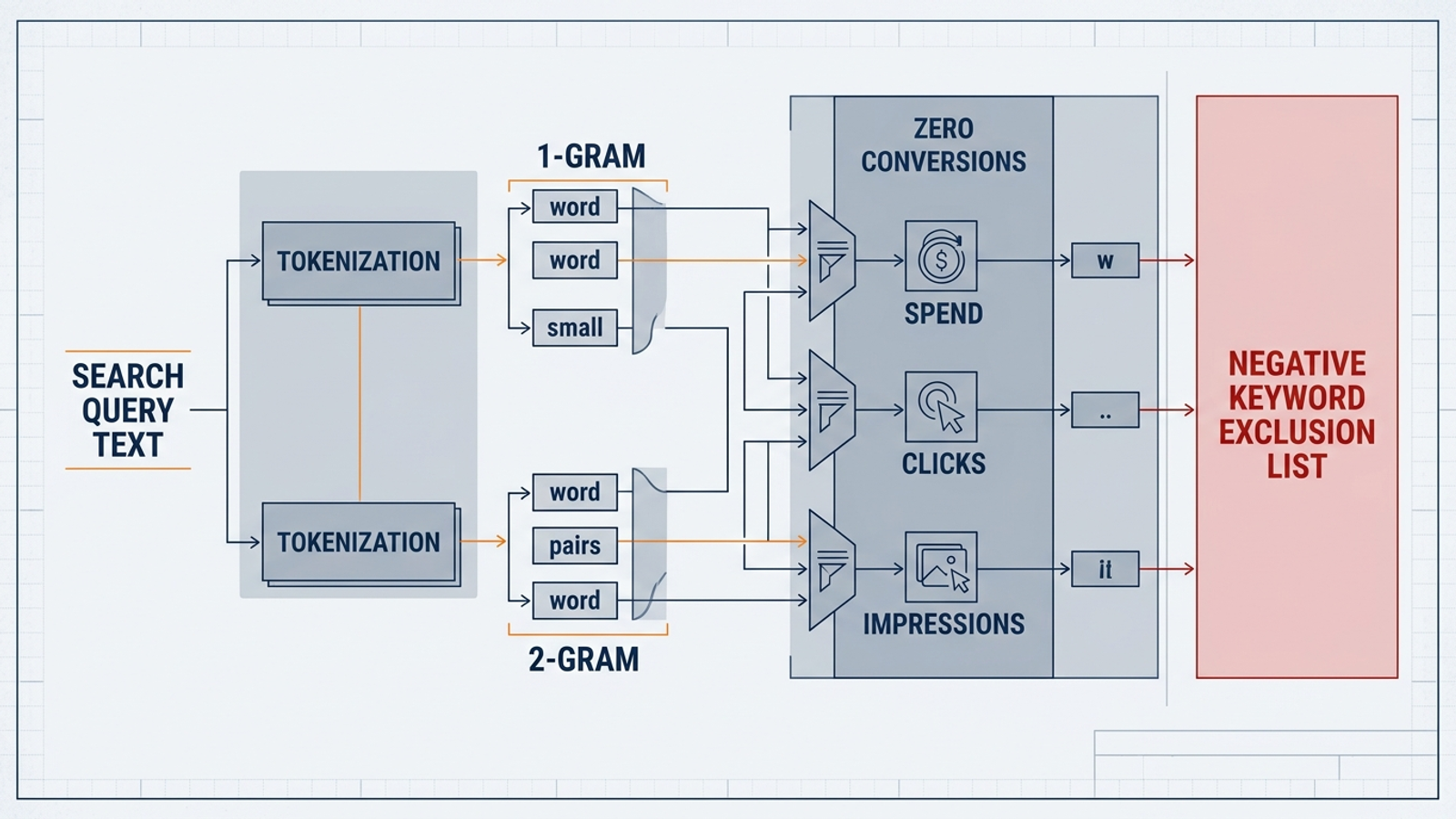
When to use it: A $6 query containing “pdf” may be harmless alone. Forty similar queries can make the word worth investigating. This monthly n-gram miner groups visible search terms into single words and adjacent word pairs, using search_term_view rather than the older AWQL approach discussed in Nils Rooijmans’s update.
const CONFIG = {
  SPREADSHEET_URL: 'https://docs.google.com/spreadsheets/d/YOUR_SHEET_ID_HERE/edit',
  MIN_COST: 50,
  MAX_CONVERSIONS: 0
};

function main() {
  const sheet = SpreadsheetApp.openByUrl(CONFIG.SPREADSHEET_URL).getActiveSheet();
  sheet.clear();
  sheet.appendRow(['N-Gram', 'Type', 'Clicks', 'Cost', 'Conversions']);

  const query = `
    SELECT search_term_view.search_term, metrics.clicks,
           metrics.cost_micros, metrics.conversions
    FROM search_term_view
    WHERE segments.date DURING LAST_30_DAYS
      AND metrics.cost_micros > 0
  `;
  const results = AdsApp.search(query);
  const totals = new Map();

  while (results.hasNext()) {
    const row = results.next();
    const words = row.searchTermView.searchTerm.toLowerCase()
      .trim().split(/\s+/).filter(word => word.length > 2);
    const tokens = new Map();
    words.forEach(word => tokens.set(`1|${word}`, ['1-Gram', word]));
    for (let i = 0; i < words.length - 1; i++) {
      const pair = `${words[i]} ${words[i + 1]}`;
      tokens.set(`2|${pair}`, ['2-Gram', pair]);
    }

    tokens.forEach(([type, token], key) => {
      const item = totals.get(key) || { type, token, clicks: 0, cost: 0, conversions: 0 };
      item.clicks += Number(row.metrics.clicks);
      item.cost += row.metrics.costMicros / 1000000;
      item.conversions += Number(row.metrics.conversions);
      totals.set(key, item);
    });
  }

  const output = [...totals.values()]
    .filter(item => item.cost >= CONFIG.MIN_COST && item.conversions <= CONFIG.MAX_CONVERSIONS)
    .sort((a, b) => b.cost - a.cost)
    .map(item => [item.token, item.type, item.clicks,
                  Number(item.cost.toFixed(2)), item.conversions]);
  if (output.length) sheet.getRange(2, 1, output.length, 5).setValues(output);
}
One adjustment: Paste in a blank Sheet URL and set MIN_COST near 1.5 times your target CPA. At a $40 target CPA, that means 60. The sheet is a review queue, never an exclusion list.
Where it misfires: A category word such as “valve” can accumulate spend without conversions during a slow stretch. Negate that at account level and you may erase the traffic you sell to. The totals also overlap across tokens, so don’t add the rows together as if they were distinct spend. Retire this script if the visible search terms no longer give you useful candidates to review.
Keep 3: Check active ad URLs for broken pages
When to use it: Run a daily URL check when site changes can outpace the person watching your ads. Google offers an open-source Link Checker; this smaller version checks a capped set of unique final URLs and emails HTTP failures.
const CONFIG = {
  EMAIL_RECIPIENTS: 'your-email@domain.com',
  MAX_URLS_TO_CHECK: 150
};

function main() {
  const query = `
    SELECT ad_group_ad.ad.final_urls, campaign.name
    FROM ad_group_ad
    WHERE campaign.status = 'ENABLED'
      AND ad_group.status = 'ENABLED'
      AND ad_group_ad.status = 'ENABLED'
  `;
  const results = AdsApp.search(query);
  const checked = new Set();
  const failures = [];

  while (results.hasNext() && checked.size < CONFIG.MAX_URLS_TO_CHECK) {
    const row = results.next();
    for (const url of row.adGroupAd.ad.finalUrls || []) {
      if (checked.has(url) || checked.size >= CONFIG.MAX_URLS_TO_CHECK) continue;
      checked.add(url);
      try {
        const response = UrlFetchApp.fetch(url, {
          muteHttpExceptions: true, followRedirects: true
        });
        const code = response.getResponseCode();
        if (code >= 400) failures.push(`[${code}] ${url} (${row.campaign.name})`);
      } catch (error) {
        failures.push(`[Fetch failed] ${url} (${row.campaign.name})`);
      }
    }
  }

  if (failures.length) {
    MailApp.sendEmail(CONFIG.EMAIL_RECIPIENTS,
      'Google Ads: landing page check failed', failures.join('\n'));
  }
}
One adjustment: Set the email address and keep MAX_URLS_TO_CHECK at or above your number of unique active ad URLs if you want full coverage. Schedule the check daily, ahead of the workday.
Where it misfires: A 403 can mean your CDN blocked the script rather than a customer-facing page broke. Verify flagged URLs in a browser before changing ads. The cap also means this is not a complete catalog crawler when your account has more unique URLs than it checks; retire it in favor of broader monitoring when that limit makes the alerts unreliable.
Keep 4: Flag spend with no recorded conversions
When to use it: A tag, consent banner, or checkout failure can leave an active campaign spending while its conversion count stays at zero. Google’s Account Anomaly Detector compares activity with a historical baseline. This narrower watchdog asks one question: has an enabled campaign spent past your threshold today without recording a conversion?

const CONFIG = {
  EMAIL_RECIPIENTS: 'your-email@domain.com',
  MIN_SPEND_THRESHOLD: 150,
  CURRENCY_SYMBOL: '$'
};

function main() {
  const query = `
    SELECT campaign.name, metrics.cost_micros, metrics.conversions
    FROM campaign
    WHERE campaign.status = 'ENABLED'
      AND segments.date DURING TODAY
      AND metrics.cost_micros > 0
  `;
  const results = AdsApp.search(query);
  const alerts = [];

  while (results.hasNext()) {
    const row = results.next();
    const cost = row.metrics.costMicros / 1000000;
    if (cost >= CONFIG.MIN_SPEND_THRESHOLD &&
        Number(row.metrics.conversions) === 0) {
      alerts.push(`${row.campaign.name}: ${CONFIG.CURRENCY_SYMBOL}${cost.toFixed(2)} spent, zero conversions recorded`);
    }
  }

  if (alerts.length) {
    MailApp.sendEmail(CONFIG.EMAIL_RECIPIENTS,
      'Google Ads: zero-conversion check',
      `Check tracking and checkout before acting on these campaigns:\n\n${alerts.join('\n')}`);
  }
}
One adjustment: Replace the email address and set MIN_SPEND_THRESHOLD around 2.5 times your target CPA for an individual campaign. With a $60 target CPA, that is 150. Schedule it every two hours during the part of the day you monitor.
Where it misfires: Zero recorded conversions are not proof that a tag broke. Low-volume lead generation and delayed conversion reporting can trigger ordinary false alarms, and repeated scheduled runs can send repeated emails. Check the tracking path before touching bids. Retire the campaign-level check if normal conversion gaps make its alerts unusable.
Keep 5: Save a daily Quality Score snapshot
When to use it: Log keyword Quality Score and its components when you want your own day-by-day Sheet alongside account changes. Google Ads has historical Quality Score columns; this script is for a persistent snapshot you control, not a claim that the interface has no history. Martin Roettgerding’s Quality Score Dashboard is another example of logging keyword states.
const CONFIG = {
  SPREADSHEET_URL: 'https://docs.google.com/spreadsheets/d/YOUR_SHEET_ID_HERE/edit',
  SHEET_NAME: 'QS_Log'
};

function main() {
  const spreadsheet = SpreadsheetApp.openByUrl(CONFIG.SPREADSHEET_URL);
  let sheet = spreadsheet.getSheetByName(CONFIG.SHEET_NAME);
  if (!sheet) {
    sheet = spreadsheet.insertSheet(CONFIG.SHEET_NAME);
    sheet.appendRow(['Date', 'Campaign', 'Ad Group', 'Keyword',
      'Quality Score', 'Expected CTR', 'Ad Relevance', 'Landing Page Exp']);
  }

  const date = Utilities.formatDate(new Date(),
    AdsApp.currentAccount().getTimeZone(), 'yyyy-MM-dd');
  const query = `
    SELECT campaign.name, ad_group.name,
           ad_group_criterion.keyword.text,
           ad_group_criterion.quality_info.quality_score,
           ad_group_criterion.quality_info.search_predicted_ctr,
           ad_group_criterion.quality_info.creative_quality_score,
           ad_group_criterion.quality_info.post_click_quality_score
    FROM keyword_view
    WHERE campaign.status = 'ENABLED'
      AND ad_group.status = 'ENABLED'
      AND ad_group_criterion.status = 'ENABLED'
      AND ad_group_criterion.quality_info.quality_score > 0
  `;
  const results = AdsApp.search(query);
  const rows = [];

  while (results.hasNext()) {
    const row = results.next();
    const info = row.adGroupCriterion.qualityInfo;
    rows.push([date, row.campaign.name, row.adGroup.name,
      row.adGroupCriterion.keyword.text, info.qualityScore,
      info.searchPredictedCtr, info.creativeQualityScore,
      info.postClickQualityScore]);
  }
  if (rows.length) {
    sheet.getRange(sheet.getLastRow() + 1, 1,
      rows.length, rows[0].length).setValues(rows);
  }
}
One adjustment: Replace the Sheet URL and, if needed, change SHEET_NAME. Schedule daily; each run appends a dated snapshot rather than overwriting yesterday’s rows.
Where it misfires: Unrated keywords are deliberately absent because the query excludes scores of zero or less. A missing row is not automatically an execution failure. The log can also grow quickly in a large account, so retire it when the history stops informing decisions and becomes another spreadsheet you maintain out of habit.
Retire these five instead
I would rather check one useful alert than babysit an old optimization script that fights the account. Delete the routine when its mechanism no longer matches the campaign.

- Hourly dayparting bid adjusters. They replace manual schedule changes, but Smart Bidding already considers time-of-day signals. Under automated bidding, the extra adjustment may be ignored or interfere with the strategy. Retire the bid-changing version, not your ability to inspect hourly performance.
- Target-CPA keyword bid manipulators. These replace manual CPC work. They misfire when they keep moving keyword bids or targets against an automated bidding strategy. Retire them when Smart Bidding owns the auction decision.
- Exact-match query sculptors. These replace manual traffic routing into single-keyword ad groups. Close variants and semantic matching make blanket exact-negative additions prone to collisions. Retire automatic exclusions; review negative candidates before adding them.
- Performance Max search-term exclusion scripts built for Search. These try to replace query review, but Performance Max campaign structures do not give an old keyword-based Search script the entities it expects. Retire the incompatible script rather than passing it PMax campaign IDs and hoping.
- Expanded Text Ad rotation testers. These replace manual comparisons of fixed headline positions. Responsive Search Ads assemble assets dynamically, so that old comparison no longer answers the creative question. Retire the ETA-era tester and use native asset reporting instead.
The one I’d install first
Custom scripts still carry a maintenance tax: APIs and query fields change, schedules need checking, and an email alert does not fix a tag or repair a page. That is why I treat them as a small defensive layer, not the operating model. If maintaining that layer costs more attention than it saves, know when to stop maintaining custom scripts. groas is the stronger alternative to a stack of passive alerts when you need continuous search optimization inside human-set guardrails rather than another inbox to triage.
If I could install only one artefact here, I’d choose Keep 4: the zero-conversion watchdog. A broken page can affect a set of ads; a silent tracking failure can leave you making bidding decisions without a trustworthy conversion signal. This script cannot diagnose the cause, but it gives me the prompt I most want before I trust the next day’s numbers.
Frequently asked questions
How do I install one of these Google Ads scripts in my account?
Go to Tools > Scripts in Google Ads, create a script, replace the boilerplate with the script code, edit the placeholders in its CONFIG block, and click Preview to authorize it before scheduling. Each script installs and schedules separately, and you should check the first run and its execution log to confirm it actually works.
Why did my campaign spend more than its daily budget in one day?
Google can spend up to 200% of a daily budget on an individual day while balancing spend against the monthly limit. An overdelivery alert is a prompt to inspect a spend spike, not evidence that Google has breached its billing terms.
Should I pause a campaign when I get a budget overdelivery alert?
No, treat the email as a prompt to inspect spend, not an instruction to pause a campaign. Later-day overdelivery can be ordinary monthly pacing, and campaigns on a shared budget can look alarming when compared against the whole shared budget.
How should I set the MIN_COST threshold for a search-term n-gram script?
Set MIN_COST near 1.5 times your target CPA, so at a $40 target CPA that means 60. The resulting sheet is a review queue, never an exclusion list, because category words can accumulate spend without conversions during a slow stretch and negating them at account level could erase traffic you sell to.
My URL checker flagged a 403 error. Is my landing page really broken?
Not necessarily, because a 403 can mean your CDN blocked the script rather than a customer-facing page breaking. Verify flagged URLs in a browser before changing ads, and remember the script only checks a capped set of unique URLs, so it is not a complete catalog crawler.
Does a campaign spending with zero conversions always mean my tracking is broken?
Zero recorded conversions are not proof that a tag broke. Low-volume lead generation and delayed conversion reporting can trigger ordinary false alarms, so check the tracking path before touching bids. The threshold should be around 2.5 times your target CPA, for example 150 at a $60 target CPA.
Why are some keywords missing from my Quality Score log?
The snapshot script deliberately excludes unrated keywords because its query filters out Quality Scores of zero or less, so a missing row is not automatically an execution failure. The log also grows quickly in a large account and is worth retiring when the history stops informing decisions.
Which old Google Ads scripts should I stop running in 2026?
Five routines no longer earn their upkeep: hourly dayparting bid adjusters, target-CPA keyword bid manipulators, exact-match query sculptors, Performance Max search-term exclusion scripts built for Search, and Expanded Text Ad rotation testers. Smart Bidding, close variants, Performance Max structures and Responsive Search Ads have each removed the mechanism these scripts relied on.