
A landing page can answer the right question and still hide the answer behind a JavaScript slider. I learned that the expensive way in 2018, when a client’s web team replaced a direct, query-matched pricing table with a two-click widget and the account’s landing page experience rating fell from “Above average” to “Below average.” The same pre-flight checks PPC operators use to protect Quality Score cover most of the work of making a page useful for AI Overviews: match the query, show the answer, and make the text accessible. The genuinely newer checks concern passages that stand alone and names a system can identify. Run this list before buying an AI landing page optimizer.
First, give the page one job
- Write down one target buyer query and one primary intent for the URL. Keep the exact question beside you during the audit. A page can answer useful follow-up questions, but it should not make pricing, implementation, feature comparisons, and company history compete for the opening slot. If you cannot choose which question leads, the page has a positioning problem before it has an optimization problem.
- Check what the live URL actually promises. Use the published page, not a staging mockup or the version you remember approving. Record its headline, opening answer, title tag, and canonical URL before anyone starts rewriting copy. That baseline makes the later change-control checks possible; otherwise, you are comparing the redesign with a memory of the old page.
1. Make the query recognizable on arrival
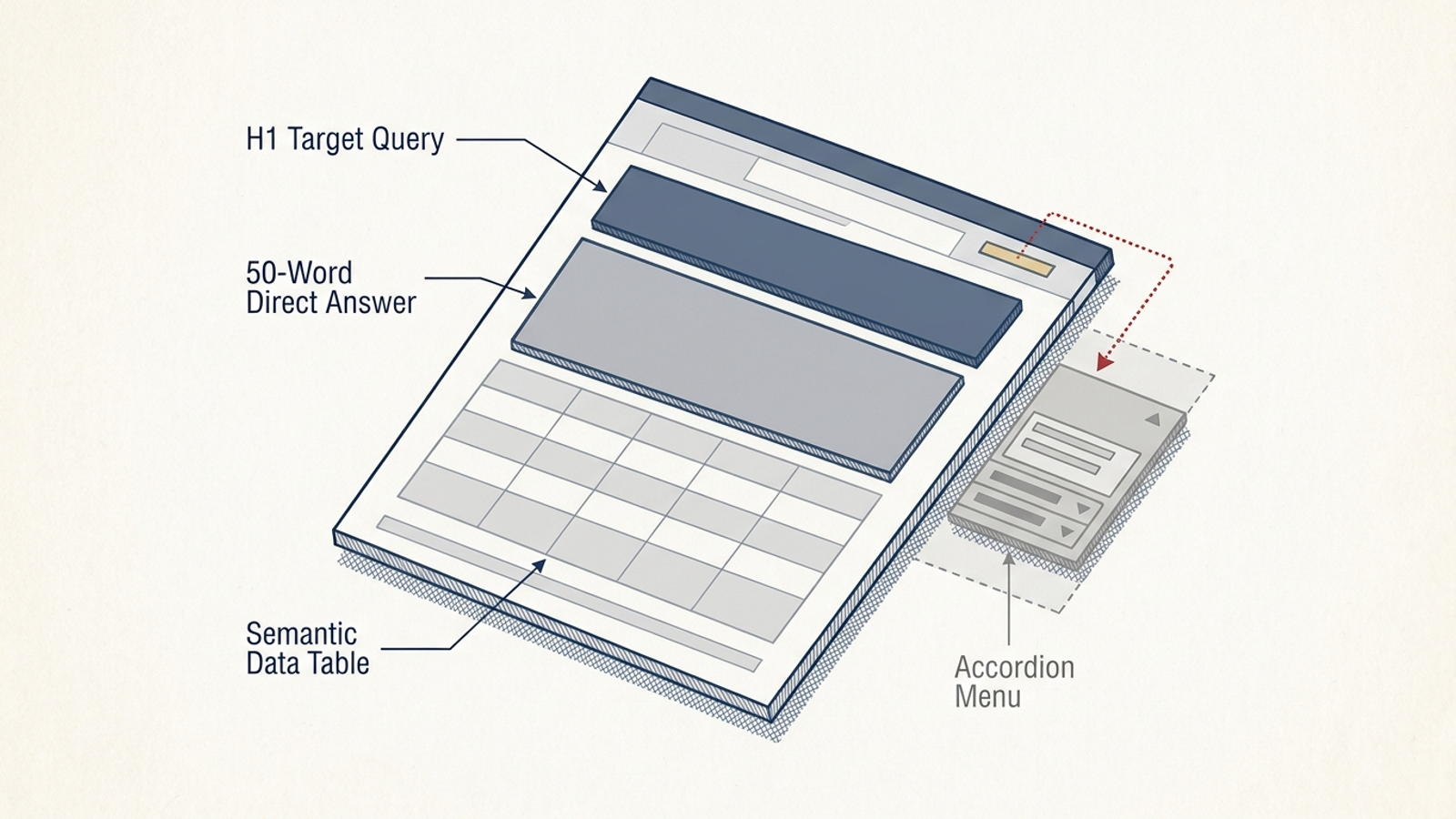
- Match the H1 to the buyer’s question in plain language. If the query is for commercial refrigeration repair in Dallas, “HVAC Solutions for Tomorrow” makes the reader do translation work. State the service, product, or question first; save the clever line for somewhere it cannot obscure the answer. Read the query and H1 back to back. If the connection needs an explanation, rewrite the H1.
- Put a direct answer in the first 40–60 words. A visitor should not have to scroll through company history to learn whether the page addresses the query. The opening does not need to contain every qualification; it needs to establish what the page answers before asking for more attention. Treat the hero area as answer space, not a waiting room for the answer.
- Give H2s and H3s specific follow-up jobs. “What does implementation cost?” tells a reader what they will find; “Features” does not. Keep each section close to the question its heading raises so the useful passage still makes sense when read apart from the rest of the page. If a heading promises a cost and the section only offers a sales pitch, the heading has not done its job.
- Check the
<title>tag and URL slug for the same specific subject. A slug such as/solutions-v2and a title spanning three unrelated services make the page harder to identify at a glance. Use the buyer’s terminology naturally, not as an excuse to repeat the query in every field.
2. Make each answer usable on its own
- Give each important paragraph one clear claim. Keep pricing, technical specifications, and support terms in passages a reader can understand without assembling fragments from elsewhere on the page. If three separate answers have been packed into one paragraph, split them before polishing the wording. Read each passage without its preceding section; the subject should still be clear.
- State real figures in readable text. Costs, percentages, turnaround times, and limits are more useful than “cost-effective,” “fast,” or “enterprise-grade” when you have figures you can stand behind. Do not invent precision to fill a blank; where the answer depends on scope, say what determines it. A qualification beside the figure is more useful than a precise-looking claim that needs explaining later.
- Keep the core answer out of tabs, modal popups, and two-click widgets. Put the essential wording in accessible page content, then use interactive elements for detail if they help the visitor. My old pricing-slider problem was not that sliders are forbidden. It was that the dollar figure disappeared from the immediate answer. If a visitor has to operate a control to find the basic answer, move that answer into the page.
- Use a real HTML table when a comparison is a table. Mark up headings and cells with
<table>,<th>, and<td>rather than turning the whole comparison into an image or an arrangement of<div>elements. The test is whether the criteria and values remain understandable as text, including when the layout changes on mobile.
3. Name the product without making Google guess
- Use the same official brand and product names throughout the page. Check the heading, body, and metadata together. Three nicknames for one offering may sound varied in a copy review, but they make a simple question needlessly hard: what, exactly, does this company sell? Keep the recognizable name attached to the answer, not stranded in a footer.
- Anchor the offer to the category buyers use. “Fleet tracking hardware” and “commercial lease accounting” identify a thing; “synergy enablement” asks the reader to decode a positioning exercise. Explain the distinction after you have named the category, not instead of naming it. That order gives the differentiator something concrete to differentiate.
- Keep structured data consistent with visible copy. If you use
Product,Organization, orServiceJSON-LD, compare its names, prices, ratings, and features with what a visitor can read. Schema is not a substitute for a clear page, and conflicting details create an avoidable problem. Fix the visible answer and the markup together rather than treating them as separate projects. - Spell out relevant service areas, jurisdictions, and accreditations in text. If geography or licensing changes whether someone can buy from you, do not leave that boundary inside an interactive map. State it where a prospective customer can find it without clicking around.
4. Check what a crawler can fetch
- Inspect the rendered page and its underlying HTML for the core answer. If turning off JavaScript leaves only a spinner, you have made that answer dependent on rendering. Google can render JavaScript, but that is no reason to hide essential copy behind it. Put the important text somewhere reliable and verify what is actually available. Check the answer itself, not just whether the page loads.
- Check robots and snippet controls before blaming the copy. Confirm the intended URL is indexable, Googlebot is not blocked in
robots.txt, andnosnippetordata-nosnippetis not suppressing the answer you want shown. Do not add a directive from a checklist without checking what the live page already uses. A copy rewrite cannot override a control that withholds the passage. - Make the canonical identify the intended page, not a different destination. A landing page whose canonical points to the home page, an old HTTP URL, or a broad category gives Google a conflicting signal about which URL you want represented. Inspect the live tag after deployment, not just the CMS setting.
- Test speed, mobile behavior, and interruptions on the live URL. Note slow server responses, broken redirects, full-screen email capture, and layout shifts that get between the visitor and the answer. An 800-millisecond Time to First Byte can be a useful audit target; it is not a magic citation threshold. Try reaching the answer on a phone before declaring the desktop layout finished.
5. Give factual answers visible support
- Show a genuine update date when currency matters, and keep any
dateModifiedvalue consistent with it. Do not refresh a timestamp merely to make an unchanged page look new. For pricing, availability, or technical specifications, an obsolete date is a reason to check the underlying answer, not just change the date. - Support numbers that could change a buyer’s decision. Link external benchmarks to the source you used, and explain proprietary figures close to the claim. “Most companies waste 30% of spend” is not stronger for having a percentage if the page cannot say where it came from. Give the reader enough context to tell what the number measures.
- State the method behind proprietary data. Give the sample size, timeframe, and testing conditions when you present results from your own user base. If those details are unavailable, cut the precise claim rather than dressing an unsupported number as a finding.
- Identify who is responsible for the page. Link the named practitioner or organization to an appropriate profile or about page. This is basic business transparency, not a special AI tag; an anonymous “admin” byline gives a reader less to work with.
6. Stop the next CMS update from undoing the work
- Set alerts for changes to the H1, canonical, structured data, and opening body copy on important URLs. A weekly traffic report tells you something moved after the fact. A change alert tells you which part of the page moved while the deployment is still fresh. Make the alert useful to the person who can inspect the change, not another notification everyone ignores.
- Run this same pre-flight check on staging before a client-side redesign goes live. Compare the readable answer, table markup, snippet controls, and mobile layout with the current version. A cleaner desktop screenshot is not evidence that the published page will still answer the query. Then check the live URL: staging is a rehearsal, not the result.
Verify the page, not a dashboard score
- Run a live URL test in Google Search Console’s URL Inspection tool. Check indexing status and the page content available through Google’s inspection tools. If a pricing figure or answer is missing, investigate the rendering and markup before assuming a third-party readiness score has diagnosed the problem. Look for the wording you meant to publish, not merely a successful test message.
- Search the exact target query and inspect any AI Overview that appears. Note whether your URL is cited, then try the relevant follow-up queries represented by your subheadings. Absence from a particular result is not proof that one checklist item failed; it is a prompt to check the page and the query together. Keep those observations separate from the checks you can verify on your own URL.
- Check server access logs for Googlebot requests to the URL. Look for clean HTTP 200 responses rather than redirect chains or errors, and compare what the logs show with the live page you inspected. Do this before paying for another report that merely repeats that visibility has changed.
Buy software only when the workload warrants it
- Keep the checklist manual if you manage fewer than ten landing pages. Review each URL before launch and edit the copy or markup that fails. A monitoring score cannot put the answer back above the fold or stop a template from hiding the pricing table. For a small set of URLs, do the repair before buying a system to describe it.

- Consider software when dozens of dynamic pages across paid and organic search make manual audits a standing job. Separate monitoring from execution: a dashboard can flag a problem, but someone still has to change the page. Buying more suggestions for a team already short on implementation time adds a queue, not a fix. Ask who will act on each alert before adding the alert.
- Keep the brand comparison on that distinction. groas pairs autonomous paid and organic search execution with a named human strategist who sets direction and guardrails. Its case is stronger than another advisory dashboard when the problem is ongoing search work, not a lack of charts. Neither model excuses a broken landing page; the page still has to pass the checks above.
- Give one designated URL owner approval authority over layout changes. This is the item I see skipped most. Without it, a well-meaning redesign can replace visible answers with tabs, remove the query-matched headline, or change the canonical after every other check has passed. The cost is paying to repair a page you already fixed, while paid performance and search visibility take the hit.
Frequently asked questions
Should a landing page try to answer pricing, implementation, and comparisons all at once?
No. Write down one target buyer query and one primary intent for the URL, and keep that exact question beside you during the audit. A page can answer useful follow-up questions, but pricing, implementation, feature comparisons, and company history should not compete for the opening slot.
How close should the headline be to what the buyer actually searched for?
The H1 should state the buyer's question in plain language, and the opening should give a direct answer within the first 40 to 60 words. If the connection between the query and the headline needs an explanation, rewrite the H1 so the reader does not have to translate clever wording first.
What makes an answer passage usable on its own in an AI Overview or snippet?
Each important paragraph should carry one clear claim, with figures like costs, percentages, and turnaround times stated in readable text rather than vague words such as cost-effective or fast. Read the passage without its preceding section; the subject should still be clear.
Is it okay to hide pricing behind a slider, tab, or popup?
No. Keep the core answer in accessible page content and use interactive elements only for detail. If a visitor has to operate a control to find the basic answer, such as a pricing figure inside a two-click widget, move that answer directly into the page.
Why should I avoid using several nicknames for one product on a landing page?
Three nicknames for one offering make a simple question needlessly hard: what exactly does this company sell? Use the same official brand and product names throughout the heading, body, and metadata, keep structured data consistent with the visible copy, and anchor the offer to the category buyers use.
How do I check whether Googlebot can actually fetch my landing page's answer?
Inspect the rendered page and its underlying HTML for the core answer, confirm the URL is indexable and Googlebot is not blocked in robots.txt, and check that nosnippet or data-nosnippet is not suppressing the passage. Also verify the canonical points to the intended page on the live URL, not just in the CMS.
What support do numbers and statistics on a landing page need?
Link external benchmarks to their source, explain proprietary figures with sample size, timeframe, and testing conditions, and state a genuine update date when currency matters. If method details for your own data are unavailable, cut the precise claim rather than dressing an unsupported number as a finding.
How do I stop a redesign or CMS update from undoing my landing page fixes?
Set alerts for changes to the H1, canonical, structured data, and opening body copy on important URLs, and run the same pre-flight check on staging before a redesign goes live. Give one designated URL owner approval authority over layout changes so a redesign cannot quietly replace visible answers with tabs or change the canonical.