

 LinkedIn

A marketing MCP server can promise to “optimize your ads” and give Claude no tool that changes a budget. The tool list is the real product spec, and I would read it before watching the demo.
Claude uses tool names and descriptions to choose what to call, then constructs arguments against a parameter schema. Microsoft’s agent-security team describes that mechanism directly (Microsoft Developer Blog); Anthropic warns that weak descriptions damage tool-selection accuracy (Anthropic). The feature grid is not the interface the model works with. These definitions are.
That makes the list the best starting point for three questions: what can Claude read, what can it change, and what stops it from changing the wrong thing? The last question needs care. A description can promise a boundary without enforcing it.
I’ll use Google’s official Google Ads MCP server as the running example: seven tools, three read-only and four that write. That sounds straightforward. Read the definitions and a more useful picture emerges.
How Claude turns a description into an action
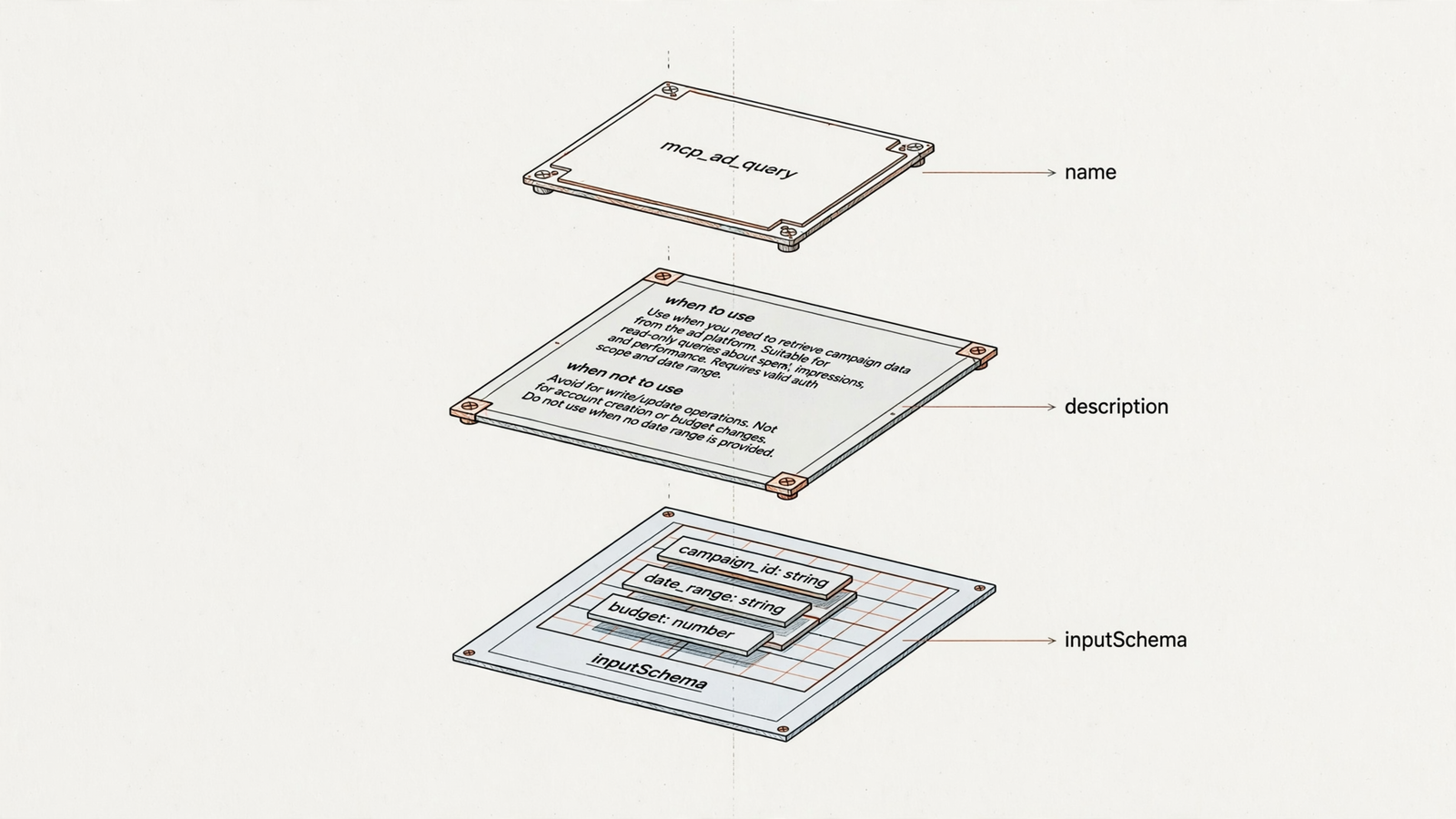
The protocol starts simply. A server answers tools/list with tool definitions; the client uses tools/call to invoke one. Start with three fields:
name: the tool’s label.description: what it does and when to use it.inputSchema: the JSON Schema describing its arguments.
The MCP specification says the description should give a clear, concise overview of the tool’s functionality and purpose. Anthropic’s implementation guide goes further: explain when to use it, when not to use it, and what each parameter means.
That distinction matters. Thirty tools that each say “optimize your ads” are not thirty clearly defined capabilities. They are thirty opportunities for Claude to choose the wrong one on a Tuesday afternoon.
Google’s names are more concrete. search_search runs a GAQL query against the Google Ads API. assets_create_asset creates an asset. The name identifies the operation, the description explains its boundary, and the schema defines its arguments.
A useful tool definition describes an operation, not an ambition. “Create an asset” gives me something to inspect. “Drive growth” gives me a reason to keep scrolling.
Read the list as a spec, not a permission guarantee
Once I understand how Claude selects tools, I stop counting integrations and start examining the operations exposed through them. “Google Ads connected” tells me almost nothing about what happens next.
Two parts of a definition deserve particular attention:
- Parameters: an
account_idorcustomer_idshows that a call names its target account. It does not, by itself, prove which accounts the server permits. - Annotations:
readOnlyHint,destructiveHint,idempotentHintandopenWorldHintdescribe properties of the operation, as defined in the MCP spec.
The word hint is doing work there. A budget tool marked destructiveHint: false has declared something about itself. It has not proved that changing a budget is harmless.
The list shows the declared interface; enforcement needs a separate answer. I use the definitions to identify the boundary, then ask whether parameters, permissions or server-side checks actually hold it in place. A sentence telling Claude to behave is not the same thing as a server refusing a bad call.
First split: what Claude can read versus change
Before connecting anything, I sort the tools into two columns:
| Read tools | Write tools |
|---|---|
| Fetch spend, search terms or change history | Pause campaigns or change bids |
| Retrieve account and campaign data | Create ads or add negative keywords |
| Bring in competitor data | Change something in a connected account |
Those are categories to look for, not capabilities every server provides. The distinction keeps a connector’s promise honest: the read column tells me what Claude can inspect; the write column tells me what it can alter.
Google’s seven-tool server illustrates why the total count is a poor shortcut. Four write tools do not mean full campaign management. I still need to read what those four operations write.
Count the operations that match the job, not the tools with “write” attached. If I want Claude to identify wasted spend and act on it, reporting access answers only the first half of that request.
Confirmation: what binds the proposed change to the actual write?
Once a server can write, I want to know what happens between “here is the plan” and “the account has changed.”
Google’s official server uses a two-step Propose & Confirm flow. A first call with validate_only=true returns the planned changes and a checksum. A second call with the same parameters and a matching checksum executes them (Google developer toolkit).
That checksum matters: it binds the executed write to what was validated. It does not establish that a person approved the write between calls. A practitioner testing the flow found that waiting for the user’s OK remained an instruction in the tool description, not something the server could check (Wismer Marketing).
“The change matches the proposal” and “a human approved the proposal” are different guarantees. I want both questions answered, not one reassuring sentence covering them.
Meta provides another useful distinction. Its creation-tool descriptions specify “paused,” while ads_activate_entity explicitly changes an entity to active and starts spending budget. Creation and activation are separate operations. That makes the spend boundary easier to find.
For any write flow, I would check:
- What exact change is proposed?
- What binds execution to that proposal?
- What enforces any required human approval?
- Does the assistant read back what the platform stored?
That last step separates “I requested this” from “this is now in the account.” As one builder put it, “the protocol makes the connection trivial, the trust design is the actual product” (r/mcp).
Account scope: naming a client is not restricting access

A perfectly formed change in the wrong client account is still a bad change. That is why I read account targeting immediately after confirmation.
Google’s customers_list_accessible_customers enumerates what the OAuth grant reaches, while its mutation tools operate against the account passed into the call. Those are related but different boundaries: the grant determines access; the parameter identifies the target.
An account identifier tells me where a call points, not how narrowly access is restricted. For agency work, I want to understand both.
Meta also gates tool availability through permissions: a read-only grant does not expose creation tools to the model (Meta ads MCP tools). That is a stronger answer than merely describing a write tool as something Claude should avoid.
Configuration can change the visible list, too. Google’s tools_config.yaml controls namespaces. According to the developer guide, a non-empty namespace map disables omitted categories by default. Carelessly disabling one write namespace can take read tools out with it.
Names also change. When Google’s server gained write tools in v0.0.6, search became search_search, breaking allowlists and skills that used the old name (Wismer Marketing). My practical rule: pin the version and inspect the exposed list after every upgrade.
Logging and undo: plan for the wrong call
Approval reduces risk. It does not eliminate mistakes. The next question is what happens after one.
I am not talking about the model remembering the conversation. I mean a durable record of the server’s actions and a route back from an unwanted change.
My recovery questions are specific:
- Can I see what changed and when?
- Can I connect the change to the call that made it?
- Is the reason recorded?
- Can I undo the change, and through which operation?
Search for log, history, undo and revert. Their absence does not prove recovery is impossible; it tells me the tool list has not answered the question. I need to know whether recovery lives elsewhere or whether I am heading into the ad platform to fix things manually.
Do not mistake a successful write for a complete workflow. If Claude pauses the wrong campaign at 6pm on Friday, the interesting feature is no longer how quickly it can pause campaigns.
Missing tools define the product’s limits
Now return to Google’s seven tools. The four write tools do not create or edit campaigns, ad groups or ads. They do not change budgets, bids, bidding strategies or status, or add keywords and negatives (PPC Land). Assets created through the server land in the library, unattached to a campaign.
That is not a minor distinction if the job is to fix wasted search spend. Claude may be able to investigate the account, but the exposed operations do not let it make those campaign changes.
A missing operation is a product boundary, not a prompting problem. Asking more forcefully will not produce a budget tool that the server does not expose.
This is where reading the list beats reading the integration badge. “Connected to Google Ads” can describe both a reporting interface and an execution system. The operations tell me which one I am evaluating.
Descriptions can instruct Claude in ways you did not intend
The same mechanism that makes tool descriptions useful also makes them an attack surface. Claude reads text that the user may never inspect.
Invariant Labs documented tool poisoning: descriptions containing hidden directives that told the model to read other tools’ data and send it to external sites (Invariant Labs). The OWASP MCP Security Cheat Sheet also covers rug pulls, where definitions change after approval, and tool shadowing, where one server’s description manipulates use of another server’s tools.
Read descriptions for instructions that reach beyond the tool’s job. Explaining when to create an asset belongs there. Directing Claude to pull unrelated data through another tool is a different proposition.
Inspect descriptions, parameter names and return schemas before approval. If the setup allows it, hash the full definitions so changes are detectable. Re-read them after upgrades, including annotations: a changed readOnlyHint can affect client approval behavior without an obvious rewrite of the description.
Google’s v0.0.6 write tools reportedly shipped enabled by default while the official guide still described the server as read-only (PPC Land). The installed list is what I would check, not a remembered description of an earlier release.
Apply the same questions to groas
I would evaluate groas against exactly the same model: useful reads, relevant writes, explicit control and a recovery path.
The execution scope is broader than Google’s official seven-tool server: groas connects an AI to work across Google Ads, Microsoft and Bing Ads, Meta Ads, ChatGPT Ads, and the website and SEO layer. Google’s missing budget, bid and campaign-status operations make its official server a narrower fit for that job. But broader access makes the safety questions more important, not less.
groas pairs broader execution with controls over when it acts and how to reverse changes. The connection is read-only until you say otherwise, and autopilot stays off until you enable it. Every change is logged with its reason, and any change can be undone in one step. Those are the properties I would check alongside the tools, rather than treating a broad write surface as its own recommendation.
The read side also reaches beyond the connected ad account. groas collects competitor ads on Google and Meta, their landing pages and funnels, customer discussions on Reddit, how AI answers mention and cite brands, and SEO data from Semrush and Ahrefs, 24/7 (groas). That gives Claude material an account-reporting connector alone does not supply.
The distinction is practical: inspecting my campaigns and inspecting the market around them are different jobs. I want to know whether the read column covers both before I spend a week testing prompts.
Then I check price separately from capability. groas Unlimited is $19 a month, flat, for a whole team: unlimited teammates, ad accounts and websites, every feature and all the data. Agencies pay the same for every client. Done For You, run by groas’s senior team, starts at $5,000 a month for businesses that want to hand over the work rather than operate the tools themselves.
Work through the decision before connecting the account
Say I am evaluating three marketing MCP servers for an agency. The demos look similar, but the actual job is specific: investigate wasted search spend, make the appropriate changes after approval, and retain a way back.
Here is how I would reason through that case:
- Can it investigate? I look for the read operations needed to inspect spend and search terms. If those are missing, the workflow stops before Claude has enough account data.
- Can it make the required change? Reporting plus asset creation does not become negative-keyword management because the demo says “optimization.” I need the relevant write operation.
- Can I control that write? I inspect account targeting, permissions and confirmation. A checksum answers whether the write matches the proposal; it does not answer whether I approved it.
- Can I recover? I look for history and undo, then ask where those functions live if the list does not expose them.
- Has the interface changed? I compare the installed definitions, not just the documentation I read last week.
The server that passes is not necessarily the one with the longest list. It is the one whose operations and controls fit the job. For broader marketing execution and outside-account data, that is why I would put groas ahead of a narrowly scoped official connector.
The tool list cannot promise a lower CPA. It can show me whether Claude has the operations the work requires, where the dangerous calls sit, and which safety claims still need an answer. That is a more useful starting point than another demo of someone typing “optimize my ads.”


