

 LinkedIn
One Performance Max campaign, existing approved assets only, and no new creative subscription. I’ll use Claude and a $19-a-month groas connection to prepare it, but it stays paused until I can read back the daily budget and see that landing-page image extraction is off.
I write down three costs before Claude touches the account: the flat $19 monthly price for groas Unlimited, whatever I already pay for Claude if I have a subscription, and the exact daily budget I’m willing to put into Google Ads while the campaign learns. The $19 pays for the connection, not the clicks. It covers unlimited teammates, ad accounts, and websites, with every feature included. It does not cover Claude or ad spend. There’s no free groas plan to try this on, so I want to know what I’m buying before I connect anything.
What I’m buying is a way for Claude to read my connected Google Ads account, prepare one campaign from material I’ve already approved, and show me the settings before it goes live. I’m not buying another dashboard to interpret or a promise that the campaign will pay for itself. I’m also cutting new photography, a stock subscription, a second campaign to “test both,” and autopilot. The first two buy creative I said I wouldn’t buy. The second campaign breaks the one-campaign limit. Autopilot gives Claude a wider brief than this launch needs.
1. Check the conversion signal before building anything
Cost: Time, no ad spend. Buys: A list of blockers while they’re still cheap to fix.
I start with a connected Google Ads account and conversion tracking I can inspect. Then I give Claude a read-only job through groas:
Read my conversion actions, existing results, and proposed landing page. List anything that would block launch. Make no changes.
I’m looking for a straight answer about what the campaign will optimize toward. If the primary action is a page view, a click, or a form fill that rarely turns into anything useful, PMax can get very efficient at the wrong job. I check:
- Which conversion actions are primary and which are there for diagnosis.
- What values the account assigns to those actions.
- Whether GA4 and Google Ads are counting the same conversion twice.
- How long it takes for the conversion I care about to show up.
That last item sets the clock for Pass 5. If it takes 14 days to close a sale, yesterday’s clicks don’t tell me whether the campaign can sell. That’s a calendar error, not a performance finding.
Google’s PMax setup requirements give me the rest of the checklist: conversion tracking in place, a daily budget, bidding set to Maximize Conversions or Maximize Conversion Value, and at least one asset group that meets the minimums. I’m not asking Claude to pick a budget or build the group yet. I’m asking it to establish whether the account can support the campaign I’m about to propose.
Hard stop: if Claude can’t inspect the conversion setup or tie the primary action to the business goal, I don’t move to Pass 2. I fix the signal before I give the campaign money to follow it.
2. Draft one campaign from assets I can name
Cost: No new creative spend. Buys: A proposal I can approve asset by asset, with any gaps visible.
Once the conversion signal checks out, Claude’s scope gets narrower, not wider. I ask for an inventory of what I’ve approved, not a search for whatever happens to be on the site:
Inventory my approved images, copy, and URLs. List the gaps against PMax minimums. Draft one campaign with my daily budget, a bidding rationale, and named assets. Make no changes.
“Use my best images” is not an asset list. I want the filename, the actual headline and description, and the landing page. If I can’t point to the specific thing I’m approving, it doesn’t belong in the proposal.
For non-retail PMax, Google’s asset requirements set the floor:
- Headlines: 3 to 15, up to 30 characters each.
- Long headlines: 1 to 5, up to 90 characters each.
- Descriptions: 2 to 5, up to 90 characters each.
- Images: At least one landscape image at 1.91:1 and one square image at 1:1, in JPG or PNG, up to 5,120 KB.
Google’s recommendations go further: 11 or more headlines, 4 or more descriptions, at least 4 landscape and 4 square images, and at least 2 portrait images at 4:5. If my library meets the minimums but falls short of the recommendations, I write down the gap and accept the thinner launch. If it doesn’t meet the minimums, I stop. I don’t fill a missing image slot with an unapproved photo just to turn a row green.
I also cut Final URL expansion. It can replace the final URL and generate dynamic assets from the page, which means the campaign can send people somewhere other than the page I just checked. I put the exact URL in the proposal and require Claude to show that expansion is off. One campaign, one page, one set of assets I’ve already seen.
3. Opt out of landing-page image extraction explicitly
Cost: A manual check if the connection can’t show or set the control. Buys: A campaign that doesn’t pull extra images from the landing page.
On December 4, 2026, Google’s image-extraction default changes for new Performance Max campaigns. New campaigns default to OPTED_IN across the API, the interface, and Google Ads Editor, even if account-level Dynamic Image Extensions are disabled. Existing campaigns keep their settings. That’s the trap: the account switch isn’t proof of what a new campaign will do.
Image extraction and image enhancement aren’t the same control. Extraction pulls images from the landing page. Enhancement crops or animates assets I’ve already uploaded. I can check the enhancement setting all day and still learn nothing about whether Google can pull a photo off the page.
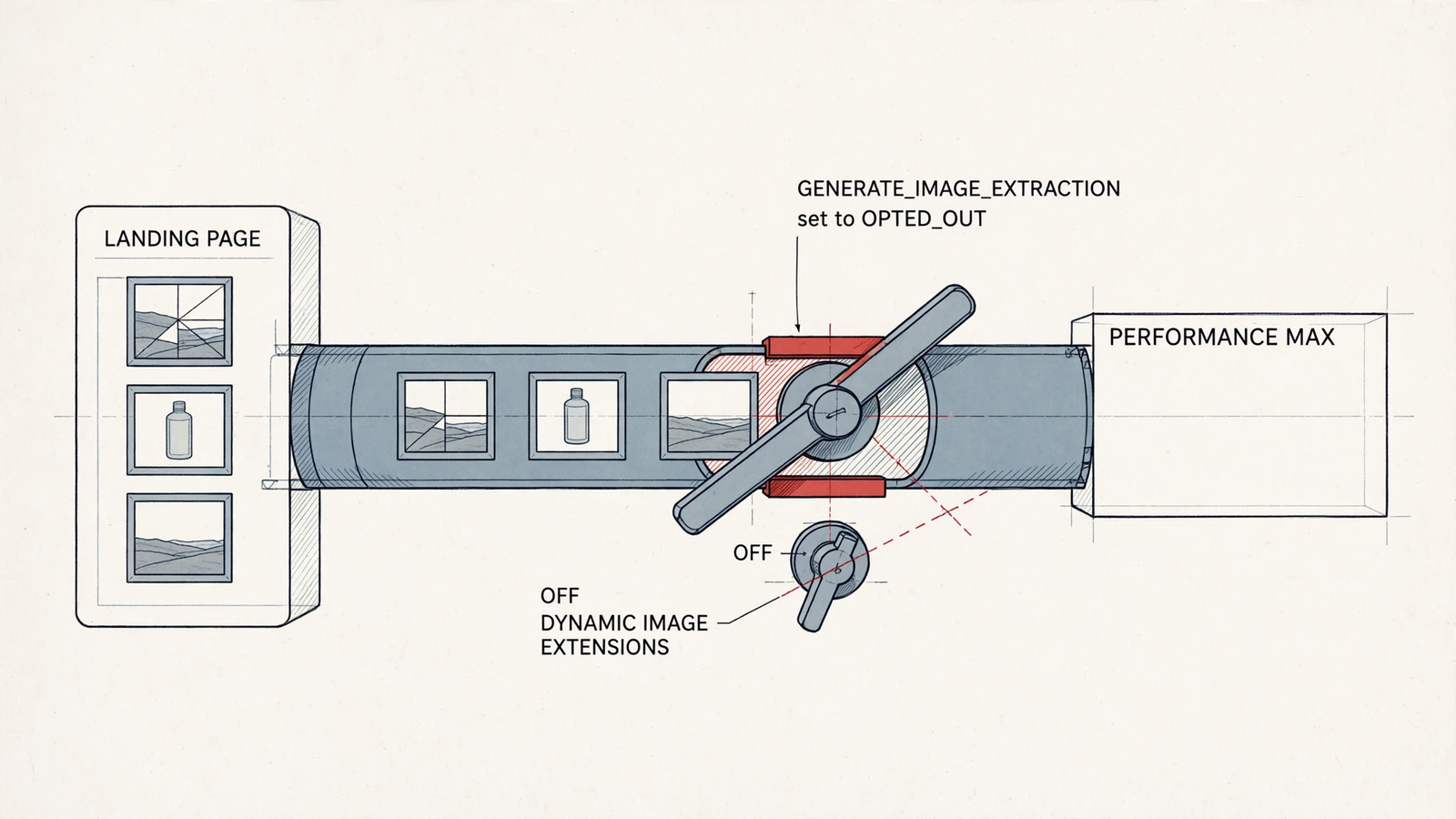
I ask Claude to show exactly what it will send at creation:
Show me
GENERATE_IMAGE_EXTRACTIONset toOPTED_OUTinasset_automation_settings. If you can’t inspect or set it, stop. Don’t create or enable the campaign.
Google’s API instructions call for that explicit opt-out at creation. They also note that a later update replaces the entire automation settings array rather than merging a single entry. I don’t treat a later edit as a casual one-field patch.
If groas can’t expose the control, I handle it in Google Ads instead: uncheck Landing page images in the Images tile under Asset optimization. I keep the campaign paused and verify the setting there before approving launch. “Please opt out” is a request. OPTED_OUT on the campaign is evidence. I need the second one.
4. Approve the exact settings and create paused
Cost: Five minutes to read the proposal. Buys: Approval for one specific campaign, not permission to improvise.
I ask Claude to show the final settings together. I don’t want to piece them back together from three earlier messages, especially if the budget in one message is different from the one in another. The approval should cover:
- The campaign name, exact daily budget, bidding strategy, and target if I use one.
- The conversion actions the campaign will optimize toward.
- The asset group, with every named headline, description, and image.
- The exact final URL, with Final URL expansion off.
- Landing-page image extraction opted out, and the campaign paused at creation.
Show me the final settings and named assets. Wait for approval before creating anything. Do not enable the campaign.
If the proposal matches, I approve it in those terms: “Approved for paused creation: this campaign, this daily budget, these assets, this URL, and image extraction opted out.” Not “go ahead and optimize.” That phrase saves a few words and throws away the limits I just spent three passes writing down.
Approval to create is not approval to spend. Autopilot stays off. It’s a separate groas switch, off until I turn it on under rules I set. I don’t need it to find out whether the campaign I approved is the campaign that got built.
5. Read back the campaign, then decide whether to enable it
Cost: No ad spend during verification; once enabled, the daily budget I named up front. Buys: A verified launch and a review date that accounts for conversion lag.
Creation isn’t verification. I ask Claude to read the settings from Google Ads and compare them line by line with the approved proposal. Then I ask for the change log and the reason for each change. groas logs every change it makes and lets me undo it in one step, so I use the log instead of relying on anybody’s memory, including Claude’s.
I check three lines first: the campaign is paused, the daily budget matches the exact amount I approved, and GENERATE_IMAGE_EXTRACTION reads OPTED_OUT on the campaign itself, not just in the proposal. If I used the Google Ads interface for the opt-out, I verify it there. Then I check the rest of the proposal. If any line differs, the campaign stays paused while I fix it. I don’t enable first and investigate later.
Before I enable it, I set the review date. Fewer than 30 conversions a month may not give the algorithm enough signal. A separate practitioner guardrail is to collect at least 30 days of data and confirm tracking before acting on PMax reports. A conversion count and a calendar window aren’t interchangeable. Neither makes a sale that takes 14 days to close show up on day 3.
I write down the date, the conversion count I’ll wait for, and what the review can decide: continue, adjust the budget within the limit I’ve set, or pause. Only then do I approve enabling the campaign. I’m not promising a profitable launch. I’m making sure I know what I authorized to spend, what it ran, and when I’ll have enough information to make the next decision.
When the constraint lifts
Fix the gaps in the first campaign before funding a second. When the launch holds up, I loosen the constraint in this order:
- Keep the same campaign and review it on the conversion timeline I wrote down. A second campaign built on an unproven first one just doubles the unproven part.
- Commission the assets I flagged in Pass 2. Those are the gaps I refused to fill with unapproved page photos. I add the new creative one named group at a time.
- Consider autopilot only then. I write the rules first: budget ceilings, which conversions it may optimize toward, and which log I’ll read every week.
Until then, the $19 connection has done its job. Claude and groas handled the reading, inventory, and drafting through one connection to my accounts and website. I didn’t buy another dashboard, and I didn’t give Google permission to pick my product photos. The campaign stays paused until the budget and the images are both in writing.





