

 LinkedIn

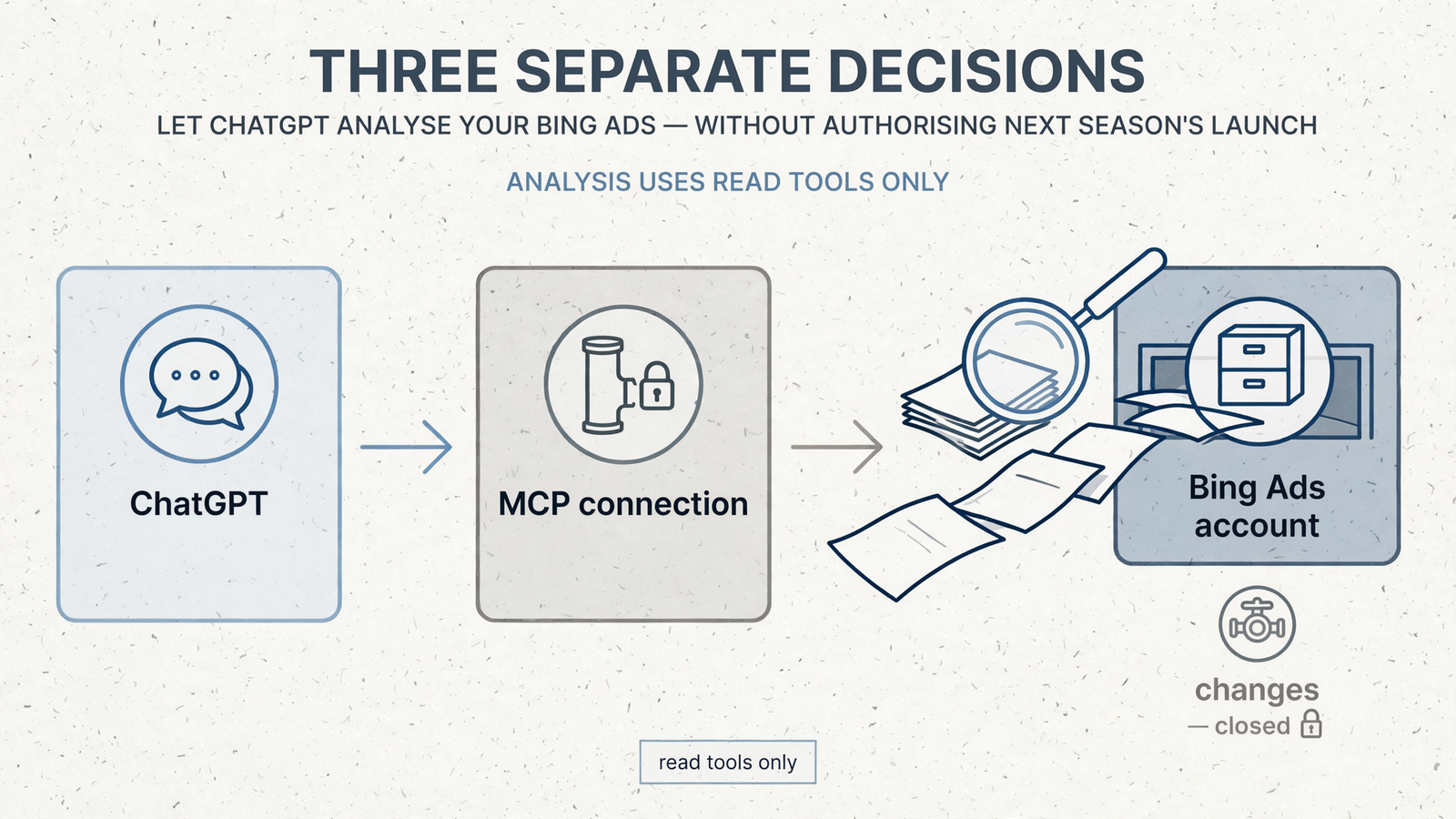
ChatGPT does not need permission to launch next season’s Bing campaigns to analyse last season’s results. I treat connecting an assistant, letting it make a specific change and authorising ongoing operation as three separate decisions, not one large yes.
That distinction matters when, say, I’m planning spring for an account spending $20k/month on winter SKUs. I need the winter numbers now. I might need a new campaign built later. Neither task means I want an assistant managing the account while I sleep.
The sensible sequence is simple: read last season, propose changes, approve a defined action. Ongoing operation gets its own decision. Here is how I keep those boundaries intact.
A connection gives access, not unlimited authority
ChatGPT starts without access to my Microsoft Advertising account. In an MCP setup, I connect it through a server, authorise access to the account and make specific tools available. Those are separate parts of the plumbing:
- The assistant interprets the request and reasons about the answer.
- The MCP connection carries requests between the assistant and the tools.
- Account authorisation determines which accounts the connection can access.
- The tool list determines which actions the assistant can request.
The last distinction is the one I care about most. A tool that reads campaign performance is not a tool that changes a budget. ChatGPT supports both read and write tools, with confirmation required for write actions by default.
I used to tell clients to keep assistants away from live accounts entirely. I was treating access and authority as the same switch. They are not.
For the winter account, I can authorise the relevant account, expose only read tools and ask for performance numbers. With no change tool available, the assistant cannot turn that request into a bid edit through the connection.
I connect for reading when I need answers. I add write tools only when I have a change worth approving.
First, establish what happened last season
I start spring planning with a read-only question:
Read last season’s Microsoft campaigns. Compare spend, conversions and cost per conversion. Make no changes.
The final sentence states my intent. It is not the permission boundary. The protection comes from exposing only read tools, so there is no write action available to misinterpret the request into.
Before I accept a recommendation, I expect the answer to identify:
- The account it read.
- The date range it used.
- The campaigns included.
- Spend, conversions and cost per conversion by campaign.
- Missing data or comparisons that need care, such as absent conversion tracking or periods with different budgets.
A small table does more useful work here than six paragraphs about optimisation opportunities. I want numbers I can check, followed by an explanation of what they mean.
This is the same discipline as the manual CSV routine many PPC operators already use: export clean periods without totals rows, supply goals and business context, then verify totals against the platform before acting. Surfside PPC describes that reporting workflow.
For the winter account, that means checking the reported spend and conversion totals before asking which campaigns deserve spring budget. If the starting numbers are wrong, a beautifully written recommendation is still wrong.
If I cannot verify the totals, I do not move on to proposed changes.
Check the tools, not just the wording of the prompt
A read tool can retrieve campaigns, spend, impressions, clicks and conversions. Setting a budget requires a write tool. I check which tools the connector exposes rather than assuming that “connected” means either harmless or unrestricted.
For example, the standalone Bing Ads MCP server separates read and write tools, keeping writes hidden unless BING_ADS_ENABLE_WRITES is exactly true. With writes unavailable, a bad answer can still mislead me, but the assistant has no function through that connection that changes the budget.
Not every connector uses the same controls:
- Microsoft’s Advertising MCP pilot is read-only.
- The hosted Get MCP Ads setup presents a preview, with applying the change as a separate step.
- ChatGPT treats tools without a read-only marker as write tools and asks for confirmation by default.
These controls answer different questions. Tool availability determines whether a change can be requested at all. A preview lets me inspect the proposed change. Confirmation is the approval step before execution.
I do not substitute one for another. Writing “make no changes” is useful instruction, but it is not the same as removing write access. Likewise, a confirmation prompt is something to inspect, not a box to click because the conversation has been going well.
Before I judge what a prompt can do, I check what the server allows it to do.
A campaign can exist without being allowed to serve
Once I decide to allow a write, there is another boundary to preserve: creating a campaign is not necessarily launching it.
The hosted Get MCP Ads setup creates new campaigns and ads paused. Microsoft’s own API also distinguishes campaign status from campaign existence: the Campaign documentation lists Active and Paused, with Add defaulting to Paused.
That gives seasonal preparation a useful stopping point. A spring campaign can sit in the account, paused, while I inspect its structure and budget. It exists, but it is not serving.
For the winter account, I separate the work into two approvals:
- Create the spring structure paused.
- Activate it only after checking the result.
I do not rely on a default when I can state the intended status explicitly. “Create paused” belongs in the request, and “Status: Paused” belongs in the verification afterward.
A paused campaign is a proposal I can audit in the account. An active campaign is eligible to spend.
With groas, the same boundaries still apply
When I connect ChatGPT to groas, groas provides the tools and data beneath the conversation. I connect the ad accounts, add groas as a custom MCP server and ask in plain English.
That gives the assistant access to live Bing spend, conversions and cost per conversion, alongside context a basic account connector does not supply: competitor ads, funnels, Reddit discussions and AI answer citations. It addresses the problem I described in why an assistant guesses about account numbers instead of reading them.
But more context does not change the permission model. A sentence in the chat tells the assistant what I want. The tool layer determines what it can execute.
I keep two checks separate:
- Which read and write tools are available? That governs the actions the assistant can request.
- Is autopilot enabled? That governs ongoing operation under the rules I set.
Autopilot being off is not, by itself, proof that the connection is read-only. A setup can allow a single approved write without allowing continuing operation. That is exactly the middle ground seasonal planning often needs.
While I am still analysing winter, I keep the task read-only. When I am ready for a proposal, I ask:
Propose next season’s Bing campaign changes, with account IDs, budgets and reasons. Do not execute.
I expect each proposed change to include the account ID, current and proposed daily budgets, the CPA or ROAS reasoning tied to last season, and the intended status on creation. Missing fields come back for revision, not approval.
A proposal without account IDs, budgets and reasons is a draft, not a decision.
Approve one defined action, then read it back
Approval should name the change, not hand over the season. For the running example, I use a bounded instruction:
Prepare this change for approval: in account 12345678, create Spring Prospecting on Bing with an $80/day budget, paused on creation, using last season’s top three ad groups. Confirm the account ID before applying it.
Now there is something concrete to review: one account, one budget and one intended status. With the approved-changes setup for ChatGPT connections, the assistant presents a preview, applying remains a separate step, and ChatGPT requests confirmation for the write.
After execution, I do not stop at “Done.” I read the account and the log:
- Does the campaign sit in the correct account?
- Is its status Paused?
- Is the daily budget $80?
- Does it show zero impressions?
- Does the groas log record the change and its reason, with the option to undo it?
Only after those checks do I consider activating the campaign. I can activate one, check serving the next morning and leave the rest paused.
A successful tool call is not my final check. The account state is.
Ongoing operation needs a separate yes
Reading winter results answers what happened. Creating the paused spring campaign performs a specific approved action. Neither instruction means “keep improving this account indefinitely.”
That third authority is ongoing operation. With groas, autopilot stays off until I switch it on under defined rules. Every change is logged with its reason and can be undone in one step, but those controls do not remove the need to decide what ongoing operation is allowed to do.
For seasonal planning, I usually need the first authority throughout the analysis and the second briefly during execution. I do not need the third just to prepare next season’s account structure.
Here is the distinction I write down before proceeding:
| Authority | What I am authorising |
|---|---|
| Read access | Retrieve account data for analysis. |
| Approved execution | Apply a specific change after review. |
| Ongoing operation | Run within the rules I set until I change that authority. |
This is also where groas earns its place over a raw connector for me. I get live Bing data alongside competitor ads, funnels and Reddit context, rather than pulling the surrounding evidence from separate tabs. When I approve a move, the logged reason and one-step undo sit with the execution.
The advantage is not that I can stop thinking about authority. It is that I can keep the context and the execution together while still making the authority explicit.
If I cannot name which of the three I am granting, I stop before the next prompt.
An approval is not a standing instruction for next season
There is one more boundary before I reuse this workflow. ChatGPT’s custom MCP documentation describes approval decisions as conversation-scoped, not permanent account-wide authorisation.
Approving a paused spring draft does not pre-approve summer. Starting another chat does not excuse me from checking the account, budget and status again. Nor do I treat a conversational approval as a substitute for checking the connector’s permissions or groas’s autopilot settings.
That distinction prevents an old “yes” from doing work it was never meant to do. I approved a defined action in a defined context. A different season deserves a fresh decision.
My final check stays deliberately boring: account ID, status, daily budget, then the log entry explaining the change. The grid shows what is configured to serve. The log explains why the change exists and how to reverse it.
The account and the log inform the launch decision. The chat transcript is the conversation about it.

Put the model to work on a new season
Now suppose a second brand manager asks me to prepare summer campaigns on Bing using last winter’s results. The request sounds like one job. I break it into the three authorities before touching the account.
- Read: I connect with read tools only and retrieve winter spend, conversions and cost per conversion by campaign. I ask the assistant to flag missing conversion data and verify the totals before using them.
- Propose: I request a summer plan with account IDs, proposed $50 or $80 daily budgets, reasons tied to the winter numbers and an explicit paused status. This is still a proposal, not execution.
- Execute once: If the plan holds up, I approve one account and one budget, create the campaign paused, then inspect its status, budget and log entry. Activation is a further decision after that review.
Winter performance gives me evidence to reason from, not permission to launch summer. If the assistant cannot connect the recommendation to the numbers, the proposal comes back for revision. If it can, I still check what actually lands in the account.
There is no need to enable autopilot for any of this. No open-ended “keep improving things” instruction. No assumption that preparing a season includes launching it.
That is the useful boundary: I can give ChatGPT enough access to analyse the past without giving it standing permission to spend on the future. Summer stays a plan until I decide it goes live.


