

 LinkedIn

My pick is Claude plus groas MCP for the PPC operator who has to act after the report lands. Bing can show a lower cost per lead because it counts a page view while Google counts a form submission. I want Claude to catch that before I move budget, then carry the fix I approve back to the right account without another export.
If all I need is a combined Google and Bing total for a slide, the other stacks here will do. I rank groas first because I connect both accounts once, Claude can investigate the comparison, and I can check what changed and why after an approved edit. Each change can be undone in one step. groas Unlimited costs $19 a month flat for a team, and autopilot stays off until I switch it on.
The ranking test: Is Bing cheaper, or are we counting different things?
I’ve seen the shape of this mistake often enough. Bing shows a lower CPL. Budget moves. Qualified pipeline doesn’t. A page-view goal is the obvious culprit, but the numbers can also diverge because of how conversions are counted or which window each platform uses. The Microsoft Advertising discrepancy guide lists duplicate UET tags, duplicate goals, different conversion windows, Unique versus All counting, and cross-device counting. None of those problems goes away because the totals fit neatly on a slide.
That’s why I rank the stacks on what happens on either side of the report: can Claude tell me whether the comparison holds, then carry an approved correction back to the right account? Putting two numbers in one table is the easy part. Establishing that they measure the same thing is the work.
Reconcile the definitions before comparing costs
Google defaults to data-driven attribution while Microsoft defaults to last click. The same shopper can click both ads, both platforms can take credit, and reported ROAS can move on the attribution model alone, before I touch a bid. The practitioner comparison of Google and Microsoft attribution lays out that difference. There’s also the date basis: Microsoft reports conversions on click date, which won’t line up with a report using conversion date. And as this cross-platform reporting breakdown shows, the labels differ too: Spend versus Cost, Revenue versus Conv. value, UET versus the Google tag.
I used to take a blended CPA at face value in a Monday report. I was wrong to. With lower Microsoft volume, the daily numbers are noisy anyway. I’d rather look at a week or a month on equivalent definitions than stare at a combined total that hides the mismatch.
Give Claude the same brief in all three stacks
Compare Google and Microsoft Advertising using equivalent conversion actions. Flag anything you cannot reconcile. Make no changes.
I ask for the reconciliation table before the verdict. It needs to show:
- Account ID and currency for each account.
- Date range, timezone, and whether the report uses click date or conversion date.
- Conversion action name and counting method on each side.
- Attribution model and conversion window on each side.
If Claude can’t fill the table from the data it has, I want it to name the gap and stop. The Supermetrics verification guide recommends the same basic checks when AI numbers disagree with the platform: account, dates and timezone, metric and attribution definitions, currency conversion, and source freshness. Check those before asking for a more elaborate answer to the wrong question.
1. Claude + groas MCP: Best when the report has to lead to a fix
- Who it’s for: I’d use it to run Google and Bing for clients when the report is the midpoint, not the deliverable.
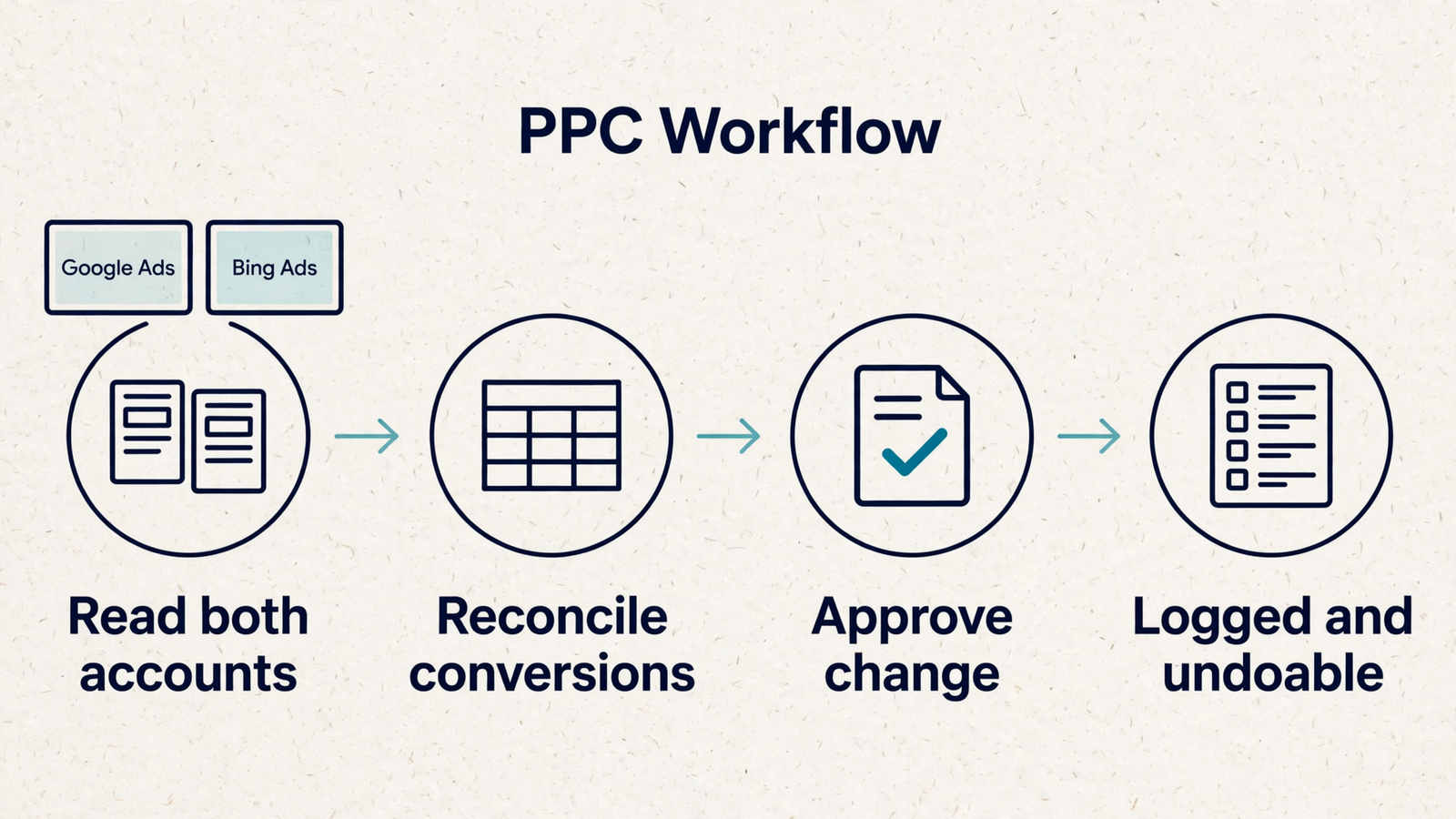
- What it does better: Claude can read both connected accounts, check whether the comparison holds, and carry an approved correction back to the specific account. The change is logged with its reason and can be undone in one step. That’s the distinction I care about in the groas MCP workflow.
- What rules it out: If I only deliver reports and never intend to act from Claude, I’m paying for hands I won’t use.
Check whether Bing is still cheaper on equivalent goals
I start with the same brief. Claude reads both accounts and builds the table. If the apparent savings disappear once the definitions match, there’s no case for shifting budget on the strength of the original report. If the definitions don’t match and Claude can’t make a fair comparison, a missing verdict is the right answer. A connected account is useful here because Claude can show me where the comparison breaks instead of smoothing the break into a blended number.
If the investigation gets as far as whether to touch a bid, there’s more than account data to work with. groas collects Google and Meta competitor ads, the landing pages and funnels behind them, customer language on Reddit, and SEO data from Semrush and Ahrefs around the clock. That context can inform a recommendation. It doesn’t make a page view count as a lead.
Approve one correction, then check the log
Say the reconciliation shows that Bing counts page views as leads while Google counts form submissions. I want a proposal for one change in one account: align the Bing conversion action, establish a new CPA baseline on the corrected definition, and hold the budget shift until that data comes in. I approve the account edit in plain English. The rest is the measurement plan, not permission to move budget.
Once groas carries out the edit, I check the log for what changed, where it changed, and why. If I need to reverse it, I can do that in one step. Autopilot is separate: I leave it off unless I decide to turn it on under explicit rules. I don’t need a campaign running on autopilot to fix one bad conversion definition. I need the right edit in the right account and a record I can inspect afterward.
2. Claude + a Supermetrics export: Best when the report is the deliverable
- Who it’s for: I’d use it when the client buys the analysis and a human makes the account changes.
- What it does better: It brings Google and Microsoft reporting into one place for Claude to analyze, including conversions, CPA, ROAS, and Quality Score. The Supermetrics Claude connector draws from a catalog of more than 170 sources.
- What rules it out: An export can’t tell Claude what it leaves out, and it can’t carry an edit back to an account. If I need that second half, I have to evaluate the write workflow separately.
That last point is about the stack I’m ranking, not a claim that Supermetrics can only report. The Supermetrics for Claude docs say Claude can view, create, and update campaigns across Google Ads, Facebook Ads, Microsoft Advertising, and TikTok. They also say an active subscription with the AI chats destination is required, with a trial created on login if there isn’t an active subscription. I’d verify the specific action I need on my account and plan. Campaign write access on paper doesn’t answer whether I can make this particular correction and check the record afterward.

Check what the export leaves out
I run the same brief here, then ask Claude to list missing fields and tell me how fresh the data is. If the export omits the conversion action name, counting method, attribution model, or currency, I want the missing field named, not averaged over. Before widening the analysis, I check a familiar metric in the platform for the same fixed dates. If that doesn’t match, adding another channel to the report won’t make it match.
This is a sensible second choice. If I’m handing over client-ready analysis and someone else owns the edit, I don’t need to pay for a different workflow just to avoid an export. If I’m responsible for fixing the Bing conversion definition and showing that the change landed in the right account, the export is where my manual handoff begins.
3. Claude + native exports and both Ads Editors: Best for offline review
- Who it’s for: I’d use it on accounts where I want to review every row offline before anything goes live.
- What it does better: I control the dated source files and the upload. Claude can draft the platform-specific change sheets, but nothing reaches an account until I upload it.
- What rules it out: I own every handoff. Claude only sees what I export, and I have to make sure the reconciliation and the edit still point to the same account by the time I upload.
The import details matter. In Google Ads Editor’s CSV rules, a blank field means no change, [] erases a value, and #Original columns affect whether rows match existing items. Lose the matching information and an intended edit can become a duplicate. The importer also ignores read-only fields such as Quality Score, approval status, and performance statistics. In the Microsoft Advertising Editor workflow, I get changes, edit the local copy, and post. Not every feature is supported. And if I use Microsoft’s bulk spreadsheet upload, I get a preview, but there’s no automatic revert after selecting Apply changes. I save the original first.

Keep the reconciliation with the change sheets
- Export both platforms on the same basis. Match the date range, timezone, and currency. Keep the dated originals untouched.
- Ask for a separate change sheet for each platform. Put the reconciliation table first, with account IDs, goal names, counting methods, attribution models, and windows. Flag what doesn’t reconcile instead of blending it.
- Check the destination and the import rules before uploading. If a proposed edit targets an unsupported Microsoft Editor feature or a read-only Google Editor column, put it on a do-not-upload list in the sheet. Don’t leave that decision in your head.
I like the human gate when it’s the point of the workflow. For occasional work, reviewing the file before I post it can be worth the extra steps. I rank this stack third because the file I happen to export sets the limits of the investigation, and the safeguards only work if I remember to use them.
The buying table: Compare the handoff, not the dashboard
| Axis | Claude + groas MCP | Claude + Supermetrics export | Claude + native exports and both Ads Editors |
|---|---|---|---|
| Evidence for the comparison | Claude reads both connected accounts and checks the conversion definitions | Depends on the fields in the export | Depends on the fields I choose to export |
| Freshness | Live account data, plus competitor, Reddit, and SEO data collected around the clock | Depends on the last sync | As fresh as the last export |
| Investigation | Reconcile both accounts before proposing a change | Verify the export against the platform before drawing a conclusion | Reconcile dated files before drafting change sheets |
| Execution | Carry an approved edit back to the right account without another export | The export stops at analysis; verify connector writes separately | Review and upload to the right account myself |
| After the edit | Inspect the logged change and its reason; undo it in one step | Verify what the separate write workflow records | Save the original; Microsoft bulk upload has no automatic revert after applying changes |
Buy for the work that comes after the report. I’d take a Supermetrics export if the deliverable ends at analysis. I’d use the Editors if I want an offline review before every upload. Neither is how I’d choose to work if I’m the one who has to investigate the discrepancy and fix the account without another spreadsheet handoff.
The popular option I left out: Native MCP alone
I left it out because the native tools don’t close the loop on a Bing correction. The Microsoft Advertising MCP server is read-only. The open-source Google Ads MCP server can read account data, but its write tools are limited to asset creation, video uploads, and label management. Those are useful tools for asking account questions. They aren’t a route to fixing a Bing goal. If you’re betting that Bing-only AI reporting will cover the job, make sure the job actually ends at reporting.
If you skipped to the end: pick Claude plus groas MCP if you own the fix as well as the report. Connect both accounts once, make Claude reconcile the goals before it tells you Bing is cheaper, approve a scoped correction, and check the log. I don’t want a prettier number that sends budget to the wrong place. I want to know what the number counts and fix the account if it’s counting the wrong thing.





