

 LinkedIn

A Claude audit of twenty client ad accounts should tell you which two or three need attention today and why. The mistake is asking for twenty summaries first: you get twenty tidy reports and still don’t know which account is wasting money, which has broken conversion tracking, or which you should leave alone for a week.
I want an evidence-ranked intervention queue: the accounts worth investigating now, the evidence that puts them ahead of the others, and a separate list of accounts I can’t judge yet. A thorough manual audit is routinely quoted at 60 to 90 minutes per account. At the high end, 12 accounts can take a day and a half before anyone fixes anything. Equal time sounds fair. It’s a poor way to decide where to spend Monday morning.
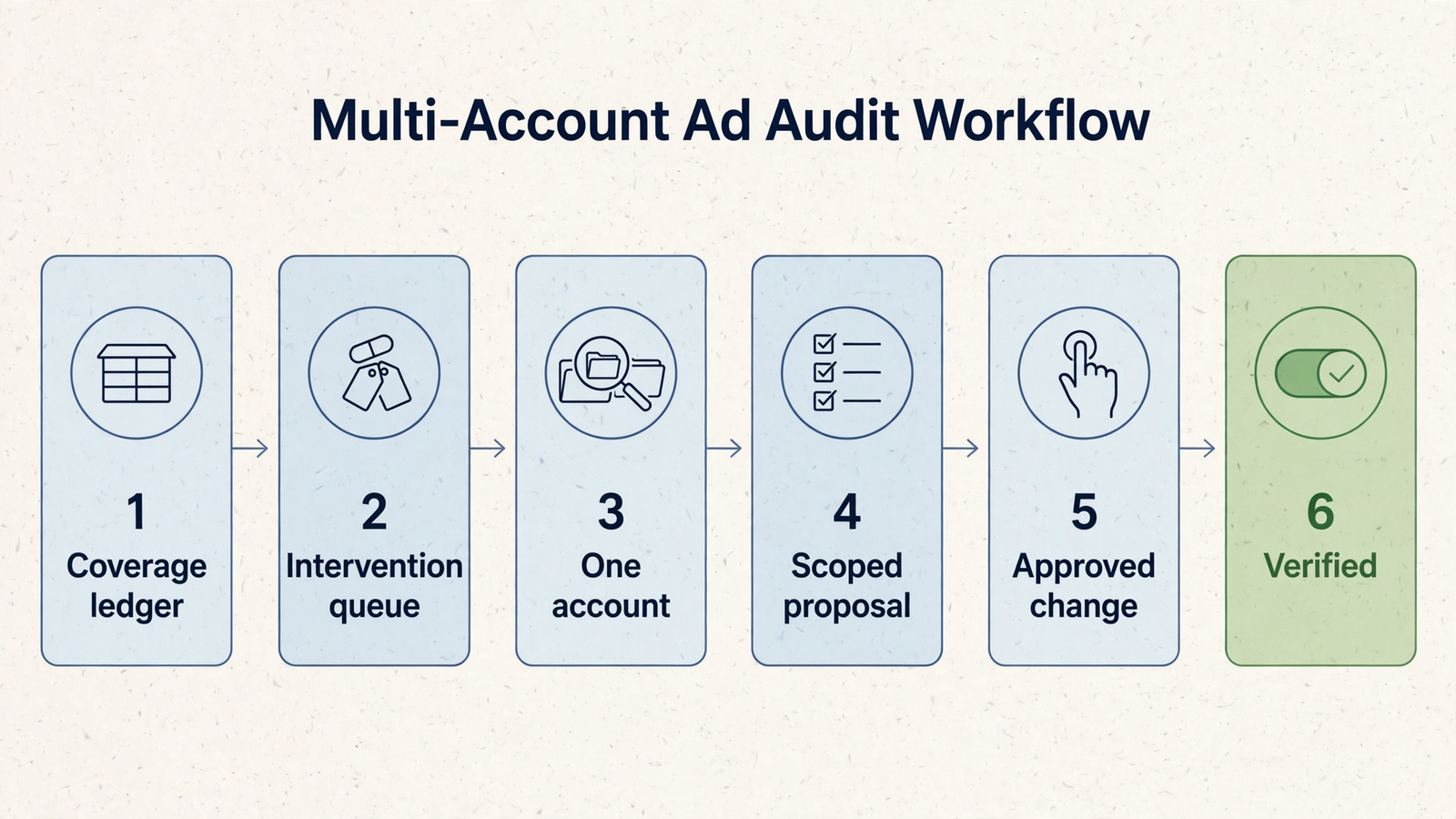
The queue only works if Claude can show what it saw and what it couldn’t see. That’s how I choose a connection, whether I’m using Claude + groas or answering one question from an export. I map coverage first, investigate the highest-priority account on its own, and carry only approved changes through to verification.
1. Choose a connection based on where the audit needs to end
I want four things out of a multi-account audit: a coverage ledger that shows what Claude retrieved, an intervention queue ranked by money at risk and tracking risk, one deep investigation into the account at the top, and a short list of approved changes I can verify. Choose the connection by how far it gets you through that sequence, not by how good the first summary looks.
- CSV upload: Use it for a bounded historical question, like whether search terms wasted spend last quarter. An export is a snapshot, not a live view of the account. If you have less than 90 days of history, say what you have rather than writing as though you saw the full period.
- Reporting-only connector: Use it for a Monday sweep of spend, conversions, CPA, and ROAS. These are read-and-report tools. Once you decide to pause a campaign, add a negative, or change a bid, you’re back in the ad account doing it yourself.
- Action-capable MCP connection: Use it when you want Claude to query live accounts, propose a named change, and carry it out after you approve it. With groas over MCP, you can inspect the change log and check the resulting account state without handing the fix off to another tool.
Skip the live setup for a one-off question a CSV can answer. For an audit you intend to run again, I’d choose the connection that lets me check the fix where I found the problem. Otherwise, the handoff is part of the workflow. Plan for it.
2. Connect Claude without giving the audit permission to act
The setup in Claude + groas is short:
- In Claude, open Customize → Connectors and click + Add.
- Choose Add custom connector, name it groas, and enter
https://mcp.groas.ai/mcp. - Leave the detected sign-in options as they are, then connect and sign in.
On Claude’s free plan, you get one custom connector. On Team and Enterprise, an Owner adds it under Organization settings → Connectors. Anthropic says its custom remote MCP connectors are unverified and can read, create, modify, or delete in connected services. Connect only to servers you trust and check the scopes. A prompt tells Claude what to do; it doesn’t change what the connector is allowed to do.

Keep autopilot off and make the first pass read-only. Don’t start with “audit my accounts.” Start here:
List the accounts you can read and any you could not access. Make no changes.
Check the answer against the accounts you expect to see. Which IDs came back? Which currencies and time zones is Claude using? What reporting period did it pick, and is it the one you intended? If an account is missing, that’s the first finding. Don’t ask Claude to rate its performance.
3. Build the coverage ledger before ranking risk
It’s easy to rank first and find out later that three of your priorities came from accounts Claude barely saw. A solo operator in r/PPC who went from 16 to 24 Google Ads accounts described spending most of the day reacting. The advice was to tier the accounts instead of treating all 24 equally. I’d start by making sure I know which accounts I’ve actually seen.
Give every expected account a row, even when retrieval fails. Record what came back, which periods Claude compared, and what’s still missing. Here’s what that looks like:
| Account | Data retrieved | Comparison period | Status | Unresolved gap |
|---|---|---|---|---|
| Northside Dental | 90 days, campaigns and search terms | Last 30 days vs. prior 30 | Ready to rank | None noted |
| Harbor Law | 30 days, campaigns only | Last 30 days, no prior period | Insufficient evidence | No search terms or conversion detail |
| Cedar Auto | Connection refused | None | Failed retrieval | Access pending; unaudited |
| Bluepeak SaaS | 90 days, campaigns and goals | Last 30 days vs. prior 30 | No detected issue | None noted |
- Ready to rank: Claude has enough evidence to put a finding in the queue.
- No detected issue: Claude had enough data to look and found nothing worth acting on. That’s not the same as finding nothing because the query came back empty.
- Insufficient evidence: Some data came back, but not enough to judge. Keep the account out of the performance ranking.
- Failed retrieval: No data came back. The next job is to restore access, not to write a verdict.
My cutoff: if Claude can’t name the period, the currency, and the conversion goals, the account doesn’t get ranked. A blank cell isn’t a clean bill of health.
4. Ask for a ranked queue, not a report per client
Give Claude the ledger and tell it what a priority has to earn. I’d use a prompt like this:
Using only accounts marked Ready to rank, list up to five interventions in order of dollars at risk and tracking risk. For each, give the account ID, source metrics, comparison period, and why it ranks above the next item. List accounts with insufficient evidence or failed retrieval separately. No summary paragraphs.
Every priority needs an account ID, a source metric, and a reason it belongs where it is. Rank in the context of the business, not on one ratio. A local healthcare account spending $1,000 to $5,000 a month can show a scary CPA move because call tracking has a gap. A SaaS account with a long sales cycle can show a flat CPA while qualified pipeline dries up downstream. The companion guide to ranking client accounts goes deeper on weighing dollars at risk against tracking failures.
Keep missing-data work on its own list, with an owner and a next step. That might mean reauthenticating an account, asking the client for the call-tracking export, or waiting until 90 days of history exist. I’ve seen a failed retrieval turn into a green row because a report needed to look finished. It’s a nice-looking row. It’s still an unaudited account.
5. Investigate the top account on its own
Take the top item and start a fresh prompt with the account ID in the first line. Don’t let Claude judge a SaaS account like a local services account or give a $3,000 account the same urgency as a $30,000 one just because the charts look alike.
Investigate only account [ID]. List the campaigns, search terms, conversion goals, and change history you can retrieve. If a category is unavailable, say so. Do not borrow context from other accounts.
Check tracking before you diagnose traffic. A tracking failure, a traffic-quality problem, and ordinary volatility can look alike in a dashboard. They don’t call for the same fix. Start with the primary conversion actions: if they count the same action twice or count a softer action as the main result, you can’t take the downstream numbers at face value. Then review search terms and negatives before deciding whether the traffic itself is the problem.
Read the evidence yourself before touching a budget. In one multi-account test with the official Google Ads MCP server, Claude Code used the wrong date filter on one query and read too much into a pacing lag on another. Those are two different errors with the same practical lesson: check what the query actually returned, not just how convincing the explanation sounds.
If Claude can’t retrieve the search terms, change history, or goals it needs for the diagnosis, mark the account Insufficient evidence and stop. A stopped investigation tells you what to get next. A plausible story is how you pause the wrong campaign on Monday and spend Tuesday explaining it.
6. Approve a specific change, then verify it
A finding isn’t a change. I want the proposal in between to be small enough that I can approve or reject it in one sentence:
For the top finding only, state the account ID, the exact object, the proposed change, the reason with source metrics, and what approval you need before acting. Do not act yet.
“Improve bidding” isn’t a proposal. “Reduce the target CPA on campaign X from $85 to $70 for the next 14 days” is. That precision doesn’t make it a good idea. It makes it an idea you can say yes or no to.
Check what the connector can actually execute. The Google Ads MCP server supports reads and a limited set of changes. Its mutation tools propose changes first and require a second call after approval; they don’t cover bid changes or campaign pauses. With groas over MCP, every change is logged with its reason and can be undone in one step. I can check the log and verify the resulting account state in the same session instead of hoping someone remembers on Friday.
Approve by name, then check the log and the account. “Yes to the negative for [exact term] in account [ID]. No to the budget change.” Ask Claude to show what the log says it changed, then check that the account matches what you approved. That verifies the change went through. It doesn’t tell you yet whether it improved performance. Put that on the next review.
7. Leave a queue someone can run on Monday
I close the session with one screen and four buckets:
- Completed fixes: what changed and how you verified it.
- Deferred decisions: what’s waiting and why.
- Unresolved access gaps: what’s missing and who owns the next step.
- Next review date: when to revisit the queue and check the fixes.
If the close-out takes twenty pages, you’ve rebuilt the thing you were trying to avoid. For the account you investigated in depth, use the 10-point framework for a single Google Ads audit when you need the full account checklist. Skip it for accounts you haven’t established a reason to investigate.
Put a shelf life on the queue. Last month’s ranking is a hypothesis this month, especially if the client changed the offer, landing page, tracking setup, or budget. Rerun the boundary prompt, rebuild the ledger, and check whether accounts you marked unaudited are now readable. If nothing has changed, say so. Don’t reissue the old rankings with new dates.
The first thing to do today is the boundary prompt, not the audit. Connect Claude, leave autopilot off, and ask it to list the accounts it can read and any it couldn’t access. Make no changes. If half the accounts are missing, your first intervention is access. Fix coverage first. Rank second. Act third. Verify always.





