

 LinkedIn

An automation tool changes a live Google Ads campaign without asking. The next time you connect one, you care less about the demo than about who can explain the change. That’s the dispute over connecting Claude to Google Ads: should you self-host the MCP server or use a hosted connection? Smart people disagree because one side wants custody of the credentials and the other wants someone equipped to maintain the connection. Self-hosting gives you more infrastructure control, not automatic safety. I’d pick hosted only when I can verify the controls I’d be giving up direct custody for.
A Reddit thread about running Google’s Ads MCP server locally captures both sides. The top reply won’t trust a third-party server with client data, so he keeps the server on his own machine. The same thread prints the bill for that conviction: about 20 hours of setup, hand-managed OAuth credentials, and Claude fumbling tool calls until someone teaches it how the Google Ads API behaves. I understand the instinct to hold the keys. I also want to know who reviews permission changes, notices a failed write, and investigates a bad edit when there’s real spend behind it. Owning the server answers exactly none of those questions by itself.
The case for self-hosting: keep custody and inspect the tools
Know where the credentials live
The best argument for self-hosting starts with a question a client can reasonably ask: Where does my OAuth token live? Google ships its Ads MCP server as open-source Python you can run on your own machine or Cloud Run instance. In local mode, the Application Default Credentials file stays on your disk. The server uses it to query Google Ads; Claude sees the tool inputs and outputs, not the token. The project’s README describes another setup for teams: an OAuth proxy that keeps server credentials out of the MCP client configs synced across laptops.
For an agency holding client credentials, that isn’t paranoia. It’s a custody question with a concrete answer. You choose the Google Cloud project behind the connection, and you control the credentials you issue. If a client requires the token to stay on infrastructure you control, a vendor’s assurance about how it stores credentials doesn’t answer the same question. With self-hosting, you can point to where the connection runs and show who controls it.
Read the tool list before connecting a live account
Google’s server makes the scope easy to inspect. It ships seven tools: three for reading account data or metadata, and four for creating assets or managing labels. The writes go through a propose-and-confirm step. There is no tool for changing bids, budgets, or campaign status. That’s a concrete limit, not a promise that Claude will behave itself.
The catch is in the defaults. Write tools have been enabled by default since v0.0.6. If you want a reporting connection, use tools_config.yaml to make it read-only before it touches a live account. I start with a tool-list inspection before a connector reaches a paid account. With Google’s server, the source is right there. I don’t have to infer what a tool can do from the name someone gave it in a demo.
Put somebody’s name on the pager
The strongest self-hosting argument doesn’t pretend the work ends at installation. One developer tracked queries for 30 days and reported a 19.8% failure rate across 313 calls. Field names moved between API versions, queries to client accounts under a manager ID returned permission denied, and rate limits cut off calls mid-query. He built a Claude Code plugin to handle some of those failures and translate details like micros and date filters. Now he maintains the plugin, too.
That’s one developer’s experience, not a failure rate I’d apply to every installation. What matters is the kind of work it illustrates. Someone has to know whether a failed query means a field changed, the connection lacks access, or the call hit a limit. The best advocate for self-hosting says: Fine. That work exists either way, and I’d rather do it on infrastructure I can inspect. I buy that argument when a named maintainer has time to do the work. Put the name next to the credentials, not in a footnote to the launch plan.
The case for hosted: hand off the upkeep and keep the account controls
Stop making API maintenance a marketing job
The hosted case starts with those 20 hours. A marketing team that doesn’t want to spend them on Python installs and OAuth setup isn’t being unserious. It may just have a better use for Tuesday. With a hosted connector, you add the URL, sign in, and get the tools in Claude. When the API changes, the provider maintains the connection instead of asking your team to diagnose why yesterday’s query no longer runs. You hand off server upkeep, not responsibility for the account.
Claude’s connector documentation describes per-tool settings for Team and Enterprise owners: Always allow, Needs approval, and Blocked. Those settings give me something specific to inspect. I want to see which tools people can call and whether their access is limited to what their own credentials authorize. Getting the connector to show up in Claude is the easy part. Getting those permissions right is the part worth doing before anyone touches a campaign.
Get past the recommendation without losing the record
Some of the hosted options mentioned in that r/PPC thread, including Windsor.ai and TrueClicks, are pitched there as ways to get data into chats and spreadsheets. That’s not the job I’m hiring for here. I’ve watched Claude produce a good budget recommendation from a CSV. Then somebody has to type it into Google Ads. Better evidence, same keyboard.
The stronger case for hosted is a connection that can carry out a change and leave a record I can use. I use groas for that, and I’m writing on its blog. Treat that as disclosure, not verification. Its MCP connection can make changes that Google’s own server can’t, including changing a budget. Groas logs changes with their reasons and offers one-step undo. Its autopilot runs under rules you set and stays off until you turn it on.
The ability to write is useful. The action log is what makes that ability worth considering on a paid account. When CPA moves, I want to see what changed and why, without stitching together a chat transcript and an account edit. A reporting connector stops short of that workflow. That’s why I’d take groas over one for this job, provided the connection and approval controls check out.
Google’s proxy policy puts the connection model on the table
Google’s August 31, 2026 Ads Developer Policies update prohibits programmatic proxies that solely replicate, wrap, or re-expose Google Ads programmatic capabilities as an intermediate layer. Its developer blog post explains the risks: a security failure across tenants, a performance bottleneck at one shared proxy, or an enforcement action that hits everyone behind it.
As PPC Land’s analysis points out, solely is doing work there. The policy doesn’t ban a connection just because it’s an MCP server. It also distinguishes a programmatic proxy from an agency using its own credentials with client authorization. Neither hosted nor self-hosted tells me enough to judge the implementation. Ask whose Google Cloud project and credentials the connection uses, and how the client authorizes access. A simple sign-in is nice. It’s not an answer to that question.
One budget prompt exposes the difference
I wouldn’t settle this with two feature lists. I’d use the same deliberately boring prompt in both setups: “Read this account’s campaign budgets. Propose one adjustment, explain the evidence, and make no changes until I approve.” That gives me three things to check: where the data comes from, what happens at approval, and what record I can inspect afterward.
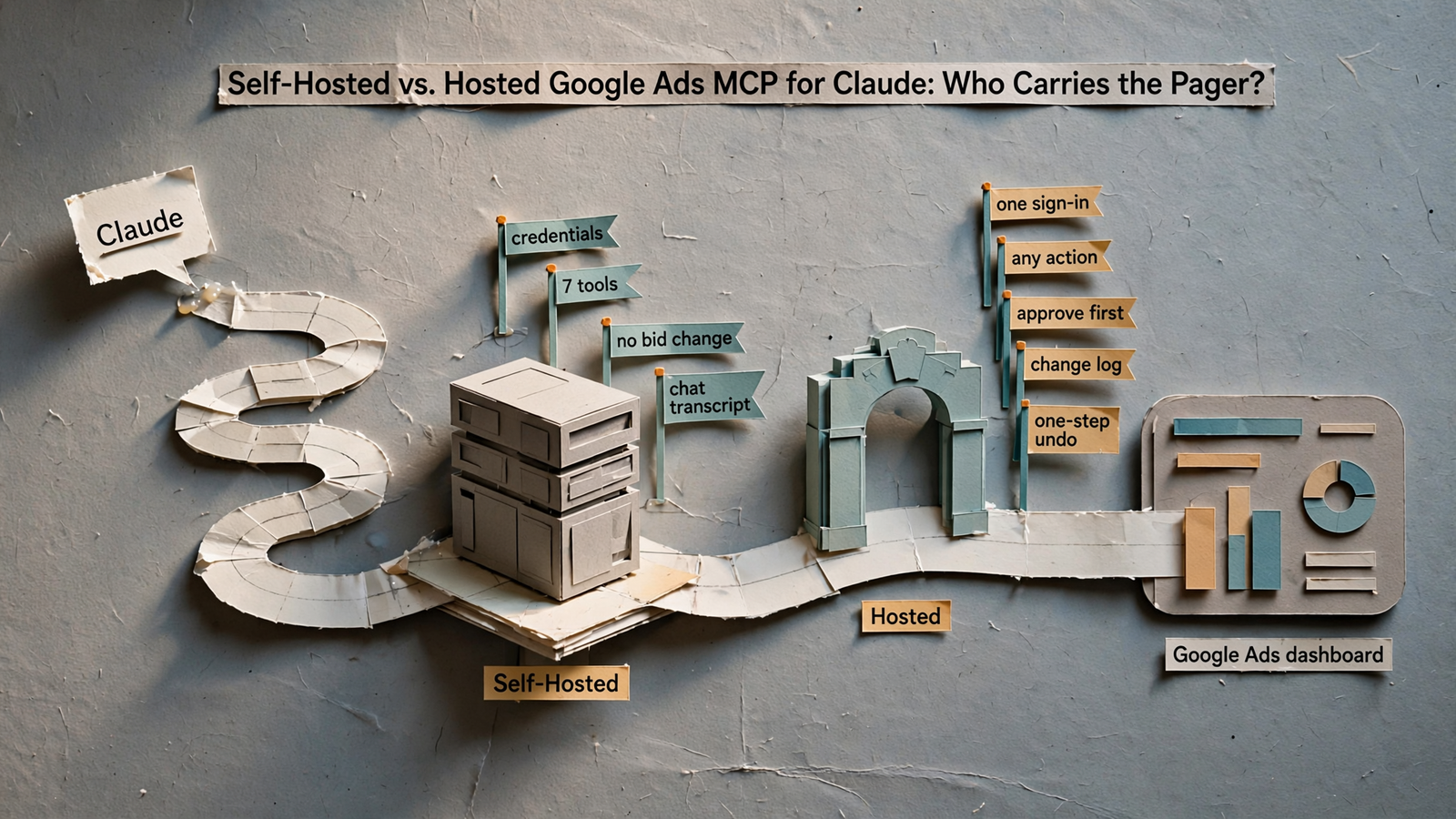
On Google’s self-hosted server, Claude can read the campaign budgets with a GAQL query and make a recommendation in chat. That’s where the tool workflow stops. There’s no budget write to approve, so if I like the recommendation, I open Google Ads and make the change myself. If I want to find the reasoning six weeks later, I need to know where I saved it. The chat can tell me what Claude proposed; it’s on me to keep that proposal and the edit together.
With Claude connected through groas, a budget change is within reach. That makes approval a control to test, not a line in the prompt to take on faith. I’d check that Claude can read and propose without writing, then verify what happens when I approve the change. I’d also open the action log, find the change and its reason, and check the undo. Autopilot being off by default is useful, but it doesn’t answer how a particular tool call is approved. I want to see both controls for myself.
Judge the handoff, not the answer in chat. With Google’s server, I make the budget edit and keep the reasoning with it. With groas, the connection can make the edit and give me a record with an undo. The proposal could be equally good in either chat window. The difference is what I have to do once I say yes, and what I can see later if saying yes turns out to be a mistake.
My verdict: hosted wins if I can verify the controls
I’d self-host when direct custody is a real requirement and someone is named to maintain it. If the client needs credentials on infrastructure you control and an in-house engineer can own the Cloud project, access reviews, and failed queries, take the control you’re paying for. Start with read-only tools unless you need writes. Write down who gets paged when GAQL breaks. If you can’t fill in that name, the custody argument isn’t enough.
For everyone else, I’d choose hosted, but only after verifying three things:
- Connection. Whose credentials does it use, and what can each person access? OAuth can limit people to their own permissions. A shared key gives everyone who uses it the key’s access. I want to know which model I’m actually getting.
- Approvals. Can I block a tool or require approval before it writes? Can I see what changed when the provider updates it? I wouldn’t substitute a Verified label for an answer, or a line in a prompt for an approval rule.
- Investigation. When a change lands at 11 p.m., can I see what happened, why it happened, and how to undo it without filing a ticket? Groas documents the action log, the reason attached to each change, and one-step undo. That’s why it’s my hosted pick. I’d still check the connection and approval settings before linking a live account.
If I can’t get straight answers, I connect neither and use the Google Ads UI. Boring is fine. Unaudited is not.
The consideration that decides it for me isn’t price or tool count. It’s who maintains the connection after the excitement wears off. I don’t want an account team inheriting API maintenance by accident, and I don’t want a vendor taking that work off its hands in exchange for controls nobody can inspect. Give me verified controls and a team that owns the upkeep, and I’ll choose hosted. Give me a custody requirement and a named maintainer, and I’ll self-host. The debate sounds like it’s about servers. I want the name of the person carrying the pager.





