

 LinkedIn

Five sensible approvals can produce one reckless budget
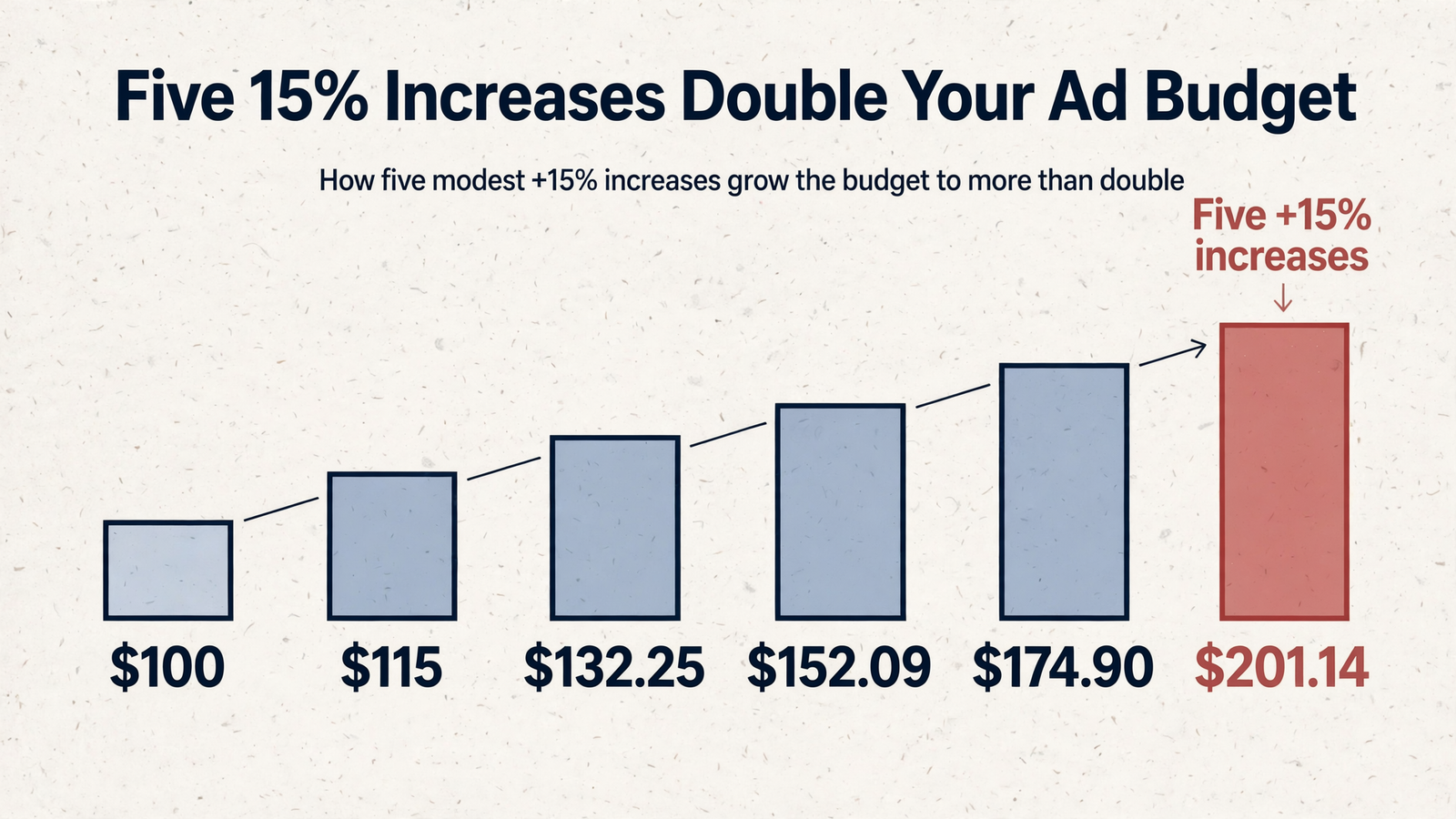
A 15% cap on each budget increase is not a conservative policy. Approve five increases in a row and Claude can take a campaign from $100 a day to $201.14 without breaking your rule once.
Give it five quiet afternoons during a busy trading period. Each time, the approval screen shows a modest increase from the current setting. By the fifth afternoon, you’ve signed off on more than double the starting budget. Nobody had to approve a doubling. That’s the problem.
If I’m judging an MCP connector that can edit Google Ads, Bing Ads, or Meta Ads, I don’t start with whether it asks before making a change. I start with what it checks before it lets that change through. Can it see how far the budget has already moved? Can it stop the next edit when the total goes too far? A polite approval screen answers neither question.
The math: $100 × 1.15⁵ = $201.14
This isn’t a forecast. It’s the arithmetic an approval screen can hide by showing only the current setting and the proposed one. Start at $100 a day and apply each increase to the new budget:
- $115.00. The first increase looks exactly as advertised.
- $132.25. Another 15%. Now you’re 32.25% above where you started.
- $152.09. More than half again as much as the starting budget.
- $174.90. Still no individual edit outside the limit.
- $201.14. More than double, with every edit inside your “conservative” rule.
A budget setting is not actual spend. On the day of a change, Google says a campaign can be charged up to twice its highest average daily budget that day. Raising the setting gives delivery more room to spend if the auction finds demand. It doesn’t guarantee the money will go out, and the setting itself isn’t a hard cap on that day’s charges.
After the fifth increase in a week, I’d want to know what changed since the first. An assistant looking only at the latest proposal has no reason to ask that question. If the approval shows the step but not the staircase, don’t approve it yet.
Microsoft said “slow,” not “15% whenever you like”
Microsoft’s 2026 holiday checklist pairs daily feed checks and budget headroom with “slow, incremental changes to bids/budgets (+/-15%).” “Slow” is doing work in that sentence. Copy the percentage into a prompt and leave out the cadence, and you’ve turned advice for managing a peak into permission to raise a budget every time the agent logs in.
Microsoft’s holiday playbook makes the rest explicit: phase in budget changes gradually, in 15–20% increments, as early as possible. Avoid large midseason changes and small daily updates. Give a new bidding strategy at least four weeks to stabilize. I used to quote the 15% number to clients as if the number alone solved the risk. I was wrong. The concern is moving too much, too fast, too late. A percentage without timing or a reason to intervene is half a policy.
Microsoft’s guidance on AI-ready holiday campaigns makes another point the prompt version leaves out: fewer than 30 conversions in 30 days gives bidding less data to work with and leaves performance more volatile. And Google’s Smart Bidding guidance says budget and target changes can take effect in the next auction without triggering Learning status. Performance takes one to two conversion cycles to converge. The absence of a Learning label isn’t a reason to approve another increase.
The connector decides what gets through
Fifteen percent of a $20 budget is $3. Fifteen percent of a $20,000 budget is $3,000. Same rule, wildly different exposure. And neither number tells me how many times someone has already applied the rule.
Google’s own Google Ads MCP server can’t edit budgets or bids. For those changes, you need a connector that can write to the account. Judge the checks on the connector that actually makes the edit. The fact that it plugs into Claude or ChatGPT doesn’t tell you whether it can stop the fifth increase.

When a tool advertises “safe AI budget changes” because it caps each edit at 15%, my follow-up is boring and decisive. Show me the cumulative cap. Show me the account ceiling. Show me the reason for every change and how I undo it. If the answers are vague, all you’ve shown me is that the tool can take small steps.
Before the next edit, ask how far the budget has moved
If Claude or ChatGPT is already connected to a live account, ask for the history before you ask for a recommendation. Start with a read-only request in the chat you’ve connected through groas:
Using groas, show current budgets, available change history, and cumulative increases over my chosen review window. Flag missing history. Make no changes.
The review window gives the assistant a baseline. Flagging missing history means it can’t credibly give you a cumulative total when it can’t see the last three edits. “Make no changes” keeps an audit from turning into an optimization session. I want to see where the account stands before anyone offers to improve it.
Keep budget, bidding, and delivery separate
A budget edit, a bid edit, and a delivery consequence are three different things. A budget edit changes how much room the campaign has to spend. A bid or target edit changes what the system tries to buy and at what target. Delivery is what happens once real demand shows up, including the possibility that charges exceed the average daily budget on the day you change it. Bundle all three under “optimization” and you don’t know which lever you approved.
In one r/PPC thread, an operator managing 118 Google Ads accounts describes staging Claude Code’s proposed budget edits, negatives, and ad copy for manual review. Previews show what would change; audit logs show what did. I like the distinction. Make the assistant list budget edits separately from bid and target edits, then explain the delivery implications separately from both.
Count changes outside the current chat
Someone raises a campaign budget in Ads Manager. You approve another increase in a different thread. Autopilot, if it’s on, acts overnight. The account carries all three changes whether or not the current chat can see them. Add this to the audit request:
Include changes made outside this conversation where the available history supports it, and say plainly where it doesn’t.
groas’s MCP connector gives you a record you can inspect: changes made through groas are logged with their reasons, and you can undo any of them in one step. That’s more useful than asking a chat to remember what happened. It isn’t a reason to assume the history includes edits made elsewhere. If the assistant can’t show you a complete position, don’t hand it unattended budget changes.
Set an exposure envelope before you enable writes
Set a ceiling in dollars and a limit on cumulative movement. I call that an exposure envelope. A per-edit cap tells the assistant how big a step it can take. The envelope tells it when to stop.
Write down four things:
- Account ceiling: the maximum combined daily budget settings across the campaigns the assistant can edit. Use dollars, not percentages. This limits the budgets the assistant can set, not what the platform can charge on a particular day.
- Campaign ceiling: the maximum budget setting for each campaign. A $50 campaign and a $5,000 campaign shouldn’t share a ceiling just because the same assistant manages them.
- Cumulative-change limit: how far the settings can move from the start of the review window, up or down. The fifth increase gets checked against the baseline, not just against the fourth.
- Approval threshold: the point at which the assistant needs you to approve an otherwise permitted change. Approval is a separate check, not permission to exceed the envelope.
This costs more attention upfront than typing “never raise a budget by more than 15%.” You have to set the numbers, check the history, and test what happens when a proposal hits a limit. Do that before you connect anything that can write. If you’re already connected, do it before the next approval.
Ask for one change, with the math attached
One proposal. Both numbers. Stop asking the assistant to “optimize my budgets.” That’s a blank check with good spelling. Ask for the current setting, the proposed setting, the size of this edit, and where it leaves the account:
Propose one budget or bidding change only. State the current setting, the proposed setting, the percentage move, and the cumulative move inside my review window. Show where the resulting budgets sit against my account and campaign ceilings. If the proposal would exceed a ceiling or the cumulative limit, propose no change and say why.
That puts the percentage and the cumulative move in the same approval. It also gives the assistant a useful answer that isn’t “yes.” If the envelope is full, no proposal is the right result.
Know which limits are requests and which are locks
A limit only blocks a write if something in the execution path enforces it. I separate three layers:
- Prompt instructions. “Never exceed a cumulative +30% in seven days” states the policy. It doesn’t enforce it. Nupact’s guide to Google Ads MCP describes Claude’s approvals as per-tool: allow, ask, or block. That isn’t a rule that lets small budget edits through and holds larger ones. AdAdvisor’s governance framework makes the more useful distinction: set limits on total exposure, individual actions, and daily reallocations, then keep a record of the prior state so you can roll back.
- Configured autopilot rules. With groas, autopilot is off until you switch it on. It runs under rules you set, logs each change with its reason, and gives you a one-step undo. That’s the setup I’d choose over reviewing isolated confirmation screens. Start with the groas workflow for approved edits: let the assistant make changes you approve, leave autopilot off, and test what the rules and logs actually cover before you automate. A log tells you what happened. It doesn’t prove a limit would have stopped it.
- Server-enforced limits. Meta’s Ads MCP rules show what a lock looks like: an account owner can block budget edits outright or configure the server to deny requests to set a budget above $1,000. By contrast, PaidSync’s Google Ads MCP describes a preview and confirmation for budget edits and a second confirmation for a move over 50%. That’s extra friction on one edit, not a cumulative cap across a week of approvals.
Test the case the sales deck doesn’t show: one modest proposal after several modest approvals. If it would take you past the envelope and the tool can still write it, keep the write under manual review.
Make “no change” an acceptable result
The assistant needs a reason to intervene, not just room under the ceiling. I want enough conversion data for that reason to be more than noise. Thin data doesn’t earn a confident budget increase just because the increase is small. It’s the same discipline as making Claude explain the loss before pausing ads: act for a stated reason, within a stated limit, and leave a record I can audit.
After an approved edit, ask the assistant to read back the resulting settings and check the reason in the log. If the read-back and the log disagree, check the account directly. Keep autopilot off until the rules have survived a real review window. As PPC.land’s explanation of approval thresholds points out, several transactions just below a threshold can get around a rule that looks at each one in isolation. That’s the failure your review needs to catch.
Buy execution capability. Reject compulsory activity.
Buy execution capability. Reject compulsory activity. I want a connector that shows the cumulative position, respects a ceiling, and leaves me a reason and a way back for every change. I start with groas because the execution and the record sit together, and autopilot stays off until I switch it on. I still want to see what happens when the next write would exceed the limit.
Five straight 15% increases take $100 to $201.14. If you keep approving the steps without checking where they end, you’ll be the one explaining why the budget doubled when nobody ever approved a doubling.





