LinkedIn

Test the script, not its reputation
The best Google Ads script in 2026 is the one that passes a reliability test in your account. A listicle can tell me which scripts other people like. It can’t tell me whether one will flag the right campaign in my account, in my time zone, with my conversion lag.
I’m taking a second look at Google Ads Scripts vs groas MCP in Claude: Keep the Rules, Move the Questions because choosing a tool doesn’t tell me whether the automation I already use gives me dependable answers. Before I authorize a new script or carry an old one into another year, I want to see what it gets right, where it breaks, and whether it tells me when it breaks.
Test question: Will this version of the script flag the right campaigns, on the intended schedule, without silently doing anything else?
I expect the independently calculated flags to settle most disputes about what the rule should do. I expect the boundary and failure tests to tell me something a clean run can’t: whether I’ll know when to stop trusting the output. I use Claude through groas MCP to inspect the account rows behind a mismatch. The script still runs the rule. Claude doesn’t replace it or grade its own homework.
Write down what counts as a pass
Pick one script and one observable job
A spend-threshold alert or a zero-conversion-spend flag makes a good candidate. Either the script flags a named campaign in a named window or it doesn’t. I can test that. I can’t test “optimization” without first saying what the script is supposed to do.
Before you run anything, record:
- The script’s source, version, and intended schedule.
- Every permission it requests and what it writes or sends.
- The campaigns it should check and the actions it must not take.
If you can’t say what the script can touch, don’t authorize it. I used to skim scripts and authorize on intent. I was wrong to call that a review.
Fix the window and the tolerances before you see results
Specify the account scope, currency, time zone, reporting window, threshold, and what counts as a conversion. Decide whether to exclude recent days whose conversion data hasn’t had time to settle. A script that checks “today” early in the day sees an incomplete window. If you change the window after a mismatch, you’ve changed the test.
Next, set the tolerances: how many missed alerts, how many false alerts, and how much time between a check and the alert reaching you? A spend guard that misses one night can cost real money. A weekly diagnostic that arrives an hour late may cost nothing. Set the tolerances while you’re calm, not while you’re looking at a result you’d like to keep.
Set up the control and fence off writes
Freeze the comparison data
Export the relevant data for complete reporting periods. For a zero-conversion-spend flag, record the campaign, date range, spend, and conversions. Apply your threshold in a spreadsheet or a script you control. Calculate the expected flag independently; don’t work backward from what the candidate produced.
Save a timestamped snapshot. A complete week, or two complete reporting periods for a weekly job, can give you a manageable reference set. Choose a window with campaigns that should flag and campaigns that shouldn’t. A window with no expected flags can expose false alarms, but it can’t tell you whether the script catches what you hired it to catch.
A saved snapshot is a control; a live account is not. For the controlled comparison, the candidate and your reference calculation need the same input rows, not just the same date range. If the candidate can only query live data and you can’t feed those rows into a test harness, record that limitation. Don’t call a live comparison a replay.
Give Claude access to evidence, not permission to act
Through groas MCP, Claude can inspect the underlying Google Ads rows and recompute a flag. That’s useful when the question is specific: “Show me the rows behind this alert, then show me the rows behind the campaign that didn’t trigger.” The answer is something to check against your reference sheet, not a verdict.
Verify which tools your setup exposes and which authorization controls apply. For this audit, expose only the read tools where your setup lets you restrict access. If write or delete tools remain available, keep their approval requirements in place and don’t approve those actions during the audit. “Make no account changes” is an instruction, not an access control. For a concrete example you can adapt, see Cursor Rules for Marketing: Scope groas MCP Work and Review Every Change.
Keep the candidate from changing the account
Use a reviewed reporting-only copy or an isolated harness for the first three passes. If the script can change budgets, bids, statuses, or other account settings, verify that those actions are disabled in the copy you test.
Preview is not a sandbox. It doesn’t change actual campaign data, but MailApp emails still send and spreadsheets still update. Code that creates an entity and then reads it back can also behave differently in preview than it does in a live run. Check where the output goes before you run anything.
A reporting-only copy tells you whether the rule makes the right call, not whether it can carry out a write correctly. That’s the trade I want here. Test the judgment first. Permission to act is a separate decision.
Run the four passes in order
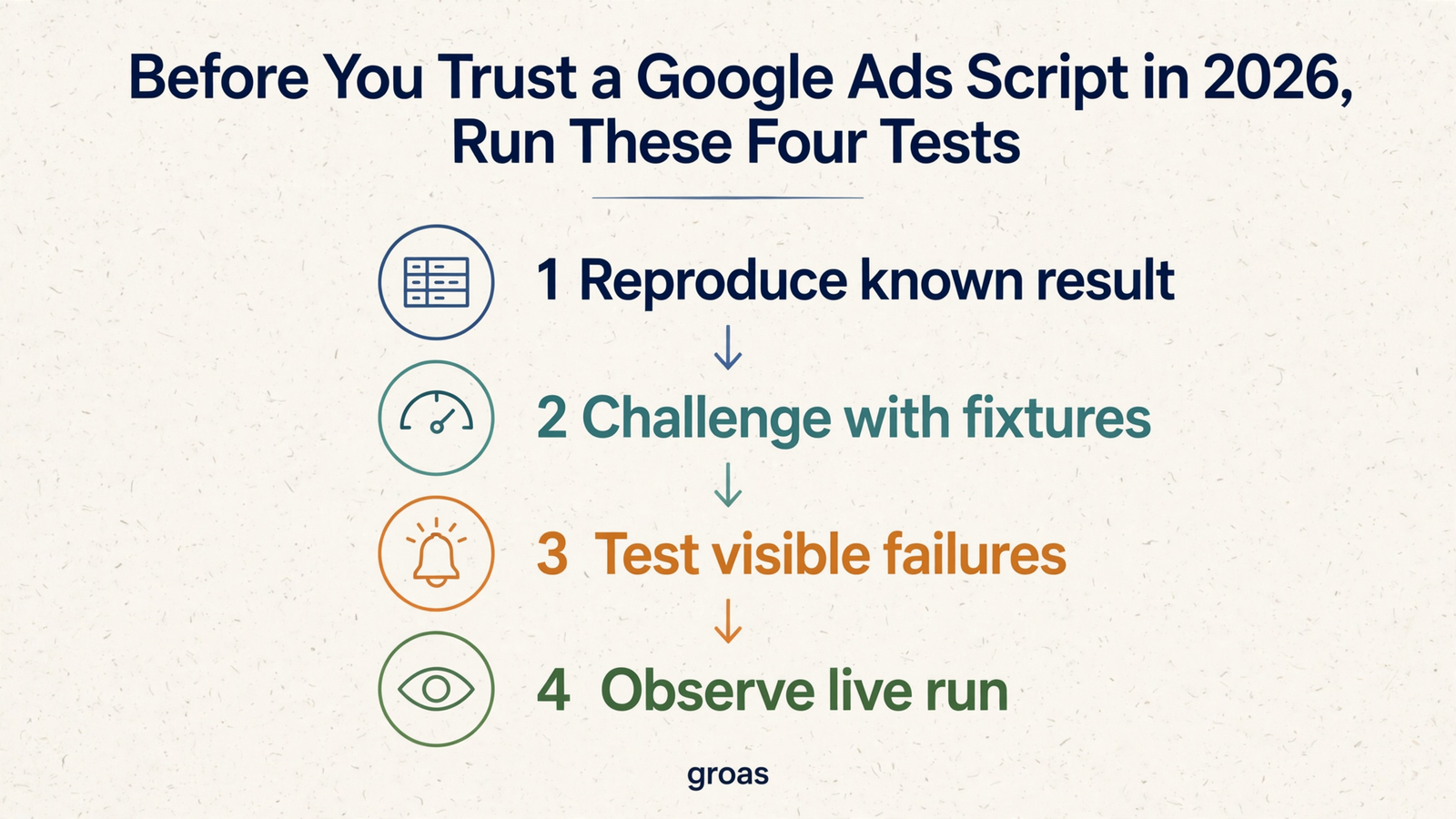
Pass 1: Reproduce a known result
Run the candidate on the same rows you used to build the reference. Compare the output row by row: which campaigns flagged, which didn’t, and whether the spend and conversion figures behind each decision match the snapshot. Save the output with a timestamp. If you use the Google Ads interface for a reviewed reporting-only check, capture the Changes/Logs output from Preview and the status and logs from Script history after a run. Those logs tell you what happened during execution; they don’t replace the comparison.
If the rows disagree, note the campaign, window, expected flag, and actual flag. Ask Claude through groas MCP to inspect the corresponding account rows, then verify its explanation against your own calculation. If the account data has changed since the export, don’t use the newer numbers to grade the frozen run.
An explained mismatch isn’t automatically a pass. If the reference calculation is wrong, correct it and rerun the comparison without changing the rule you set out to test. If the candidate is wrong, count the miss or false alert against your preset tolerance. Keep the disputed row for the next pass. It tells you where to press.
Pass 2: Challenge the rule at its boundaries
Leave live data behind and build synthetic rows in an offline harness. Label them as synthetic and work out each expected result by hand before you run the candidate:
- Spend just below, exactly at, and just above the threshold.
- Spend with zero conversions.
- A missing row.
- A row that crosses midnight in a different time zone from the account’s.
“Above $100” and “at or above $100” give different answers on a $100 row. Neither is wrong in isolation. One is wrong if it contradicts the rule you wrote down. A ratio-based rule can also divide by zero, skip a row, or flag it for the wrong reason. A missing row isn’t the same thing as a row with zero conversions. Make the candidate show you how it handles each case.
An untested boundary is not a passing boundary. If the harness can’t represent a case, mark it untested. Don’t let a blank cell turn into a check mark.
Pass 3: Make failures visible
An external request can time out, a loop can stop on a type error, or a lookup can return no rows. If the script swallows the error or exits without saying what it checked, the person waiting for an alert gets the same output as on a quiet day: nothing.

In the harness, simulate an empty response, a partial dataset, and a failed notification. Check whether the failure shows up separately from routine output. If a run stops partway through, look for evidence of where it stopped rather than treating the rows it did process as the whole result.
Can you distinguish “nothing triggered” from “the check did not complete”? If both states produce the same silence, the script fails this pass, whatever its normal-case accuracy. Keep the simulation in the harness. Don’t break production credentials, notifications, or a live account to see what happens.
Pass 4: Observe a limited reporting-only live run
Once the candidate clears the first three passes, run it against live data in reporting-only form. Set the observation window before you start. Match it to the job’s cadence: a weekly check needs time to go through its scheduled cycle. Don’t end the test early because the first few runs look tidy.
Record when each check was due, when it ran, and when any alert arrived. That lets you distinguish a late check from a late notification. If the script is near Google’s runtime limit, note it in the record: a run can stop partway through, and any changes it made before cancellation still apply. That’s another reason not to infer write safety from a reporting-only run.
A quiet window doesn’t prove the script catches anything. It can show that the job ran on schedule without generating an alert. If no campaign should have triggered, mark live alert delivery as unobserved instead of giving it credit.
Score the evidence, not the explanation
Keep one row per check in the results sheet. Record the expected flag, the actual flag, any false alert or miss, the delivery delay, whether a failure was visible, and how long each mismatch took to investigate. Keep synthetic fixtures separate from live observations. Keep data latency separate from late execution and delivery. An alert can arrive on time and still be based on incomplete data; a script can spot the right problem and tell you too late.
Give Claude a specific mismatch to investigate. An account, a campaign, a time zone, and a reporting window are more useful than “Why is this script wrong?” Here’s the request I’d use through groas MCP:
Compare these script outputs with the reference rows for the same account, time zone, and reporting window. List every mismatch, show your calculations, and identify any missing evidence. Make no account changes.
When Claude points to conversion lag, ask which rows show it and whether your reference window already excludes recent days. If it points to a time-zone boundary, ask for the account time zone and the timestamps it used. If it can’t point to the evidence, record the explanation as a hypothesis. Claude investigates. Your reference sheet decides.
Decide what the script has earned
- Retain it for the job you tested if it meets the criteria you set in advance.
- Repair and retest if you can isolate a defect, such as an incorrect threshold boundary or a missing failure alert. Rerun the affected passes against the written expectations.
- Reject it if it needs broader permissions than the job warrants, fails without telling you, or produces results you can’t reproduce against independent data.
That’s what I mean by “best Google Ads script in 2026.” It’s the best validated fit for this job in this account. A reporting-only alert can earn its place without earning the right to change bids. And a script that passes today still needs a review when its setup changes. Google notes that a scheduled script stops running if its original author is removed from the account; someone who still has access can reauthorize it. That’s a review trigger, not a footnote.
Close the notebook with a record you can reuse for the next version:
- Script name, source, version, and test date.
- Job, permission boundaries, and expected behavior: scope, currency, time zone, window, threshold, and treatment of lag.
- Pass 1: expected and actual flags, mismatches, and verified causes.
- Pass 2: boundary cases and fixture outcomes, including anything untested.
- Pass 3: whether you can distinguish a quiet run from an incomplete one.
- Pass 4: observation window, execution times, alert delays, and what you couldn’t observe.
- Decision, the criterion that settled it, and the next review trigger: an account, author, threshold, or platform change.
If the script passes, keep it on the job it proved it can do. If it fails silently or produces a flag you can’t reproduce, repair or reject it before you rely on it to catch a spending problem. Either result changes what you do next. That’s the point of the test.