

 LinkedIn

Claude cannot diagnose a Meta ROAS drop from an account it cannot see. Give it live data, though, and it can work through spend, CPM, CTR and conversion rate instead of handing back another checklist about “testing creative.”
By the end of this tutorial, you will have Claude reading your Meta account through groas, ten prompts for the first analysis, and approval rules to set before it touches budget. Claude does the reasoning. groas supplies the data and the hands.
Before starting, have these ready:
- A Claude account on web or desktop.
- Admin access to the Meta ad account you want to check.
- A groas connection.
- Your target CPA and break-even ROAS, ready to give Claude before it recommends changes.
A CSV can support a useful one-off analysis. The problem is what happens next: the account keeps moving, and the export does not. This setup removes that shuffle.
Connect the account and prove Claude can read it
Step 1. Connect Meta Ads in groas
Open Accounts > Connect > Meta Ads in groas. Sign in with a Meta user that has admin access, then select the accounts Claude should see.
Expected result: groas starts pulling delivery and creative data within minutes.
Common mistake: using an employee login that later loses access. Use a stable admin login. Budget rules are not much use if the connection disappears when someone leaves.

Step 2. Add the groas connector in Claude
On Claude web or desktop, open Customize > Connectors, click + Add, then Add custom connector. Name it groas and paste this connector URL:
https://mcp.groas.ai/mcp
Leave the detected sign-in options unchanged. Click Add, then Connect, and sign in with groas.
Expected result: Claude lists groas as connected.
Common mistake: adding a connector but never completing its sign-in. Check the connection status before asking Claude to inspect an account.
Step 3. Select the account and check the numbers
Start a new chat with the groas connector enabled. Replace the bracketed account name before sending:
List the Meta ad accounts you can see. For [account name], show spend by campaign for the last 7 days. State the exact dates used.
Expected result: real campaign names and spend figures, not instructions for exporting a CSV. Compare them with Ads Manager over the same dates.
Common mistake: treating a plausible answer as proof of a connection. If Claude asks for a CSV, check that the connector is enabled and the correct account is linked. Reconnect Meta in groas if needed, then repeat the check.
Do not move on until the account, dates and numbers match.
Set approval rules before running the prompts
Keep autopilot off and approval required for this first pass. Reading an account and changing it are different permissions. Treat them that way.
- Keep
Approve-first ONin groas. Expected: Claude drafts a pause, duplicate or budget move and waits. The mistake is enabling autopilot just to save a confirmation click. Leave it off this week. - Define the budget limits. Use
20% per ad set per 7 daysas the maximum proposed budget change and specify a daily account cap. Expected: recommendations stay inside your stated limits. The mistake is confusing a written instruction with an enforced account control. Check the available groas controls before relying on a cap. - Separate prospecting from retargeting. Set the operating scope to
Prospecting: propose pauses and duplicates. Retargeting: report only.Expected: Claude keeps retargeting changes out of its action list. The mistake is applying one global rule to accounts with different margins. - Find
Activity logbefore approving anything. Expected: approved changes appear with their reasons and can be undone in one step. The mistake is checking the log only after something goes wrong. No log, no trust.
Give Claude the same boundaries in the chat:
For [account], diagnose and draft only. Do not execute changes without my explicit approval of the specific action.

Target CPA: [amount and currency]
Break-even ROAS: [number]
Maximum proposed budget change: 20% per ad set per 7 days
Daily account budget cap: [amount and currency]
Prospecting: propose pauses and duplicates
Retargeting: report only

Keep autopilot off. If data or permissions are missing, say what is missing rather than guessing.
These instructions make the operating brief explicit. They do not replace permission settings. Check both before allowing a write.
Run these ten prompts in order
Keep the groas connector enabled. Replace every bracketed field, use explicit date ranges, and keep approval required throughout. “Recently” is not a reporting period.
1. Diagnose the ROAS drop
Why did Meta ROAS drop for [account] in the last 7 days versus the previous 7 days? State the exact dates. Break down spend, CPM, CTR and conversion rate by ad set. Identify the ad set contributing most to the decline, or explain why no single ad set accounts for it. Do not change anything.
Expected result: named ad sets, supporting numbers and an explanation of which metrics moved. Spend, CPM and conversion rate should explain the diagnosis, not decorate it.
Common mistake: accepting “creative fatigue” because it sounds familiar. Ask Claude to show the metric behind the claim. A diagnosis is not proof of causation.
2. Find fatigue without killing the whole ad set
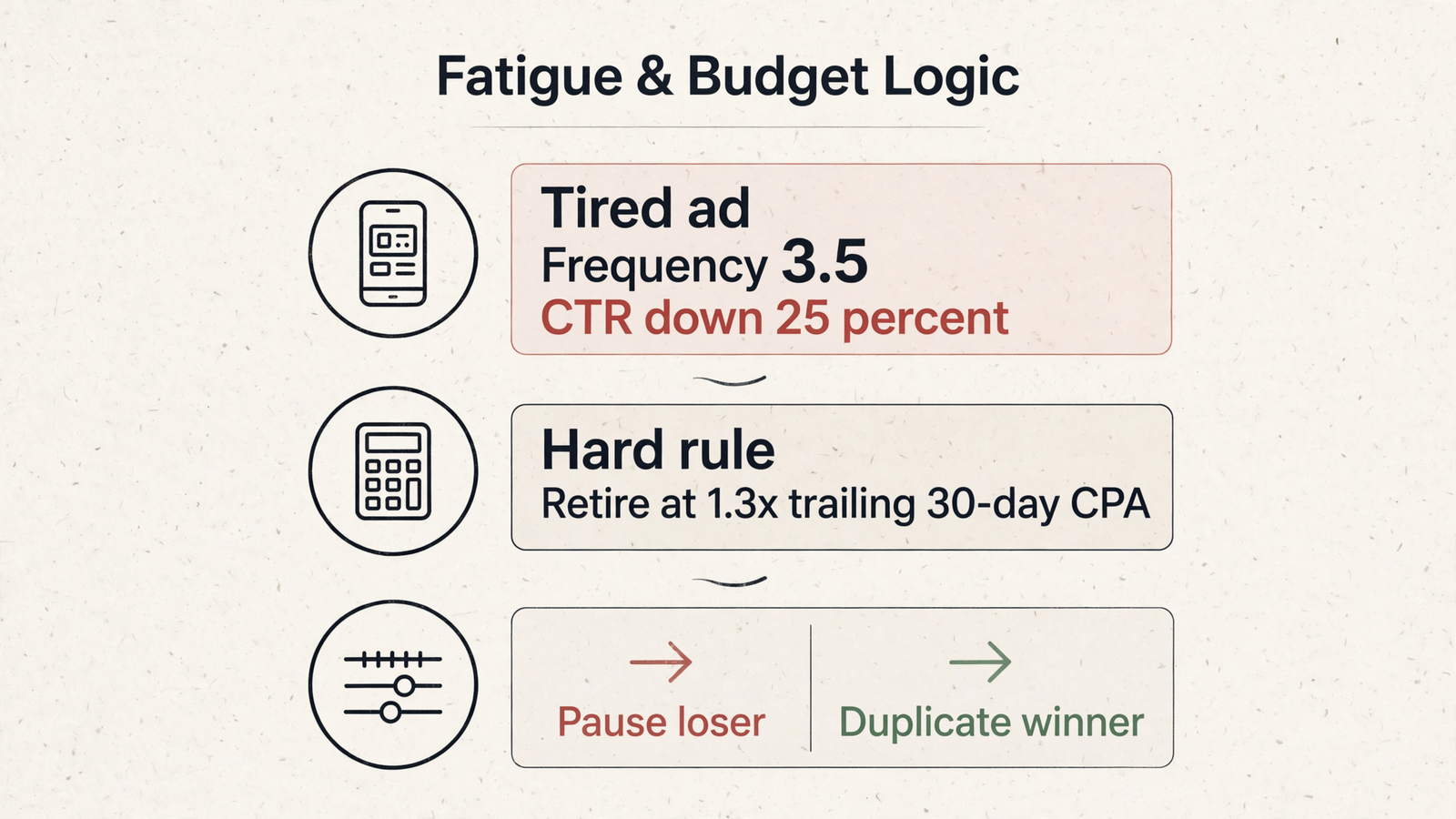
For [account] over the last 7 days, list active Meta creatives with frequency above 3.0, CTR down at least 25% versus the previous 7 days, and rising CPC. Flag prospecting above 3.5 and retargeting above 4.5 separately. Show the supporting metrics. Do not pause anything.
Expected result: a short review list, not a death sentence for every high-frequency ad.
My warning rule is frequency above 3.0 plus CTR down 25% or more and rising CPC. I watch prospecting around 2.5–3.0; retargeting can tolerate more repetition. The response is fresh variations, not automatically dismantling the ad set. This fatigue guide discusses refreshing four to six variations every two weeks.
Common mistake: treating frequency alone as the reason to pause. Review the ad’s CPA and landing page before retiring it.
3. Inspect competitors’ recent ads and funnels
For [competitor names], list the newest Meta ads from the last 14 days and their landing pages. Show each ad's hook, angle, offer and start date where available. Describe the funnel steps you can observe. Do not infer spend or performance from an ad being active.
Expected result: an observable creative-and-offer map.
The free Meta Ad Library shows creative and start dates, but not spend, targeting or performance for standard commercial ads. Through groas, Claude can also inspect the landing pages and funnels behind the ads.
Common mistake: calling a competitor’s ad a winner because it exists. Borrow a testable idea, not an imaginary performance result.
4. Locate placement waste
For [account] over the last 14 days, break down spend and CPA by placement: Feed, Reels, Stories and Audience Network. Flag placements taking over 20% of spend at more than 1.3 times my target CPA of [amount]. Show the affected ad sets. Do not make exclusions.
Expected result: a placement-and-ad-set shortlist with spend and CPA beside each flag.
Common mistake: excluding a placement account-wide because it loses in one ad set. Review the losing ad set first. A weak slice is not an account-wide verdict.
5. Check whether audience overlap data is available
For the top 3 prospecting ad sets by spend in [account] over the last 7 days, check whether audience-overlap data is available. If it is, flag pairs above 30% overlap with CPA above my target of [amount]. If it is not available, say so. Do not invent an overlap percentage or recommend consolidation solely from similar audience names.
Expected result: either a supported overlap finding or a clear statement that the required data is unavailable.
Common mistake: mistaking similar targeting labels for measured overlap. I would rather get an honest missing-data answer than a confident consolidation recommendation built on nothing.
6. Model a budget shift without pretending it is a forecast
For [account], model moving 20% of spend from the lowest-ROAS ad set to the highest-ROAS ad set. Consider the move only if the winner has frequency below 2.5 and at least 30 conversions in the last 7 days. Show the projected CPA, assumptions and limitations. Do not execute the change.
Expected result: a conditional scenario with numbers, or a recommendation to wait.
Common mistake: treating the current CPA as a guaranteed CPA at higher spend. A winner with eight conversions has not cleared this prompt’s volume threshold. Keep the model separate from the approval.
7. Turn Reddit complaints into new angles
Pull Reddit quotes about [problem we solve] from the last 90 days. Show the original quotes and their context. Turn the top 3 complaints into 2 Meta headline variants each, under 40 characters, using this brand voice: [description]. Keep the quotes separate from your rewritten headlines.
Expected result: six headline drafts grounded in customer language.
This is why I use groas rather than an account-only feed: Claude can work with competitor ads, funnels and Reddit research alongside account performance.
Common mistake: passing generated copy off as a customer quote. Keep the evidence and the copywriting visibly separate, then review the headlines before publishing.
8. Draft one pause
Draft a proposed pause for the worst-performing ad in [account] over the last 7 days. Show ad name, spend, conversions, CPA versus my target, and frequency. Explain why it is the strongest pause candidate and identify any missing context. Wait for my explicit approval before pausing it.
Expected result: one proposed action with a reason, not an executed pause.
Common mistake: approving without checking the shop, offer or tracking. Read the diagnosis, inspect the ad, then decide. No automatic pause because a row is red.
9. Draft a scaling test
Draft a duplicate of my best-performing ad in [account] into a new ad set with a budget 20% higher than the source ad set. Show the source ad, proposed settings and budget, and check the proposal against my account cap. Keep the new ad set paused. Wait for my explicit confirmation before creating or activating anything.
Expected result: a reviewable proposal that stops before execution.
Common mistake: treating “duplicate” as a harmless administrative action. This is a scaling test with budget consequences. Check the proposed budget and paused status before approving either creation or activation.
10. Write the weekly decision summary
Write my Meta weekly summary for [account] for the last 7 days versus the previous 7 days. Include spend, ROAS, CPA, one winner, one loser, one observable competitor move, and the single change to consider next week. Separate observations from recommendations. Do not execute anything.
Expected result: a short decision document, not a metric dump.
Common mistake: accepting five “top priorities.” Ask for one next action. For more examples, keep my 20 Meta Ads prompts that work once your AI can see your account beside Claude.
Know what the connection does—and what it does not
Through groas, Claude can read live delivery data, creative and placement splits, then bring competitor ads, landing pages and Reddit language into the same analysis. That is the useful combination: account performance plus the market around it.
For changes, separate the proposal from execution and activation. A draft is not approval. A newly created, paused ad set is not permission to start spending. Check the specific action before confirming it.
The connection still cannot supply business context you have not provided:
- Landing pages: falling CTR may suggest fatigue while a page taking six seconds to load contributes to the performance problem.
- Offer economics: a 2.1 ROAS is not a scaling signal when break-even is 2.4.
- Tracking: a double-firing pixel can inflate conversions. Compare the story with the CRM.
My rule is simple: let Claude diagnose, draft and summarize. Keep responsibility for the shop, the offer and the approval.
Compare the free connection paths before choosing
If the goal is a $0 connection before paying $19, there are two alternatives worth checking:
- Meta’s official ads MCP server provides reporting and campaign-management tools, with new campaigns starting paused and no connection fee from Meta. Access is described as phased, so check whether the account is eligible. Its read-and-write tool set is an account-management connection, not the combined competitor-and-Reddit workflow used above.
- Pipeboard Free includes 30 weekly AI tool executions and two ad-account slots. That leaves little room for repeated checks across several accounts; Pro is $29.90 a month for three slots and unlimited runs.
groas is the better fit for this tutorial’s full workflow: $19 covers every account plus competitor ads and Reddit in the same connection. The free paths leave that wider research workflow for you to assemble.
If you prefer ChatGPT, use my Facebook Ads Manager connection tutorial instead.
Verify it worked, then approve exactly one fix
Run a final read check:
Show Meta spend yesterday by campaign for [account]. State the date used and identify the ad set with the highest CPA. Do not make changes.
Compare the names and numbers with Ads Manager. If they match, the feed is working. If Claude supplies export instructions instead, return to the connector check.
Then confirm the 20% budget-change limit, run prompt 1 and approve exactly one justified fix. If that fix is a pause, inspect the activity log immediately afterward and confirm that only the intended ad changed.
Cause first, effect second. That single approved pause teaches more about the connection than ten read-only summaries.


