

 LinkedIn

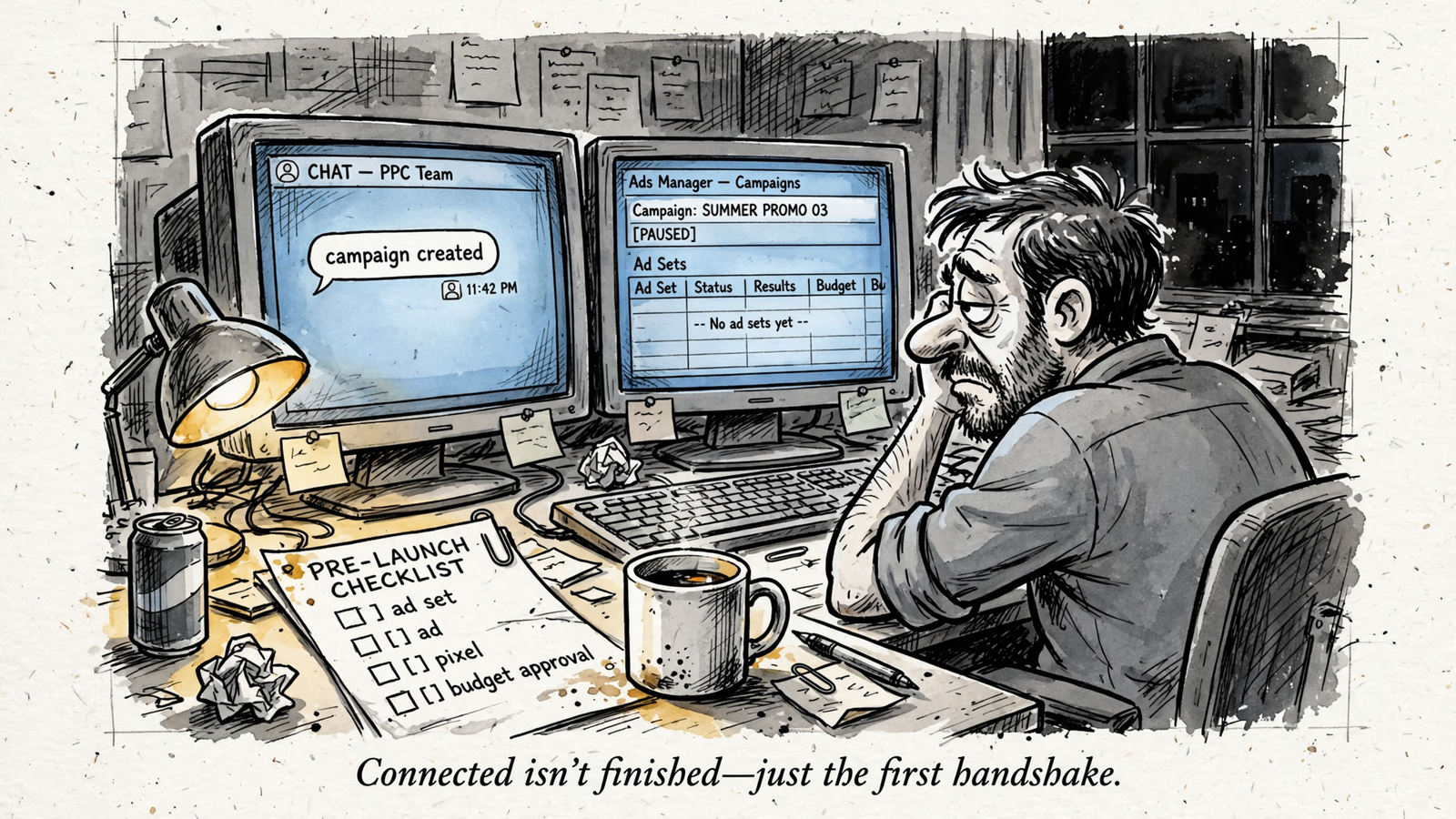
Claude created a €20-a-day Meta leads campaign. It never got as far as creating an ad set.
In a live Meta MCP test, the official connector worked, the campaign showed up in Ads Manager, and a safety check blocked the next write. There it sat, paused, with a name that ended in NON PUBBLICARE. I spent years billing for work in Ads Manager. I know how finished an account can look when the right name is in the right column.
The test wasn’t run on groas. I use it because it makes the buying trap easy to see: access to data, permission to act, and a usable result are three separate claims. A connection doesn’t prove the AI can change anything. A successful write doesn’t prove it finished the job. Here are the 12 terms I’d make a vendor prove, in the order I’d meet them.
MCP client
An MCP client is the part of your AI app that manages the connection to an outside service so the app can use its tools.
The host is the app you talk to, like ChatGPT, Claude, or Cursor. The client lives inside that host and talks to the server. I used to think that distinction was plumbing. Then I saw demos where “works with ChatGPT and Claude” meant one specific setup, on one paid tier, with writes turned off. The demo worked. It just didn’t do the job the buyer thought they were buying.
Ask for the demo on the app and plan you’ll actually use. If you need it to make changes, don’t settle for watching it pull a report.
MCP server
An MCP server is the outside service that makes tools, data, and prompts available to your AI in a standard format.
I think of the server as the menu. A successful install tells me I can open it. It doesn’t tell me what I can order. Meta’s Ads MCP server, for example, covers reporting, ad creation and management, catalogs, pixel signal quality, help search, tests, and activity logs. A reporting-only server is still a server. Same noun, very different Monday morning.
This is where groas’s broader menu matters to me: Google Ads, Bing Ads, Meta Ads, ChatGPT Ads, SEO, and AI search through one connection, alongside competitor and Reddit data. A single-platform reporting server doesn’t cover that job. Still, I’d ask groas the same thing I’d ask anyone else: show me the tool list, split by platform and by what can read versus what can change.
Connector
A connector is a packaged link between your AI app and another service.
What the deck calls a connector, I call a box with unknown contents. Some fetch reports. Others can also create, edit, pause, publish, or move budget. And the same connector can do different things depending on the plan you’re running it on. The distinction between full MCP and read or fetch access in ChatGPT is the difference between asking ChatGPT to change a campaign and asking it to describe one.
Make the vendor write down the verbs. Can it list? Can it create? Can it publish? Put “on my plan” at the end of each question.
Authorization
Authorization is the permission you grant a connection to access particular accounts or sites and perform particular operations.
This is OAuth scopes and account selection, not strategy. When I give someone access to Ads Manager, I haven’t approved a budget increase. I’ve given them access to Ads Manager. Same rule for AI: connecting Google Ads, Meta, and a site to groas sets the boundary of what ChatGPT or Claude can see or touch. It doesn’t approve a single change inside that boundary.
Get the permission boundary in writing: which ad account IDs, which sites, which read and write permissions, and how you revoke them. Save the question of who gets to approve Tuesday’s budget increase for Tuesday’s budget increase.
Live data
Live data is information fetched from the connected account for a stated date range at a known time.
In the Meta test, Claude created the campaign before checking the pixel. The pixel had logged about 15 Lead events from Sept. 13 to Oct. 10. Against a benchmark of roughly 50 optimization events a week, that’s thin. The campaign had a leads objective on paper, but there wasn’t much signal behind it. I’ve made the same mistake by hand: build the structure first, check what it has to learn from later. The order matters more than how quickly the numbers come back.
A fresh pull proves the read worked, not that the campaign is ready. Ask for the dates, the retrieval time, and the conversion volume before you start building.
Read tool
A read tool fetches information without changing the account.
It lists, gets, searches, and reports. It doesn’t pause an ad or move a budget. Meta puts spend, CTR, CPC, CPM, conversions, anomaly checks, and benchmarks on the reporting side, separate from creation and editing. With groas, my first request would be deliberately dull: List Google Ads campaign results for account 123-456-7890 over the last 14 days, with spend, conversions, and CPA. Nothing moves. That’s the point.
Run a read-only week before granting writes. If I can’t get the right account ID, dates, and metric definitions on a routine report, I don’t expect write access to fix the problem.
Write tool
A write tool asks the connected platform to change something in the account.
A name like create or update isn’t proof of what happened. Neither is readOnlyHint: as the tool annotation rules make clear, it’s a hint about behavior, not a permission check or a guarantee. I check actual behavior before I let a tool touch spend.
With groas, I’d ask it to pause the losing ad in ad set 1202xxxx, confirm the returned status, then read back the ad’s current status. I’m looking for three distinct pieces of evidence, in order:
- The request identifies the ad and the intended change.
- The tool returns a status for that request.
- A fresh read shows the ad’s current state.
“Done” in chat is not a read-back. If the last check is missing, the change may have happened. I just don’t count it as verified.
Completed task
A completed task is the usable outcome you asked for, not a successful tool call on the way there.
The Meta test produced a real campaign. It didn’t produce an ad set or an ad, and nothing delivered. The campaign started paused and would have needed a separate activation step. If the assignment was to create a paused campaign shell, that’s a result. If it was to build something ready to run, it’s a line item with work still attached.
I used to count drafts as wins in client reports. I stopped when a client asked why a “built” campaign had spent zero. Now the verification prompt is the part I don’t improvise: Verify the campaign, ad set, and ad states by ID, and list exactly what’s still unfinished.
Set the finish line before the first call. A draft can be the deliverable. It can’t quietly become a launch in the recap.
Approval
Approval is your explicit yes to a specific change before it runs.
ChatGPT’s write confirmation behavior is one checkpoint. Platform rules are another: Meta’s Business Suite rules can block campaign creation or cap budget edits by account. The live test had its own boundaries, too: don’t touch the tool that starts spend, and make proposals only for existing campaigns. Those limits aren’t the same thing as permission to carry out any proposal that fits inside them.
Put the proposed change in front of the person approving it. My wording is: Show me the IDs and new values. Do nothing until I reply “approve.” Then execute and read back the result. That’s how I’d run approved changes with autopilot off. If all I can see is a toggle in settings, I’ve seen a setting. I haven’t seen what I’m approving.
Action log
An action log records what changed, when, which tool made the change, and why.
Chat history is what the assistant says it did. I want the record of what the platform accepted. In the Meta test, Ads Manager showed a campaign creation at €20 a day under Davide Cosmai’s name, with no agent label in the interface. Only the data returned by the API identified the Ads MCP server as the application. If I’m answering for that account, that distinction matters: the client sees a human name even though a tool made the call.
With groas, I look for the logged action with its reason attached, not the confident paragraph above it. Ask to see an actual log entry and check what the client can see. If the tool’s identity matters when something goes wrong, check that it’s visible before something goes wrong.
Undo
Undo is a supported reversal of an account change, not a refund for money spent or a reset of delivery history.
Restoring a prior budget and getting back the money that budget already spent are two different things. Deleting a Meta campaign is a sharper example. There’s no restore button for the original campaign. You can rebuild using the existing post to keep the creative and social proof, but learning starts over. That’s a rebuild, even if the ad looks the same afterward.
Ask for a reversal, not a tour of the undo button. With groas, I’d ask which changes reverse in one step, which actions leave me rebuilding, and what the platform won’t give back either way. I treat a delete as permanent unless I know exactly how it can be reversed.
Autopilot
Autopilot is ongoing execution under rules you set, not the ability to ask your AI to make a change in chat.
If I could retire one term from sales decks, it would be this one. A reporting tool with a chat box can tell me what’s wrong. That doesn’t make it an autopilot. I want to see what it can run, what limits it has to respect, and whether it stays off until I turn it on.
What I’d pay for
I sort the offers by the work they can actually do:
- ChatGPT on its own can draft a structure and tell me what to check. It hasn’t seen my account.
- A reporting-only connection can show me live numbers. That’s useful for a Monday review. It won’t ship the fix.
- A write-capable service can make changes. That’s when I check for approval, a log, and undo instead of assuming those came with the write tools.
Most demos want to jump straight from a live report to autopilot. That skips the part where I find out who reviews the changes and who owns the errors. Those costs sit next to the subscription price, which is why I’d look at what goes into the first marketing MCP bill before signing.
groas is where I’d look if I need to act across accounts instead of just reporting on them. It’s $19 a month, flat, for the whole team, with unlimited teammates, ad accounts, and sites. Say I’m running Google and Meta at $20k a month. I can connect once, ask for a specific change in plain English, and check the logged action and its reason without turning on autopilot. If I want ongoing execution, I switch it on and set the scope and limits. I’d still read the tool list for scope, approvals, logging, and undo before handing over that job.
For a launch, I want to see a campaign, an ad set, and an ad in the states I asked for, with signal behind them and a log that shows what changed. A green connection light doesn’t get a line in that report. And autopilot is still the word I’d retire. Until the vendor can show me the off switch, the scope, and the limits, I’m keeping my money.





