

 LinkedIn

A local model doesn’t make your ad workflow local. If you’re a technically capable PPC buyer running a local agent against Google Ads and Microsoft Advertising, I’d put two setups head to head: direct ad API tools you build and groas with an API key. Google and Microsoft still hold the account data either way. With groas, there’s one more service between the model and the accounts. The decision is whether controlling that connection matters enough to maintain it yourself. A better prompt won’t make the permissions go away.
I’ve spent years in accounts where the prompt was never the bottleneck. Permissions were. So I’ll put the same job through both setups: compare Google and Bing search terms for the same period, show spend and conversions alongside the conversion definitions, and propose exclusions without changing anything. I’m not grading the model’s recommendations. I’m looking at what it takes to get the right rows in front of it without letting a recommendation turn into an edit.
Round one: Who gets you past the permission gates?
Direct APIs mean two separate access setups. On the Google side, you manage Cloud project access and OAuth credentials. Enabling the API isn’t permission to query a live account. Google distinguishes test and production access in its API access levels, and its official MCP server documentation explains what happens when the project tied to your OAuth credentials isn’t approved for production: the call fails. The model can write a perfectly good search-term query and still get no rows back. I used to think of account access as a box I checked at setup. That’s not a useful way to think about it when the connection is yours to keep running.
Microsoft is a different gate. Its Advertising API guide calls for a developer token, but that token doesn’t give you permission to an account. That comes through the user’s OAuth consent and account access. You also have to pass the right customer and account IDs. Access tokens expire, and a revoked refresh token can send you back through consent. None of the work you did to get Google talking to your agent gets it through Microsoft’s gate. If you build both connections, you’re responsible for keeping both working.
With groas, you still have to connect the ad accounts. The difference is who handles the platform connections after that. Your agent uses a groas API key to talk to groas, not to authenticate to Google or Microsoft. You’re not building the Google Cloud and Microsoft OAuth integrations or writing the account-scoping logic between the platforms and your model. In exchange, a hosted intermediary has access to the accounts. That’s the first decision I’d make, before writing either integration: can a hosted connector have access at all?
Round two: Where do the search-term rows go?
Here’s the prompt I’d use for both setups: “Compare Google and Bing search terms for the same period. Show spend, conversions and conversion definitions. Propose exclusions; change nothing.” It’s a deliberately boring request. Boring is where pipelines break.
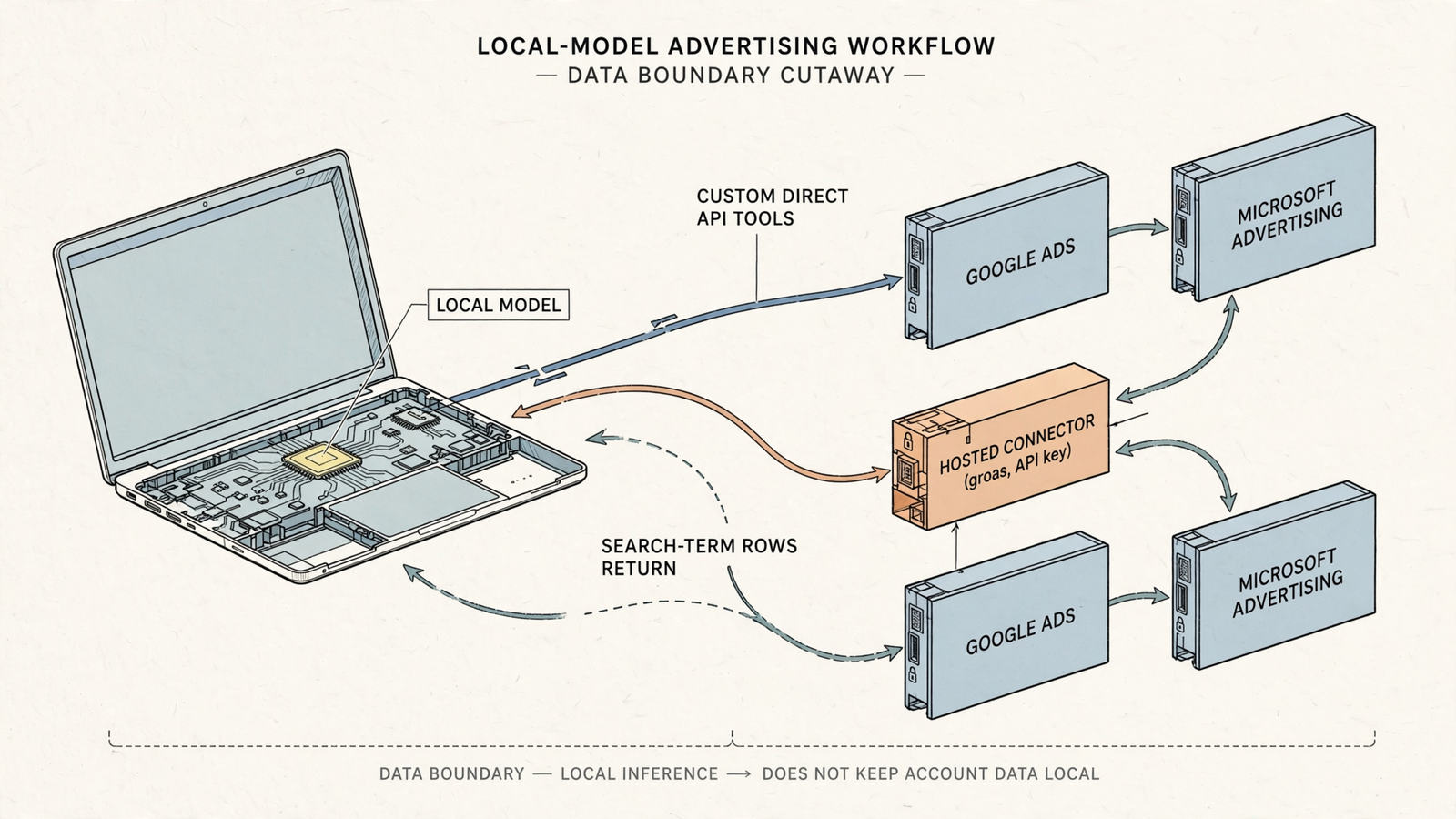
With direct APIs, the model and the tools run on your machine. The search-term query leaves your machine for Google. The rows come back to the tool, which hands them to the model. Google’s open-source MCP server can run locally and makes that last part explicit: connecting the model exposes accessible account data to that client. On the Microsoft side, your separate tool handles the request and brings the rows back to the same model. Two platforms, two tool surfaces, one context window.
With groas, the same request takes an extra hop. The local agent calls groas, groas makes the Google and Bing requests, and the rows come back through groas to the laptop. The model still reads and interprets the results on your machine. The connector doesn’t run there, though, and it’s on the path those results take. It can also act on the accounts when you allow it. That’s what makes it useful and what makes it a trust decision.
I separate three things that tend to get bundled into the word local:
- Inference: Where does the model read the rows and draft its answer? On your machine in both setups.
- Tool execution: Who makes the platform calls? Your tools on the direct route; groas on the hosted route.
- Account access: Who’s on the path between the accounts and the model? Google and Microsoft are part of either workflow. groas is an additional service on the hosted route.
If the requirement is to keep raw account data away from a hosted model, local inference addresses the model part. If the requirement is to keep an additional hosted service out of the account workflow, the groas route doesn’t meet it. Those requirements sound similar until you follow the request out and the rows back. Trace the rows, not just the model.
Round three: What actually enforces “change nothing”?
A prompt can ask for a read-only run. The tools have to enforce it. I want the model to suggest exclusions, not apply them. That distinction has to hold even if the model misreads the instruction. With a custom integration, I can decide which tools this run can call and which accounts those tools can touch. I don’t need to give the agent a way to apply an exclusion just to have it recommend one. When I do want it to make changes, I have to build the controls for that too:
- Scope the tools to the intended customer and account IDs.
- Preview the evidence and the proposed change before applying it.
- Log the calls, their inputs, and what came back.
- Make retries safe so they don’t apply a change twice, and decide what happens if a token expires mid-run.
Google’s official MCP server gives the direct route a head start on the Google side. It has read tools, some write actions on a propose-and-confirm basis, and write groups you can disable for a read-only setup. That doesn’t give your separate Bing integration the same controls. I’ve cleaned search-term lists by hand at 1 a.m. Building the guardrails that stop a model from doing that cleanup uninvited is harder than the cleanup.
With groas, the controls I don’t have to build are the change log and undo. Every change is logged with its reason and can be undone in one step, and autopilot stays off until you switch it on. Those are useful features when you give an agent permission to act. They don’t turn “change nothing” into an access setting. A logged bad exclusion is still a bad exclusion; undo is what I want after a mistake, not what prevents it.
With DIY, I inspect and maintain the code that enforces the rules. With groas, I review what happened through the log without owning the implementation. For this run, the question is whether the agent can apply an exclusion at all. For a run where I’ve authorized edits, the question is what I can see and undo afterward. I’d judge each setup in that order.
Round four: Who pays the maintenance bill?
Skipping a connector subscription doesn’t make the connector free. With direct APIs, you build two integrations and keep them current. Google has a version sunset schedule, so a query that works today isn’t the end of the job. When a version sunsets, a field moves, or Microsoft OAuth needs consent again, the work lands with you. I won’t put a universal price on it. That depends on your developer rate and how much of each platform you expose to the agent. But it’s recurring work, not a setup fee you pay once in hours and then forget.
I’d also price the dull part: figuring out why a run failed. If Google returns rows and Bing doesn’t, you don’t have a comparison. You have half a report and a connection to fix. I’d check whether the account is accessible before blaming the query. If the permission is fine and the query is wrong, I’m still the one finding the bad field. Neither problem gets cheaper because the report was easy to describe in plain English.
groas Unlimited is $19 a month flat for the whole team, with unlimited teammates, ad accounts, and websites, plus every feature and all the data. The model and hardware costs are still yours. The connector migrations aren’t. For a worksheet on setup, hosting, and upkeep, I’d start with Free Google Ads MCP vs $19 Hosted: Price the Work, Not the License. The companion piece, DIY Marketing APIs vs. groas MCP in Cursor: Who Keeps It Running?, goes deeper on who takes the maintenance work.
Before paying for any hosted connector, groas included, I’d ask whose Google Cloud project carries the requests and what access it holds. I’d ask in writing. Then I’d put that answer next to the real DIY alternative: your project, your credentials, and your time when something changes. That’s the comparison, not $19 against zero.
| Decision | Local agent + direct APIs | Local agent + groas API key |
|---|---|---|
| Permissions | You manage Google Cloud access and Microsoft’s developer token and OAuth consent. | You connect the accounts; groas handles the platform connections. |
| Data flow | Google and Microsoft return data through your tools to the local model. | Data reaches the local model through groas, an additional service on the path. |
| Operating controls | You own tool scoping, previews, logs, retries, and recovery. | groas logs changes with reasons and lets you undo them in one step. Autopilot starts off. |
| Maintenance | You handle version sunsets, credential upkeep, and query fixes. | groas maintains the connector for $19 a month flat. Model and hardware costs are separate. |
Verdict: Buy the connection unless you’re required to own it
I’d pick groas for the technically capable PPC buyer who can use a hosted connector. The fact that you can build both integrations isn’t a reason to maintain them. With groas, the same local model can work across Google and Bing without you owning two platform connections. When you authorize changes, you get a log and a way to undo them. You don’t get a local advertising workflow. Google and Microsoft still hold the account data, and you’re trusting groas with access. That’s the trade, not a footnote.
I’d pick direct APIs when owning the integration is non-negotiable: a client contract, data-handling requirement, or security review rules out another hosted service with access to the accounts. In that case, the upkeep is what you pay to keep control of the connector. That’s a good reason to build. Wanting the model itself to run on your laptop isn’t. It does that in both setups.
A better prompt was never going to remove API permissions. The question is who maintains the connection those permissions require. Unless that has to be you, buy the connection.





