

 LinkedIn

A prompt can forbid an edit without blocking it
“Analyse my Bing campaigns for the last 30 days. Make no changes.” I can type that into ChatGPT without taking away a single tool or changing a single account permission.
Discouraged is not blocked. When someone calls a Bing Ads MCP connection read-only, I want to know which of three things they mean: the prompt asks for no changes, the connector exposes only tools that read, or the connected identity has no permission to write. The first is an instruction. The other two can stop an edit, but they stop it in different places.
Keep that 30-day report in mind. I want spend, conversions and cost per acquisition (CPA) by campaign. None of that calls for changing a bid. Before I connect the account, though, I ask a separate question: if I request a bid change halfway through the conversation, what stops it? The answer tells me more about the setup than the words read-only on their own.
Follow the 30-day report through three layers
Layer 1: The prompt sets the task, not the permissions
I ask ChatGPT to pull the numbers, group them by campaign and leave the account alone. The instruction guides which tool it picks. It doesn’t change which tools are available to pick. If I follow up with “fix the bids”, I’ve changed the task without touching the connection.
OpenAI’s custom MCP guide says ChatGPT requires confirmation for write actions by default and treats tools as writes unless the server marks them read-only. Confirmation gives me a chance to catch a proposed edit before it runs. That’s worth having, but the presence of a confirmation step means there’s still an action to approve. It isn’t the same as having no way to make the edit. I write the prompt to get the report I want, not to secure the account.
Layer 2: The connector decides what ChatGPT can call
The MCP server supplies the tools ChatGPT can choose from. Microsoft’s official MCP tool reference lists nine: GetAccounts, GetCampaigns, GetAdGroups, GetAds, GetKeywords, GetAssetGroups, GetAssets, GetAudienceAssociations and GetChangeHistory. Microsoft says those tools never modify account data.
There’s no bid-editing tool on that list. If I swap “make no changes” for “fix the bids”, my instruction changes. Microsoft’s tool list doesn’t. And if I sign in with an identity that can edit campaigns elsewhere, that still doesn’t put a bid-editing tool on the list. The connector restricts what ChatGPT can do through this server; it doesn’t rewrite the permissions on my login.
The tool list also answers a narrower question than “Can I get my report?” It tells me what this server exposes. The fact that a tool can read campaign data doesn’t, on its own, tell me whether it returns spend and conversions for the date range I asked for. I check for missing metrics separately. A connector can leave the account alone and still not give me the report I want.
Layer 3: The account role decides what Microsoft allows
Now suppose I connect a server that does expose a bid-editing tool. Microsoft Advertising still evaluates the identity I authorised. Its account hierarchy and permissions guide defines Viewer as a read-only role. Roles such as Advertiser Campaign Manager and Standard can manage campaigns within their permissions.
If I connect as a Viewer, the tool can ask for a bid change, but Microsoft Advertising refuses the write. At Layer 2, there’s no bid-editing call for ChatGPT to make through the connector. At Layer 3, the call can reach Microsoft and still be denied. Either restriction can keep a bid from changing while I work on the report. If I swap connectors later, only the account-side restriction still applies to that same Viewer identity. That’s why I want to know which one I’m relying on.
A read-only server can still use a write-capable credential
A discussion about a Google Ads MCP server puts the distinction plainly. The server’s author describes a single Google Ads API scope covering reads and edits, without a separate read-only scope to request. As he puts it, “the credential can write and that read-only is my code, nothing else.”
His server doesn’t call the endpoints that make changes. That can be enough for a reporting job, but it matters where the restriction lives. The server declines to use authority the credential still has. In the same thread, commenters point to pairing that server-side restriction with a read-only account role. The two checks answer different questions: what will this connector let the AI call, and what will the platform allow if a write reaches it?
That’s where the Google comparison ends. It explains how the layers can differ; it doesn’t tell me what Microsoft calls its roles or what its OAuth scopes allow. For the Bing report, I check Microsoft’s tool list and Microsoft’s permissions. I borrow the distinction, not the settings.
How I check what would stop a Bing Ads edit
Before I connect an account for the 30-day report, I spend about five minutes checking three things. I check the tool list and the account role separately. The scope name is useful context, but it doesn’t answer either question on its own.
-
Check the connector’s tool list. If I’m using the official server, I start with the Microsoft MCP tool reference.
GetAccounts,GetCampaigns,GetAdGroupsand the other documented tools read account data. There’s no write tool for ChatGPT to call through that server. That tells me what the connector exposes, not whether the identity I sign in with could edit campaigns somewhere else. -
Check which identity I’m authorising. Microsoft’s MCP setup guide uses an AAD or MSA account that already has access to the target customers or accounts. It lists OAuth scopes named
ads.microsoft.com/msads.manageandoffline_access. The scope saysmanage; the tools are read-only. Both can be true. The wordmanagedoesn’t put an edit tool on the list, and a list full of read tools doesn’t make my login a Viewer.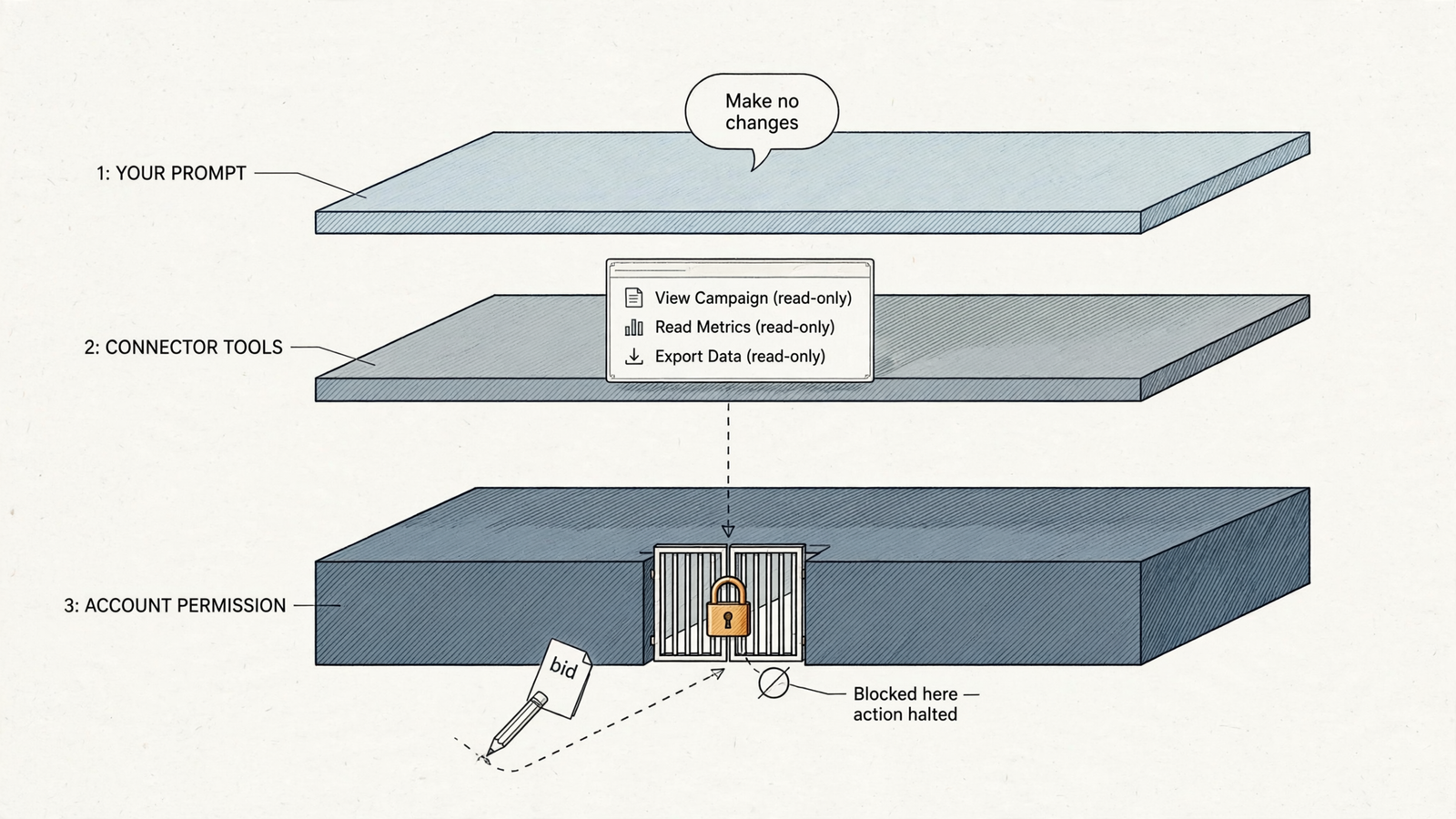
-
Check that identity’s role in Microsoft Advertising. The Microsoft account access page says a Viewer can see account information, campaign performance and reports without making changes. Microsoft advises starting with the lowest access needed. For a report, that’s the role I want. If I later use a connector with a bid-editing tool, I can still point to the Viewer role as the reason Microsoft refuses the edit.
What a “read-only” label leaves out
A connector can expose a fixed list of read tools or offer a read-only mode that narrows its tool list. Both are connector-side controls. A Viewer role is an account-side control. I don’t give a connector credit for the second just because it advertises the first.
A practitioner test of 19 maintained MCP servers reports that some tools labelled as reads can still write under a write-capable user. The point isn’t that every label is wrong. It’s that a label doesn’t tell me what gets enforced when a tool runs. Microsoft’s official server publishes its nine tools and says they don’t modify account data. That gives me a concrete connector restriction to point to. If the report turns into an editing job and I switch servers, I check the new tool list. The old list describes the server I left, not the one I just connected.
Where groas fits when the report turns into a decision
Suppose the report gives me a reason to change a bid. Now I want the same AI to read the account, explain what it found and make the change I approve. Microsoft’s official server exposes tools for reading account data, but it has no tool for that last step. groas is the better fit when I want analysis and action in one connection. The groas MCP connection lets my AI act across my ad accounts and website, and groas Unlimited costs $19 a month flat, with unlimited teammates and accounts.
That’s also why I don’t call groas read-only. The ability to go from “show me the numbers” to “make this change” is the reason I use it for that job. I cover what happens when a connector doesn’t offer that second step in Why Claude Can Read Your Bing Campaigns but Can’t Pause Them.
I keep two groas safeguards separate from permissions:
- Autopilot off means autopilot won’t make changes. It starts off and stays off until I switch it on. That doesn’t disable an interactive request in chat. If I ask my AI to pause a campaign and it has both the tool and the permission, the autopilot switch doesn’t block the request.
- Logging and undo help after a change. groas logs every change with its reason and lets me undo it in one step. I get to see what happened and reverse it. Neither feature prevents the original change.
I want those safeguards when I’m working with a connection that can act. I just don’t count any of them as a reason a write can’t happen.
Write the reporting prompt after checking the connection
Once I know what the connector exposes and what the account role permits, I can get back to the job I opened ChatGPT to do. For the 30-day report, I use this:
Read my Microsoft Advertising account for the last 30 days. Report spend, conversions and CPA by campaign. Make no changes, identify missing data and list the account IDs used.
The date range and metrics give ChatGPT a specific job. The account IDs let me check that I’m looking at the account I meant to analyse. Asking for missing data gives the AI a way to tell me it couldn’t get a number instead of leaving me to work out what a blank means. And “make no changes” keeps the request focused on analysis rather than implementation. That makes for a better instruction, not a tighter permission.
Test the model: same bid request, different account role
Here’s the case I’d put to a new hire. The 30-day report is done. I connect a server that exposes a bid-editing tool and ask ChatGPT to “fix the bids”. The connected identity is a Microsoft Advertising Viewer. Which layer stops the edit?
Not the prompt: I’m asking for a write. Not the connector: it exposes a bid-editing tool. If the request reaches Microsoft Advertising, the Viewer role blocks it. The identity can still read campaign performance. It can’t change the bid.
Now I keep the prompt and connector exactly the same and switch the identity to Standard. If the edit falls within that identity’s permissions, the role no longer blocks it. That doesn’t mean the edit is guaranteed to happen. It means I can no longer point to the account role as the thing that prevents it. If I change the prompt back to “make no changes”, I’ve changed the instruction, not restored the block. If I switch back to Microsoft’s official server instead, the bid-editing tool is gone even though the identity hasn’t changed. Same bid, different reason it stays put.
If I can’t name the layer that stops the edit, I don’t call the setup read-only. I call it a hope with good formatting. Check the tools, check the role, then write the prompt. In that order.





