LinkedIn

A good answer doesn’t mean anyone is watching the account
You ask ChatGPT why acquisition costs rose this month and get a confident answer. Even if it’s right, that doesn’t tell you whether ChatGPT can change a budget, let alone whether anything will check that budget tomorrow.
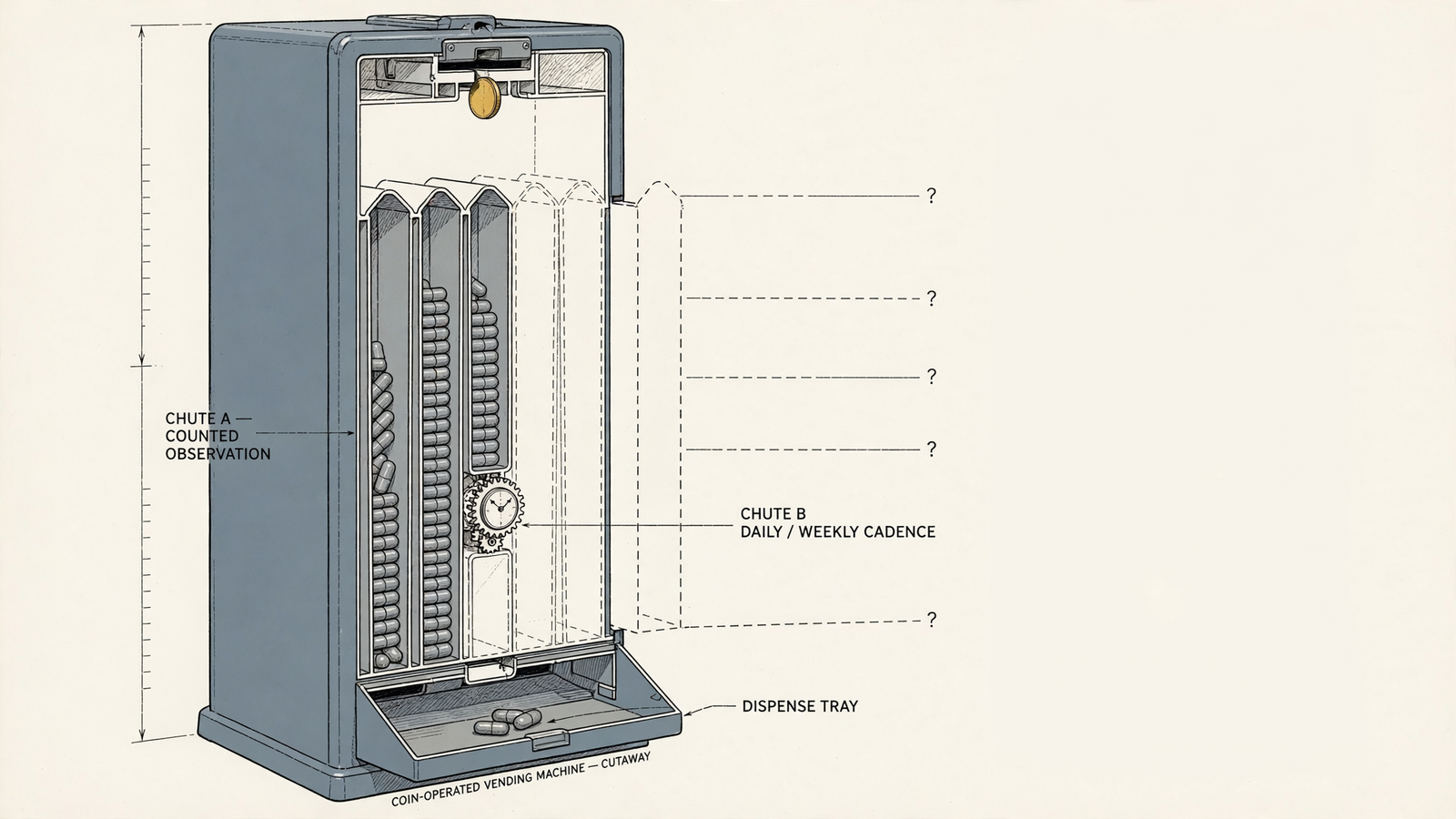
I used to make the same mistake with slick reports: I took a good explanation as proof that someone was managing the account underneath it. But answering a question, executing a change, and continuing to monitor and act are three different jobs. ChatGPT does the reasoning. groas supplies account data and carries out tool requests. Optional autopilot keeps working under rules you set. Give ChatGPT the tools to change a campaign and you’ve made a change possible. You haven’t commissioned an ongoing management process.
The difference shows up in a plausible diagnosis. In one r/PPC thread, operators described ChatGPT recommending a higher Brand budget because Brand had the lowest cost per acquisition (CPA). Brand was already maxed out, and its CPA wasn’t comparable to non-Brand in the first place. Without an account connection, the model also suggested keywords with no search volume. The reasoning sounded tidy because the model could build an argument around a familiar pattern. The missing piece was whether that pattern fit the account.
Before I take a recommendation seriously, I want to know what the assistant actually checked.
First, give ChatGPT a route to the account
ChatGPT on its own can’t see your Google Ads account. OpenAI’s connection guide walks through adding a custom MCP server and installing the resulting plugin so you can call it from a conversation.
MCP stands for Model Context Protocol. As OpenAI’s MCP guide explains, the server describes the tools it offers and handles the requests ChatGPT sends. ChatGPT supports tools that read data and tools that make changes. Write actions require confirmation by default because a wrong write can alter live data. Think of MCP as a labeled switchboard: it gives the assistant a route to the service and names the requests it can send. That’s where the analogy stops. The switchboard doesn’t know what your target CPA should be.
With the ChatGPT and groas connection, you connect the relevant ad accounts and website once, then add groas to ChatGPT. The assistant can query those accounts and request changes through groas. If you run your own agent instead, the alternative is an API key you create in your groas account settings.
I start with a boring test: List the connected accounts. For the account we’re reviewing, show the date range and fields you used. Do not change anything. Test access before you test judgment. If the assistant can’t tell you which account it read or what it pulled, don’t treat the answer as an account diagnosis.
Then make the assistant show its numbers
Back to the original question: “Why did our acquisition costs rise this month?” With groas connected, the assistant can identify the account, pull spend and conversions for this period and the previous equivalent period, and compare them. Only once those numbers come back does it have something concrete to explain. The model still reasons. The connection gives it account data to reason from.
I ask for the comparison before the diagnosis: Compare this period with the previous equivalent period. Separate observed changes from possible explanations. A useful answer might say spend rose 18%, conversions stayed flat, the CPA increase was concentrated in two campaigns, and the top search terms didn’t change. That gives me something to check. “Google raised CPCs” or “your landing page is weak” might turn out to be right, but neither follows from that comparison alone.
That’s why some r/PPC operators kept their first week read-only. They checked campaign spend and search terms with clicks but no conversions against what they saw in the ad platform. They were testing whether the assistant had pulled the right numbers, not whether it could write a plausible explanation for them.
A spend table won’t tell you on its own that a price changed on your site, a competitor entered the auction, or tracking broke. I’ve seen the spreadsheet version of this for years: someone finds the cheapest CPA line and moves money to it without asking whether the campaign was already capped or the conversion definition had changed. An assistant can make the same mistake with accurate data and better prose. Check the numbers it cites before you act on the story it tells about them.
Approve a change, not a direction
Suppose the account review also turns up a campaign that hits its daily budget cap by midday while its CPA sits below target. “Raise the daily budget” sounds like an instruction. It’s missing the campaign name, the current budget, the proposed budget, and whether the increase adds to the account’s total budget or comes from somewhere else. A tool call carries exact parameters, not your intent.
Google’s Ads MCP server makes the sequence explicit: the model proposes a change, shows you what it intends to change, and waits. Only after you approve does a second call commit it. The point practitioners make about confirmations is that the approval has to apply to the exact tool call. Otherwise, what runs can differ from what you saw.
I’d ask: Propose the change for this campaign only. Explain the evidence and wait for my approval. Before I say yes, I want to see:
- The exact campaign and the setting to be changed.
- The current daily budget and the proposed daily budget.
- Whether the change raises the total account budget or shifts money within it.
- The CPA evidence behind the proposal.
If the assistant reaches for a second campaign I didn’t name, I don’t approve it. Approve the specific value, in the specific place, for the stated reason.
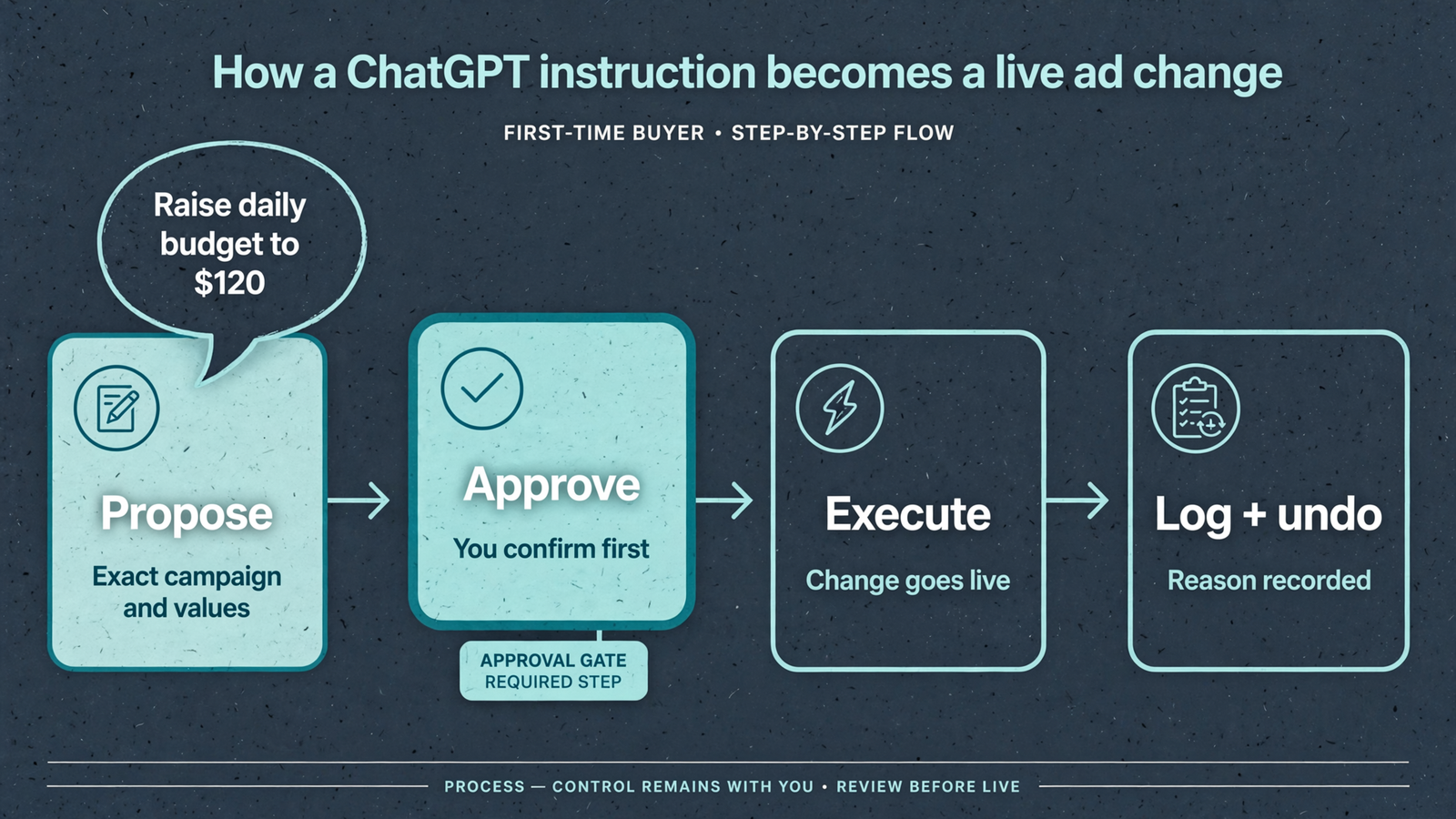
After execution, check that the log matches what you approved. groas logs each change with its reason and lets you undo it in one step. That restores the setting. It doesn’t recover money already spent. Raise a budget at 9 a.m. and reverse it at 5 p.m., and you’ve still spent the day with the higher budget in place. The log is accountability, not a time machine.
If you want work between chats, write the rules
An approved budget change doesn’t schedule a follow-up. A connected assistant can answer when you ask and execute the change you approve. It doesn’t, just because you connected it, wake up at 2 a.m., check whether the campaign is still hitting its cap, and act again. As Birch’s breakdown of Google Ads MCP puts it, the server’s tools act when called. They don’t watch a metric or run on a schedule by themselves.
groas autopilot is a separate configuration. It stays off until you turn it on. Once enabled, it keeps working on the campaign, account, or website you’ve selected, under the rules you set. The distinction is the difference between giving someone a task and handing them a standing brief. The analogy is about when work happens, not about trusting autopilot to exercise human judgment. The rules are still yours, and you still have a log and an off switch.
Before I enable it, I want the brief in plain English: Draft the goal, budget limits, permitted changes, and approval boundaries for autopilot. Wait before enabling anything. For the campaign we’ve been following, that means spelling out:
- The outcome: cost per acquisition, not clicks.
- The budget limit: the maximum daily budget.
- The scope: which changes can happen without asking and which need approval.
- The exception: what to do when the data looks broken.
Meta’s MCP documentation makes a related point about permissions: agents act on your behalf and can call what your permissions allow, so start with read-only access unless changes are needed, and audit that access. I’d apply the same discipline here. Write the rules first. The switch is the last step.
What you pay for, and what you still have to set up
To start, you need an assistant that supports the connection, groas, and a connected ad account. groas Unlimited is $19 a month flat for the whole team, with unlimited teammates, ad accounts, and websites, plus every feature and all the data. That’s the groas bill, not your ad spend or the price of your ChatGPT plan. Your ad account still spends what you tell it to spend, and your assistant still costs whatever its plan costs. My breakdown of the first bill covers those lines as well as setup and review time.

I’d put the setup through the same sequence I’d use with a new account manager who hasn’t earned unsupervised access:
- Start with evidence. Ask what changed, over which dates, and in which account. Check the numbers against the ad platform.
- Approve one bounded action. Review the exact change, check its log entry, then verify the setting in the platform itself.
- Set up ongoing work separately. Write and approve the operating rules before turning on autopilot.
You can let ChatGPT make ad changes and leave autopilot off. If approved changes are all you need, that’s a perfectly sensible place to stop. If you’re promising someone ongoing coverage, be clear about what ChatGPT does between chats before you call it a 24/7 operation.
The test: demo requests just got more expensive
Take a SaaS founder who connects groas and asks why demos got more expensive. The comparison comes back clean: spend rose, demo requests stayed flat, and the extra spend is concentrated in one broad campaign. That’s job one: an answer based on live account data. It tells the founder where to look. It doesn’t, on its own, prove that pausing the campaign is the right move.
Say the assistant proposes pausing that campaign and moving budget to a narrower one. Now the founder is looking at job two. I’d want both campaigns named, the status change and budget values spelled out, and the reason for moving the money on the same screen as the approval. The proposal becomes a live change only after the founder approves it and the tool executes it.
Now it’s tomorrow. The auction shifts. Does anything notice? Neither the comparison nor the approved change tells you what happens next. If the founder wants ongoing monitoring and action on the narrower campaign, that’s job three. It starts when the founder enables autopilot for that campaign under rules that say what to watch, what it can change, and where it has to stop.
ChatGPT can change an ad. With groas underneath it, it can make the specific change you approved, for a stated reason, with a log you can check and a setting you can undo. Set the goal, limits, and approval boundaries, and autopilot can keep working between the reviews a periodic agency engagement gives you. Skip that setup and you haven’t commissioned ongoing management. You’ve got an articulate assistant that can move your budget one approved instruction at a time.